Free template · Build it with Claude, Cursor, Lovable or any AI app builder
Content Calendar template
Our content plan lives in four different docs and nobody trusts any of them.
One calendar for every post, newsletter and launch, with the owner, channel and status of each piece.
By Sam Claassen · Updated · 4 build phases · 27/27 acceptance checks passed
- No.
- 004
- Department
- Marketing
- Build time
- 1 hr
- Difficulty
- Beginner
- Team size
- 2–15 people
- Replaces
- CoSchedule
- Your builder needs
- A database and sign-in, plus a scheduled job and sending email
- Status
- Build-tested Oct 15, 2026
Can you build your own content calendar instead of paying for CoSchedule?
Yes. A marketing team of 2 to 15 people can build its own content calendar from this blueprint: a month calendar colored by channel, one record per piece with owner, status, publish date and draft link, a five-step workflow where only an editor can approve a piece into Scheduled, an idea backlog, campaigns you can move as a block, due-soon reminders, overdue flags and a weekly digest. It is specified in four build phases with 27 acceptance checks. We built it by sending the 4 phase prompts to Claude in order, and all 27 checks passed in a real browser. It deliberately leaves out publishing to social networks, AI writing, social analytics and custom statuses.
Built and tested from this blueprint
We sent the 4 build prompts below to an AI builder, in order, and checked every acceptance item in a real browser, resetting to the seed before each phase's checks. The test build ran as a full web app with a database, sign-in, a daily job and a weekly digest. Where the build exposed a gap in the spec, we fixed the spec.
- Acceptance checks passed
- 27/27
- Automated tests
- 63
- Spec gaps found and fixed
- 8
- Build phases
- 4
The full write-up of this build test, with every gap and what was not tested, is in the build-test report below.
Watch the build test
We gave Claude one Markdown spec for a small-team content calendar and had it build the tool in four phases. It passed all 27 acceptance checks in a real browser, along with 63 automated tests, and exposed 8 gaps in the spec, from sign-in that told strangers to ask an editor to add them when no screen managed people to a daily 08:00 job that can't be one UTC cron schedule. What passed, what broke, what we didn't test, and when CoSchedule is still worth paying for. 2:42.
Watch on YouTube · More build tests on our channel
Transcript
Here's how to reverse engineer CoSchedule from a written spec. Claude passed all twenty-seven checks, and found eight gaps in my spec.
We gave Claude one Markdown file. It copies the part of CoSchedule a small marketing team actually uses. One calendar for every channel, colored by channel. A record per piece, with an owner, a status and a publish date. An editor's approval before anything is scheduled. And campaigns you can move as a block.
The core rule is approval. Every piece moves through five steps. Idea, writing, in review, scheduled, published. The only way into scheduled is an editor's approval. And nobody approves their own piece. When Maya, an editor, sends her own post for review, it goes to Dana instead.
Claude built it in four phases, one prompt each. The foundation, with channels, campaigns and settings. Pieces, the calendar, the backlog and the pipeline. Review and publishing. Then reminders, overdue flags, the weekly digest and campaign moves. After every phase, the acceptance checks ran in a real browser, from fresh seed data.
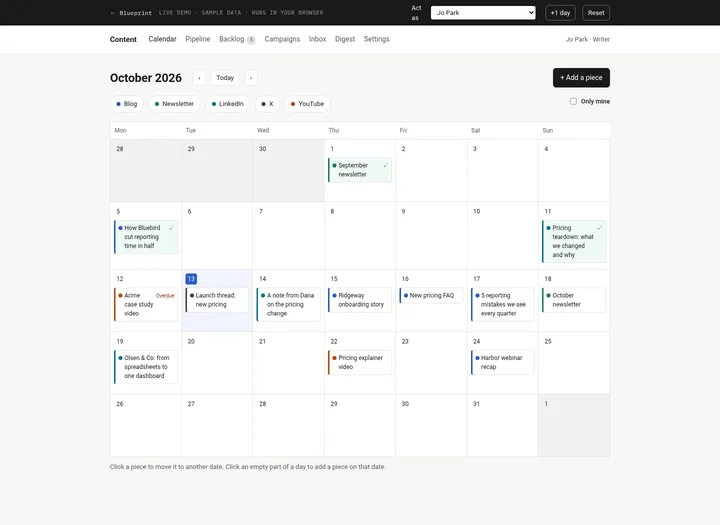
Here's what it built. The month calendar puts each piece on its date in its channel color, and flags the overdue video. The pipeline board counts every status. A piece in review shows Approve and Request changes, with the full activity log. The weekly digest lists what publishes in the next seven days. And on a phone, the month becomes an agenda.
In the final browser run, all twenty-seven checks passed, along with sixty-three automated tests.
But the more useful result is what broke. The build exposed eight gaps in the spec. Places where Claude had to guess. Sign-in told strangers to ask an editor to add them, but no screen managed people. One part of the spec let editors withdraw any piece, while another said owner only. And a daily job at eight in the morning, team time, can't be one UTC cron schedule. Every gap is now fixed in the spec.
Passing every check isn't the same as production-ready. We didn't test production sign-in, sending email, the scheduled daily job, or several servers writing at once. Those are yours to check before a team relies on it.
So is it worth building? CoSchedule Starter is twenty-nine dollars a month, billed annually, for one user. Professional is forty-nine, with two users included. Campaigns are only on the Suite plan, from sixty-nine dollars a month. If you want posts published straight to social networks, with analytics, pay for CoSchedule. If your team just needs the plan, you mostly need the calendar, the approval step, and the reminders.
Everything is in one file. The data model, seventeen rules, seed data, four phase prompts, and all twenty-seven checks, with the eight fixes already in.
The full spec is free at personal software factory dot com. If you build it, tell me what broke. I'm Sam. See you tomorrow.
Made with AI from the real test-build screenshots. Narration and the on-camera intro and outro: an AI voice clone and avatar of Sam Claassen (HeyGen). Music: "Chill Wave" by Kevin MacLeod (incompetech.com), licensed under Creative Commons Attribution 4.0.
Build it or buy CoSchedule?
CoSchedule Starter is $29 per month billed annually for 1 user. Professional is $49 per month billed annually with 2 users included (3 maximum, $29 per extra seat). Campaigns, custom statuses, the table view of unscheduled projects and the team performance report are listed only on the Suite plan, which has custom pricing from $69 per month. Source: coschedule.com/pricing, checked October 2026.
What this blueprint keeps
A month calendar colored by channel, one record per piece (title, channel, owner, status, publish date, draft link), a fixed five-step status workflow with an editor approval step, an idea backlog anyone can add to, campaigns that group pieces and can be moved as a block, a due-soon reminder, an overdue flag, a weekly digest, and an activity log on every piece.
What it leaves out
Publishing to social networks, AI writing, best-time scheduling, social inboxes and analytics, custom statuses and fields, per-client calendars, a document editor (v1 links to your Google Doc or Notion page), and drag and drop (v1 uses a "Move to date" control that works the same on a phone). A team of 2 to 15 people mainly needs to know what is going out, who owns it, and whether it has been approved.
Build it if
- Your content plan lives in several docs and nobody trusts any of them.
- You need more than two or three people on the calendar, or campaigns, without moving to a higher tier.
- You want a real approval step: nothing is scheduled until an editor who did not write it approves it.
- Your drafts already live in Google Docs or Notion and you only need the plan around them.
Buy CoSchedule if
- You want posts published to social networks directly from the calendar.
- You need social inboxes, analytics, best-time scheduling or AI writing.
- You manage separate calendars for several clients.
- You want drag and drop and custom statuses and fields out of the box.
Try the app
A working app loaded with sample data. Changes are saved in this browser only, not shared with other visitors. Use Reset to restore the examples. No real emails, payments or vendor changes are made.
- 1Select a calendar piece and use Move to date, or open the Pipeline board.
- 2As Jo, submit a draft for review; switch to Maya to approve it or request changes.
- 3Open a campaign to see its pieces; as an editor, shift its unpublished dates together.
- 4Advance the demo clock one day at a time, then check Inbox and Digest for reminders.
 Open demo
The blueprint
Paste the whole spec into your AI builder, then send each prompt in the Build plan section one at a time. Check each phase before moving on.
How to use this file: paste this whole document into your AI builder (Claude, ChatGPT, Cursor, Lovable, Replit, Type) as context. Then send the build prompts in section 15 one at a time. Do not move to the next phase until the acceptance checks for the current phase pass.
1. The problem
"Our content plan lives in four different docs and nobody trusts any of them."
A small marketing team publishes on a blog, a newsletter, LinkedIn, X and YouTube. The plan is a spreadsheet, a Notion page, a Slack thread and somebody's head. Nobody can say what goes out this week, who is writing it, whether the editor has read it, or which pieces quietly slipped past their date. Ideas get posted in chat and are never seen again.
2. What the real product does
Research basis: CoSchedule's Marketing Calendar and pricing pages (coschedule.com/marketing-calendar, coschedule.com/pricing), Asana's editorial calendar template and guide (asana.com/templates/editorial-calendar, asana.com/resources/editorial-calendar), and Notion's Basic Content Calendar template (notion.com/templates/content-calendar), October 2026.
What these tools have in common:
- One calendar for every channel. CoSchedule puts social, blog, email, events and podcasts on a single Marketing Calendar, with customizable color labels to tell them apart. Notion's template tracks "everything you're putting out, from blog posts to podcasts to tweets."
- A record per piece. Asana's template tracks the due date, primary channel, content status (for example "not started", "in review", "ready to publish"), content type, approval status and publish date for each piece, with an owner.
- Rescheduling. CoSchedule lets you drag posts to new dates, "or move a campaign's launch date and its schedule moves with it." Asana's guide stresses shifting deadlines and owners on the fly.
- Approval before publishing. Asana's workback schedule includes "Get approval from editor". CoSchedule sells "Social Message Approvals" ("ensure all planned social messages get required approval before publishing") from its Professional plan up.
- Campaigns. CoSchedule groups campaign projects in a focused calendar view.
- Unscheduled work and team visibility. CoSchedule's table view shows "scheduled and unscheduled projects", and its team report shows each teammate's completed, due and overdue tasks. Asana suggests a weekly or biweekly check-in on the calendar.
Pricing context: CoSchedule Starter is $29 per month billed annually for 1 user; Professional is $49 per month billed annually with 2 users included (3 maximum, $29 per extra seat). Campaigns, custom statuses, the table view of unscheduled projects and the team performance report are listed only on the Suite plan (custom pricing, from $69 per month).
What this blueprint keeps
A month calendar colored by channel, one record per piece (title, channel, owner, status, publish date, draft link), a fixed five-step status workflow with an editor approval step, an idea backlog anyone can add to, campaigns that group pieces and can be moved as a block, a due-soon reminder, an overdue flag, a weekly digest, and an activity log on every piece.
What this blueprint deliberately leaves out
Publishing to social networks, AI writing, best-time scheduling, social inboxes and analytics, custom statuses and fields, per-client calendars, a document editor (v1 links to your Google Doc or Notion page), and drag and drop (v1 uses a "Move to date" control that works the same on a phone). A team of 2 to 15 people mainly needs to know what is going out, who owns it, and whether it has been approved.
3. Scope of v1
- One team, one calendar, one time zone (set once; publish dates are calendar dates in that zone).
- Five fixed statuses: Idea, Writing, In review, Scheduled, Published.
- Channels are editable (name and color). Campaigns are optional.
- Notifications in the app plus email. If no email provider is configured, log emails instead of sending.
- Web app that works on a phone.
4. Roles
| Role | Who | Can do |
|---|---|---|
| Writer | Everyone on the team | Add ideas to the backlog. Own pieces. On pieces they own: edit, move to a date, start writing, send for review, withdraw from review, mark published, reopen. Comment on any piece. Delete ideas they added. |
| Editor | One or more people | Everything a writer can do, on any piece, except Withdraw, which stays with the owner. Approve or request changes on pieces in review that they do not own. Assign pieces to other people. Manage channels and campaigns. |
Everyone can see every piece. Only the actions above are restricted, and they are enforced on the server, not only by hiding buttons.
5. Content calendar data model
All timestamps are UTC. "Date" means a calendar date (YYYY-MM-DD) in the team time zone. All IDs are strings.
Person
- id
- name (required)
- email (required, unique)
- role: writer | editor
- active (boolean, default true)
Channel
- id
- name (required, max 30 chars, unique ignoring case)
- color (hex, "#rrggbb")
- active (boolean). Inactive channels keep their pieces but are hidden from pickers.
Campaign
- id
- name (required, max 80 chars, unique ignoring case)
- starts_on, ends_on (dates; ends_on >= starts_on)
- goal (optional, max 200 chars)
- created_by, created_at
Piece
- id
- title (required, max 120 chars)
- channel_id (required)
- owner_id (required, an active Person)
- campaign_id (nullable)
- status: idea | writing | in_review | scheduled | published
- publish_on (nullable date; null means unscheduled, shown in the backlog)
- draft_url (nullable, http or https URL)
- notes (optional, max 2,000 chars)
- reviewer_id (nullable; the editor asked to review, set on submit)
- submitted_at, approved_by, approved_at, published_at (nullable)
- reminded_for (nullable date; the publish_on value the due-soon reminder was sent for)
- overdue_notified_for (nullable date; the publish_on value the overdue notice was sent for)
- created_by, created_at, updated_at
Activity (append-only log per piece; never edited or deleted)
- id, piece_id, actor_id (null for the scheduled job)
- type: created | edited | moved | started_writing | parked | submitted | withdrawn | approved | changes_requested | reopened | published | commented | reminded | overdue | deleted
- comment (nullable), data (JSON, nullable; for example the from and to dates of a move), created_at
Notification (outbox)
- id, person_id, kind (review_requested | approved | changes_requested | assigned | commented | due_soon | overdue | digest), piece_id (nullable), text, created_at, read (boolean), emailed_at (nullable), error (nullable)
Settings (one row)
- time_zone (IANA name, for example "America/Chicago")
- default_reviewer_id (the editor who gets review requests by default, usually the managing editor)
- last_digest_on (nullable date)
Overdue is not a column. It is computed from publish_on, today and status (R12).
6. Status workflow
The normal path is Idea → Writing → In review → Scheduled → Published. Pieces can go back: Writing → Idea (park), In review → Writing (withdraw or request changes), Scheduled → Writing (reopen).
| Action | Who | From | To | Side effects |
|---|---|---|---|---|
| Add | Anyone | (none) | Idea | Activity created. If the owner is someone else, notify them (assigned) |
| Start writing | Owner or editor | Idea | Writing | Activity started_writing |
| Park as idea | Owner or editor | Writing | Idea | Activity parked |
| Send for review | Owner or editor | Writing | In review | Needs a publish date of today or later and a draft link (R4). Sets reviewer_id and submitted_at. Notify the reviewer |
| Withdraw | Owner (an editor who isn't the owner uses Request changes instead) | In review | Writing | Clears reviewer and submitted_at |
| Request changes | Editor who is not the owner | In review | Writing | Comment of 3+ characters required. Notify the owner with the comment |
| Approve | Editor who is not the owner | In review | Scheduled | Publish date must be today or later. Sets approved_by and approved_at. Notify the owner |
| Reopen | Owner or editor | Scheduled | Writing | Clears the approval. The piece must be reviewed again |
| Mark published | Owner or editor | Scheduled | Published | Only on or after the publish date (R9). Sets published_at |
| Move to date | Owner or editor | Idea, Writing, In review, Scheduled | same | R7, R8, R10. Activity moved with from and to |
| Delete | Whoever added it, or an editor | Idea | (removed) | Activity deleted with the title |
| Comment | Anyone | any | same | Activity commented. Notify the owner unless they wrote it |
Any other transition is refused. Published is final: a published piece can only receive comments.
7. Content calendar business rules
- R1. Every piece starts as Idea. The only way into Scheduled is an editor's approval from In review. There is no button, API or bulk action that sets Scheduled directly.
- R2. The transitions in section 6 are the only ones allowed. Anything else is refused with a message that names the current status ("Only pieces in review can be approved. This piece is Writing.").
- R3. Nobody approves their own piece. Only editors approve or request changes, and never on a piece they own. On submit, the reviewer is the editor the sender picks. If they pick nobody, it is the default reviewer from Settings, unless that person owns the piece or is inactive; then it is the first active editor by name who is not the owner. If there is no such editor, submitting is refused: "No other editor can review this piece. Ask an editor to take it over, or add an editor." Any editor who is not the owner may decide; reviewer_id only says who was asked.
- R4. Sending for review needs a publish date that is today or later and a draft link. Messages: "Pick a publish date before sending for review.", "The publish date has passed. Move it to today or later first.", "Add a draft link before sending for review."
- R5. Requesting changes needs a comment of at least 3 characters. The piece returns to Writing and any approval is cleared.
- R6. Approving needs a publish date of today or later ("The publish date has passed. Move it to today or later before approving.").
- R7. Moving a piece to a date before today is refused: "Pick today or a later date." Published pieces cannot be moved or edited. Editing the title, channel, draft link or notes of a piece that is In review or Scheduled is refused: "This piece is In review. Withdraw it (or Reopen a scheduled piece) before changing it." Owner, campaign and date changes are allowed.
- R8. Only Idea and Writing pieces can be unscheduled (moved back to the backlog). For In review and Scheduled: "A piece in review or scheduled needs a publish date. Send it back to Writing first."
- R9. Mark published is refused before the publish date: "This piece is scheduled for Oct 24. If it went out early, move it to today first." This keeps the calendar truthful.
- R10. Moving a piece keeps its status. A Scheduled piece stays Scheduled: the approval covers the content, not the date. Moving clears reminded_for and overdue_notified_for, so reminders apply again to the new date.
- R11. Due-soon reminder: a piece in Idea or Writing whose publish date is 0, 1 or 2 days away gets one reminder to its owner, once per publish date (reminded_for).
- R12. Overdue: a piece is overdue when its publish date is before today and it is not Published. This includes Scheduled pieces nobody marked published. The owner gets one overdue notice per publish date (overdue_notified_for). The flag disappears as soon as the piece is published or moved to today or later.
- R13. Who can change a piece: its owner or an editor ("Only the owner or an editor can change this piece."). Anyone can add an idea. Only editors can set an owner other than themselves ("Only editors can assign a piece to someone else.").
- R14. Only ideas can be deleted, by the person who added them or an editor. Everything else keeps its history; park a piece as an idea first if it really should go.
- R15. Moving a campaign by N days moves the campaign's dates and every dated, unpublished piece in it by N days, all or nothing (section 10).
- R16. A piece dated outside its campaign's dates shows an "Outside campaign dates" warning. It is allowed.
- R17. Every action writes exactly one Activity row (a campaign move writes one per piece moved). Activity rows are never edited or deleted.
8. Dates, reminders, overdue and the daily job
"Today" is the current date in the team time zone. Days are counted as calendar days, so a piece due tomorrow is 1 day away whether it is 9 am or 11 pm.
Daily job (runs every day at 08:00 team time; on Vercel use a cron hitting /api/cron/daily protected by a CRON_SECRET header. Vercel Cron runs in UTC, so schedule it hourly and have it do nothing before 08:00 team time; it is safe to run again, so later runs that day send nothing). For each piece:
- If it is due soon (R11) and reminded_for is not its publish_on: notify the owner, set reminded_for, write a
remindedactivity. - If it is overdue (R12) and overdue_notified_for is not its publish_on: notify the owner, set overdue_notified_for, write an
overdueactivity.
Then, if today is Monday and last_digest_on is not today, send the weekly digest (section 9) and set last_digest_on. The job is safe to run twice on the same day: the second run sends nothing. Accept an optional "now" override in development so time-based behavior can be tested without waiting.
Worked examples (seed data, today = Tuesday Oct 13)
| Piece | Status | Publish on | Days away | Reminder this morning? | Overdue? |
|---|---|---|---|---|---|
| Ridgeway onboarding story | Writing | Thu Oct 15 | 2 | Yes, to Lee | No |
| 5 reporting mistakes we see every quarter | Writing | Sat Oct 17 | 4 | No. It fires on Thu Oct 15 if still not in review | No |
| New pricing FAQ | In review | Fri Oct 16 | 3 | No (already in review) | No |
| A note from Dana on the pricing change | Scheduled | Wed Oct 14 | 1 | No (approved) | No |
| Launch thread: new pricing | Scheduled | Tue Oct 13 | 0 | No | Not today. From Wed Oct 14 if nobody marks it published |
| Acme case study video | Writing | Mon Oct 12 | -1 | No (past dates get the overdue notice instead) | Yes. Sam is notified once |
| Kestrel customer interview | Idea | Mon Nov 2 | 20 | No | No |
| Pine Labs integration walkthrough | Idea | none | none | Never while unscheduled | Never |
More cases:
- Lee moves Ridgeway from Oct 15 to Oct 16 on Oct 13. reminded_for is cleared, so the job reminds Lee again on Oct 14 (2 days away from the new date).
- Lee sends Ridgeway for review on Oct 14. No further reminders: In review pieces are not "due soon".
- Sam moves Acme to Oct 20. The overdue flag disappears immediately; nothing more is sent until Oct 20 is in the past.
9. Weekly digest
Sent every Monday by the daily job to every active person (in the app and by email). A preview screen shows the digest as it would look if sent today. The digest covers the 7 days starting on its date and has these sections, each left out when empty except the first:
- Publishing in the next 7 days, grouped by day: title, channel, status, owner. Anything not Scheduled or Published is marked "not approved yet".
- Overdue: every overdue piece with its original date.
- Waiting for review: pieces in review, oldest first, with whole days waiting and the reviewer.
- Due soon, not in review yet: the R11 set.
- Backlog: number of unscheduled pieces (ideas and writing), plus titles added in the last 7 days.
- Published in the last 7 days: pieces with status Published and a publish date in the 7 days before the digest date.
Worked example (preview on Tue Oct 13, covers Oct 13 to Oct 19)
- Publishing: Tue Oct 13 Launch thread (X, Scheduled); Wed Oct 14 A note from Dana (LinkedIn, Scheduled); Thu Oct 15 Ridgeway onboarding story (Blog, Writing, not approved yet); Fri Oct 16 New pricing FAQ (Blog, In review, not approved yet); Sat Oct 17 5 reporting mistakes (Blog, Writing, not approved yet); Sun Oct 18 October newsletter (Newsletter, In review, not approved yet); Mon Oct 19 Olsen & Co (LinkedIn, Scheduled).
- Overdue: Acme case study video, was due Mon Oct 12, Writing, Sam.
- Waiting for review: October newsletter (2 days, Maya), New pricing FAQ (1 day, Maya).
- Due soon: Ridgeway onboarding story (in 2 days, Lee).
- Backlog: 5 unscheduled (4 ideas, 1 in writing). New this week: Year in review thread.
- Published in the last 7 days: Sun Oct 11 Pricing teardown (LinkedIn). How Bluebird cut reporting time in half (Oct 5) is 8 days back and is not listed.
10. Campaigns
A campaign is a name, a date range and an optional goal. Pieces join a campaign through campaign_id. The campaign page lists its pieces by date with counts per status ("2 of 5 published").
Moving a campaign (R15). An editor enters a number of days (whole number, not 0, between -365 and 365). The app computes the new date of every piece in the campaign that has a publish date and is not Published. If any new date would be before today, nothing changes and the error names the first such piece: '"Launch thread: new pricing" would move to Oct 10, which is in the past. Nothing was moved.' Otherwise the campaign's start and end move by N days and each of those pieces moves by N days (status kept, reminders re-armed, one moved activity each). Published and unscheduled pieces stay where they are.
Worked example, today Tue Oct 13, "Q4 pricing launch" runs Oct 10 to Oct 31:
- Move by -3: Launch thread (Oct 13) would land on Oct 10. Refused; nothing moves.
- Move by +7: the campaign becomes Oct 17 to Nov 7. Launch thread Oct 13 → Oct 20 (still Scheduled), A note from Dana Oct 14 → Oct 21, New pricing FAQ Oct 16 → Oct 23, Pricing explainer video Oct 22 → Oct 29. Pricing teardown (Published, Oct 11) stays and now shows "Outside campaign dates".
11. Content calendar screens
- Calendar (home). Month grid, Monday first, with previous, next and today buttons. Each day lists its pieces as chips: a channel-colored edge and dot, the title, and a small status label; overdue pieces show an "Overdue" flag. Filters: channel chips (click to hide or show a channel) and "Only mine". Clicking a chip selects it and opens a Move to date panel: a date field, a Move button, Back to backlog (Idea and Writing only), and Open. Clicking an empty part of a day opens New piece with that date filled in. On a phone, the grid is replaced by an agenda list of the month's days that have pieces.
- Pipeline. A toggle between Board and List. Board: five columns by status with counts; cards show title, channel, owner, date and flags. List: a table sorted by date (unscheduled last) with filters for status, channel, owner and campaign.
- Backlog. A quick-add form at the top (title, channel) that anyone can use; the new idea is owned by its author. Below, all unscheduled pieces, newest first, each with a date field and a Schedule button.
- Review queue (editors). Pieces in review that the viewer does not own, oldest submission first: title, owner, publish date, days waiting, draft link, Approve button. Request changes opens the piece because it needs a comment.
- Piece detail. Title, channel, status, flags (Overdue, Due soon, Outside campaign dates), owner, reviewer, approval, publish date, campaign, draft link, notes. Workflow buttons only for actions the viewer may take (section 6). Move to date is shown on every unpublished piece; if the viewer isn't the owner or an editor, the server refuses with the R13 message. The Edit form is shown only to the owner and editors; others see who owns the piece. Comments and the activity log, newest last.
- New piece. Title, channel, owner (writers see only themselves), publish date (optional; empty means backlog), campaign, draft link, notes. Always created as Idea.
- Campaigns. List with dates, goal, piece counts and progress. Campaign page with its pieces and, for editors, Edit and Move campaign.
- Inbox. The viewer's notifications, newest first, with an unread count in the navigation and Mark all read.
- Weekly digest. The digest as it would go out today (section 9) and the date of the next Monday send.
- Settings. Channels (name and color; editors can add, rename, recolor and deactivate), the default reviewer, and People: name, email, role and active. Editors can add a person, change a role and deactivate someone; the last active editor and the default reviewer cannot be demoted or deactivated, and someone who owns unpublished pieces must hand them over first. Writers see this screen read-only.
12. Notifications
| Trigger | Recipient | Content |
|---|---|---|
| Sent for review | Reviewer | "Jo Park sent "New pricing FAQ" for review. It publishes Fri Oct 16." |
| Approved | Owner | "Maya Chen approved "New pricing FAQ". It is scheduled for Fri Oct 16." |
| Changes requested | Owner | Who, and the comment |
| Assigned | New owner | "Maya Chen gave you "Kestrel customer interview"." |
| Comment | Owner (not the author) | Who, and the comment |
| Due soon (daily job) | Owner | ""Ridgeway onboarding story" publishes in 2 days (Thu Oct 15) and is not in review yet." |
| Overdue (daily job) | Owner | ""Acme case study video" was due Mon Oct 12 and is not published (Writing). Move it to a new date or finish it." |
| Weekly digest (Mondays) | Every active person | Section 9 |
Write every notification to the outbox first, then send the email. A failed email keeps its error and is retried on the next run of the daily job. A notification failure never blocks an action.
13. Edge cases
- The only editor owns the piece: sending for review is refused (R3). Another editor must be added, or an editor must take the piece over.
- An editor reassigns a piece in review to themselves: they can no longer approve it; another editor can.
- A Scheduled piece is moved to a later date: it stays Scheduled (R10).
- A piece is moved to a new date after its reminder was sent: the reminder applies again to the new date (R10).
- A Scheduled piece's date passes without anyone marking it published: it shows as overdue (R12) until someone marks it published (allowed, since the date has passed) or moves it.
- An overdue piece in review: the editor cannot approve it until someone moves it to today or later (R6).
- A channel is deactivated: its pieces keep it and stay on the calendar; it disappears from pickers. The last active channel cannot be deactivated.
- A campaign move that would put any piece in the past changes nothing (R15).
- Two people act on the same piece from stale screens: check the status inside the same transaction as the update; the second action gets the R2 message.
14. Seed data
| Person | Role | |
|---|---|---|
| Maya Chen | maya@yourcompany.com | Editor (default reviewer) |
| Dana Ruiz | dana@yourcompany.com | Editor |
| Jo Park | jo@yourcompany.com | Writer |
| Lee Park | lee@yourcompany.com | Writer |
| Sam Okafor | sam@yourcompany.com | Writer |
| Ana Lima | ana@yourcompany.com | Writer |
Replace yourcompany.com with your own email domain.
Channels: Blog (#2c5ac9), Newsletter (#1f7a4d), LinkedIn (#0e7490), X (#3f3f46), YouTube (#c2410c).
Campaigns (T = today): Q4 pricing launch, T-3 to T+18, goal "Explain the new pricing to existing customers before renewals."; Customer stories, T-12 to T+33, goal "One customer story every week."
| Piece | Channel | Owner | Status | Publish on | Campaign |
|---|---|---|---|---|---|
| How Bluebird cut reporting time in half | Blog | Jo | Published | T-8 | Customer stories |
| September newsletter | Newsletter | Ana | Published | T-12 | |
| Pricing teardown: what we changed and why | Dana | Published | T-2 | Q4 pricing launch | |
| Acme case study video | YouTube | Sam | Writing | T-1 (overdue) | Customer stories |
| Launch thread: new pricing | X | Lee | Scheduled (approved by Maya) | T | Q4 pricing launch |
| A note from Dana on the pricing change | Dana | Scheduled (approved by Maya) | T+1 | Q4 pricing launch | |
| Ridgeway onboarding story | Blog | Lee | Writing | T+2 | Customer stories |
| New pricing FAQ | Blog | Jo | In review (Maya, sent 1 day ago) | T+3 | Q4 pricing launch |
| 5 reporting mistakes we see every quarter | Blog | Jo | Writing, no draft link | T+4 | |
| October newsletter | Newsletter | Ana | In review (Maya, sent 2 days ago) | T+5 | |
| Olsen & Co: from spreadsheets to one dashboard | Maya | Scheduled (approved by Dana) | T+6 | Customer stories | |
| Pricing explainer video | YouTube | Sam | Writing | T+9 | Q4 pricing launch |
| Harbor webinar recap | Blog | Ana | Scheduled (approved by Maya) | T+11 | |
| Kestrel customer interview | YouTube | Sam | Idea | T+20 | Customer stories |
| Pine Labs integration walkthrough | Blog | Lee | Idea | none | |
| Year in review thread (added yesterday) | X | Jo | Idea | none | |
| Reporting templates roundup | Newsletter | Ana | Idea | none | |
| Behind the scenes: how we plan content | Maya | Idea | none | ||
| Data glossary for new customers | Blog | Jo | Writing | none |
Counts: 5 Idea, 5 Writing, 2 In review, 4 Scheduled, 3 Published. Every piece except "5 reporting mistakes" and the ideas has a draft link. Run the daily job once after seeding so Lee's due-soon reminder and Sam's overdue notice exist.
15. Content calendar build plan
Send these prompts one at a time after pasting this file. Each phase ends with checks you can run by clicking through the app. Start each phase's checks from a fresh load of the seed (the reset button); checks within a phase run in order on the same data.
Phase 1: Foundation
Using the Content Calendar blueprint above, build Phase 1 only.

1. Set up the data model from section 5 exactly (Person, Channel, Campaign, Piece, Activity, Notification, Settings) with a real database.
2. Add sign-in with the platform's built-in auth or Google sign-in limited to our company email domain. A signed-in email must match an active Person; anyone else sees "Ask an editor to add you."
3. Build the Settings screen (channels and default reviewer) and the Campaigns list and form (section 11, screens 7 and 10). Only editors can change them; writers see them read-only.
4. Load the seed data from section 14, with dates relative to today.
5. Add an "Act as" switcher visible only in development, so I can test as different people.

Do not build pieces or the calendar yet. When you're done, list what you built and anything in the spec you had to interpret.
Acceptance checks
- Six people exist, and the switcher marks Maya Chen and Dana Ruiz as editors.
- As Jo, Settings shows the five channels read-only with "Only editors can change channels."
- As Maya, adding a channel called "blog" is refused with "A channel called Blog already exists.", and adding "Podcast" with a color works.
- As Maya, a campaign "Holiday gift guide" that ends before it starts is refused with "The end date must be on or after the start date."; with valid dates it appears in Campaigns.
- As Jo, Campaigns has no New campaign form and says "Only editors can manage campaigns."
Phase 2: Pieces, calendar, backlog and pipeline
Using the Content Calendar blueprint above, build Phase 2 only. This phase is pieces and the views of them.

1. Build screens 1, 2, 3, 5 and 6 from section 11: Calendar, Pipeline (board and list), Backlog, Piece detail and New piece.
2. Implement Add, Edit, Move to date, Back to backlog and Delete from section 6, with rules R7, R8, R10, R13, R14, R16 and R17. Enforce permissions on the server, not only by hiding buttons.
3. Color every piece by its channel. Show the Overdue flag from R12 everywhere a piece appears.
4. Write one Activity row for every action and show the activity log on the piece page.

No drag and drop: use the Move to date control so it works the same on a phone.

When you're done, list what you built and anything in the spec you had to interpret.
Acceptance checks
- The calendar opens on the current month with each seeded piece on its date in its channel color, and "Acme case study video" shows an Overdue flag.
- Clicking an empty day opens New piece with that date filled in.
- As Jo, adding the idea "Customer FAQ roundup" (Blog) on the Backlog page with no date puts it in the Backlog as an Idea owned by Jo, and not on the calendar.
- Scheduling it from the Backlog for 5 days from today removes it from the Backlog and shows it on the calendar on that day.
- Moving it to yesterday is refused with "Pick today or a later date."
- As Jo, Lee's "Ridgeway onboarding story" shows no workflow buttons, and moving it is refused with "Only the owner or an editor can change this piece."
- As Jo, the New piece owner field offers only Jo; as Maya it lists everyone.
- On fresh seed data, the pipeline board shows Idea 5, Writing 5, In review 2, Scheduled 4, Published 3, and the list filtered to Blog shows only Blog pieces.
Phase 3: Review and publishing
Using the Content Calendar blueprint above, build Phase 3 only. This phase is the status workflow.

1. Implement every transition in section 6 and rules R1 to R6 and R9. Put the transition rules in one pure function module with unit tests for each row of the section 6 table.
2. Show only the workflow buttons the viewer may use on the piece page, and refuse anything else on the server.
3. Build the Review queue (section 11, screen 4) for editors, with Approve on each row.
4. Build the Inbox (screen 8) and write notifications from section 12 for review requests, approvals, requested changes, assignments and comments. Email can be logged instead of sent for now.
5. Do the status check and the update in one transaction.

When you're done, list what you built and anything in the spec you had to interpret.
Acceptance checks
- As Jo, sending "5 reporting mistakes we see every quarter" for review is refused with "Add a draft link before sending for review." After adding a draft link it goes to In review with Maya as reviewer, and Maya's inbox shows the request.
- As Jo, her piece in review shows Withdraw and no Approve button.
- As Maya, Request changes with an empty comment is refused; with "Tighten the intro" the piece goes back to Writing and Jo sees the comment in her inbox.
- Jo sends it again and Maya approves it from the Review queue. It is Scheduled and shows "Approved by Maya Chen".
- As Maya, her own "Behind the scenes: how we plan content", once started, dated, linked and sent for review, goes to Dana; Maya sees no Approve button on it, and Dana can approve it.
- Marking "Harbor webinar recap" published is refused because its date is in the future; marking "Launch thread: new pricing" published works and the calendar shows it as Published.
- The activity log of "5 reporting mistakes we see every quarter" lists sent for review, changes requested (with the comment), sent for review and approved, each with who and when.
Phase 4: Reminders, overdue, digest and campaigns
Using the Content Calendar blueprint above, build Phase 4 only.

1. The daily job in section 8 (due-soon reminders, overdue notices, Monday digest) at /api/cron/daily, protected by a CRON_SECRET header. Accept an optional "now" override in development, and add a development-only "+1 day" button that moves the app clock forward one day and runs the job.
2. The Weekly digest preview screen (section 9) and the digest email.
3. Campaign pages with Move campaign (section 10, R15) and the "Outside campaign dates" warning (R16).
4. Send emails from the Notification outbox. If no email provider is configured, log them.

When you're done, list what you built and anything in the spec you had to interpret.
Acceptance checks (start from fresh seed data)
- Right after seeding, Lee's inbox has the due-soon reminder for "Ridgeway onboarding story" and Sam's has the overdue notice for "Acme case study video".
- The Weekly digest preview for today lists 7 pieces publishing in the next 7 days, Acme as overdue, October newsletter (2 days) and New pricing FAQ (1 day) waiting for review, Ridgeway as due soon, and 5 unscheduled pieces in the backlog.
- After "+1 day", "Launch thread: new pricing" shows as Overdue and Lee gets one overdue notice.
- After a second "+1 day", Jo gets a due-soon reminder for "5 reporting mistakes we see every quarter"; a third "+1 day" does not send it again.
- As Sam, moving "Acme case study video" to a date next week clears its Overdue flag.
- As Maya, moving "Q4 pricing launch" by -3 days is refused because "Launch thread: new pricing" would land in the past; by +7 days, its four unpublished pieces move 7 days later and "Pricing teardown: what we changed and why" stays put and shows "Outside campaign dates".
- Pressing "+1 day" until the next Monday puts the weekly digest in every person's inbox, once.
16. Variations
- Slack reminder two days before something is due, and the digest posted to a channel.
- A read-only "coming soon" page or iCal feed for the rest of the company.
- Recurring pieces (the newsletter every first Tuesday) generated a few weeks ahead.
- A second approval step for legal or a client on selected channels.
- Drag and drop on desktop, calling the same Move to date action.
- Per-channel publishing cadence with a warning when a week has a gap.
17. Build notes from our test build
We built this blueprint by sending the four phase prompts above, in order, to an AI builder (Claude, working in Type), then checked every acceptance item in a real browser.
Result: 27 of 27 acceptance checks passed in one final browser run, with the data reset to the seed before each phase's checks, plus 63 automated tests.
Gaps the build found, now fixed in this spec:
- Sign-in told strangers to ask an editor to add them, but no screen managed people. Settings now has People, with rules for the last editor and the default reviewer.
- The seed people had no email addresses. Section 14 now lists them.
- The piece page didn't say who sees Move to date and Edit, and a check needs a writer to try a move and be refused. Screen 5 now says.
- A Phase 2 check expected the seed's board counts after an earlier check added an idea. Each phase's checks now start from fresh seed data, and the check says so.
- Section 4 let editors withdraw any piece, while section 6 said owner only. Withdraw is now the owner's, and editors use Request changes.
- A daily job "at 08:00 team time" can't be one UTC cron schedule. Section 8 now says to run it hourly and skip until 08:00.
- A Phase 3 check skipped the Start writing step the rules require. The check now includes it.
- A piece in review or scheduled could still be edited without another review. R7 now refuses those edits; the test build followed the earlier wording and allows them.
What we did not test:
- Production sign-in. Google sign-in was built, but every check used the development "Act as" switcher.
- Sending email. Emails were logged in the outbox, not delivered.
- The scheduled daily job. Its endpoint was called directly, and days passing were simulated with the development clock.
- Several server processes writing at once. The test build ran on SQLite in one process. For a hosted deploy, use a managed Postgres (or your platform's database) and the same schema.
Field report
Building a CoSchedule replacement with AI, 27 checks and 8 spec gaps
We had an AI builder build a small marketing team's content calendar from our spec, one phase at a time, and checked every acceptance item in a real browser. It passed all 27 checks and exposed 8 gaps in the spec, under the median for our builds. What it costs next to CoSchedule, each gap and its fix, and what we did not test.
The short answer
Yes, for a marketing team of 2 to 15 people that needs a shared plan with owners and approvals rather than a social publishing tool. We gave Claude, working in Type, our Content Calendar blueprint and had it follow the four phase prompts in order. The final build passed 27 of 27 acceptance checks in one browser run, with the data reset to the seed before each phase's checks, and 63 automated tests. It handles a month calendar colored by channel, one record per piece, a five-step workflow where only an editor who did not write the piece can approve it, an idea backlog, campaigns that move as a block, reminders, overdue flags and a weekly digest.
The build exposed 8 gaps in the spec, places where the builder had to guess because the spec was silent, ambiguous or disagreed with itself. That is under the median of 14.5 across our twenty-two build tests. Every gap is now fixed in the published spec.
What it is not: a tested production deployment. Real sign-in, delivered email, a real scheduler and several server processes writing at once were not part of the test. The last section lists what was and wasn't checked.
What we built, and what we left out
The blueprint copies the planning part of CoSchedule's Marketing Calendar, with a look at Asana's and Notion's content calendar templates. We read their pages in October 2026 and kept the rules a small team needs to trust its calendar:
- Five statuses, one way into Scheduled. Idea, Writing, In review, Scheduled and Published. The only way into Scheduled is an editor's approval from In review; nothing sets it directly. Published is final.
- Nobody approves their own piece. Only editors approve or request changes, never on a piece they own. If the default reviewer owns the piece, it goes to another active editor; if there is none, sending for review is refused.
- Review needs a date and a draft. Sending for review needs a publish date of today or later and a draft link. Requesting changes needs a comment. A piece In review or Scheduled can't be edited until it goes back to Writing.
- A calendar that stays truthful. Nothing can be moved to a date before today, and Mark published is refused before the publish date. A piece is overdue when its date has passed and it is not Published, Scheduled pieces included.
- Reminders once per date. One due-soon reminder 0 to 2 days out for pieces still in Idea or Writing, and one overdue notice, each tied to the publish date. Moving the piece re-arms both.
- Campaigns that move together. An editor moves a campaign by N days and every dated, unpublished piece moves with it, all or nothing. A Scheduled piece stays Scheduled: the approval covers the content, not the date.
Left out on purpose: publishing to social networks, AI writing, best-time scheduling, social inboxes and analytics, custom statuses and fields, per-client calendars, a document editor (each piece links to your Google Doc or Notion page) and drag and drop (a Move to date control works the same on a phone). If you need those, CoSchedule's plans include them.
What it costs next to CoSchedule
CoSchedule prices per plan with a user cap. On the prices we saw on coschedule.com/pricing in October 2026:
| Plan | Users | Price |
|---|---|---|
| Starter | 1 | $29 per month billed annually, $348 a year |
| Professional | 2 included, 3 maximum | $49 per month billed annually, $588 a year, plus $29 per extra seat |
| Suite | custom | custom pricing, from $69 per month |
Campaigns, custom statuses, the table view of unscheduled projects and the team performance report are listed only on Suite. Campaigns and a backlog are in the blueprint, so the plan to compare against is Suite, and a team of four or more outgrows Professional's cap anyway.
The build has no per-seat price and no user cap, but it isn't free: you pay for hosting, a database, an email provider for the reminders and digest, and the time to build and look after it. For one or two people, Starter or Professional is a few hundred dollars a year and the build is hard to justify. Build when you need more than three people on the calendar, want campaigns without a Suite quote, or want an approval step nothing can skip. Our build-or-buy guide has the full decision.
How the build went, phase by phase
The builder received the blueprint as one Markdown file and sent itself the four phase prompts one at a time. After each phase, that phase's acceptance checks ran in a real browser as the named person, from a fresh load of the seed data. After the last phase, all 27 checks ran again in one final pass.
- Foundation. The seven tables, sign-in for development, Settings with channels and the default reviewer, the Campaigns list and form, the seed data and the "Act as" switcher.
- Pieces, calendar, backlog and pipeline. The month calendar with channel colors and the Overdue flag, the pipeline board and list, the backlog, the piece page with its activity log, and Move to date with permissions enforced on the server.
- Review and publishing. Every transition in the status table as one pure function module with unit tests per row, the editors' Review queue, the Inbox, and the status check and update in one transaction.
- Reminders, overdue, digest and campaigns. The daily job behind a CRON_SECRET header with a "+1 day" development control, the weekly digest, campaign pages with Move campaign and the "Outside campaign dates" warning, and sending from the outbox.
Each phase prompt ends with one sentence: "list what you built and anything in the spec you had to interpret." That sentence is what surfaced the gaps.
The 8 gaps, grouped
The full list, with each fix, is in the blueprint's build notes. They fall into four groups.
Seed data and checks that didn't line up (3 gaps)
The seed people had no email addresses, which sign-in matches on; section 14 now lists them. A Phase 2 check expected the seed's board counts after an earlier check in the same phase had added an idea, so it could never pass as written; each phase's checks now start from fresh seed data. And a Phase 3 check sent a piece straight for review, skipping the Start writing step the rules require.
Lesson: walk every check through the rules yourself before asking a builder to. A check that contradicts the spec gets "fixed" by the builder in whichever direction it picks.
Screens the spec needed but never described (2 gaps)
Sign-in told strangers to "Ask an editor to add you", but no screen let an editor add anyone. Settings now has People, with rules that protect the last active editor and the default reviewer. The piece page didn't say who sees Move to date and Edit, while a check needs a writer to attempt a move and be refused; screen 5 now says who sees what.
Lesson: for every message, ask what the person does next and whether a screen exists for it.
Two sections that disagreed about who may act (2 gaps)
Section 4 let editors withdraw any piece from review, while the transition table said owner only. Withdraw is now the owner's; an editor uses Request changes. And a piece In review or Scheduled could still have its title, channel, draft link or notes edited without another review, which quietly undermines the approval. R7 now refuses those edits. The test build followed the earlier wording and allows them, so this one is fixed in the spec but not in the build we tested.
Lesson: when two sections describe the same action, one of them will drift. Say it once, and ask of every approval what can still change after it.
A schedule that couldn't be written as one cron line (1 gap)
The spec asked for a daily job "at 08:00 team time". Vercel Cron runs in UTC, so no single cron schedule means 08:00 in a team time zone all year. Section 8 now says to run the job hourly and have it do nothing before 08:00 team time, which works because the job is safe to run twice on the same day.
Lesson: anything that touches the hosting platform, here the scheduler, needs its exact mechanics written down. See What AI app builders get wrong for the same pattern across every build.
What we did not test
- Production sign-in. Google sign-in was built, but every check used the development "Act as" switcher.
- Sending email. Emails were logged in the outbox, not delivered.
- The scheduled daily job. Its endpoint was called directly, and days passing were simulated with the development clock.
- Several server processes writing at once. The test build ran on SQLite in one process. For a hosted deploy, use a managed Postgres, or your platform's database, and the same schema.
These gaps are not special to the content calendar. We list what every build left untested in Is an AI-built internal tool ready for production?.
Build it yourself
The Content Calendar blueprint is free: one Markdown file with the data model, the 17 business rules, screens, seed data, the four phase prompts and all 27 acceptance checks, with the 8 fixes already in. Paste it into Claude, ChatGPT, Cursor, Lovable, Replit or Type and send the phases one at a time. Our CoSchedule alternatives page puts the two side by side. If you find a gap we missed, tell us on the About page and we'll credit it in the build notes.
Content Calendar: questions people ask
What should a content calendar include?
One record per piece of content with its title, channel, owner, status, publish date and a link to the draft; a month view colored by channel; a backlog of undated ideas; and a clear status workflow. This blueprint uses five fixed statuses (Idea, Writing, In review, Scheduled, Published), campaigns that group pieces, and an activity log on every piece.
How does content approval work?
A piece is sent for review once it has a publish date of today or later and a draft link. Only an editor who does not own the piece can approve it into Scheduled or request changes (with a comment). There is no way to set Scheduled directly, so everything on the calendar marked Scheduled has been approved by someone other than its writer.
What happens when a publish date is missed?
A piece is overdue when its publish date has passed and it is not Published, including Scheduled pieces nobody marked as published. The owner gets one overdue notice per publish date, and the flag clears when the piece is published or moved to today or later. Pieces still in Idea or Writing get a due-soon reminder 0 to 2 days before their date.
Can you move a whole campaign at once?
Yes. Moving a campaign by N days moves the campaign's dates and every dated, unpublished piece in it by N days, all or nothing. Moving keeps each piece's status: a Scheduled piece stays Scheduled, because the approval covers the content, not the date.
What data model does a content calendar need?
Person (with an editor role), Channel (name and color), Campaign (name and dates), Piece (title, channel, campaign, owner, status, publish date, draft link, reviewer and approval fields), Activity (an append-only log), Notification (an outbox for in-app and email messages) and Settings (team time zone and default reviewer).
How much does CoSchedule cost?
CoSchedule Starter is $29 per month billed annually for 1 user, and Professional is $49 per month billed annually with 2 users included and a maximum of 3. Campaigns and custom statuses are listed only on the Suite plan, from $69 per month with custom pricing (checked October 2026).
Get new blueprints by email
One email when a new blueprint is published. Nothing else.
More blueprints
Testimonial Wall
Our best customer quotes are buried in emails and call notes.
- No.
- 005
- Dept.
- Marketing
- Status
- Tested
- Replaces
- Senja
Link Shortener
Our UTM tags are a mess and nobody knows which links still work.
- No.
- 021
- Dept.
- Marketing
- Status
- Tested
- Replaces
- Bitly
Simple CRM
We pay for a giant CRM and use about ten percent of it.
- No.
- 001
- Dept.
- Sales
- Status
- Tested
- Replaces
- HubSpot
All marketing blueprintsEvery blueprintHow we test blueprints