Free template · Build it with Claude, Cursor, Lovable or any AI app builder
Hiring Pipeline template
We're hiring for three roles and tracking candidates in a spreadsheet.
Candidates move across a board from applied to offer, with interview notes and scorecards attached.
By Sam Claassen · Updated · 4 build phases · 29/29 acceptance checks passed
- No.
- 011
- Department
- People
- Build time
- 2 hrs
- Difficulty
- Intermediate
- Team size
- 5–75 people
- Replaces
- Greenhouse
- Your builder needs
- A database and sign-in, plus a scheduled job, sending email and links that work without a staff sign-in
- Status
- Build-tested Oct 15, 2026
Can you build your own applicant tracking system instead of paying for Greenhouse?
Yes, for a team of 5 to 75 people hiring for a few roles at a time. This blueprint specifies a small applicant tracking system: a public careers page with an application form per role, a board with five stages (Applied, Screen, Interview, Offer, Hired), structured scorecards using Greenhouse's Definitely not to Strong yes scale, a rule that interviewers submit their own feedback before they can read anyone else's, no Offer while feedback is missing, optional rejection emails, and automatic anonymization of closed applications. It is specified in four build phases with 29 acceptance checks. We built it by sending the 4 phase prompts to Claude in order, and all 29 checks passed in a real browser. It leaves out calendar scheduling, job board syndication, offer letters, EEOC reporting and AI features.
Built and tested from this blueprint
We sent the 4 build prompts below to an AI builder, in order, and checked every acceptance item in a real browser, resetting to the seed before each phase's checks. The test build ran as a full web app with a database, sign-in, a public careers page, an outbox and an hourly job. It exposed 18 gaps in the spec, and we fixed them all.
- Acceptance checks passed
- 29/29
- Automated tests
- 65
- Spec gaps found and fixed
- 18
- Build phases
- 4
The full write-up of this build test, with every gap and what was not tested, is in the build-test report below.
Watch the build test
We gave Claude one Markdown spec for a small-team hiring pipeline and had it build the tool in four phases. It passed all 29 acceptance checks in a real browser, along with 65 automated tests, and exposed 18 gaps in the spec, from a CSV export that could reveal hidden scorecards to a retention rule that wiped contact details while another application was still open. What passed, what broke, what we didn't test, and when Greenhouse is still worth paying for. 2:42.
Watch on YouTube · More build tests on our channel
Transcript
Here's how to reverse engineer Greenhouse from a written spec. We gave Claude one Markdown file, and checked twenty-nine things in a real browser. Here's what passed, and what broke.
The spec copies the part of Greenhouse a small team hiring for a few roles actually uses. A public careers page. Five stages, from Applied to Hired, plus Rejected and Withdrawn. One scorecard per interviewer, with Greenhouse's recommendation scale. And closed applications that are anonymized after a set number of days.
The core rule is honest feedback. Every interviewer submits their own scorecard before they can read anyone else's. Even the hiring manager. And nobody moves to Offer while a scorecard is still pending. The app never turns ratings into a score. The decision stays with the team.
Claude built it in four phases, one prompt each. The foundation, with sign-in, people and roles. The careers page, applications and the board. Interviews and scorecards. Then the daily digest, reminders, data retention and export. After every phase, the acceptance checks ran in a real browser, from fresh seed data.
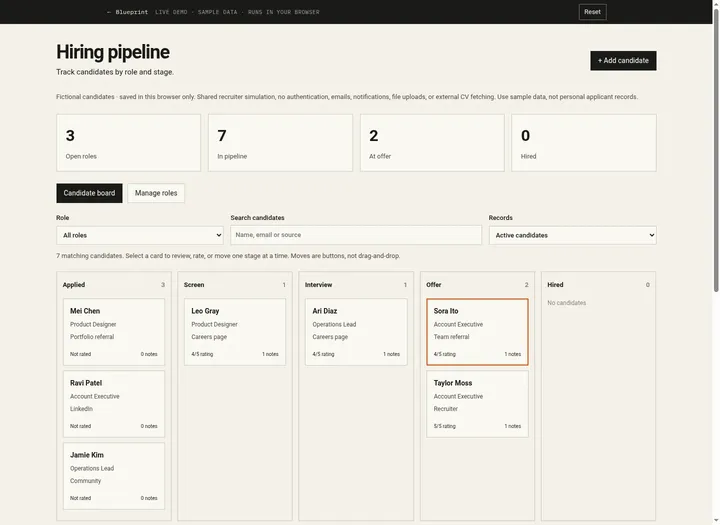
Here's what it built. The board shows every candidate by stage, with days in stage and scorecard progress. Each application keeps the scorecards, the stage actions and a full activity log. Interviewers rate each attribute from weak to strong, with no default recommendation. And candidates apply from their phone.
In the final run, on a fresh database, all twenty-nine checks passed, along with sixty-five automated tests.
But the more useful result is what broke. The build exposed eighteen gaps in the spec. Places where Claude had to guess. The CSV export counted recommendations, which could reveal scorecards the honesty rule hides. Data retention wiped a candidate's phone number when one old application expired, even while another was still open. And no screen offered a jump of two stages, so the one-stage-at-a-time rule couldn't even be tested. Every gap is now fixed in the spec.
Passing every check isn't the same as production-ready. We didn't test real sign-in, real email delivery, the hourly job on a real scheduler, or hosting. Those are yours to check before a team relies on it.
So is it worth building? Greenhouse doesn't publish prices. All three plans say get a demo. If you need EEOC reporting, scheduling automation or job board reach, Greenhouse is worth paying for. If you hire for a few roles at a time, you mostly need the board, honest scorecards, and a decision on every candidate.
The spec is free. The data model, eighteen rules, seed data, four phase prompts, and all twenty-nine checks, with the eighteen fixes already in. Find it at personal software factory dot com.
Made with AI from the real test-build screenshots. Voice: Kokoro (open-source text to speech). Music: "Chill Wave" by Kevin MacLeod (incompetech.com), licensed under Creative Commons Attribution 4.0.
Build it or buy Greenhouse?
Greenhouse does not publish prices. Its pricing page lists three plans, Core, Plus and Pro, each with a "Get a demo" button. Structured interview kits and scorecards, scheduling, reporting and SSO are listed from Core. Source: greenhouse.com/pricing, checked October 2026.
What this blueprint keeps
Roles (jobs) with a hiring manager and 3 to 6 scorecard attributes; a public careers page with an application form per open role, including a privacy notice the candidate accepts; one application per candidate per role; fixed stages Applied → Screen → Interview → Offer → Hired, plus Rejected (with a reason) and Withdrawn; interviews that assign one scorecard per interviewer; scorecards with attribute ratings, key takeaways and Greenhouse's overall recommendation scale; the "only after submitting their own" visibility rule; a gate that keeps candidates out of Offer until every scorecard is in; optional rejection emails from a template; a private link candidates use to withdraw; a daily digest, scorecard reminders and other email through an outbox; automatic anonymization of closed applications; an activity log; CSV export.
What it leaves out
Calendar scheduling, availability and self-scheduling (v1 records the interview time and sends the details by email), job board syndication, sourcing CRM and email campaigns, job and offer approvals, offer letters and e-signature, auto-advance and auto-reject rules, knockout questions, AI notetaking, matching and voice interviews, resume uploads and parsing (v1 accepts a link), demographic and EEOC reporting, onboarding, and integrations. These matter to companies that hire dozens of people a year across locations and need to report on it. A team of 5 to 75 people hiring for a few roles at a time needs the board, honest scorecards and a decision on every candidate. If you need EEOC reporting, scheduling automation or job board reach, Greenhouse is worth paying for.
Build it if
- You are hiring for a handful of roles and tracking candidates in a spreadsheet.
- You want independent interview feedback and a rule that nobody gets an offer before every scorecard is in.
- You want candidate data deleted on a schedule, not kept forever by default.
- An enterprise hiring platform sold by demo is more than a small team needs.
Buy Greenhouse if
- You hire dozens of people a year across locations and need scheduling automation and job board reach.
- You need EEOC and demographic reporting, offer approvals or e-signature.
- You want sourcing CRM, AI notetaking, matching or voice interviews.
- You rely on integrations with HR, background check or assessment tools.
Try the app
A working app loaded with sample data. Changes are saved in this browser only, not shared with other visitors. Use Reset to restore the examples. No real emails, payments or vendor changes are made.
- 1Add a candidate to Product Designer, then find them on the board.
- 2Move Sora from Interview to Offer and inspect the activity log.
- 3Add an evidence-based interview note and update the overall rating.
- 4Archive a candidate, find them in Archived candidates, and restore them.
 Open demo
The blueprint
Paste the whole spec into your AI builder, then send each prompt in the Build plan section one at a time. Check each phase before moving on.
How to use this file: paste this whole document into your AI builder (Claude, ChatGPT, Cursor, Lovable, Replit, Type) as context. Then send the build prompts in section 14 one at a time. Do not move to the next phase until the acceptance checks for the current phase pass.
1. The problem
"We're hiring for three roles and tracking candidates in a spreadsheet."
The spreadsheet has a row per candidate and a column someone forgets to update. Interview feedback lives in Slack threads and email, so the loudest opinion in the debrief wins, and interviewers who read each other's notes first stop forming their own view. Candidates who are turned down often never hear back. And nobody knows when the personal data of people who were not hired is supposed to be deleted.
This blueprint is a small applicant tracking system built around four rules: every candidate is in exactly one stage, every interviewer writes their feedback before they can read anyone else's, nobody reaches Offer while feedback is still missing, and closed applications are anonymized after a set number of days.
2. What the real product does
Research basis: Greenhouse's pricing page (greenhouse.com/pricing), platform page (greenhouse.com/platform) and help center articles "Scorecard overview" and "Scorecard visibility options" (support.greenhouse.io/hc/en-us/articles/4414777492891 and /16187220652059), October 2026.
What we verified:
- Plans and price. Greenhouse sells three plans, Core, Plus and Pro. No prices are published; each plan's button is "Get a demo". Core includes sourcing and CRM, structured interview kits and scorecards, an AI notetaker, scheduling, reporting and analytics, SSO and talent matching. Plus adds AI report filters, a business intelligence connector, sourcing automation and texting. Pro adds unlimited CRM events, enterprise data configuration and security, an audit log and a developer sandbox.
- Pipeline features. The plan comparison lists stage transitions, auto-reject and auto-advance, job and offer approvals, scheduling links and candidate self-scheduling, interviewer availability, e-signature, bulk offers, resume anonymization, U.S. demographic questions and EEOC data management, an internal job board and application limits.
- Scorecards. A job's scorecard lists the attributes (skills, traits, qualifications) the team assesses, and each interview can focus on some of them. A scorecard is assigned to an interviewer automatically when their interview is scheduled, or manually. After the interview, the interviewer writes key takeaways, rates the attributes and gives an overall recommendation: Definitely Not, No, Yes or Strong Yes. If they choose none, it is recorded as No decision. The hiring team then reviews the scorecards together in a "candidate roundup".
- Scorecard visibility. An organization chooses whether interviewers can see other interviewers' submitted scorecards Never, Always, or Only after submitting their own. Greenhouse's help center recommends the last as a way to stop interviewers being influenced by others' feedback before they finish their own.
- Beyond hiring. Voice AI interviews, AI recruiting features, a candidate portal, onboarding and over 500 integrations.
What this blueprint keeps
Roles (jobs) with a hiring manager and 3 to 6 scorecard attributes; a public careers page with an application form per open role, including a privacy notice the candidate accepts; one application per candidate per role; fixed stages Applied → Screen → Interview → Offer → Hired, plus Rejected (with a reason) and Withdrawn; interviews that assign one scorecard per interviewer; scorecards with attribute ratings, key takeaways and Greenhouse's overall recommendation scale; the "only after submitting their own" visibility rule; a gate that keeps candidates out of Offer until every scorecard is in; optional rejection emails from a template; a private link candidates use to withdraw; a daily digest, scorecard reminders and other email through an outbox; automatic anonymization of closed applications; an activity log; CSV export.
What this blueprint deliberately leaves out
Calendar scheduling, availability and self-scheduling (v1 records the interview time and sends the details by email), job board syndication, sourcing CRM and email campaigns, job and offer approvals, offer letters and e-signature, auto-advance and auto-reject rules, knockout questions, AI notetaking, matching and voice interviews, resume uploads and parsing (v1 accepts a link), demographic and EEOC reporting, onboarding, and integrations. These matter to companies that hire dozens of people a year across locations and need to report on it. A team of 5 to 75 people hiring for a few roles at a time needs the board, honest scorecards and a decision on every candidate. If you need EEOC reporting, scheduling automation or job board reach, Greenhouse is worth paying for.
3. Scope of v1
- One company and one team time zone (Settings; default America/New_York). Dates such as "applied on" are shown in that zone; interview times are stored in UTC and shown in the team time zone with the zone name.
- Roles are open (accepting applications), paused (visible to the team, hidden from the careers page) or closed.
- The same five stages for every role. A candidate can apply to several roles; each is a separate application.
- Candidates never sign in. They apply through the careers page and can withdraw through a private link in their confirmation email.
- Email through an outbox. If no email provider is configured, emails are logged, not sent.
- Web app that works on a phone. The careers page and application form must work well on a phone.
4. Roles
| Role | Who | Can do |
|---|---|---|
| Admin | People operations, one or more people | Everything below, for every role. Manage people, roles and settings. See every application, scorecard and note. Delete a candidate's data. Read the outbox. |
| Hiring manager | The person set as a role's hiring manager | For their roles: see every application, move stages, add candidates, schedule interviews, reject, hire, write notes, export. See submitted scorecards, subject to R11. Edit their role's title, department, location, description and attributes (screen 9); only admins create roles, change a role's status or change its hiring manager. |
| Interviewer | Any active person assigned to an interview | See the applications they are assigned to (candidate details, answer, link, role attributes) and submit their own scorecards. See other scorecards on that application only after submitting their own (R11). Never see notes. |
| Candidate | Anyone, without signing in | Apply to an open role. Withdraw their application through the private link. |
Team members who are not an admin, not the role's hiring manager and not assigned to an interview on an application cannot see that application at all, not even in counts. Candidate data is confidential by default. The server enforces all of this.
5. Hiring pipeline data model
All IDs are strings. Timestamps are UTC. "Date" means a calendar date in the team time zone.
Person (a member of the team)
- id, name (required), email (required, unique, stored lowercase)
- is_admin (boolean, default false), active (boolean, default true)
Settings (one row)
- company_name (required, max 60), time_zone (IANA name, default "America/New_York")
- careers_intro (optional, max 1,000 characters, shown at the top of the careers page)
- privacy_notice (required text the candidate accepts, max 2,000 characters), privacy_version (integer, starts at 1; R15)
- retention_days (integer, 30 to 730, default 180)
- rejection_template (required text, max 2,000 characters, may use {candidate_first_name}, {role_title} and {company_name})
- last_digest_at (nullable timestamp; written only by the scheduled job)
Role (a job)
- id, title (required, 1 to 100 characters; unique ignoring case among roles that are not closed)
- department (optional, max 60), location (required, max 80, e.g. "Remote (US)")
- description (required, 20 to 5,000 characters, Markdown)
- hiring_manager_id (references an active Person)
- status: open | paused | closed; opened_at, closed_at (nullable)
- A new role is saved as paused unless it is opened in the same step, which R4 must allow. opened_at is empty until the role is first opened.
RoleAttribute (the scorecard criteria for a role)
- id, role_id, name (required, 2 to 60 characters, unique per role ignoring case), position (integer)
- A role must have 3 to 6 attributes before it can be opened (R4).
- An attribute that has ratings can be renamed or reordered but not removed: "Coachability already has ratings on scorecards, so it can't be removed. Rename it instead."
Candidate (a person who applied or was added)
- id, name (1 to 100), email (required, stored lowercase, unique among candidates that are not anonymized)
- phone (optional, max 30), link (optional https URL to a CV, LinkedIn or portfolio, max 2,000)
- anonymized_at (nullable timestamp; R14)
Application (one candidate for one role)
- id, candidate_id, role_id; unique (candidate_id, role_id)
- source: careers_page | referral | sourced | agency | other; source_detail (optional, max 100, e.g. the referrer's name)
- answer (the candidate's reply to "Why this role?"; required on the careers form, 1 to 2,000 characters; optional when the team adds a candidate)
- consent_at, consent_version (set from the privacy checkbox on the public form; null for applications added by the team)
- stage: applied | screen | interview | offer | hired | rejected | withdrawn
- stage_before_close (nullable; the stage it was in when rejected or withdrawn)
- reject_reason (nullable): requirements | chose_another | role_closed | no_response | other; close_note (optional, max 500)
- applied_at, stage_changed_at, closed_at (nullable; set by hire, reject and withdraw)
- withdraw_token (at least 128 random bits, URL-safe; R13)
- anonymized_at (nullable timestamp; R14)
Interview
- id, application_id, kind: screen | interview
- starts_at (timestamp), duration_minutes (15 to 240), location (required, max 200: a room, a phone number or a video link)
- created_by, created_at, cancelled_at (nullable)
Scorecard (one per interviewer per interview)
- id, interview_id, interviewer_id (references Person)
- status: pending | submitted | cancelled
- takeaways (20 to 3,000 characters, required to submit)
- recommendation: definitely_not | no | yes | strong_yes | no_decision (required to submit; shown as Definitely not, No, Yes, Strong yes, No decision)
- submitted_at (nullable), reminded_at (nullable)
AttributeRating
- scorecard_id, attribute_id, rating: 1 | 2 | 3 | 4 | null (null means "Not assessed"; shown as 1 Weak, 2 Mixed, 3 Good, 4 Strong)
Note (internal comments on an application)
- id, application_id, author_id, text (1 to 2,000 characters), created_at
Event (append-only activity log; never copies a candidate's name, email, phone, link or answer)
- id, application_id (nullable), actor_id (nullable for the candidate and the system)
- type: applied | added | stage_changed | rejected | withdrawn | reopened | hired | interview_scheduled | interview_cancelled | scorecard_submitted | note_added | anonymized | candidate_deleted | role_created | role_changed | settings_changed
- data (JSON, nullable: from/to stage, reason, counts), created_at
Notification (outbox)
- id, kind, to_email, person_id (nullable; empty for candidates), application_id (nullable)
- subject, body (plain text), status: pending | sent | logged | failed, error (nullable), attempts (integer, default 0; each send attempt adds 1), created_at, sent_at
ApplyAttempt (the public form's rate limit, R5)
- ip_hash (an HMAC of the IP address with a server secret), created_at. Rows older than a day are deleted.
6. Stages and lifecycle
The open stages run in order: Applied → Screen → Interview → Offer → Hired. Rejected and Withdrawn close an application from any open stage.
| Action | Who | From | To | Side effects |
|---|---|---|---|---|
| Apply | Candidate (careers page) | (none) | applied | Candidate found by email or created; consent recorded; "Application received" email with the withdraw link; event applied |
| Add candidate | Admin or the role's hiring manager | (none) | applied | Source required; no consent fields; no email to the candidate; event added |
| Advance | Admin or hiring manager | applied, screen, interview, offer | the next stage | Interview → Offer only if R7 holds; Offer → Hired is the Hire action. Event stage_changed |
| Move back | Admin or hiring manager | screen, interview, offer | the previous stage | Note of at least 5 characters required. Event stage_changed |
| Reject | Admin or hiring manager | any open stage | rejected | Reason required, note optional; optional rejection email (R9); pending scorecards cancelled; closed_at set |
| Withdraw | Candidate (private link), or admin or hiring manager on their behalf | any open stage | withdrawn | Team withdrawals need a note; pending scorecards cancelled; hiring manager emailed when the candidate withdraws; closed_at set |
| Reopen | Admin or hiring manager | rejected, withdrawn | stage_before_close | Only if not anonymized and the role is not closed; note required; clears closed_at, reason and note |
| Hire | Admin or hiring manager | offer | hired | Final. closed_at set; every interviewer on the application is emailed "Hired: {name}"; event hired |
| Schedule interview | Admin or hiring manager | screen (kind screen) or interview (kind interview) | same | One pending scorecard per interviewer; each interviewer emailed |
| Cancel interview | Admin or hiring manager | any open stage | same | Interview cancelled_at set; its pending scorecards cancelled; interviewers emailed |
The notes required for Move back and Reopen are saved as Notes on the application (R12 applies), and the event records the note's id. A team withdrawal's note is saved as the close_note.
Hired, and any anonymized application, are final: no action except notes (and none at all once anonymized). Any other move is refused.
7. Interviews and scorecards
- An interview has one or more interviewers (1 to 4 active people). Scheduling creates one pending Scorecard for each.
- An interviewer can submit only their own scorecard, only once, and only after the interview's starts_at. Before that the form says "You can submit feedback after the interview starts (Wed Oct 14, 10:00 EDT)."
- To submit: rate at least one attribute (each attribute is 1 to 4 or Not assessed), write takeaways of 20 to 3,000 characters, and choose one of the five recommendations. No decision is a valid, explicit choice; there is no default.
- A submitted scorecard cannot be edited or deleted. To add something later, the interviewer asks the hiring manager to add a note (interviewers can't see or write notes, R12).
- Each application shows a scorecard summary to people allowed to see scorecards: "3 of 3 submitted · Strong yes 1, Yes 2, No 0, Definitely not 0, No decision 0", plus each scorecard with its ratings, takeaways and recommendation. Cancelled scorecards are listed as cancelled and never counted.
- The app never combines ratings into a score, a ranking or a recommendation of its own. The decision belongs to the hiring team.
Worked examples (seed data in section 13; today is Tue Oct 13, 2026, 08:00 in the team time zone, as after a reset)
| Situation | Result |
|---|---|
| Sam Okafor (hiring manager, Account Executive) opens Sora Ito. Sora's interview yesterday had two scorecards: Ben Cho submitted (Yes), Sam's own is pending. | Sam sees "1 of 2 submitted · Ben Cho submitted · Submit your scorecard to see the others." He cannot read Ben's ratings, takeaways or recommendation, and the API refuses them too (R11). |
| Dana Ruiz (admin, not an interviewer on Sora) opens Sora Ito. | Dana sees Ben's full scorecard and "Sam Okafor: pending". |
| Sam tries to advance Sora from Interview to Offer. | Refused: "1 scorecard is still pending (Sam Okafor)." (R7) |
| Sam submits his scorecard: Discovery questions 3, Product knowledge 2, Written follow-up 4, Coachability 3, recommendation Yes. | Sam now sees Ben's scorecard. The summary reads "2 of 2 submitted · Strong yes 0, Yes 2, No 0, Definitely not 0, No decision 0". Advancing to Offer is now allowed. |
| Ari Diaz (Operations Lead) has two submitted scorecards: Jo Park Strong yes, Ana Lima Yes. | Jo can advance Ari to Offer straight away. |
| Maya Rivera opens the scorecard for Leo Gray's screen, which starts tomorrow at 10:00. | The form is shown read-only with "You can submit feedback after the interview starts (Wed Oct 14, 10:00 EDT)." |
| Ben Cho (interviewer only) opens Ari Diaz, whose interviews he is not on. | Not found (404), the same as an application that does not exist. |
8. Hiring pipeline business rules
- R1. Visibility. Admins see every application. A hiring manager sees every application for their roles. An interviewer sees an application only while they have a scorecard (pending, submitted or cancelled) on one of its interviews. Anyone else gets "Not found" for the application and never sees it in lists or counts.
- R2. Server checks. Every rule about who can do what is enforced on the server, for every action and every API call. Hiding a button is not a permission check.
- R3. One application per candidate per role. Candidates are matched by email, trimmed and lowercased. Applying again to a role the candidate already has any application for creates nothing and shows the same thank-you page as a new application, so the form never reveals who has applied. Applying to a different role adds a new application for the same candidate.
- R4. Roles. A role needs 3 to 6 attributes and a hiring manager to be opened. Only open roles appear on the careers page and accept applications; a paused or closed role's page says "This role isn't accepting applications right now." Closing a role with open applications requires the closer to reject them all with the reason "Role closed" (rejection emails optional) in the same action.
- R5. The public form. Name 1 to 100 characters, a valid email up to 254, phone optional, link optional (https only, no username or password in it, up to 2,000), answer 1 to 2,000 characters, and the privacy checkbox ticked: "Please confirm you've read the privacy notice." The checkbox is never pre-ticked. Protect the form with a hidden honeypot field and at most 5 applications per IP hash per hour; store a hash of the IP with a server secret (ApplyAttempt), never the IP itself. Every accepted submission counts, including duplicates; refused ones don't. Over the limit the form says "We've received several applications from your network in the last hour. Please try again later." and creates nothing.
- R6. One stage at a time. Advance and move back change the stage by exactly one step. Anything else is refused: "Move one stage at a time."
- R7. Feedback before Offer. Advancing from Interview to Offer requires at least one submitted scorecard on the application and no pending scorecards on interviews that are not cancelled. The refusal names who is missing: "2 scorecards are still pending (Ben Cho, Lee Park)." With no submitted scorecard it says "At least one submitted scorecard is needed before Offer."
- R8. Hiring. Hire is allowed only from Offer, is final, and does not close the role (a role can hire more than one person). Closing the role is a separate action.
- R9. Rejection. Reject requires a reason. Sending the rejection email is a choice made in the same dialog, defaulting to on for candidates who applied through the careers page and off for candidates the team added. The email uses the Settings template, and never includes ratings, takeaways, notes or the reject reason.
- R10. Scorecards. Only the assigned interviewer submits, once, after starts_at, with the fields in section 7. A scorecard on a cancelled interview or a closed application is cancelled and cannot be submitted.
- R11. Feedback independence. A person who has a pending scorecard on any interview of an application cannot see other people's submitted scorecards on that application, even if they are the hiring manager or an admin, until they submit their own. After submitting they see all submitted scorecards on the application. Admins and hiring managers with no scorecard on the application see all submitted scorecards. Interviewers never see scorecards on applications they are not assigned to.
- R12. Notes. Notes are visible to admins and the role's hiring manager only, never to interviewers and never to candidates.
- R13. Withdraw link. The confirmation email links to /withdraw/<withdraw_token>. The page shows the role and company only (no other personal data) and a Withdraw button with a confirmation. After withdrawing, or if the application is already closed, it says "Your application is no longer active." Unknown tokens show the same message.
- R14. Retention. Every day the job anonymizes applications that were rejected or withdrawn more than retention_days ago: the answer, close note and interview locations are cleared, notes and scorecard takeaways are deleted, the application's outbox rows are deleted, the application's anonymized_at is set and the event
anonymizedis written. The same run deletes outbox rows older than retention_days, which covers digests that named the candidate. When a candidate has no remaining application that is open, hired or inside the retention window, the candidate's name becomes "Anonymized candidate", their email, phone and link are cleared, and the candidate's anonymized_at is set. Ratings, recommendations, stages, dates, source and reject reason are kept for reporting. Hired applications are not anonymized automatically. - R15. Privacy notice. Changing privacy_notice increases privacy_version and writes
settings_changed. Existing applications keep the consent_version they accepted. - R16. Delete now. An admin can delete a candidate's data on request, with "Delete now" on the Application page: the candidate, all their applications, interviews, scorecards, ratings, notes, outbox rows and the deleted applications' events are removed, and one
candidate_deletedevent is written with the admin, the time and counts, but no personal data. - R17. People changes. Deactivating a person who is the hiring manager of an open or paused role, or who has pending scorecards, is refused and says what to resolve first: "Sam Okafor manages 1 open role and has 1 pending scorecard. Give the role a new hiring manager, and submit the scorecard or cancel its interview, first." There must always be at least one active admin.
- R18. Events. Every successful action writes the events in section 6. Events are never edited and are only removed by R16. They never contain candidate personal data.
9. Hiring pipeline screens
- Careers page (public, /careers). Company name, careers_intro, and open roles grouped by department with location. Each role links to its page.
- Role page and form (public, /careers/
). Title, location, description, then the form from R5 with the privacy notice above the checkbox. On success: "Thanks, {first name}. We've received your application for {role}. We'll be in touch." (the same page for duplicates, R3). - Withdraw page (public, R13).
- Board (home for admins and hiring managers; anyone else sees "You're not the hiring manager for any role." with a link to My interviews). A role filter (All my roles / each role), columns Applied, Screen, Interview, Offer, Hired with counts, and cards showing the candidate's name, role, source, days in stage and "2 of 3 scorecards" when interviews exist. Advance and move back from the card menu. A link to Closed applications.
- Application (detail). Candidate details, answer, link (opens in a new tab with rel="noopener noreferrer"), stage with actions (including a "Move to stage" control listing the open stages; the server refuses anything but the next or previous stage, R6), "Delete now" for admins (R16, with a confirmation), interviews with their scorecards and the summary (section 7, R11), notes (R12), and the activity log.
- Scorecard form. The role's attributes with 1 to 4 or Not assessed, takeaways, the five recommendations. Read-only before starts_at.
- My interviews (home for interviewers). Upcoming interviews and pending scorecards, oldest interview first, then submitted ones from the last 30 days.
- Closed applications. Rejected and withdrawn applications with role, reason and closed date; anonymized ones show "Anonymized candidate". Reopen where allowed.
- Admin: Roles. List, create and edit roles with attributes and status (R4). A role's hiring manager can open the edit page of their own role (not the list) to change its title, department, location, description and attributes; status and hiring manager are admin-only.
- Admin: People. Add, edit, deactivate (R17).
- Admin: Settings. Company, time zone, careers intro, privacy notice (R15), retention days, rejection template with a preview.
- Admin: Outbox. Every notification with its status.
- Admin: Activity. Every event, newest first, including those without an application (candidate_deleted, role and settings changes).
10. Notifications
| Trigger | Recipient | Subject |
|---|---|---|
| Apply | Candidate | "We received your application for {role}" (with the withdraw link) |
| Schedule interview | Each interviewer | "Interview: {candidate} for {role}, {date and time}" (with the location and a link to the scorecard) |
| Cancel interview | Each interviewer | "Cancelled: interview with {candidate}" |
| Scorecard reminder (section 11) | The interviewer | "Feedback due: {candidate} for {role}" |
| All scorecards submitted for an interview | The role's hiring manager | "Feedback complete: {candidate}" |
| Candidate withdraws | The role's hiring manager | "{candidate} withdrew from {role}" |
| Reject, if chosen (R9) | Candidate | "Your application for {role}" (rejection_template) |
| Hire | Each interviewer on the application | "Hired: {candidate} for {role}" |
| Daily digest (section 11) | Each hiring manager with news | "Hiring update for {date}" |
Write every notification to the outbox first, then send it. With no provider configured, set status logged. Failed sends are retried by the job. A notification failure never blocks the action that caused it.
11. Scheduled job and time
The job runs every hour (for example a cron calling /api/cron/tick with a CRON_SECRET header) and reads "now" through one function that adds the development clock offset.
- Digest. At or after 08:00 in the team time zone, if last_digest_at is empty or on an earlier date: for each hiring manager, list open applications for their roles received since last_digest_at (on the very first run, in the previous 7 days), and their applications with no stage change for 14 or more days in Applied or Screen. Queue one email per hiring manager with anything to report. Set last_digest_at to now.
- Scorecard reminders. For each pending scorecard whose interview started 24 hours or more ago and whose reminded_at is empty: queue one reminder and set reminded_at.
- Retention. Apply R14 once per day, in the same run as the digest.
- Retry failed notifications until their attempts reach 5.
A missed day is not caught up: the next run sends that day's digest. Running the job twice in the same hour sends nothing new.
12. Edge cases
- A candidate applies to Account Executive with SORA.ITO@Example.com: R3 matches it to Sora's existing application; nothing is created.
- The hiring manager is also one of the interviewers: R11 applies to them like anyone else.
- An interviewer is deactivated after submitting: their scorecard stays and keeps their name. Pending scorecards block deactivation (R17).
- A role is closed while an interview is scheduled: the reject-all step in R4 cancels the interviews' pending scorecards (section 6).
- A candidate withdraws while Sam is filling in a scorecard: submitting is refused with "This application is closed." and nothing is saved.
- Reopening a rejected application whose role was paused: allowed; the role is still visible to the team. Reopening on a closed role is refused.
- Two people act on the same application at once: stage changes check the current stage in the same transaction; the second gets "Sora Ito was already moved to Offer by Sam Okafor."
- A link value such as javascript:alert(1) or http://example.com is refused by the form; only https is accepted.
- Candidate text is always rendered as text, never as HTML.
13. Seed data
Settings: company "Fernway", time zone America/New_York, retention 180 days, a short privacy notice (version 1), and the rejection template "Hi {candidate_first_name}, thank you for applying for {role_title} at {company_name}. We've decided not to move forward with your application. We wish you the best with your search."
People: Dana Ruiz (admin), Maya Rivera, Sam Okafor, Jo Park, Ben Cho, Ana Lima, Lee Park. Everyone is active; only Dana is an admin.
Roles (all open):
| Role | Hiring manager | Location | Attributes |
|---|---|---|---|
| Product Designer | Maya Rivera | Remote (US) | Interaction design, User research, Visual craft, Collaboration |
| Account Executive | Sam Okafor | New York | Discovery questions, Product knowledge, Written follow-up, Coachability |
| Operations Lead | Jo Park | Remote (US) | Process design, Prioritization, Stakeholder communication |
Applications (emails are firstname.lastname@example.com; T is the day the seed is loaded, here Tue Oct 13, 2026):
| Candidate | Role | Stage | Source | Applied | Interviews and scorecards |
|---|---|---|---|---|---|
| Mei Chen | Product Designer | Applied | referral (Lee Park) | T-2 | none |
| Leo Gray | Product Designer | Screen | careers_page | T-6 | Screen T+1 at 10:00 with Maya Rivera (pending) |
| Ravi Patel | Account Executive | Applied | sourced | T-1 | none |
| Sora Ito | Account Executive | Interview | referral (Ana Lima) | T-12 | Interview T-1 at 14:00 with Sam Okafor (pending) and Ben Cho (submitted: Discovery questions 3, Product knowledge 3, Written follow-up 2, Coachability 4, Yes) |
| Taylor Moss | Account Executive | Offer | agency | T-20 | Interview T-8 with Sam Okafor (Strong yes) and Ben Cho (Yes), both submitted |
| Ari Diaz | Operations Lead | Interview | careers_page | T-10 | Interview T-2 at 11:00 with Jo Park (Strong yes) and Ana Lima (Yes), both submitted |
| Jamie Kim | Operations Lead | Applied | other ("Community meetup") | T-3 | none |
| Noor Haddad | Product Designer | Rejected (from Screen, reason chose_another) | careers_page | T-230 | none; closed T-200 |
| Kai Brooks | Operations Lead | Withdrawn (from Screen, by the candidate) | careers_page | T-25 | none; closed T-10 |
Reset to seed data also sets the development clock to 08:00 on T in the team time zone.
Every submitted scorecard has takeaways of at least 20 characters. Ben Cho's takeaways for Sora Ito read "Strong discovery, asked good follow-ups. Written recap was thin." Careers-page applications have consent version 1. Mei Chen has one note from Maya: "Referred by Lee; portfolio link looks strong."
14. Hiring pipeline build plan
Send these prompts one at a time after pasting this file. Each phase ends with checks you can run by clicking through the app. Start each phase's checks from a fresh load of the seed (the reset button); checks within a phase run in order on the same data.
Phase 1: Foundation
Using the Hiring Pipeline blueprint above, build Phase 1 only.

1. Set up the data model from section 5 exactly, with a real database.
2. Add sign-in with the platform's built-in auth or Google sign-in limited to our company email domain. A signed-in email must match an active Person; anyone else sees "Ask an admin to add you."
3. Build Admin: People, Admin: Roles (with attributes) and Admin: Settings (section 9, screens 9 to 11). Only admins can open them, and the server refuses admin actions from anyone else. Enforce R4 (3 to 6 attributes and a hiring manager to open a role, unique titles) and R17.
4. Load the seed data from section 13, with dates relative to today.
5. Add a "sign in as" switcher, a "move the clock forward" control and a "reset to seed data" button (which also sets the clock to 08:00 on the seed day, section 13), all visible only in development, so I can test as different people and times.

Do not build the careers page, board or scorecards yet. When you're done, list what you built and anything in the spec you had to interpret.
Acceptance checks
- Signed in as Dana, Admin: Roles lists Product Designer (Maya Rivera), Account Executive (Sam Okafor) and Operations Lead (Jo Park), all open, and Account Executive shows 4 attributes.
- Signed in as Ben, opening Admin: Roles shows "Only admins can open this page." and a direct request to create a role is refused.
- Creating a role called "account executive" is refused because the title already exists; opening a new role with only 2 attributes is refused.
- Deactivating Sam Okafor is refused with a message naming his open role and pending scorecard.
- Changing the privacy notice increases its version from 1 to 2.
Phase 2: Careers page, applications and the board
Using the Hiring Pipeline blueprint above, build Phase 2 only.

1. Build the public careers page, role pages with the application form, and the withdraw page (section 9, screens 1 to 3), with R3, R5 and R13. The form must work on a phone.
2. Build the Board, the Application page (without interviews and scorecards for now), Closed applications and Add candidate (screens 4, 5 and 8).
3. Implement every action in section 6 except the interview actions and Reopen, with R1, R2, R4 (closing with open applications), R6, R8, R9, R12 and R18 enforced on the server.
4. Write the notifications for Apply, Reject and candidate withdrawal (section 10) to the outbox, and build Admin: Outbox (screen 12).

When you're done, list what you built and anything in the spec you had to interpret.
Acceptance checks
- Signed out, the careers page lists the three open roles. After Dana pauses Operations Lead, it disappears from the list and its page says "This role isn't accepting applications right now."
- Applying to Product Designer as "Jordan Lee" with a valid email, an answer and the privacy box ticked shows the thank-you page; Jordan appears in Applied on Maya's board, and the outbox has one "We received your application for Product Designer" email with a withdraw link.
- Submitting without ticking the privacy box is refused with "Please confirm you've read the privacy notice." and creates nothing.
- Applying again to Account Executive with SORA.ITO@example.com shows the same thank-you page and creates no new application.
- Signed in as Maya, the board shows only Product Designer applications, and opening Sora Ito's application URL returns Not found.
- Advancing Mei Chen from Applied straight to Interview is refused with "Move one stage at a time."; advancing her to Screen works and appears in the activity log.
- Jo rejects Jamie Kim with reason "Not a fit for the requirements" and the email option on: Jamie moves to Closed applications, and the outbox email uses the template and contains no reason or notes.
- Opening Jordan's withdraw link and confirming moves the application to Withdrawn, emails Maya, and opening the link again says "Your application is no longer active."
- Signed in as Ben, the Board says "You're not the hiring manager for any role." and opening Mei Chen's application returns Not found.
Phase 3: Interviews and scorecards
Using the Hiring Pipeline blueprint above, build Phase 3 only.

1. Add scheduling and cancelling interviews on the Application page, creating and cancelling scorecards as section 6 and section 7 describe.
2. Build the Scorecard form and My interviews (section 9, screens 6 and 7), with R10.
3. Show the scorecard summary and scorecards on the Application page, and enforce R11 on the server for every read, including direct API calls for a scorecard.
4. Enforce R7 when advancing from Interview to Offer.
5. Write the interview, feedback-complete and hire notifications from section 10 to the outbox.

When you're done, list what you built and anything in the spec you had to interpret.
Acceptance checks
- Signed in as Sam, Sora Ito's application shows "1 of 2 submitted" and "Submit your scorecard to see the others", without Ben's ratings or takeaways, and a direct request for Ben's scorecard is refused.
- Signed in as Dana, Sora Ito's application shows Ben's full scorecard and "Sam Okafor: pending".
- Sam advancing Sora to Offer is refused with "1 scorecard is still pending (Sam Okafor)."
- Sam submitting with takeaways under 20 characters, or with no attribute rated, is refused; submitting a complete scorecard with Yes then shows Ben's scorecard and the summary "Strong yes 0, Yes 2, No 0, Definitely not 0, No decision 0", and the outbox has "Feedback complete: Sora Ito" for Sam.
- After that, Sam advances Sora to Offer.
- Signed in as Maya, Leo Gray's screen scorecard is read-only with the start-time message; after moving the clock past tomorrow 10:00 it can be submitted.
- Jo schedules an interview for Ari Diaz with Ben Cho and Lee Park: two pending scorecards appear in their My interviews, the outbox has two interview emails, and Ben can now open Ari's application.
- Signed in as Ben, Sora Ito's application shows the scorecards but no Notes section, and a direct request for its notes is refused.
- Hiring Taylor Moss from Offer moves Taylor to Hired, emails Sam and Ben, and leaves no stage actions on Taylor's application.
Phase 4: Digest, reminders, retention and export
Using the Hiring Pipeline blueprint above, build Phase 4 only.

1. Build the scheduled job from section 11 (digest, scorecard reminders, retention, retries), protected by a CRON_SECRET header, with a development-only "run job now" control that uses the development clock.
2. Implement R14, R16 (with Delete now and Admin: Activity, section 9, screens 5 and 13) and Reopen from section 6.
3. Add CSV export of a role's applications for admins and its hiring manager: candidate name, stage, source, applied date, closed date, reject reason and the recommendation counts. No answers, notes or takeaways. R11 applies: where the person exporting has a pending scorecard on an application, its count columns say "hidden".

When you're done, list what you built and anything in the spec you had to interpret.
Acceptance checks (reset to seed data first)
- Running the job at 08:00 sends Sam one digest listing Ravi Patel as a new application; running it again the same day sends nothing new.
- With the clock at least 24 hours after Sora Ito's interview started, running the job queues one reminder to Sam for his pending scorecard; running it again queues none.
- The job anonymizes Noor Haddad: Closed applications shows "Anonymized candidate · Product Designer · Rejected", her email is gone, and Kai Brooks is unchanged.
- Dana uses Delete now on Kai Brooks: Kai's applications are gone, and the activity log's candidate_deleted entry contains no name or email.
- Rejecting Jamie Kim and then reopening the application returns Jamie to Applied; reopening Noor Haddad is refused because she is anonymized.
- Dana exporting Account Executive downloads a CSV with one row per application, recommendation counts for Sora Ito and Taylor Moss, and no takeaways or notes.
15. Variations
- Calendar invites (.ics attachments) for interviews, then scheduling links.
- CV uploads with type and size limits, stored privately, deleted by the retention job.
- Knockout questions on the form that route to a review queue (never auto-reject).
- An XML or JSON job feed for job boards.
- Offer approvals before Offer, and offer letters with e-signature.
- An anonymous, optional demographic survey reported only in aggregate.
- A referral form for employees that fills in source and referrer.
- Slack notifications for hiring managers.
16. Build notes from our test build
We built this blueprint by sending the four phase prompts above, in order, to an AI builder (Claude, working in Type), then checked every acceptance item in a real browser, resetting to the seed data before each phase's checks. Where a check says something is refused, the person saw the reason on screen and a direct request got an error with nothing changed.
Result: 29 of 29 acceptance checks passed in one final browser run on a fresh database, plus 65 automated tests. We then ran the full browser suite and the automated tests again ourselves, with the same result.
Gaps the build found, now fixed in this spec:
- A new role had no starting status. It is saved as paused unless it is opened in the same step.
- Section 4 let hiring managers edit their roles, but the only role editor was admin-only. Sections 4 and 9 now say what a hiring manager can edit, and where.
- Nothing said whether an attribute that already has ratings can be removed. It can be renamed, not removed.
- R17 told admins to "reassign" a pending scorecard, but no action does that. The message now names what clears it.
- The checks depended on the time of day the seed was loaded. Reset to seed data now also sets the clock to 08:00.
- The form's rate limit had no field for the IP hash, no counting rule and no message. Section 5 and R5 now have them.
- The notes that Move back and Reopen require had nowhere to be stored. They are saved as notes on the application.
- Reopen was assigned to both Phase 2 and Phase 4. It is now in Phase 4 only.
- No screen offered a move of more than one stage, so the "Move one stage at a time" check couldn't be reached through the screens. The Application page now has a "Move to stage" control.
- Section 7 told interviewers to add to a submitted scorecard with a note, but interviewers can't write notes. They now ask the hiring manager.
- R7 had no message for an application with no submitted scorecard. It now does.
- R14 anonymizes applications one by one, but applications had no field to show it. They now have anonymized_at.
- R14 cleared the candidate's link and phone when one old application expired, even if another was still open, and missed the close note, interview locations and the outbox. It now covers each.
- The digest stored the date of its last run, but listing applications "since the previous digest" needs the time. It now stores a timestamp.
- Retries stopped after 5 attempts, with nothing to count them. Notifications now have an attempts count.
- The export's recommendation counts could reveal scorecards that R11 hides. They now say "hidden" for someone with a pending scorecard on that application, and the check names Dana as the person exporting.
- There was no screen for Delete now, or for events without an application. The Application page has Delete now, and Admin: Activity lists every event.
- Only Phase 4 said to reset to the seed data before its checks. The build plan now says it for every phase.
What we did not test:
- Production sign-in. Google sign-in was built, but every check used the development "sign in as" switcher.
- Sending email. Emails were logged in the outbox, not delivered.
- The hourly job on a real scheduler. It was run from the development control and by calling its endpoint with and without the secret.
- Production deployment details: HTTPS, secure cookies and the form's rate limit behind a real proxy.
- Two people moving the same candidate at the same moment from two browsers. This is covered by automated tests only.
- Hosting. The test build ran on SQLite on one server. For a hosted deploy, use a managed Postgres (or your platform's database) and the same schema.
Field report
Building a Greenhouse replacement with AI, 29 checks and 18 spec gaps
We had an AI builder build a small-team hiring pipeline from our spec, one phase at a time, and checked every acceptance item in a real browser. It passed all 29 checks in the end and exposed 18 gaps in the spec, tied for the tenth-most of any build so far. What it took, what broke, what Greenhouse charges instead, and what we still haven't tested.
The short answer
Yes, for a team of 5 to 75 people hiring for a few roles at a time. We gave Claude, working in Type, our Hiring Pipeline blueprint and had it follow the four phase prompts in order. The final build passed 29 of 29 acceptance checks in one browser run on a fresh database, with 65 automated tests.
Measured by gaps, it tied for the tenth-hardest of our twenty-two build tests. The build exposed 18 gaps in the spec, places where the builder had to guess. Only the invoice reminders build, with 83, the link shortener, with 69, the inventory tracker, with 63, the status page, with 58, the employee onboarding build, with 44, the internal knowledge base, with 30, the help desk and the timesheets, with 21 each, and the customer feedback inbox, with 20, had more, and the client onboarding tracker tied it at 18; the median across all twenty-two is 14.5. Every gap is now fixed in the published spec.
What it is not: a tested production deployment. Real email delivery, production sign-in, a real scheduler and hosting were not part of the test. The last section lists exactly what was and wasn't checked.
What we built, and what we left out
The blueprint copies the part of Greenhouse a small team uses when it hires for a handful of roles. We read Greenhouse's pricing and platform pages and its help center articles on scorecards in October 2026, and kept these rules:
- Five stages, one step at a time. Applied, Screen, Interview, Offer and Hired, plus Rejected (with a reason) and Withdrawn. A move of more than one stage is refused with "Move one stage at a time."
- One scorecard per interviewer. Each role has 3 to 6 attributes rated 1 Weak to 4 Strong or Not assessed, key takeaways, and Greenhouse's recommendation scale: Definitely not, No, Yes, Strong yes or No decision. The app never adds ratings up into a score of its own.
- Feedback before reading. Greenhouse offers "only after submitting their own" as a visibility setting. Here it is the rule for everyone, hiring managers included: anyone with a pending scorecard cannot read the others on that application until theirs is in.
- No Offer while feedback is missing. Interview to Offer needs at least one submitted scorecard and no pending ones. The refusal names who is missing: "1 scorecard is still pending (Sam Okafor)."
- A careers page that works on a phone. One form per open role, a privacy notice above an unticked checkbox, a honeypot, a rate limit, and a private withdraw link in the confirmation email.
- Data that expires. A daily job anonymizes applications rejected or withdrawn more than a set number of days ago (default 180), and an admin can delete a candidate's data on request.
Left out on purpose: calendar scheduling, job board syndication, sourcing CRM, offer approvals, offer letters and e-signature, auto-advance and auto-reject, AI notetaking, resume parsing, EEOC reporting, onboarding and integrations. If you hire dozens of people a year and need those, Greenhouse is worth paying for.
What it costs next to Greenhouse
Greenhouse does not publish prices. On greenhouse.com/pricing in October 2026 it listed three plans, Core, Plus and Pro, each with a "Get a demo" button; structured interview kits and scorecards, scheduling, reporting and SSO are listed from Core. We can't give you a per-seat comparison.
The build has no per-seat price either, but it isn't free: you pay for hosting, a database, an email provider for the confirmation, interview and rejection emails, and the time to build and look after it. Build when you want independent feedback and the feedback-before-Offer gate as rules rather than settings, candidate data deleted on a schedule, or the candidates in your own database. Buy when you rely on scheduling automation, job board reach, offer approvals or HR integrations. Our build-or-buy guide has the full decision.
How the build went, phase by phase
The builder received the blueprint as one Markdown file and sent itself the four phase prompts one at a time. After each phase, that phase's acceptance checks ran as browser scripts that click through the app as the named person, from a fresh load of the seed data. After the last phase, all 29 checks ran again in one final pass.
- Foundation. The data model, sign-in for development, the admin pages for people, roles and settings, the seed data, and a "sign in as" switcher, a clock control and a reset button.
- Careers page, applications and the board. The public careers page and form, the withdraw page, the Board, the Application page, every stage action except interviews and Reopen, and the first outbox emails.
- Interviews and scorecards. Scheduling and cancelling interviews, the Scorecard form, My interviews, the visibility rule on every read, and the feedback-before-Offer gate.
- Digest, reminders, retention and export. The hourly job behind a secret header, the daily digest, scorecard reminders, anonymization, Delete now, Reopen and CSV export.
Each phase prompt ends with one sentence: "list what you built and anything in the spec you had to interpret." That sentence is what surfaced the gaps.
The 18 gaps, grouped
The full list, with each fix, is in the blueprint's build notes. They fall into four groups.
The build plan and seed got in the way of the checks (4 gaps)
The checks depended on the time of day the seed was loaded; reset now also sets the clock to 08:00. Reopen was assigned to both Phase 2 and Phase 4. No screen offered a jump of more than one stage, so the "Move one stage at a time" check couldn't be reached by clicking; the Application page now has a "Move to stage" control. And only Phase 4 told the tester to reset the seed before its checks.
Lesson: the build plan and seed are part of the spec. A check you can't reach from the screens is not a check.
Rules whose data had nowhere to live (5 gaps)
The public form's rate limit had no field for the IP hash, no counting rule and no message. The notes that Move back and Reopen require had no table to go in. Retention anonymizes applications one by one, but an application had no field to say so. The digest stored the date of its last run, while "since the previous digest" needs a time. Retries were meant to stop after 5 attempts, with nothing to count them.
Lesson: for every rule, ask where its data lives. If the data model has no column for it, the builder will invent one, or skip the rule.
Sections that pointed at actions or screens that did not exist (4 gaps)
Section 4 let hiring managers edit their roles, but the only role editor was admin-only. The deactivation rule told admins to "reassign" a pending scorecard, and no action does that. Section 7 told interviewers to add to a submitted scorecard with a note, but interviewers can't write notes. Delete now, and events with no application, had no screen to appear on.
Lesson: every verb in a rule needs a button somewhere, and every record a check inspects needs a screen that shows it.
Rules that stopped short (5 gaps)
A new role had no starting status. Nothing said whether an attribute that already has ratings can be removed (it can be renamed, not removed). The feedback-before-Offer rule had no message for an application with no submitted scorecard at all. Retention cleared a candidate's phone and link when one old application expired, even if another was still open, and missed the close note, interview locations and the outbox. And the CSV export's recommendation counts could reveal scorecards the visibility rule hides; they now say "hidden" for someone with a pending scorecard.
Lesson: a rule that protects data has to be applied everywhere the data shows up, including exports and background jobs. See What AI app builders get wrong for the patterns across every build.
What we did not test
- Production sign-in. Google sign-in was built, but every check used the development "sign in as" switcher.
- Sending email. Emails were logged in the outbox, not delivered.
- The hourly job on a real scheduler. It was run from the development control and by calling its endpoint with and without the secret.
- Production deployment details. HTTPS, secure cookies and the form's rate limit behind a real proxy.
- Two people moving the same candidate at once from two browsers. Covered by automated tests only.
- Hosting. The test build ran on SQLite on one server. For a hosted deploy, use a managed Postgres and the same schema.
These gaps are not special to the hiring pipeline. We list what every build left untested in Is an AI-built internal tool ready for production?.
Build it yourself
The Hiring Pipeline blueprint is free: one Markdown file with the data model, the 18 business rules, screens, seed data, the four phase prompts and all 29 acceptance checks, with the 18 fixes already in. Paste it into Claude, ChatGPT, Cursor, Lovable, Replit or Type and send the phases one at a time. To compare before you build, see the Greenhouse alternatives page. If you find a gap we missed, tell us on the About page and we'll fix it and credit it in the build notes.
Hiring Pipeline: questions people ask
What stages should a hiring pipeline have?
This blueprint uses five, the same for every role: Applied, Screen, Interview, Offer and Hired, plus two ways to close an application: Rejected (with a reason) and Withdrawn. Candidates move one stage at a time, and every move is logged, so the board always shows exactly where each person is.
What is an interview scorecard?
A structured form each interviewer fills in after the interview: a rating for each of the role's attributes (3 to 6 skills or traits, rated 1 Weak to 4 Strong or Not assessed), key takeaways, and an overall recommendation. This blueprint uses the same recommendation scale as Greenhouse: Definitely not, No, Yes or Strong yes, with No decision as an explicit choice. The app never turns the ratings into a score of its own.
Should interviewers see each other's feedback?
Not before they submit their own. Reading someone else's feedback first tends to pull your view toward theirs. Greenhouse offers this as a setting ("Only after submitting their own"); in this blueprint it is a rule for everyone, including the hiring manager: anyone with a pending scorecard on an application cannot read the other scorecards on it until theirs is submitted.
How do you stop an offer going out before the feedback is in?
With a gate on the move from Interview to Offer: it needs at least one submitted scorecard and no pending ones, and the refusal names who is missing, for example "1 scorecard is still pending (Sam Okafor)." Interviewers with a pending scorecard get one reminder 24 hours after the interview starts.
How long should you keep data on candidates you didn't hire?
Decide a period and enforce it. In this blueprint an admin sets a retention period (default 180 days), and a daily job anonymizes applications that were rejected or withdrawn longer ago than that: names, contact details, answers, notes and written feedback are removed, while stages, dates, sources and ratings stay for reporting. An admin can also delete a candidate's data on request. Check the rules that apply where you hire.
What data model does an applicant tracking system need?
Person (the team), Settings, Role (the job, with a hiring manager and status), RoleAttribute (the scorecard criteria), Candidate, Application (one candidate for one role, with source, stage, reject reason and consent), Interview, Scorecard (one per interviewer per interview), AttributeRating, Note, an append-only Event log that never copies personal data, and a Notification outbox.
How much does Greenhouse cost?
Greenhouse does not publish prices; its Core, Plus and Pro plans are sold through a demo (checked October 2026). Scorecards, structured interview kits, scheduling, reporting and SSO are listed from Core.
Get new blueprints by email
One email when a new blueprint is published. Nothing else.
More blueprints
Time-Off Tracker
I can never tell who's out next week until they're already gone.
- No.
- 010
- Dept.
- People
- Status
- Tested
- Replaces
- Timetastic
Employee Onboarding
Every new hire's first week depends on who remembers what.
- No.
- 015
- Dept.
- People
- Status
- Tested
- Replaces
- BambooHR
Shift Scheduling
The schedule lives in a spreadsheet and every change happens by text.
- No.
- 018
- Dept.
- People
- Status
- Spec
- Replaces
- When I Work
All people and hr blueprintsEvery blueprintHow we test blueprints