Free template · Build it with Claude, Cursor, Lovable or any AI app builder
Simple CRM template
We pay for a giant CRM and use about ten percent of it.
Contacts, deals and follow-up dates in one list, sorted so the people you need to call today are at the top.
By Sam Claassen · Updated · 4 build phases · 27/27 acceptance checks passed
- No.
- 001
- Department
- Sales
- Build time
- 2 hrs
- Difficulty
- Intermediate
- Team size
- 1–15 people
- Replaces
- HubSpot
- Your builder needs
- A database and sign-in, plus a scheduled job and sending email
- Status
- Build-tested Oct 15, 2026
Can you build your own CRM instead of paying for HubSpot?
Yes, if your sales team is 1 to 15 people and mostly needs contacts, deals and follow-ups. This blueprint specifies a CRM built around one rule: every contact has a next follow-up date, and the overdue ones are always at the top. It adds a deal pipeline with weighted totals, activity logging, CSV import and export, and a daily digest email, specified in four build phases with 27 acceptance checks. We built it by sending the 4 phase prompts to Claude in order, and all 27 checks passed in a real browser. It deliberately leaves out email sync, sequences, marketing contacts, lead scoring and forecasting.
Built and tested from this blueprint
We sent the 4 build prompts below to an AI builder, in order, and checked every acceptance item in a real browser on a freshly seeded database. The test build ran as a full web app with a database, sign-in and a daily digest job, and every screen was also checked at phone width. Where the build exposed a gap in the spec, we fixed the spec.
- Acceptance checks passed
- 27/27
- Automated tests
- 91
- Spec gaps found and fixed
- 8
- Build phases
- 4
The full write-up of this build test, with every gap and what was not tested, is in the build-test report below.
Watch the build test
We gave Claude one Markdown spec for a simple CRM for small sales teams and had it build the tool in four phases. It passed all 27 acceptance checks in a real browser, along with 91 automated tests, and exposed 8 gaps in the spec, from owner-only buttons the checks expected a colleague to try to a morning digest that drifted with daylight saving. What passed, what broke, what we didn't test, and when HubSpot is still worth paying for. 2:39.
Watch on YouTube · More build tests on our channel
Transcript
Here's how to reverse engineer HubSpot from a written spec. Claude passed all twenty-seven checks, and found eight gaps in my spec.
We gave Claude one Markdown file. It copies the part of HubSpot a small sales team actually uses. Contacts and companies, each with an owner. One deal pipeline, with stage probabilities. A log of every call, email and meeting. And CSV import, with a preview before anything is saved.
The core rule is the follow-up. Every contact always has a next follow-up date. It can be moved, but never cleared. Overdue contacts sit at the top, oldest first. And logging a call always sets the next date, three days out by default. So Grace Kim, six days overdue, is the first name Sam sees.
Claude built it in four phases, one prompt each. The foundation, with the team, companies and contacts. Activities, follow-ups, the Today screen and search. Deals and the pipeline. Then import, export and the daily digest. After every phase, the acceptance checks ran in a real browser, from fresh seed data.
Here's what it built. The contacts list puts late follow-ups first, with the days overdue. The pipeline board totals every stage, open and weighted. Logging a call moves the next follow-up a week out. The import preview flags duplicates and errors before anything is saved. And on a phone, Today shows who to call.
In the final run, on a fresh database, all twenty-seven checks passed, along with ninety-one automated tests.
But the more useful result is what broke. The build exposed eight gaps in the spec. Places where Claude had to guess. Owner-only buttons were hidden, but the checks expected a colleague to try them and see the refusal. Unarchiving a contact with no follow-up date had no rule. And the morning digest drifted with daylight saving on a UTC scheduler. Every gap is now fixed in the spec.
Passing every check isn't the same as production-ready. We didn't test real sign-in, sending email, the scheduled morning run, real phones, or hosting. Those are yours to check before a team relies on it.
So is it worth building? HubSpot's free CRM covers up to two users. Paid seats start at fifteen dollars per seat per month. Pipedrive has no free tier, and starts at fourteen. If you rely on email sync, sequences or forecasting, pay for HubSpot. If your team works from contacts, deals and follow-ups, you mostly need the list, the board, and the reminder.
Everything is in one file. The data model, twenty-one rules, seed data, four phase prompts, and all twenty-seven checks, with the eight fixes already in.
The full spec is free at personal software factory dot com. If you build it, tell me what broke. I'm Sam. See you tomorrow.
Made with AI from the real test-build screenshots. Narration and the on-camera intro and outro: an AI voice clone and avatar of Sam Claassen (HeyGen). Music: "Chill Wave" by Kevin MacLeod (incompetech.com), licensed under Creative Commons Attribution 4.0.
Build it or buy HubSpot?
HubSpot's free CRM is free for up to 2 users (and, per its product page, up to 1,000 contacts). Paid HubSpot seats are $20 per seat per month on Starter (new customers are offered $7 a seat billed yearly, or $10 monthly, for a limited time). Pipedrive, the other common choice for small teams, has no free tier: Lite is $14, Growth $39, Premium $59 and Ultimate $79 per seat per month, billed annually. Source: hubspot.com/pricing/crm and pipedrive.com/en/pricing, checked November 2026.
What this blueprint keeps
Contacts and companies with owners; one deal pipeline with stage probabilities and Won/Lost; a next follow-up date on every contact (Pipedrive's "next activity date", reduced to the one date that matters); a log-activity form that always sets the next follow-up (HubSpot's "task follow up", made mandatory); a pipeline board with per-stage totals and weighted totals; simple search; CSV export; CSV import by paste with a validation preview and duplicate detection by email; a daily email digest of what is due.
What it leaves out
Email sync and open tracking, sequences, marketing contacts and forms, multiple pipelines, custom fields and custom objects, lead scoring, meeting scheduler and calendar sync, quotes, tickets, AI assistants, forecasting beyond weighted totals, and updating existing records by import. These earn their keep in larger sales teams. A team of 1 to 15 people needs the list, the board and the reminder.
Build it if
- Your team is 1 to 15 people and works from contacts, deals and follow-ups.
- You have outgrown HubSpot's free seats but do not use its paid features.
- Follow-ups slip, and you want one rule enforced: every contact always has a next date.
- You want your pipeline in your own database, with a one-click CSV export.
Buy HubSpot if
- You rely on email sync and tracking, sequences or marketing contacts.
- You need custom fields and objects, several pipelines, or forecasting beyond weighted totals.
- You are 2 people or fewer and HubSpot's free CRM already covers what you do.
- Your CRM must connect to many other tools out of the box.
Try the app
A working app loaded with sample data. Changes are saved in this browser only, not shared with other visitors. Use Reset to restore the examples. No real emails, payments or vendor changes are made.
- 1Log a call with Grace Kim and choose her next follow-up.
- 2Move a deal through the pipeline; marking it lost requires a reason.
- 3Act as Dana, then preview and import the sample contact CSV.
- 4Advance one day to simulate daily digests, or Reset to restore the sample data.
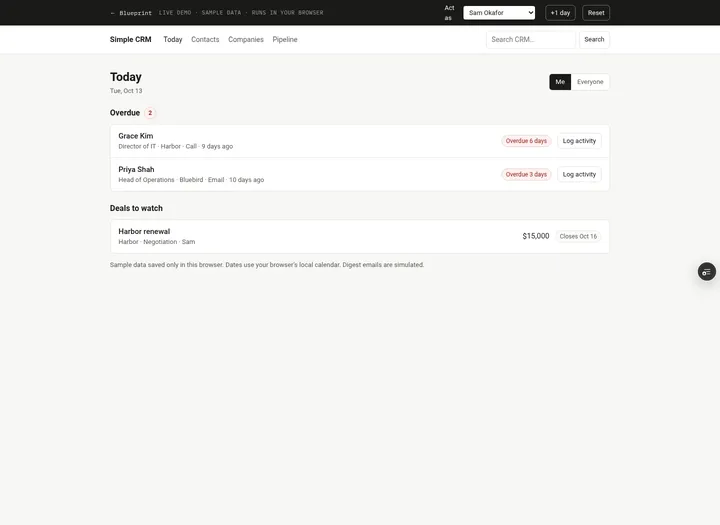 Open demo
The blueprint
Paste the whole spec into your AI builder, then send each prompt in the Build plan section one at a time. Check each phase before moving on.
How to use this file: paste this whole document into your AI builder (Claude, ChatGPT, Cursor, Lovable, Replit, Type) as context. Then send the build prompts in section 13 one at a time. Do not move to the next phase until the acceptance checks for the current phase pass.
1. The problem
"We pay for a giant CRM and use about ten percent of it."
A small sales team needs three things from a CRM: a list of people and companies, the deals in play, and a reminder of who to call next. Everything else (email sequences, scoring, forecasting, marketing contacts) sits unused. Meanwhile the one thing that matters slips: a promised follow-up is forgotten because nothing put it in front of the right person on the right day.
This blueprint is a CRM built around one rule: every contact has a next follow-up date, and the ones that are late are always at the top.
2. What the real product does
Research basis (October 2026):
- HubSpot free CRM product page and pricing: hubspot.com/products/crm, hubspot.com/pricing/crm
- HubSpot knowledge base: knowledge.hubspot.com/object-settings/set-up-and-customize-pipelines, knowledge.hubspot.com/records/manually-log-activities-on-records, knowledge.hubspot.com/import-and-export/import-objects
- Pipedrive pricing: pipedrive.com/en/pricing
- Pipedrive knowledge base: support.pipedrive.com/en/article/activities, support.pipedrive.com/en/article/pipeline-view, support.pipedrive.com/en/article/importing-data-into-pipedrive-with-spreadsheets
What we verified:
- Price and limits. HubSpot's free CRM is free for up to 2 users and, per its product page, up to 1,000 contacts. Paid HubSpot seats start at $15 per seat per month (Starter, which adds required fields, permission sets and multiple currencies). Pipedrive has no free tier: Lite is $14, Growth $39, Premium $59 and Ultimate $79 per seat per month, billed annually, with a 14-day trial.
- Contacts and companies. Both products keep people and companies (Pipedrive calls them organizations) as separate records, linked to each other and to deals. Records have an owner.
- Deal pipeline. HubSpot's default sales pipeline has seven stages, each with a probability: Appointment scheduled (20%), Qualified to buy (40%), Presentation scheduled (60%), Decision maker bought-in (80%), Contract sent (90%), Closed won (100%), Closed lost (0%). The board view shows a weighted amount per stage: the total amount in the stage multiplied by the stage probability. Pipedrive's pipeline view moves deals through stages until they are marked Won or Lost; closed deals leave the active board. Cards show title, contact, value and owner. Deals are sorted by next activity by default and can be sorted by value or expected close date. A Pipedrive deal must be linked to a person or an organization.
- Activities. HubSpot lets you log a note, email, call or meeting on a record with the date it happened, and offers a "task follow up" option in the same form ("log an email and create a task due in two business days to follow up"). Pipedrive activity types are call, meeting, task, deadline, email and lunch; every person and deal shows a "last activity date" (last activity marked done) and a "next activity date" (next scheduled activity not yet done).
- Import. HubSpot accepts a file upload or data pasted directly from a spreadsheet, matches existing contacts by email, and shows mapping errors you can fix or skip before importing. Pipedrive requires a header row, maps columns by name, requires a name for people and organizations, suggests email as an extra identifier to reduce duplicates, previews the result, and reports how many rows were added, updated, merged or skipped, with a reason for each skipped row (for example, an invalid date format).
What this blueprint keeps
Contacts and companies with owners; one deal pipeline with stage probabilities and Won/Lost; a next follow-up date on every contact (Pipedrive's "next activity date", reduced to the one date that matters); a log-activity form that always sets the next follow-up (HubSpot's "task follow up", made mandatory); a pipeline board with per-stage totals and weighted totals; simple search; CSV export; CSV import by paste with a validation preview and duplicate detection by email; a daily email digest of what is due.
What this blueprint deliberately leaves out
Email sync and open tracking, sequences, marketing contacts and forms, multiple pipelines, custom fields and custom objects, lead scoring, meeting scheduler and calendar sync, quotes, tickets, AI assistants, forecasting beyond weighted totals, and updating existing records by import. These earn their keep in larger sales teams. A team of 1 to 15 people needs the list, the board and the reminder.
3. Scope of v1
- One team, one currency, set with a TEAM_CURRENCY configuration value (default USD). Deal values are stored as integer cents.
- One pipeline with fixed stages (section 7).
- Follow-up and close dates are calendar dates (no time of day), interpreted in one team time zone (a configuration value such as a
TEAM_TIME_ZONEenvironment variable; default America/New_York). "Today" means today in that time zone. - Web app that works on a phone. One email per person per day (the digest). No other notifications.
4. Roles
| Role | Who | Can do |
|---|---|---|
| Member | Everyone on the team | See every contact, company and deal. Create contacts, companies and deals. Log activities on any contact. Edit, reschedule, archive or move only records they own. Export CSV. |
| Owner | The person set as owner of a record | Edit the record, change its owner, reschedule its follow-up, archive it; for deals, move stages, mark won or lost, reopen. |
| Admin | One or more people | Everything an owner can do, on every record. Manage the team (add people, deactivate with reassignment). Import CSV. Delete any logged activity. |
Everyone can see everything: on a small team, a colleague often covers a call. Only changes are restricted. Any member can log an activity on any contact (the activity records who logged it).
5. Simple CRM data model
All IDs are strings. Dates written as "date" are calendar dates stored as YYYY-MM-DD. Timestamps are UTC.
Person (a user of the CRM)
- id
- name (required)
- email (required, unique, case-insensitive)
- is_admin (boolean, default false)
- active (boolean, default true)
Company
- id
- name (required, max 120 chars, unique case-insensitive)
- domain (optional; normalised to lowercase without
https://,www.or a path, e.g.acme.example; unique when present) - owner_id (references an active Person)
- created_at (timestamp)
Contact
- id
- name (required, max 120 chars)
- email (optional; unique across all contacts, including archived ones, case-insensitive)
- phone (optional, free text)
- title (optional, job title)
- company_id (nullable, references Company)
- owner_id (references an active Person)
- next_follow_up (date, required while the contact is not archived)
- archived (boolean, default false)
- created_at (timestamp)
- last_activity_on (derived: the latest
happened_onamong the contact's call, email, meeting and note activities; empty if none)
Deal
- id
- title (required, max 120 chars)
- contact_id (required, references Contact)
- company_id (nullable; copied from the contact's company whenever the deal's contact is set)
- owner_id (references an active Person while the deal is open)
- value_cents (integer, 0 or more)
- stage: lead | demo | proposal | negotiation | won | lost
- expected_close (date, required)
- closed_on (date; set when the deal is won or lost, cleared on reopen)
- lost_reason (text; required when the deal is lost, cleared on reopen)
- created_at (timestamp)
Activity (the timeline of a contact)
- id
- contact_id (required)
- deal_id (nullable; set when the activity is about a deal)
- type: call | email | meeting | note | system
- happened_on (date)
- note (text, max 2,000 chars; required for note and system types)
- by_id (the Person who logged it)
- created_at (timestamp)
system activities are written by the app (contact created or imported, owner changed, follow-up moved, deal created, deal stage changed, archived, unarchived). People cannot log or delete them.
DigestLog (one row per digest email, so the job never sends twice)
- id, person_id, date (the day the digest covers), overdue_count, due_today_count, deals_count, sent_at, error
6. Simple CRM business rules
Follow-ups
- R1. Every contact that is not archived has exactly one next follow-up date. It can be moved but never cleared. To stop following someone up, archive them.
- R2. A contact's follow-up status is computed against today: overdue if
next_follow_upis before today, due today if equal, upcoming if later. "Overdue N days" means today minusnext_follow_upin days. - R3. Contact lists are sorted overdue first (oldest date first), then due today, then upcoming (soonest first). Ties sort by contact name A to Z. Archived contacts never appear in this list unless the Archived filter is chosen.
- R4. When a person enters or changes a follow-up date by hand (new contact, edit, reschedule), it must be today or later. Saving other fields on an overdue contact does not force a new date.
- R5. Logging an activity (call, email, meeting or note) always sets the contact's next follow-up. The new date must be after today (tomorrow or later): logging means you followed up today. The form offers quick picks Tomorrow, 3 days, 1 week, 2 weeks, and defaults to 3 days.
- R6. An activity's
happened_onmust be today or earlier. The note is required for the note type (at least 3 characters) and optional for call, email and meeting. - R7. Anyone can log an activity on any active contact. Archived contacts cannot get new activities until they are unarchived.
- R8. The author of an activity or an admin can delete a call, email, meeting or note. Deleting does not change the contact's follow-up date. System activities cannot be deleted.
Ownership and permissions
- R9. Every company, contact and open deal has an active owner. New records default to the person creating them.
- R10. Only the record's owner or an admin can edit it, change its owner, reschedule its follow-up, archive or unarchive it, or (for deals) move its stage, mark it won or lost, or reopen it. The refusal message names the owner: "Only Sam Okafor (the owner) or an admin can change this contact."
- R11. Changing a contact's owner or follow-up date writes a system activity ("Owner changed from Jo Park to Maya Chen", "Follow-up moved from Oct 10 to Oct 20"), including the follow-up change made by logging an activity (R5).
Duplicates and validation
- R12. Contact email is unique across all contacts, archived included, compared trimmed and case-insensitive. The error names the existing contact: "Kim Olsen already uses kim@olsen.example."
- R13. Company names are unique (case-insensitive, trimmed). When a contact form or an import row names a company that does not exist, the company is created, owned by the contact's owner. When it matches an existing company (ignoring case), that company is used.
- R14. Archiving a contact who has open deals is refused: "Kim Olsen has 1 open deal. Close it or move it to another contact first." Unarchiving sets
next_follow_upto today if the stored date is missing or in the past.
Deals
- R15. A deal needs a title, a contact who is not archived, a value of $0 or more, and an expected close date. When an expected close date is set or changed on an open deal, it must be today or later. A deal is created in an open stage only.
- R16. An open deal whose expected close is before today is flagged "Past close date" on the board, on the Today screen and in the owner's digest. The flag clears when the date is moved or the deal is closed.
- R17. Moving a deal to Lost requires a reason of at least 3 characters. Won and Lost set
closed_onto today. Reopening (moving a closed deal to an open stage) clearsclosed_onandlost_reason. If its owner has been deactivated, the reopened deal is assigned to the active admin reopening it (R9 and R10); otherwise the owner stays unchanged. Every stage change writes a system activity on the deal's contact withdeal_idset. - R18. Stage totals use open deals only: count, sum of
value_cents, and weighted sum (value × stage probability, rounded to the nearest cent per deal). "Won this month" is the sum of deals with stage won andclosed_onin the current calendar month.
Team
- R19. Only admins can add or deactivate people. An admin cannot deactivate themselves. Deactivating requires picking an active person to receive their records: all their companies and contacts (archived included) and their open deals are reassigned. Closed deals keep their original owner, so history stays true. Inactive people disappear from owner pickers and from Act as.
Search, import and export
- R20. Search is case-insensitive. The query is split on spaces and every term must appear somewhere in the record: contact name, email, phone, title and company name; company name and domain; deal title, company name and contact name. Queries shorter than 2 characters are refused: "Type at least 2 characters." Archived contacts appear in results, labelled Archived.
- R21. Only admins can import. Export is open to everyone and exports exactly the rows in the current view (filters applied, in display order).
7. Deals and pipeline
| Stage | Probability | Open? |
|---|---|---|
| Lead | 10% | yes |
| Demo | 30% | yes |
| Proposal | 60% | yes |
| Negotiation | 80% | yes |
| Won | 100% | no |
| Lost | 0% | no |
Deal lifecycle
| Action | Who | From | To | Side effects |
|---|---|---|---|---|
| Create | Anyone | (none) | lead, demo, proposal or negotiation | company_id copied from the contact; system activity "Deal created" |
| Edit | Owner or admin | any | same | Contact change re-copies company_id; new expected close must be today or later if the deal is open |
| Move | Owner or admin | open stage | another open stage | System activity "Moved from Proposal to Negotiation" |
| Mark won | Owner or admin | open stage | won | closed_on = today; system activity |
| Mark lost | Owner or admin | open stage | lost | Reason required (R17); closed_on = today; system activity with the reason |
| Reopen | Owner or admin | won or lost | an open stage | Refused if the contact is archived: "Unarchive Ruth Adams before reopening this deal." Clears closed_on and lost_reason; system activity. If the expected close is now in the past the deal shows "Past close date" until it is updated |
Moving a deal to the stage it is already in is refused: "Bluebird annual plan is already in Proposal."
Worked examples (with the seed data in section 12; T is today)
Contact order (Everyone). Grace Kim (overdue 6 days), Priya Shah (3), Hana Sato (2), Rosa Diaz (1), then due today: Kim Olsen, Nina Patel (name order), then Leo Martins (T+1), Owen Hart (T+2), Tom Becker (T+4), Ivan Petrov (T+5), Zoe Carter (T+7), Marcus Lee (T+9), Felix Wong (T+14). Ruth Adams is archived and not listed.
Clock moves one day. Today becomes T+1. The order is now Grace Kim (overdue 7 days), Priya Shah (4), Hana Sato (3), Rosa Diaz (2), Kim Olsen (1), Nina Patel (1), then Leo Martins (due today), then the rest. Kim Olsen and Nina Patel tie on date and sort by name.
Logging a call. On day T, Sam logs a call with Priya Shah ("Walked through pricing, needs Tom's sign-off") and picks "1 week". Priya's next follow-up becomes T+7, her last activity becomes T, and she drops out of Sam's overdue list. Sam's overdue count goes from 2 to 1.
Board totals.
| Stage | Deals | Total | Weighted |
|---|---|---|---|
| Lead | Acme expansion $12,500, Kestrel starter $3,200 | $15,700 | $1,570 |
| Demo | Bluebird add-on seats $4,500, Acme pilot $6,000, Pine Labs team plan $7,400 | $17,900 | $5,370 |
| Proposal | Bluebird annual plan $18,000, Ridgeway onboarding $9,800 | $27,800 | $16,680 |
| Negotiation | Olsen & Co rollout $32,000, Harbor renewal $15,000 | $47,000 | $37,600 |
| Open pipeline | 9 deals | $108,400 | $61,220 |
Filtered to Sam's deals: Bluebird annual plan, Bluebird add-on seats, Harbor renewal: $37,500 open.
Moving Bluebird annual plan from Proposal to Negotiation: Proposal becomes $9,800 (1 deal), Negotiation $65,000 (3 deals). The open total is unchanged; the weighted total rises by $3,600 (from 60% to 80% of $18,000).
8. Simple CRM screens
- Today (home). For the signed-in person, with a Me / Everyone toggle. Three sections: Overdue (red, most overdue first, "Overdue 3 days"), Due today, and Deals to watch (their open deals that are past close date or closing in the next 7 days). Each contact row has a Log activity button that opens the log form for that contact. Shows a one-line note when today's digest was sent ("Digest sent for Oct 14: 2 overdue, 0 due today, 1 deal"). Empty state: "Nothing due today. Nice."
- Contacts. Table: name (with title and company), owner, open deal (most advanced stage and value), last activity ("Call · 10 days ago"), next follow-up (badge: "Overdue 3d" red, "Today" amber, or a date). Filters: Mine / Everyone / a specific owner; All / Overdue / Due today / Archived. Summary line: "3 overdue · 2 due today". Buttons: New contact, Export CSV, Import (admins).
- Contact detail. Name, title, company link, email, phone, owner, follow-up status. Log activity card: type (Call, Email, Meeting, Note), date it happened (default today), note, optional deal (open deals of this contact), next follow-up with quick picks. Timeline (newest first, system entries muted, delete for the author or admins). Deals list with New deal. Actions: Edit, Reschedule follow-up, Archive or Unarchive. Everyone sees them (a colleague may be covering); when anyone other than the owner or an admin uses one, the server refuses with the R10 message.
- New / edit contact. Name, email, phone, title, company (pick an existing one or type a new name), owner, next follow-up (default today).
- Companies. Table: name, domain, owner, active contacts, open deal value, earliest next follow-up among its contacts. New company.
- Company detail. Fields, contacts (with follow-up badges), deals, and the combined recent timeline of its contacts. Edit for owner or admin.
- Pipeline. Open tab: one column per open stage with header "Proposal · 2 · $27,800 · weighted $16,680", cards sorted by expected close (title, company, value, owner, expected close; "Past close date" in red). Each card has a "Move to" control (works on a phone; drag and drop is optional). Page header: open pipeline total, weighted total, won this month, number past close date. Mine / Everyone filter. New deal. Closed tab: won and lost deals with closed date and lost reason.
- Deal detail. Title, contact, company, owner, value, stage, probability, expected close, closed date, lost reason. Actions (everyone sees them; the server refuses anyone but the owner or an admin with the R10 message): Edit, Move to stage, Mark won, Mark lost (reason), Reopen. History: the deal's activities and stage changes.
- Search. One box in the top bar. Results grouped into Contacts, Companies and Deals, each linking to its page.
- Import (admins). Paste box with the expected columns shown. Check button shows a preview table: each row's line number, values, and a status (Ready, Duplicate, or Error with the message). Import button imports the Ready rows and shows the summary.
- Team (admins). People with email, admin flag and active status. Add person (name, email, admin). Deactivate with a required "Give their records to" picker, showing how many contacts, companies and open deals will move.
All screens must work on a phone at 390px wide without sideways scrolling of the page.
9. CSV import and export
Import by paste
- The first line is a header row. Columns are matched by name, ignoring case, spaces and underscores:
name(required),email,phone,title,company,owner,next_follow_up. Unknown columns are ignored and listed as a warning ("Ignored column: Source"). A paste without anamecolumn is refused: "The header row needs a name column." - Values may be separated by commas (a CSV file) or tabs (cells copied from a spreadsheet). The separator is chosen from the header line: tab if it contains a tab, otherwise comma. Double-quoted values may contain commas, line breaks and doubled quotes (
"Olsen & Co, Ltd"). - At most 500 data rows per paste. Blank lines are skipped.
- Per row, checked in this order:
nameis required: "Name is required."email, when present, must look like an email: "Invalid email: max@@bluebird".emailalready used by a contact in the CRM: status Duplicate, "Already in the CRM as Kim Olsen", not imported. Email repeated earlier in the same paste: Duplicate, "Same email as line 2".owner, when present, must match an active person by email or full name (case-insensitive): "Unknown owner: Pat". Blank means the importer.next_follow_up, when present, must be a real date inYYYY-MM-DDform: "Invalid date: 13/01/2026 (use YYYY-MM-DD)". Blank means today. Past dates are accepted (they come from your old system) and show as overdue.
- Rows with status Ready are imported; Duplicate and Error rows are not. Importing re-checks every row first, so nothing changed between Check and Import can slip through.
- Each imported contact gets a system activity "Imported by Dana Ruiz". Companies are resolved by R13.
- The summary reads: "Imported 2 contacts (1 new company). Skipped 1 duplicate and 3 rows with errors."
Sample paste (use it for the acceptance checks)
name,email,phone,title,company,owner,next_follow_up
Ella Brooks,ella@harbor.example,,Office manager,Harbor,sam@northwind.example,
Kim Olsen,kim@olsen.example,,,Olsen & Co,,
Max Ford,max@@bluebird,,,Bluebird,,
,noname@acme.example,,,Acme,,
Ava Reed,ava@newco.example,,,Newco,lee@northwind.example,13/01/2026
Ben Ortiz,ben@quill.example,555-0142,Founder,Quill Studio,Lee Park,
Expected preview: line 2 Ella Brooks Ready (owner Sam Okafor, follow-up today, existing company Harbor); line 3 Duplicate (already in the CRM as Kim Olsen); line 4 Error "Invalid email: max@@bluebird"; line 5 Error "Name is required."; line 6 Error "Invalid date: 13/01/2026 (use YYYY-MM-DD)"; line 7 Ben Ortiz Ready (owner Lee Park, new company Quill Studio). Import creates 2 contacts and 1 company.
Export
- Contacts CSV (
contacts-YYYY-MM-DD.csv): Name, Email, Phone, Title, Company, Owner, Next follow-up, Follow-up status (overdue, today, upcoming, archived), Last activity, Open deals, Open deal value. Values are plain amounts in the team currency without a symbol (18000.00). - Deals CSV (
deals-YYYY-MM-DD.csv): Title, Company, Contact, Owner, Stage, Value, Probability, Weighted value, Expected close, Closed on, Lost reason. - Formats: dates are
YYYY-MM-DD. Last activity is the date of the latest call, email, meeting or note. Open deals is the number of open deals and Open deal value their total. Probability is a whole percentage (60%); Value and Weighted value are plain amounts (10800.00). - Both export the rows in the current view (R21). Quote any value containing a comma, quote or line break, and double inner quotes.
10. Daily digest (the only notification and the only scheduled job)
Runs once a day at 08:00 in the team time zone. On Vercel, schedule /api/cron/digest at 0 12,13 * * * (UTC) and let the handler run only when it is 08:00 in the team time zone, so daylight saving does not move it. Vercel sends Authorization: Bearer <CRON_SECRET>; refuse anything else with 401. In development, accept a today override, and make the clock control's +1 day run the job for the new day.
For each active person:
- Count their overdue contacts, their contacts due today, and their open deals that are past close date or closing within 7 days.
- If all three are zero, send nothing.
- If a DigestLog row already exists for this person and date, send nothing (the job is safe to run twice).
- Otherwise write the DigestLog row, then send one email: subject "3 follow-ups due today" (overdue plus due today; "1 deal to watch today" when there are no follow-ups), body listing each contact with company and how overdue, then the deals, each linking to its page. If sending fails, keep the row with the error and retry on the next run.
There are no other scheduled jobs and no other notifications (no email per activity or per stage change). Overdue status is always computed from today's date, never stored.
11. Edge cases
- A contact changes company: their existing deals keep the old company (it was copied when the deal's contact was set). Editing the deal's contact re-copies it.
- An owner leaves: deactivate them in Team and pick who gets their records (R19). Closed deals keep the old owner for history.
- Two people log activities on the same contact on the same day: both are kept; the last one saved sets the follow-up.
- Logging an activity on an overdue contact with a follow-up date of today is refused (R5), so the overdue list cannot be cleared without moving the date forward.
- A pasted spreadsheet has a trailing empty column or blank lines: ignored.
- The same email appears twice in one paste: the second is a Duplicate of the first (section 9).
- A deal's contact is archived later: not possible while the deal is open (R14). Closed deals may point to archived contacts.
- Daylight-saving changes: dates have no time of day, so nothing shifts.
- The browser and the team are in different time zones: "today" always uses the team time zone.
12. Seed data
Team (from the shared sample company, Northwind):
| Person | Admin | |
|---|---|---|
| Dana Ruiz | dana@northwind.example | yes |
| Ana Lima | ana@northwind.example | yes |
| Maya Chen | maya@northwind.example | no |
| Sam Okafor | sam@northwind.example | no |
| Ben Cho | ben@northwind.example | no |
| Jo Park | jo@northwind.example | no |
| Lee Park | lee@northwind.example | no |
Companies: Bluebird (bluebird.example, Sam), Acme (acme.example, Maya), Ridgeway (ridgeway.example, Lee), Olsen & Co (olsen.example, Dana), Harbor (harbor.example, Sam), Kestrel (kestrel.example, Jo), Pine Labs (pinelabs.example, Lee).
Contacts (T is the day the seed is loaded):
| Contact | Title | Company | Owner | Next follow-up |
|---|---|---|---|---|
| Grace Kim | Director of IT | Harbor | Sam | T-6 |
| Priya Shah | Head of Operations | Bluebird | Sam | T-3 |
| Hana Sato | Operations lead | Pine Labs | Lee | T-2 |
| Rosa Diaz | VP Finance | Acme | Maya | T-1 |
| Kim Olsen | Founder | Olsen & Co | Dana | T |
| Nina Patel | COO | Ridgeway | Lee | T |
| Leo Martins | CEO | Kestrel | Jo | T+1 |
| Owen Hart | Procurement manager | Acme | Maya | T+2 |
| Tom Becker | CTO | Bluebird | Sam | T+4 |
| Ivan Petrov | Head of Sales | Pine Labs | Lee | T+5 |
| Zoe Carter | Independent consultant | (none) | Maya | T+7 |
| Marcus Lee | Office manager | Olsen & Co | Dana | T+9 |
| Felix Wong | Engineering manager | Ridgeway | Lee | T+14 |
| Ruth Adams | Former buyer | Kestrel | Jo | archived (no follow-up date) |
Emails are first name at the company domain (priya@bluebird.example); Zoe Carter is zoe@carter.example.
Deals:
| Deal | Contact | Owner | Value | Stage | Expected close |
|---|---|---|---|---|---|
| Acme expansion | Owen Hart | Maya | $12,500 | Lead | T+40 |
| Kestrel starter | Leo Martins | Jo | $3,200 | Lead | T+30 |
| Bluebird add-on seats | Tom Becker | Sam | $4,500 | Demo | T+25 |
| Acme pilot | Rosa Diaz | Maya | $6,000 | Demo | T-2 (past close date) |
| Pine Labs team plan | Hana Sato | Lee | $7,400 | Demo | T+18 |
| Bluebird annual plan | Priya Shah | Sam | $18,000 | Proposal | T+10 |
| Ridgeway onboarding | Nina Patel | Lee | $9,800 | Proposal | T+14 |
| Olsen & Co rollout | Kim Olsen | Dana | $32,000 | Negotiation | T+5 |
| Harbor renewal | Grace Kim | Sam | $15,000 | Negotiation | T+3 |
| Pine Labs pilot | Ivan Petrov | Lee | $5,000 | Won (T-2) | T-2 |
| Harbor first order | Grace Kim | Sam | $8,000 | Won (T-20) | T-20 |
| Ridgeway consulting | Felix Wong | Lee | $2,500 | Lost (T-8, "Chose to build in-house") | T-8 |
Give every contact one to three past activities (calls, emails, meetings, notes) so timelines and "last activity" have content.
13. Simple CRM build plan
Send these prompts one at a time after pasting this file. Each phase ends with checks you can run by clicking through the app. Start each phase's checks from a fresh load of the seed (the reset button); checks within a phase run in order on the same data.
Phase 1: Foundation, team, companies and contacts
Using the Simple CRM blueprint above, build Phase 1 only.

1. Set up the data model from section 5 (Person, Company, Contact, Deal, Activity, DigestLog) with a real database.
2. Add sign-in with the platform's built-in auth or Google sign-in limited to our company domain. A signed-in email must match an active Person; anyone else sees "Ask an admin to add you."
3. Build Team (screen 11), Companies (5, 6) and Contacts (2, 4) with create and edit. Enforce rules R1 to R4, R9 to R13 and R19 on the server, not only in the UI (R14 comes with Archive in Phase 2).
4. Sort the contacts list exactly as R3, with the Mine / Everyone / owner filters and the All / Overdue / Due today / Archived filters.
5. Load the seed data from section 12, with dates relative to today.
6. Add a small "act as" switcher visible only in development, so I can test as different people, a development-only control that moves "today" forward one day, and a development-only button that resets the data to the seed.

Do not build activities, deals, import or export yet. When you're done, list what you built and anything in the spec you had to interpret.
Acceptance checks
- Seven people exist; Dana and Ana are admins. Acting as Jo, Team is not available; acting as Dana it is.
- Contacts (Everyone) lists Grace Kim first with "Overdue 6d", then Priya Shah, Hana Sato and Rosa Diaz, then Kim Olsen and Nina Patel with "Today". Ruth Adams is not listed; the Archived filter shows her.
- Acting as Sam, Mine shows exactly Grace Kim, Priya Shah and Tom Becker.
- Creating a contact with email kim@olsen.example is refused with "Kim Olsen already uses kim@olsen.example."
- Creating a contact with a follow-up date of yesterday is refused. Creating "Lena Fox" with company "Lumen Dental" (new) and follow-up today creates both, and Lumen Dental appears in Companies owned by the creator.
- Acting as Lee, opening Priya Shah's edit form and saving is refused with "Only Sam Okafor (the owner) or an admin can change this contact."
- Acting as Dana, deactivating Jo Park with records going to Maya Chen moves Leo Martins, Ruth Adams, Kestrel and the Kestrel starter deal to Maya; the confirmation says 2 contacts, 1 company and 1 open deal moved to Maya Chen (Phase 3 shows the deal itself). Jo no longer appears in owner pickers.
Phase 2: Activities, follow-ups, Today and search
Using the Simple CRM blueprint above, build Phase 2 only. This phase is activities, follow-ups, the Today screen and search.

1. Contact detail (screen 3) with the Log activity card and timeline. Implement R5 to R8 and R11 exactly. Logging an activity and setting the next follow-up happen in one database transaction.
2. Reschedule follow-up and Archive / Unarchive for the owner or an admin (R4, R10, R14).
3. Today screen (screen 1) for the signed-in person with the Me / Everyone toggle.
4. Search (screen 9) exactly as R20.
5. Write unit tests for follow-up status, the R3 sort order (use the worked example in section 7), and the R5 date rule.

When you're done, list what you built and anything in the spec you had to interpret.
Acceptance checks
- Acting as Sam, Today shows Grace Kim (Overdue 6 days) and Priya Shah (Overdue 3 days), and Harbor renewal under Deals to watch.
- Sam logs a call on Priya Shah with "1 week". Priya leaves Sam's overdue list, her timeline shows the call by Sam Okafor, and her last activity is today.
- Logging an activity with next follow-up today is refused ("Pick a next follow-up date after today."). Logging a Note with no text is refused.
- Acting as Lee, logging an email on Priya Shah works and shows "by Lee Park", but Reschedule is refused with the owner message.
- Pressing +1 day makes Kim Olsen and Nina Patel overdue by 1 day and Leo Martins due today.
- Searching "olsen" finds Kim Olsen and Marcus Lee, the company Olsen & Co, and the deal Olsen & Co rollout. Searching "a" is refused.
- Acting as Dana, archiving Kim Olsen is refused because she has an open deal. Archiving Marcus Lee works; he leaves the list and shows under Archived.
Phase 3: Deals and pipeline
Using the Simple CRM blueprint above, build Phase 3 only. This phase is deals and the pipeline board.

1. Deals with create, edit, move, won, lost and reopen exactly as the lifecycle table in section 7 and rules R15 to R18. Enforce owner-or-admin on the server.
2. Pipeline screen (screen 7) with per-stage count, total and weighted total, the header totals, the Mine / Everyone filter, the "Move to" control on each card, and the Closed tab.
3. Deal detail (screen 8). Show open deals on the contact and company pages, and offer the contact's open deals in the Log activity form.
4. Write unit tests for the board totals using the worked example in section 7.

When you're done, list what you built and anything in the spec you had to interpret.
Acceptance checks
- The board shows Lead $15,700 (2), Demo $17,900 (3), Proposal $27,800 (2) and Negotiation $47,000 (2); the header shows open pipeline $108,400 and weighted $61,220.
- Acme pilot shows "Past close date". Mine as Sam shows 3 deals and $37,500.
- Acting as Lee, moving Harbor renewal is refused with "Only Sam Okafor (the owner) or an admin can change this deal."
- Acting as Sam, moving Bluebird annual plan to Negotiation updates Proposal to $9,800 and Negotiation to $65,000, and Priya Shah's timeline shows "Moved from Proposal to Negotiation".
- Marking Harbor renewal lost without a reason is refused. With "Budget frozen" it leaves the board and appears in Closed with the reason.
- Acting as Dana, marking Olsen & Co rollout won raises Won this month by $32,000.
- A new deal for Rosa Diaz with expected close yesterday is refused. With a date next month and stage Proposal it appears in the Proposal column and on Rosa Diaz's page.
Phase 4: Import, export and the daily digest
Using the Simple CRM blueprint above, build Phase 4 only. This phase is CSV import by paste, CSV export and the daily digest.

1. Import screen (screen 10) exactly as section 9: header matching, comma or tab separator, quoted values, per-row checks in the stated order, preview, then import of Ready rows with the summary line. Admins only (R21).
2. Export Contacts CSV and Deals CSV with the columns in section 9, exporting the current view.
3. The daily digest job in section 10 at /api/cron/digest, protected by CRON_SECRET, with a development-only "today" override. If no email provider is configured, log the emails instead of sending.
4. Write unit tests for the CSV parser (quotes, commas, tabs, line breaks) and for every row of the sample paste.

When you're done, list what you built and anything in the spec you had to interpret.
Acceptance checks
- Acting as Jo, there is no Import button and the import page is refused. Acting as Dana it opens.
- Checking the sample paste shows 2 Ready, 1 Duplicate (Kim Olsen) and 3 Errors with the messages in section 9.
- Importing creates Ella Brooks (owner Sam Okafor, due today, company Harbor) and Ben Ortiz (owner Lee Park, new company Quill Studio), and shows "Imported 2 contacts (1 new company). Skipped 1 duplicate and 3 rows with errors."
- Export with the Overdue filter downloads contacts-YYYY-MM-DD.csv with a header row and one row per overdue contact (4 with the seed data).
- Export from the pipeline downloads deals-YYYY-MM-DD.csv with one row per deal in the view and the weighted value column.
- Moving the clock forward one day runs the digest: acting as Sam, Today shows "Digest sent" for the new date with his counts. Running the job again for the same day sends nothing new.
14. Variations
- Contacts from a form on your website (a public endpoint that creates a contact owned by a round-robin owner, follow-up today).
- A Friday email to each owner of everything that slipped this week.
- Custom stages and probabilities that match how you actually sell.
- Update existing contacts by email during import (HubSpot's "create and update").
- Business-day follow-up picks that skip weekends.
- A "rotting" flag for deals with no activity in N days.
15. Build notes from our test build
We built this blueprint by sending the four phase prompts above, in order, to an AI builder (Claude, working in Type), then checked every acceptance item in a real browser.
Result: 27 of 27 acceptance checks passed in one final browser run on a freshly seeded database, with no page or server errors, plus 91 automated tests (follow-up status and the sort order from the worked example, the follow-up date rule, board totals, the CSV parser and every row of the sample paste). Every screen was also checked 390 pixels wide with no sideways scrolling. The build found one real bug along the way (a crash on the New deal page), fixed before the final run.
Gaps the build found, now fixed in this spec:
- Screen 3 hid owner-only actions while the checks expected a non-owner to try them and see the R10 message. The actions are now visible to everyone and refused on the server.
- Phase 1 asked for archiving (R14) and a deal check before archiving and deals existed. R14 moved to Phase 2, and the Phase 1 check reads the confirmation instead.
- R14 didn't say what unarchiving does when there is no stored follow-up date, as for Ruth Adams. It now sets today.
- The currency was "set once by an admin" with no screen for it. It is now a configuration value, and exports are plain amounts.
- It was unclear whether logging an activity also writes a "Follow-up moved" entry. R11 now says it does.
- Reopening a closed deal whose contact is archived was undefined. It is now refused.
- The digest's 08:00 schedule moves with daylight saving on a UTC scheduler, the cron header wasn't named, the clock control didn't say it runs the job, and the subject could read "0 follow-ups due today". Section 10 now covers all four.
- Several export columns had no format. Section 9 now defines them.
The checks also assume fresh data per phase (Phase 4 expects 4 overdue contacts, which is no longer true after Phase 2 moves the clock), so the build plan now says to reset the seed before each phase's checks.
What we did not test:
- Production sign-in. Google sign-in was built, but every check used the development sign-in and "act as" switcher.
- Sending email. Digests were checked in the logged outbox, not delivered.
- The scheduled 08:00 run. The digest endpoint was called directly with its secret and a development date.
- Hosting. The test build ran on SQLite on one server. On a serverless host, use a managed Postgres (or your platform's database) and the same schema.
- Other browsers and real phones. We tested in Chromium, including its phone emulation.
Field report
Building a HubSpot replacement with AI, 27 checks and 8 spec gaps
We had an AI builder build a simple CRM for a small sales team from our spec, one phase at a time, and checked every acceptance item in a real browser, including at phone width. It passed all 27 checks and exposed 8 gaps in the spec. What it took, what it costs next to HubSpot, and what we did not test.
The short answer
Yes, for a sales team of 1 to 15 people that works from contacts, deals and follow-ups. We gave Claude, working in Type, our Simple CRM blueprint and had it follow the four phase prompts in order. The final build passed 27 of 27 acceptance checks in one browser run on a freshly seeded database, with 91 automated tests covering follow-up status, the sort order, the follow-up date rule, board totals, the CSV parser and every row of the sample import. Every screen was also checked 390 pixels wide. It handles contacts and companies with owners, one deal pipeline with weighted totals, a timeline of calls, emails, meetings and notes, a next follow-up date on every contact, search, CSV import and export, and a daily digest email.
The build exposed 8 gaps in the spec, places where the builder had to guess because the spec was silent or a check expected something the screens didn't allow. That is under the median of 14.5 across our twenty-two build tests; the invoice reminders build had the most at 83. Every gap is now fixed in the published spec. The build also found one real bug, a crash on the New deal page, fixed before the final run.
What it is not: a tested production deployment. Real sign-in, delivered email, the 08:00 scheduled run, other browsers, real phones and hosting were not part of the test. The last section lists exactly what was and wasn't checked.
What we built, and what we left out
The blueprint copies the part of HubSpot's free CRM that a team of 1 to 15 people uses, with Pipedrive as the second reference. We read both vendors' pricing pages and knowledge base articles on pipelines, logging activities and importing in October 2026, and kept their rules where a small team needs them:
- Every contact has a next follow-up date. It can be moved but never cleared; to stop following someone up, you archive them. Lists sort overdue first, oldest date first, then due today, then upcoming. Grace Kim, six days overdue, is the first name Sam Okafor sees.
- Logging an activity always sets the next date. HubSpot offers a follow-up task when you log a call; here it is mandatory, and the new date must be tomorrow or later, because logging means you followed up today.
- One pipeline with probabilities. Lead 10%, Demo 30%, Proposal 60% and Negotiation 80%, then Won or Lost with a reason. The board shows count, total and weighted total per stage; with the seed data that is $108,400 open and $61,220 weighted.
- Everyone sees, owners change. Anyone can log an activity on any contact, but only the owner or an admin can edit, reschedule, reassign, archive or move a deal's stage. The refusal names the owner.
- Import with a preview. An admin pastes CSV or spreadsheet cells; every row is shown as Ready, Duplicate or Error with its reason before anything is saved. Duplicates are matched by email, archived contacts included.
- One email a day. Each person gets one digest at 08:00 listing what is overdue, due today and which deals are past or near their close date, and a log row makes sure it never sends twice.
Left out on purpose: email sync and open tracking, sequences, marketing contacts and forms, multiple pipelines, custom fields and objects, lead scoring, meeting scheduling and calendar sync, quotes, tickets, AI assistants, forecasting beyond weighted totals, and updating existing records by import. If your team relies on those, keep paying for HubSpot.
What it costs next to HubSpot
HubSpot's CRM is free for up to 2 users and, per its product page, up to 1,000 contacts. Paid seats are $20 per seat per month on Starter (new customers are offered $7 a seat, paid yearly, for a limited time). Pipedrive, the other common choice for small teams, has no free tier: Lite is $14, Growth $39, Premium $59 and Ultimate $79 per seat per month, billed annually (hubspot.com/pricing/crm and pipedrive.com/en/pricing, checked November 2026).
| Team | HubSpot Starter ($20 per seat per month) | Pipedrive Growth ($39 per seat per month, billed annually) |
|---|---|---|
| 3 seats | $720 a year | $1,404 a year |
| 5 seats | $1,200 a year | $2,340 a year |
| 10 seats | $2,400 a year | $4,680 a year |
The build has no per-seat price, but it isn't free: you pay for hosting, a database, an email provider for the digest, and the time to build and look after it. If you are 2 people or fewer, HubSpot's free CRM already covers this and building saves nothing. The case starts when you have outgrown the free seats but do not use the paid features, when follow-ups slip and you want the next-date rule enforced, or when you want the pipeline in your own database. Our build-or-buy guide has the full decision, and the HubSpot alternatives page sets the two side by side.
How the build went, phase by phase
The builder received the blueprint as one Markdown file and sent itself the four phase prompts one at a time. After each phase, the acceptance checks for that phase ran as browser scripts that click through the app as the named person, starting from a fresh load of the seed data. After the last phase, all 27 checks ran again in one final pass, each screen also at phone width.
- Foundation, team, companies and contacts. The six-table data model, sign-in for development, Team with deactivate-and-reassign, Companies and Contacts with the exact sort order and filters, the seed data, and development controls to act as someone, move the clock a day and reset the seed.
- Activities, follow-ups, Today and search. The Log activity card and timeline, with the activity and the new follow-up saved in one transaction, Reschedule and Archive, the Today screen, search, and unit tests for status, sort order and the date rule.
- Deals and pipeline. Create, edit, move, won, lost and reopen from the lifecycle table, the board with per-stage and header totals, the Closed tab, deal detail, and unit tests for the worked-example totals.
- Import, export and the daily digest. The paste importer with its preview and summary line, Contacts and Deals CSV exports of the current view, the digest job behind a secret header with a development date override, and tests for the CSV parser and every row of the sample paste.
Each phase prompt ends with one sentence: "list what you built and anything in the spec you had to interpret." That sentence is what surfaced the gaps.
The 8 gaps, grouped
The full list, with each fix, is in the blueprint's build notes. They fall into four groups.
Checks the screens and phases couldn't satisfy (2 gaps)
The contact page hid owner-only actions from everyone else, but the checks expected a colleague to try Reschedule and see the refusal. The actions are now visible to everyone and refused on the server. And Phase 1 asked for archiving, including a check that a contact with an open deal cannot be archived, before deals existed. Archiving moved to Phase 2 and the Phase 1 check reads the confirmation instead.
Lesson: walk each check through the screens and the phase order before the builder does. A check can be right and still impossible at that point.
Edge cases with no rule (2 gaps)
Unarchiving a contact with no stored follow-up date, like the seeded Ruth Adams, had no rule, yet the date is required on every active contact. It now sets today. Reopening a closed deal whose contact has since been archived was undefined; it is now refused.
Lesson: for each state a record can be in, ask what every action does from there, including the states the seed data creates.
Things required but never pinned down (3 gaps)
The currency was "set once by an admin" with no screen to set it; it is now a configuration value, and exports are plain amounts. It was unclear whether logging an activity, which moves the follow-up date, also writes the "Follow-up moved" system entry that a hand reschedule does; R11 now says it does. And several export columns had no format; dates, probability, weighted value and follow-up status are now defined exactly.
Lesson: for every value the spec names, say where it is set and exactly how it is shown.
The scheduled job is where the real-world details hide (1 gap)
The digest's 08:00 schedule moved with daylight saving on a UTC scheduler, the cron header wasn't named, the clock control didn't say it runs the job, and the subject could read "0 follow-ups due today" when only a deal was due. Section 10 now covers all four.
Lesson: anything that talks to a clock, a scheduler or an inbox needs its exact times, headers and wording written down. The same pattern produced six email gaps in the help desk build; What AI app builders get wrong collects the patterns across every build.
One more change came out of the test without counting as a gap: Phase 4 expects 4 overdue contacts, which is no longer true after Phase 2 moves the clock, so the build plan now says to reset the seed before each phase's checks.
What we did not test
- Production sign-in. Google sign-in was built, but every check used the development sign-in and "act as" switcher.
- Sending email. Digests were checked in the logged outbox, not delivered.
- The scheduled 08:00 run. The digest endpoint was called directly with its secret and a development date.
- Hosting. The test build ran on SQLite on one server. On a serverless host, use a managed Postgres or your platform's database with the same schema.
- Other browsers and real phones. We tested in Chromium, including its phone emulation.
These gaps are not special to the CRM. We list what every build left untested in Is an AI-built internal tool ready for production?.
Build it yourself
The Simple CRM blueprint is free: one Markdown file with the data model, the 21 business rules, the deal lifecycle, screens, seed data, a sample import paste, the four phase prompts and all 27 acceptance checks, with the 8 fixes already in. Paste it into Claude, ChatGPT, Cursor, Lovable, Replit or Type and send the phases one at a time. If you find a gap we missed, tell us on the About page and we'll fix it and credit it in the build notes.
Simple CRM: questions people ask
What should a simple CRM for a small team include?
Three things: a list of people and companies with an owner, the deals in play by stage, and a reminder of who to call next. This blueprint adds an activity timeline, a pipeline board with stage totals and weighted totals, search, CSV import and export, and one daily email per person listing what is overdue or due today.
What data model does a simple CRM need?
Six tables: Person (the users, with an admin flag), Company (name, domain, owner), Contact (name, email, company, owner, next follow-up date, archived), Deal (title, contact, value in integer cents, stage, expected close date, closed date, lost reason), Activity (call, email, meeting, note or system entry, with who logged it and when) and DigestLog (one row per daily email, so the job never sends twice).
How do follow-up reminders work?
Every active contact has exactly one next follow-up date. It can be moved but never cleared; to stop following someone up, you archive them. Contacts are sorted overdue first, then due today, then upcoming. Logging a call, email, meeting or note always sets the next follow-up (tomorrow or later, default three days), and a daily digest at 08:00 tells each owner what is overdue, due today, or closing soon.
What is a weighted pipeline?
Each open deal's value multiplied by its stage probability. In this blueprint the stages are Lead 10%, Demo 30%, Proposal 60% and Negotiation 80%, so a $32,000 deal in Negotiation counts as $25,600 weighted. With the sample data the open pipeline is $108,400 and the weighted pipeline is $61,220.
Can I import contacts from a spreadsheet?
Yes. An admin pastes CSV or cells copied from a spreadsheet, with a header row. The app previews every row before importing: missing names, invalid emails, unknown owners and bad dates are errors, and emails already in the CRM (or repeated in the paste) are flagged as duplicates and skipped. Companies that do not exist yet are created. Import adds new contacts only; updating existing records by import is left out of v1.
How much does HubSpot cost for a small team?
HubSpot's free CRM covers up to 2 users, and paid seats are $20 per seat per month on Starter (with a limited-time $7 offer for new customers who pay yearly). Pipedrive has no free tier and starts at $14 per seat per month billed annually, with Growth at $39. Prices checked on the vendors' own pages in November 2026.
Who can see and change what?
Everyone on the team can see every contact, company and deal, and anyone can log an activity on any active contact. Only the record's owner or an admin can edit it, reschedule its follow-up, reassign it, archive it, or move a deal's stage. Only admins add or deactivate people, and deactivating someone requires choosing who receives their records.
Get new blueprints by email
One email when a new blueprint is published. Nothing else.
More blueprints
Commission Calculator
Every month-end we spend two days arguing over the commission spreadsheet.
- No.
- 002
- Dept.
- Sales
- Status
- Tested
- Replaces
- QuotaPath
Quote Builder
Writing a custom quote takes an hour, every single time.
- No.
- 003
- Dept.
- Sales
- Status
- Tested
- Replaces
- PandaDoc
Content Calendar
Our content plan lives in four different docs and nobody trusts any of them.
- No.
- 004
- Dept.
- Marketing
- Status
- Tested
- Replaces
- CoSchedule