Free template · Build it with Claude, Cursor, Lovable or any AI app builder
Approval Workflow template
Purchase requests get lost in Slack, and nobody knows who approved what.
A short request form, a defined chain of approvers, and a decision screen that works on a phone. Every decision is recorded.
By Sam Claassen · Updated · 4 build phases · 20/20 acceptance checks passed
- No.
- 007
- Department
- Ops
- Build time
- 1–2 hrs
- Difficulty
- Intermediate
- Team size
- 5–100 people
- Replaces
- Kissflow
- Your builder needs
- A database and sign-in, plus a scheduled job, sending email and a Slack integration
- Status
- Build-tested Oct 12, 2026
Can you build your own approval workflow instead of paying for Kissflow?
Yes. A team of 5 to 100 people can build its own purchase-approval workflow with an AI app builder from this blueprint: a request form, routing rules by amount and category, a sequential approval chain, Slack approvals, reminders, escalation and an append-only audit log. We built it by sending the blueprint's 4 phase prompts to Claude in order, and all 20 acceptance checks passed in a real browser. What it leaves out is the enterprise layer: a visual workflow designer, parallel branches and ERP integrations.
Built and tested from this blueprint
We sent the 4 build prompts below to an AI builder, in order, and checked every acceptance item in a real browser. On Oct 15 we re-ran each of the 20 checks by name on a fresh database, backed by 65 browser assertions, and all 20 passed. The test build ran as a full web app with a database and a Slack integration, tested against signed requests and a mock of Slack's API. Where the build exposed a gap in the spec, we fixed the spec.
- Acceptance checks passed
- 20/20
- Automated tests
- 38
- Spec gaps found and fixed
- 9
- Build phases
- 4
The full write-up of this build test, with every gap and what was not tested, is in the build-test report below.
Watch the build test
We gave Claude one Markdown spec for a small-team approval workflow for spend requests and had it build the tool in four phases. It passed all 20 acceptance checks in a real browser, along with 38 automated tests, and exposed 9 gaps in the spec, from escalation that could hand a step to someone who owned a later step to reporting loops that break routing and Slack approval times shown in UTC. What passed, what broke, what we didn't test, and when Kissflow is still worth paying for. 2:31.
Watch on YouTube · More build tests on our channel
Transcript
Here's how to reverse engineer Kissflow from a written spec. We gave Claude one Markdown file, and checked twenty things in a real browser. Here's what passed, and what broke.
The spec copies the part of Kissflow a small team uses for spend approvals. A short request form. Routing rules by amount and category. A chain of approvers who approve, reject, or send back. And an audit log that's never edited.
The core rule is routing. Every request goes to the requester's manager first, then each rule is checked in order. Jo's twenty-four hundred dollar laptop goes to Maya, her manager, then to Ana in Finance, because it's over a thousand dollars. And nobody approves their own request. When Ana asks, her Finance step is skipped, and her manager, Dana, decides.
Claude built it in four phases, one prompt each. The foundation, with people and routing rules. Requests, routing and decisions. Notifications, and approvals in Slack. Then delegation, reminders, escalation and the export. After every phase, the acceptance checks ran in a real browser.
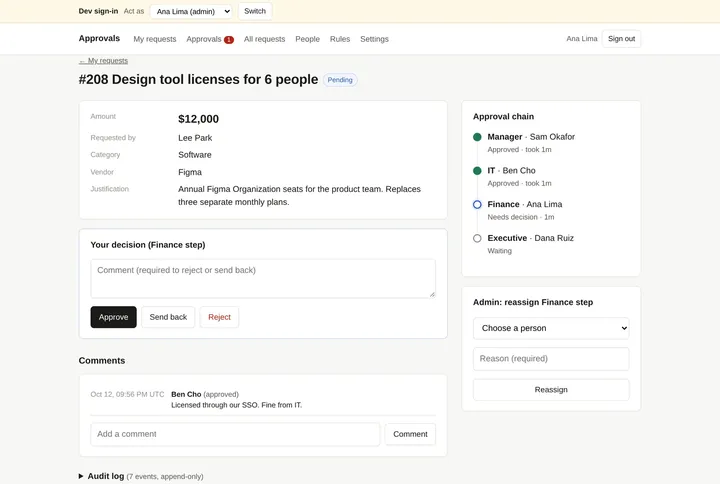
Here's what it built. The request form previews the approval chain before you submit. Each request shows the chain so far, with the approver's decision panel. The approvals inbox lists everything waiting on you, oldest first. And admins edit the routing rules, with a live example of where a request will go.
In the final run, on a fresh database, all twenty checks passed, along with thirty-eight automated tests.
But the more useful result is what broke. The build exposed nine gaps in the spec. Places where Claude had to guess. Escalation could hand a step to someone who owned a later step, so they'd approve the same request twice. The people screen allowed reporting loops, which break routing. And Slack showed approval times in UTC. Every gap is now fixed in the spec.
Passing every check isn't the same as production-ready. We didn't test real sign-in, a live Slack workspace, sending email, or hosting. Those are yours to check before a team relies on it.
So is it worth building? Kissflow doesn't publish prices. You ask for a quote, and agreements are fixed and annual. If you need a no-code workflow designer, parallel approvals or ERP integrations, Kissflow is worth paying for. If your team just needs spend approvals, you mostly need the form, the rules, and a record of who approved what.
The spec is free. The data model, thirteen rules, seed data, four phase prompts, and all twenty checks, with the nine fixes already in. Find it at personal software factory dot com.
Made with AI from the real test-build screenshots. Voice: Kokoro (open-source text to speech). Music: "Chill Wave" by Kevin MacLeod (incompetech.com), licensed under Creative Commons Attribution 4.0.
Build it or buy Kissflow?
Kissflow does not publish prices. Its pricing page asks you to request a quote or book a consultation, describes fixed annual agreements, and is aimed at enterprises. Source: kissflow.com/pricing, checked October 2026.
What this blueprint keeps
Structured request form, rule-based routing by amount and category, sequential approval chain, approve / reject / send back, segregation of duties, out-of-office delegation, reminders and escalation, an append-only audit log, Slack approvals, CSV export for finance.
What it leaves out
No-code form builder, visual workflow designer, parallel approval branches, GL/cost-centre coding, ERP integrations, field-level access logs, file uploads (v1 accepts a link instead). These matter to enterprises with thousands of monthly approvals. A team of 5 to 100 people does not need them.
Build it if
- You need spend or purchase approvals for a team of 5 to 100 people, with a record of who approved what and when.
- Your routing fits in a short table: the requester's manager, then approvers by amount threshold and category.
- Approvals already happen in Slack and you want one-tap decisions there instead of a new inbox.
- You want to own the audit trail and the data rather than rent them.
Buy Kissflow if
- Non-technical staff need to design new workflows themselves in a visual, no-code designer.
- You need parallel approval branches, GL or cost-centre coding, or ERP integrations.
- You run thousands of approvals a month across many departments and need vendor support, SLAs and certifications such as SOC 2 and ISO 27001, which Kissflow lists on its pricing page.
Try the app
A working app loaded with sample data. Changes are saved in this browser only, not shared with other visitors. Use Reset to restore the examples. No real emails, payments or vendor changes are made.
- 1As Jo, request a $2,400 laptop and watch the approval chain preview update as you type.
- 2Act as Maya to approve it, then as Ana to send it back with a comment.
- 3Move the clock forward a day at a time to see reminders, then escalation after three days.
- 4As Dana (admin), change the routing rules and see who a new request goes to.
 Open demo
The blueprint
Paste the whole spec into your AI builder, then send each prompt in the Build plan section one at a time. Check each phase before moving on.
How to use this file: paste this whole document into your AI builder (Claude, ChatGPT, Cursor, Lovable, Replit, Type) as context. Then send the build prompts in section 15 one at a time. Do not move to the next phase until the acceptance checks for the current phase pass.
1. The problem
"Purchase requests get lost in Slack, and nobody knows who approved what."
A person needs to spend money (a laptop, a software subscription, a contractor). Today they post in Slack or send an email. The request sits in someone's inbox, the right people are not asked in the right order, and three months later nobody can say who approved it.
2. What the real product does
Research basis: Kissflow's approval workflow documentation and product pages (kissflow.com/workflow/approval-workflow-software, kissflow.com/workflow/approval-process, kissflow.com/workflow/workflow-audit-trail), October 2026.
Enterprise approval tools run every request through the same steps:
- Submission. A structured form captures everything needed to decide.
- Validation. Required fields and pre-approval checks.
- Routing. The request goes to approvers based on rules: amount, department, request type.
- Review and decision. Approvers see the full context and can approve, reject, or send back for revision. Every action is logged with a timestamp.
- Exception handling. If an approver does not act within a deadline, the request escalates automatically.
- Audit trail. An attributed, timestamped record of every action, including proof that the same person did not both submit and approve (segregation of duties).
What this blueprint keeps
Structured request form, rule-based routing by amount and category, sequential approval chain, approve / reject / send back, segregation of duties, out-of-office delegation, reminders and escalation, an append-only audit log, Slack approvals, CSV export for finance.
What this blueprint deliberately leaves out
No-code form builder, visual workflow designer, parallel approval branches, GL/cost-centre coding, ERP integrations, field-level access logs, file uploads (v1 accepts a link instead). These matter to enterprises with thousands of monthly approvals. A team of 5 to 100 people does not need them.
3. Scope of v1
- One request type: spend requests.
- One currency (set once by an admin; default USD). Amounts are stored as integer cents.
- Sequential approval chain. One approver per step.
- Web app that works on a phone, plus Slack direct messages with an Approve button.
4. Roles
| Role | Who | Can do |
|---|---|---|
| Requester | Anyone on the team | Create, edit (only in draft or changes requested), submit, resubmit, cancel their own requests. Comment. |
| Approver | Whoever is assigned the active step | Approve, reject, or send back the request they are assigned. Comment. |
| Admin | One or more people | Manage people and routing rules, reassign an active step, export CSV. Admins have no special approval power: they cannot approve a step that is not assigned to them. |
A person can hold several roles. Everyone can see all requests (transparency is the point); only the actions above are restricted.
5. Approval workflow data model
All timestamps are UTC. All IDs are strings (UUID or similar).
Person
- id
- name (required)
- email (required, unique)
- manager_id (nullable, references Person)
- is_admin (boolean, default false)
- slack_user_id (nullable; can be filled automatically from email, see section 11)
- out_of_office_until (nullable timestamp)
- delegate_id (nullable, references Person)
- active (boolean, default true)
Rule (the approval matrix)
- id
- name (e.g. "Finance", "IT", "Executive")
- approver_id (references Person)
- min_amount_cents (integer, 0 means any amount)
- category (nullable; when set, the rule only applies to that category)
- position (integer; rules are evaluated in ascending position)
- active (boolean)
Request
- id
- number (integer, human-friendly, sequential: #201, #202 …)
- requester_id
- title (required, max 120 chars)
- category (one of: Hardware, Software, Services, Travel, Other)
- amount_cents (integer, > 0)
- vendor (optional)
- justification (required, min 10 chars)
- needed_by (optional date)
- link (optional URL to a quote, invoice, or product page)
- status: draft | pending | changes_requested | approved | rejected | cancelled
- current_step_id (nullable)
- created_at, submitted_at, decided_at
Step (one row per approval step; regenerated on every submission)
- id
- request_id
- round (integer; starts at 1, increments each time the request is resubmitted)
- position (1, 2, 3 …)
- name (e.g. "Manager", "IT", "Finance")
- assignee_id (who must act now)
- original_assignee_id (who the rules picked, before delegation/escalation/reassignment)
- status: waiting | active | approved | rejected | changes_requested | skipped | cancelled
- skip_reason (nullable text)
- activated_at, decided_at, last_reminded_at, escalated_at (nullable timestamps)
Event (the audit log; append-only, never updated or deleted)
- id
- request_id
- step_id (nullable)
- actor_id (nullable for system actions)
- type: created | edited | submitted | step_activated | approved | rejected | changes_requested | resubmitted | cancelled | commented | delegated | reminded | escalated | reassigned | skipped | completed
- comment (nullable)
- data (JSON, nullable; e.g. old/new amount on edit, from/to assignee)
- created_at
Notification (outbox; makes notifications testable and retryable)
- id, person_id, channel (email | slack | in_app), kind, request_id, payload (JSON), created_at, sent_at, error
6. Routing algorithm
Run this when a request is submitted or resubmitted. It must be deterministic: the same request and the same rules always produce the same chain.
- Manager step. Add a step named "Manager" assigned to the requester's manager.
- If the requester has no manager, assign it to an admin who is not the requester (first by name).
- If no such admin exists, block submission with the error: "No one can approve this request. Ask an admin to set your manager."
- Rule steps. For each active rule in ascending position: if
amount_cents >= min_amount_centsand (rule.categoryis empty or equals the request category), add a step named after the rule, assigned torule.approver_id. - Segregation of duties. If any step's assignee is the requester, reassign that step to the requester's manager (or the admin fallback from step 1). If a rule's approver is inactive, reassign that step to the inactive person's manager (or the admin fallback). Keep
original_assignee_idand record the reason in the event data so the audit log shows why. - Duplicates. If the same person is assigned to more than one step, keep the earliest step and mark later ones
skippedwith skip_reason "Same approver as step N". Skipped steps stay visible in the chain. - Set the first non-skipped step to
active(see delegation in section 12) and the rest towaiting.
Worked examples (with the seed data in section 14)
| Requester | Request | Resulting chain |
|---|---|---|
| Jo | $2,400, Hardware | Manager: Maya → Finance: Ana |
| Lee | $300, Software | Manager: Sam → IT: Ben |
| Lee | $12,000, Software | Manager: Sam → IT: Ben → Finance: Ana → Executive: Dana |
| Ana | $2,000, Services | Manager: Dana → Finance: reassigned from Ana to Dana, then skipped (same approver as step 1) |
| Dana | $500, Other | Manager: Ana (Dana has no manager; Ana is the other admin) |
7. Lifecycle
Request status transitions
| Action | Who | From | To | Side effects |
|---|---|---|---|---|
| Create | Anyone | (none) | draft | Event created |
| Edit | Requester | draft, changes_requested | same | Event edited with changed fields |
| Submit | Requester | draft | pending | Build chain (section 6), activate first step, events submitted + step_activated, notify assignee |
| Approve | Active step's assignee | pending | pending, or approved if it was the last non-skipped step | Step approved; next step activated and its assignee notified; on final approval: decided_at, event completed, notify requester |
| Reject | Active step's assignee | pending | rejected | Comment required. Step rejected, remaining steps cancelled, notify requester |
| Send back | Active step's assignee | pending | changes_requested | Comment required. Step changes_requested, remaining steps cancelled, notify requester |
| Resubmit | Requester | changes_requested | pending | New round: the chain is rebuilt from scratch and all approvals happen again. Event resubmitted |
| Cancel | Requester | draft, pending, changes_requested | cancelled | Active and waiting steps cancelled; notify current assignee |
| Reassign | Admin | pending | pending | Active step's assignee changes; comment required; event reassigned; notify new assignee |
| Comment | Anyone | any | same | Event commented; notify requester and current assignee (not the author) |
Final states: approved, rejected, cancelled. Nothing can change a request in a final state except comments.
8. Approval workflow business rules
- R1. Only the assignee of the active step can approve, reject, or send back. Not admins, not earlier approvers.
- R2. A requester can never approve their own request (enforced by routing and checked again when the action happens).
- R3. Reject and send back require a comment of at least 3 characters.
- R4. Editing is only possible in draft or changes_requested. Resubmitting always starts a new round from step 1.
- R5. Every action writes exactly one event row. Events are never edited or deleted. There is no API or UI to do so.
- R6. Amounts are integers in cents. Display with thousands separators and two decimals only when cents are non-zero ($2,400 / $2,400.50).
- R7. Request numbers are sequential and never reused.
- R8. Inactive people cannot be assigned. If an assignee is deactivated while a step is active, the step is reassigned to their manager (or the admin fallback) automatically, with an event.
- R9. Changing rules affects only future submissions, never chains already in progress.
- R10. Nobody approves the same request twice. When the next step is about to activate, if the person who would act (after delegation) already approved an earlier step in this round, mark the step
skippedwith skip_reason "Already approved at step N", write askippedevent, and move on. This happens after escalation, delegation or reassignment hands a step to someone who also owns a later step. - R11. Reporting lines cannot loop. Admin → People rejects a manager change that would make someone their own manager, directly or indirectly.
- R12. Reassignment, escalation and deactivation all restart the step's reminder clock (
activated_at= now,last_reminded_at= empty). - R13. Refusals. When someone tries an action they aren't allowed to take, from a screen or by calling the server directly, nothing changes and they see the reason, for example "You're not the approver for this step." Endpoints that aren't page actions (Slack, export) answer with HTTP 403 and the same reason.
9. Approval workflow screens
- My requests (home). Table of the signed-in person's requests: number, title, amount, status badge, current step ("Waiting on Ana · Finance · 2d"), last updated. Button: New request. Empty state: "No requests yet."
- New / edit request. Fields from section 5 with inline validation. Buttons: Save draft, Submit. Before submitting, show a preview of the approval chain the rules will produce ("This will go to: Maya (Manager) → Ana (Finance)"). This preview is the single most useful feature; build it.
- Request detail. Header: number, title, amount, status. Body: justification, vendor, link, needed-by. Approval chain as a vertical timeline: each step with name, assignee (and "delegated from / escalated from" when relevant; when a delegated step later escalates, both: "Dana Ruiz, escalated from Sam Okafor (delegated from Maya Chen)"), status, time taken. Action bar appropriate to the viewer (Approve / Reject / Send back for the assignee; Edit / Resubmit / Cancel for the requester; Reassign for admins). Comments thread. Audit log (collapsed by default): every event, actor, time, comment.
- Approvals inbox. Requests where the signed-in person is the active assignee, oldest first, showing age. Approve directly from the row for small requests; others open the detail.
- All requests. Filterable list (status, category, requester, date range) for everyone. Admins get an Export CSV button.
- Admin: people. Name, email, manager, admin flag, Slack status (linked / not found), out-of-office and delegate, active.
- Admin: rules. Ordered list of rules with name, approver, minimum amount, category, active. Shows a live example: "A $2,400 Hardware request from Jo goes to …".
- My settings. Out-of-office until date and delegate.
All screens must work on a phone. Approving from a phone must take one tap from the notification.
10. Notifications
| Trigger | Recipient | Channels | Content |
|---|---|---|---|
| Step activated | Assignee | Slack DM (with buttons), email | "#208 New laptop · $2,400 from Jo Park needs your approval (Manager step)." Buttons: Approve, Open |
| Request approved | Requester | Slack DM, email | "#208 was approved." Show the chain |
| Rejected / sent back | Requester | Slack DM, email | Who, which step, the comment |
| Reminder | Assignee | Slack DM | "#208 has been waiting on you for 1 day." |
| Escalated | New assignee and previous assignee | Slack DM, email | Why and from whom |
| Cancelled | Assignee of the active step | Slack DM | FYI |
Write every notification to the Notification outbox first, then send. If sending fails, keep the row with the error and retry on the next scheduled run. A notification failure must never block an approval.
11. Slack integration
Setup (once, by an admin):
- Create a Slack app at api.slack.com/apps.
- Bot token scopes:
chat:write,im:write,users:read,users:read.email. - Turn on Interactivity and set the Request URL to
https://<your-app>/api/slack/interactions. - Install the app to the workspace. Store
SLACK_BOT_TOKENandSLACK_SIGNING_SECRETas environment variables. - Link people: for each person without a
slack_user_id, callusers.lookupByEmailand store the ID. Show "not found" in Admin → People when the lookup fails.
Sending a DM: conversations.open with the user's ID, then chat.postMessage to the returned channel with Block Kit blocks: a section with the request summary and an actions block with two buttons:
- Approve (
action_id: "approve",value: <step id>, style primary) - Open (URL button to the request detail page)
Reject and Send back stay in the web app because they require a comment.
Handling a button click (POST /api/slack/interactions):
- Verify the request. Build
v0:{X-Slack-Request-Timestamp}:{raw body}, compute HMAC-SHA256 with the signing secret, compare toX-Slack-Signatureusing a constant-time compare. Reject (401) if it does not match or if the timestamp is more than 5 minutes from now. - The body is
application/x-www-form-urlencodedwith apayloadfield containing JSON oftype: "block_actions". - Find the step from the button
value. Find the person whoseslack_user_idequalspayload.user.id. - Apply the same rules as the web app (R1, R2). Never trust the button alone.
- Respond 200 within 3 seconds. Then update the original message by POSTing to
payload.response_urlwithreplace_original: true, replacing the buttons with the outcome ("Approved by Maya Chen, Oct 13 at 09:14" or "Already approved by Maya Chen, Oct 13 at 09:14" or "You're not the approver for this step"), with the date and time written as in step 6.response_urlworks up to 5 times within 30 minutes. - Write times with Slack's date token, e.g.
<!date^1791842045^{date_short_pretty} at {time}|fallback>, so every viewer sees their own time zone. - If the Slack user isn't linked to anyone, reply "Your Slack account isn't linked to the approvals app. Ask an admin to check Admin → People."
12. Delegation, reminders, escalation
Delegation. When a step becomes active and its assignee has out_of_office_until in the future and a delegate_id, assign the step to the delegate instead (unless the delegate is the requester; then use the assignee's manager). Keep original_assignee_id, write a delegated event, and show "delegated from Maya (out of office)" in the chain.
Scheduled job (runs every hour; on Vercel use a cron hitting /api/cron/tick protected by a CRON_SECRET header):
- Reminder. For each active step: if it has been active for 24 hours or more and has not been reminded in the last 24 hours, send a reminder and set
last_reminded_at. - Escalation. If a step has been active for 72 hours or more since activation (or since its last escalation), reassign it to the assignee's manager. If there is no manager, reassign it to an admin other than the requester. Skip escalation if the only candidate would be the requester. Write an
escalatedevent and notify both people. Reset the 72-hour clock. - Retry unsent notifications.
Use real elapsed time in v1. Business-hours calendars are a variation, not v1.
13. Edge cases
- The requester's manager is the requester's own delegate target: handled by the delegation rule.
- An approver is deactivated mid-flight: R8.
- Two approvers click at the same time on stale screens: the second action fails with "This step was already decided" (check step status inside the same transaction as the update).
- An amount is edited after send-back: the chain is rebuilt, so a request that drops below a threshold skips that step next round.
- A rule's approver leaves: deactivating the person shows a warning in Admin → Rules until the rule is updated.
- Slack button clicked after the request was cancelled: respond with "This request was cancelled" and update the message.
14. Seed data
| Person | Manager | Admin | Notes |
|---|---|---|---|
| Dana Ruiz (Head of Ops) | none | yes | Executive approver |
| Ana Lima (Finance lead) | Dana | yes | Finance approver |
| Maya Chen (Design lead) | Dana | no | |
| Sam Okafor (Engineering lead) | Dana | no | |
| Ben Cho (IT) | Sam | no | IT approver for Software |
| Jo Park (Designer) | Maya | no | |
| Lee Park (Engineer) | Sam | no |
| Position | Rule | Approver | Minimum | Category |
|---|---|---|---|---|
| 1 | IT | Ben | $0 | Software |
| 2 | Finance | Ana | $1,000 | any |
| 3 | Executive | Dana | $10,000 | any |
Seed one example request in each status so every screen has something to show.
15. Approval workflow build plan
Send these prompts one at a time after pasting this file. Each phase ends with checks you can run by clicking through the app. Load the seed data once, before Phase 1's checks; the checks of every phase then run in order on the same data, each phase continuing from where the previous one ended.
Phase 1: Foundation
Using the Approval Workflow blueprint above, build Phase 1 only.

1. Set up the data model from section 5 exactly (Person, Rule, Request, Step, Event, Notification) with a real database.
2. Add sign-in. Use the platform's built-in auth or Google sign-in limited to our company email domain. A signed-in email must match an active Person; anyone else sees "Ask an admin to add you."
3. Build Admin → People and Admin → Rules (section 9, screens 6 and 7) with create/edit/deactivate. Only admins can open them.
4. Load the seed data from section 14.
5. Add a small "sign in as" switcher visible only in development, so I can test as different people.

Do not build requests or approvals yet. When you're done, list what you built and anything in the spec you had to interpret.
Acceptance checks
- Seven people exist with the manager chain from section 14.
- Jo cannot open Admin pages; Dana and Ana can.
- Rules show in order IT → Finance → Executive.
- Deactivating a person removes them from approver pickers.
Phase 2: Requests and routing
Using the Approval Workflow blueprint above, build Phase 2 only. This phase is requests, routing and decisions.

1. Implement the routing algorithm in section 6 as a pure function with unit tests for every row of the worked-examples table.
2. Build screens 1 to 5 from section 9, including the approval-chain preview on the request form.
3. Implement every transition in section 7 and every rule R1 to R9 in section 8. Enforce permissions on the server, not only by hiding buttons.
4. Write one Event row for every action (R5). Show the audit log on the request detail page.
5. Do the status check and the update in one database transaction so two people cannot decide the same step.

Skip notifications for now; just write rows to the Notification table.

When you're done, list what you built and anything in the spec you had to interpret.
Acceptance checks (sign in as each person with the switcher)
- Jo submits "New laptop", $2,400, Hardware. The preview and the chain both show Maya → Ana.
- Signed in as Ana while Maya's step is active, there is no Approve button and a direct API call is refused.
- Maya approves. Ana's step becomes active and Ana sees it in her inbox.
- Ana tries to reject without a comment and is blocked. She sends back with a comment instead. Jo sees "Changes requested" and the comment.
- Jo edits the amount to $800 and resubmits. The new round's chain is Maya only. Maya approves and the request is approved.
- Jo cannot cancel the approved request.
- Ana submits $2,000 Services. The chain is Dana, with Finance shown as skipped ("Same approver as step 1").
- Every action above appears in the audit log with actor and time.
Phase 3: Notifications and Slack
Using the Approval Workflow blueprint above, build Phase 3 only. This phase is notifications and Slack.

1. Send the notifications in section 10 from the Notification outbox. Email can use any provider we have; if none is configured, log emails instead of sending.
2. Implement the Slack integration in section 11 exactly: user lookup by email, DM with Approve and Open buttons, and the interactions endpoint with signature verification, permission checks and response_url message updates.
3. Add tests for the interactions endpoint: valid signature approves the step; wrong signature returns 401; timestamp older than 5 minutes returns 401; a Slack user who is not the assignee gets "You're not the approver for this step"; clicking after the step was decided updates the message to say who decided it.
4. Show Slack status per person in Admin → People.

Tell me the exact Slack app settings I need to enter.

When you're done, list what you built and anything in the spec you had to interpret.
Acceptance checks
- With Slack connected, submitting Jo's request DMs Maya within a few seconds.
- Maya taps Approve in Slack. The message changes to "Approved by Maya Chen" with the date and time, and the web app shows the step approved.
- Tapping Approve again on an old message says it was already approved.
- Without Slack configured, nothing breaks; notifications are recorded with the status logged.
Phase 4: Delegation, reminders, escalation, export
Using the Approval Workflow blueprint above, build Phase 4 only.

1. My settings: out-of-office until date and delegate (section 9, screen 8).
2. Delegation, reminders and escalation exactly as section 12, run by a scheduled job at /api/cron/tick protected by a CRON_SECRET header. Make the job accept an optional "now" override in development so I can test time-based behaviour without waiting.
3. Admin reassign action (section 7) with required comment.
4. Export CSV on the All requests page for admins: number, title, requester, category, amount, status, submitted_at, decided_at, approvers in order.

When you're done, list what you built and anything in the spec you had to interpret.
Acceptance checks
- Maya sets out of office until next week with Sam as delegate. Jo's new request goes to Sam, shown as "delegated from Maya".
- Running the job with now = 25 hours after activation sends one reminder; running it again at 26 hours sends none.
- Running it at 73 hours escalates the step to the assignee's manager and both people are notified.
- The CSV opens in a spreadsheet with one row per request.
16. Variations
- Parallel steps (IT and Finance at the same time) for faster approvals.
- Business-hours clock for reminders and escalation.
- Budgets per category with "remaining budget" shown to approvers.
- Reject and send back from Slack using a modal for the comment.
- Other request types (time off, discounts, contract sign-off) using the same engine with a different form.
- File uploads instead of a link.
17. Build notes from our test build
We built this blueprint by sending the four phase prompts above, in order, to an AI builder (Claude, working in Type), then checked every acceptance item in a real browser.
Result: The final run on Oct 12 passed all 34 of its browser assertions, which together cover the 20 acceptance checks, plus 38 automated tests (routing for every worked example, every lifecycle rule, the Slack endpoint, and notification delivery). The Slack signature check also passes against the example request in Slack's own documentation.
Re-check on Oct 15: we re-ran the same build on a fresh database and checked each of the 20 acceptance items by name, with 65 browser assertions, including a direct approve call made as Ana and a Slack direct message to Maya sent to a mock of Slack's API (it arrived 54 milliseconds after submit). All 20 items passed, and the 38 automated tests passed again. One stricter assertion failed: the server refuses Ana's direct approve call with an error message and no change, but not with an HTTP 4xx status. R13 now says what a refusal looks like.
Gaps the build found, now fixed in this spec:
- Escalation could hand a step to someone who owned a later step, so they would be asked to approve twice. Added R10.
- The spec didn't say what happens when a rule's approver is inactive at submission. Added to section 6, step 3.
- Admin → People allowed reporting loops (A manages B manages A), which breaks routing. Added R11.
- Reassignment and escalation didn't say whether the reminder clock restarts. Added R12.
- Slack times showed in UTC. Added Slack's date token (section 11, step 6).
Gaps the re-check found, now fixed in this spec: 6. "A direct API call is refused" didn't say what a refusal looks like. Added R13. 7. "Notifications show as logged" didn't say where. The check now says they are recorded with the status logged. 8. The Slack example "Approved by Maya Chen at 09:14" clashed with the date format in step 6. Section 11 now shows the text as it renders. 9. The chain display for a delegated step that later escalates was undefined. Section 9 now shows both; the Oct 12 build shows only the delegation.
Added after the tests: the build plan now says that the checks of all four phases run in order on one load of the seed data, which is how both runs worked.
What we did not test:
- Production sign-in. We used the development "sign in as" switcher only.
- A live Slack workspace. We tested with correctly signed requests, Slack's documented example and a mock of Slack's API, not by clicking in a real workspace.
- Sending email. Emails were written to the outbox and logged, not delivered.
- Hosting. The test build ran on SQLite on one server. For a hosted deploy, use a managed Postgres (or your platform's database) and the same schema.
Field report
Building a Kissflow replacement with AI, 20 checks and 9 spec gaps
We had an AI builder build a small-team spend-approval workflow from our spec, one phase at a time, and checked every acceptance item in a real browser. It passed all 20 checks, and passed them again on a fresh database three days later, while exposing 9 gaps in the spec. What it took, what Kissflow charges (it won't say), and what we still haven't tested.
The short answer
Yes, for spend approvals on a team of 5 to 100 people. We gave Claude, working in Type, our Approval Workflow blueprint and had it follow the four phase prompts in order. The final build passed 20 of 20 acceptance checks in a real browser, with 38 automated tests. It handles a request form, routing by amount and category, a sequential approval chain with approve, reject and send back, delegation, reminders and escalation, an append-only audit log, Slack approvals and CSV export.
This was the first of our twenty-two build tests, on 12 October 2026. A re-run three days later on a fresh database, checking each of the 20 items by name with 65 browser assertions, passed all 20 again. Between the two runs the build exposed 9 gaps in the spec, places where the builder had to guess because the spec was silent or two parts of it disagreed. That is under the median of 14.5 across the twenty-two blueprints. Every gap is now fixed in the published spec.
What it is not: a tested production deployment. Production sign-in, a live Slack workspace, email delivery and hosting were not part of the test. The last section has the list.
What we built, and what we left out
The blueprint copies the part of Kissflow a small team uses when someone needs to spend money. We read Kissflow's approval workflow and audit trail pages in October 2026 and kept the steps every approval tool shares:
- Routing you can read in a table. Every request goes to the requester's manager first. Then each active rule is checked in order: if the amount is at least the rule's minimum and the category matches, that approver is added.
- Nobody approves their own request. A step that would land on the requester goes to their manager instead, and the audit log says why. Admins get no special approval power.
- One approver per step, in order. Reject and send back need a comment and cancel the rest of the chain. A resubmitted request starts a new round from step 1.
- A chain preview before you submit. The form shows "This will go to: Maya (Manager) → Ana (Finance)" as you type.
- Reminders and escalation on a real clock. A reminder after 24 hours; escalation to the approver's manager after 72 hours. Out-of-office delegation sends new steps to a delegate, shown as "delegated from Maya".
- An audit log that is never edited. Every action writes exactly one event row, and nothing can change or delete one.
- Approve from Slack. A direct message with Approve and Open buttons, signature-verified, that updates itself to say who decided and when.
Left out on purpose: a no-code form builder, a visual workflow designer, parallel approval branches, GL and cost-centre coding, ERP integrations, field-level access logs and file uploads (v1 takes a link). If you need them, Kissflow is the right tool.
What it costs next to Kissflow
Kissflow does not publish prices. Its pricing page (kissflow.com/pricing, checked October 2026) asks you to request a quote or book a consultation, describes fixed annual agreements, and is aimed at enterprises. So there is no price table here.
The build has no licence fee, but it isn't free: you pay for hosting, a database, an email provider if you want email as well as Slack, and the time to build and look after it. Build when your routing fits in a short table, approvals already happen in Slack, and you want the audit trail in your own database. Buy when staff need to design new workflows themselves, or you need parallel branches and ERP integrations. Our build-or-buy guide has the full decision, and the Kissflow alternatives page puts the two side by side.
How the build went, phase by phase
The builder received the blueprint as one Markdown file and was sent the four phase prompts one at a time. The seed data (seven people, three rules) was loaded once before Phase 1, and each phase's checks ran as browser scripts, clicking through the app as the named person and continuing from where the previous phase left off.
- Foundation. The six tables, sign-in for development, Admin → People and Admin → Rules, the seed data and the "sign in as" switcher.
- Requests and routing. The routing algorithm as a pure function with a unit test for every worked example, the five request screens with the chain preview, every transition and rules R1 to R9 enforced on the server, and decisions made in one transaction.
- Notifications and Slack. Sending from the outbox, the Slack lookup by email, the DM with buttons, and the interactions endpoint with signature verification and message updates.
- Delegation, reminders, escalation, export. My settings, the hourly job at /api/cron/tick with a "now" override for testing, admin reassignment and the CSV export.
Each phase prompt ends with one sentence: "list what you built and anything in the spec you had to interpret." That sentence is what surfaced the gaps.
The 9 gaps, grouped
The full list, with each fix, is in the blueprint's build notes. Five came from the first build and four from the re-check. They fall into four groups.
Who ends up holding a step (3 gaps)
Escalation could hand a step to someone who already owned a later step, so the same person would approve twice; R10 now skips the later step and records why. The spec said nothing about a rule whose approver is inactive at submission; section 6 now says where that step goes. And Admin → People accepted reporting loops (A manages B manages A), which break routing; R11 refuses them.
Lesson: a routing algorithm is only as deterministic as the data it reads. Write down what happens when the people in the chain change.
Clocks and time zones (2 gaps)
Reassignment and escalation didn't say whether the reminder clock restarts; R12 now restarts it. Slack messages showed approval times in UTC; the spec now uses Slack's date token so each reader sees their own zone.
Lesson: every timestamp a person sees needs a stated zone, and every timer a stated reset rule.
What a refusal looks like (2 gaps)
A check said a direct API call "is refused" without saying what a refusal is; the build refused Ana's call with a message and no change, but not with an HTTP 4xx status, so a stricter assertion failed. R13 now spells it out. "Notifications show as logged" didn't say where; the check now says they are recorded with the status logged.
Lesson: if a check can be satisfied two ways, the spec hasn't finished describing the behaviour.
Examples that didn't match the rules (2 gaps)
The Slack example "Approved by Maya Chen at 09:14" contradicted the date format defined a few lines later; the example now shows the text as it renders. The chain display for a step that was delegated and then escalated was undefined; section 9 now shows both.
Lesson: worked examples are code; when a rule changes, re-run every example that touches it. For the same patterns across all twenty-two builds, including the invoice reminders build with its 83 gaps, see What AI app builders get wrong.
What we did not test
- Production sign-in. Only the development "sign in as" switcher was used.
- A live Slack workspace. The endpoint was tested with correctly signed requests, Slack's documented example and a mock of Slack's API, not by clicking in a real workspace.
- Sending email. Emails were written to the outbox and logged, not delivered.
- Hosting. The test build ran on SQLite on one server. For a hosted deploy, use a managed Postgres or your platform's database with the same schema.
These gaps are not special to approvals. We list what every build left untested in Is an AI-built internal tool ready for production?.
Build it yourself
The Approval Workflow blueprint is free: one Markdown file with the data model, the 13 business rules, screens, seed data, the four phase prompts and all 20 acceptance checks, with the 9 fixes already in. Paste it into Claude, ChatGPT, Cursor, Lovable, Replit or Type and send the phases one at a time. If you find a gap we missed, tell us on the About page and we'll fix it and credit it in the build notes.
Approval Workflow: questions people ask
What is an approval workflow?
An approval workflow is the path a request takes from the person asking to the people who decide. It has a structured request form, routing rules that pick the approvers (for example by amount and category), a sequence of decisions (approve, reject or send back), reminders and escalation when an approver does not act, and an audit trail of every action.
How should purchase approvals be routed?
In this blueprint every request goes to the requester's manager first. Then each active rule is checked in order: if the amount is at least the rule's minimum and the category matches (or the rule has no category), that rule's approver is added. With the sample data, a $2,400 hardware request goes Manager then Finance, and a $12,000 software request goes Manager, IT, Finance, then Executive. The same request and rules always produce the same chain.
How do you stop someone approving their own request?
Segregation of duties is enforced twice. When the chain is built, any step that would be assigned to the requester is reassigned to their manager (or an admin fallback), and the reason is written to the audit log. When someone clicks Approve, the server checks again that they are the assignee of the active step and not the requester. Admins have no special power to approve steps that are not theirs.
What data model does an approval workflow need?
Six tables: Person (with manager, admin flag, Slack ID, out-of-office and delegate), Rule (the approval matrix: approver, minimum amount, optional category, position), Request (amount in integer cents, category, justification, status), Step (one row per approver per round, with status and timestamps), Event (an append-only audit log that is never edited or deleted) and Notification (an outbox, so email and Slack messages can be tested and retried).
How do reminders and escalation work?
A scheduled job runs every hour. When a step has been active for 24 hours it sends the approver a reminder, at most once every 24 hours. After 72 hours the step escalates to the approver's manager (or an admin who is not the requester), both people are notified, and the clock restarts. Out-of-office delegation sends new steps to the delegate and shows who it was delegated from.
Can approvals happen in Slack?
Yes. Phase 3 of the build plan sends the approver a Slack direct message with Approve and Open buttons. The interactions endpoint verifies Slack's request signature, rejects requests older than five minutes, checks the person is the assignee of the active step, and updates the message to say who decided. Our test build verified this with correctly signed requests and Slack's documented example, not by clicking in a live workspace.
How much does Kissflow cost compared with building your own?
Kissflow does not publish prices; its pricing page offers a quote or consultation and describes fixed annual agreements aimed at enterprises (checked October 2026). Building from this blueprint costs the time to send four phase prompts and run the checks, plus your AI builder and hosting. The blueprint itself is free.
Get new blueprints by email
One email when a new blueprint is published. Nothing else.
More blueprints
Client Onboarding Tracker
Client onboarding lives in one person's head, and things fall through the cracks.
- No.
- 006
- Dept.
- Ops
- Status
- Tested
- Replaces
- Rocketlane
Project Status Board
Every Monday I rebuild the same status report from scratch.
- No.
- 008
- Dept.
- Ops
- Status
- Tested
- Replaces
- Monday.com
Equipment Tracker
Nobody knows who has which laptop, or when its warranty ends.
- No.
- 016
- Dept.
- Ops
- Status
- Spec
- Replaces
- Asset Panda
All operations blueprintsEvery blueprintHow we test blueprints