Free template · Build it with Claude, Cursor, Lovable or any AI app builder
Project Status Board template
Every Monday I rebuild the same status report from scratch.
One row per project and one square per week, marked on track, at risk or blocked. Owners update their own row and the report builds itself.
By Sam Claassen · Updated · 4 build phases · 28/28 acceptance checks passed
- No.
- 008
- Department
- Ops
- Build time
- 1 hr
- Difficulty
- Beginner
- Team size
- 5–50 people
- Replaces
- Monday.com
- Your builder needs
- A database and sign-in, plus a scheduled job and sending email
- Status
- Build-tested Oct 16, 2026
Can you build your own weekly project status board instead of paying for monday.com?
Yes. A team of 5 to 50 people can build its own status board from this blueprint: one row per project with an owner and target date, one square per week marked On track, At risk or Blocked with a required note, a "No update" flag when an owner misses a week, and a weekly report that assembles itself and can be copied or emailed on a schedule. It is specified in four build phases with 28 acceptance checks. We built it by sending the 4 phase prompts to Claude in order, and all 28 checks passed in a real browser. It deliberately leaves out task boards, Gantt and timeline views, dashboards, the automation builder and AI summaries.
Built and tested from this blueprint
We sent the 4 build prompts below to an AI builder, in order, and checked every acceptance item in a real browser, resetting to the seed before each phase's checks. The test build ran as a full web app with a database, sign-in, an outbox and an hourly job for reminders and the weekly report. It exposed 6 gaps in the spec, and we fixed them all.
- Acceptance checks passed
- 28/28
- Automated tests
- 64
- Spec gaps found and fixed
- 6
- Build phases
- 4
The full write-up of this build test, with every gap and what was not tested, is in the build-test report below.
Build it or buy Monday.com?
monday.com lists Free (up to 2 seats and 3 boards), Basic at $9, Standard at $12 and Pro at $19 per seat per month billed annually, and Enterprise at a custom price. Portfolio management with project health snapshots (On track, At risk, Off track) is listed only on Enterprise. Source: monday.com/pricing, checked October 2026.
What this blueprint keeps
One row per project with an owner and a target date, and one square per week with three health labels. monday.com's portfolio calls the third label Off track; this blueprint uses Blocked, because the report should tell leaders when someone needs help. A short note is required with every health, like the quick description the portfolio lets you add when health changes. A missing update shows as "No update" instead of last week's color. Owners who have not updated get one reminder a week at a fixed team time. The weekly report assembles itself from the saved updates: anyone can copy it, admins can email it, and it goes out on a schedule. Everyone on the team can read everything, every change goes into an activity log, and the history exports to CSV.
What it leaves out
Task boards, subitems, dependencies and progress tracking (v1 records the owner's judgment, not task counts). Gantt, timeline and calendar views. Dashboards and widgets. The automation builder and integrations (v1 has two fixed weekly emails). AI summaries, risk insights and AI reports. Guest access and public share links. File uploads and docs. Time tracking and resource planning. Native mobile apps, private boards and multi-level permissions. If you need task-level tracking rolled up into portfolio health across many teams, monday.com's Enterprise portfolio does that. A team of 5 to 50 people that needs the weekly status ritual does not.
Build it if
- Every Monday someone rebuilds the same status report from scratch.
- You want one honest square per project per week, written by the owner, not a color inferred from tasks.
- Leaders need a plain-text report in their inbox, not another tool to log into.
- Project health across teams is listed only on monday.com's Enterprise plan, and you do not need the rest of it.
Buy monday.com if
- You want task boards, subitems and dependencies rolled up into project health.
- You need Gantt, timeline and calendar views, dashboards and widgets.
- You rely on monday.com's automation builder, integrations or AI summaries.
- You need guest access, public share links or native mobile apps.
Try the app
A working app loaded with sample data. Changes are saved in this browser only, not shared with other visitors. Use Reset to restore the examples. No real emails, payments or vendor changes are made.
- 1Open CRM migration, resolve the blocked import task, and see its blocker disappear from the report.
- 2Act as Sam and publish this week’s CRM health update; publish again to replace it without a duplicate.
- 3Create a project, add an owned task with a deadline, and move it through the task statuses.
- 4Select a reporting week and download its report; archive a project to remove it from the active summary.
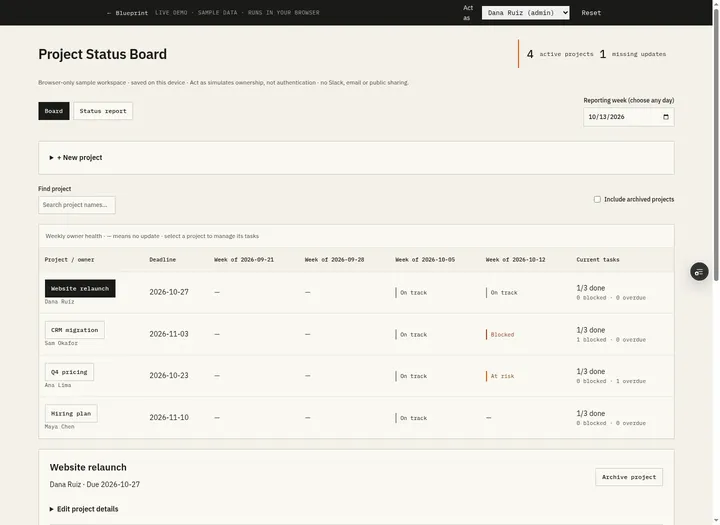 Open demo
The blueprint
Paste the whole spec into your AI builder, then send each prompt in the Build plan section one at a time. Check each phase before moving on.
How to use this file: paste this whole document into your AI builder (Claude, ChatGPT, Cursor, Lovable, Replit, Type) as context. Then send the build prompts in section 16 one at a time. Do not move to the next phase until the acceptance checks for the current phase pass.
1. The problem
"Every Monday I rebuild the same status report from scratch."
A team runs a handful of projects at once: a website relaunch, a CRM migration, a pricing change, a hiring plan. Every Monday the ops lead chases each owner in Slack, copies last week's email, asks "is this still on track?", pastes the answers in and colors the cells by hand. Owners who do not reply quietly keep last week's green. Nobody can see how a project has trended over the past month, and the report eats an hour of someone's Monday.
2. What the real product does
Research basis: monday.com's pricing page (monday.com/pricing) and its help center articles "The Status Column", "The Updates Section", "The Battery Widget", "How to create recurring tasks", "Alerts and Reminders with Automations" and "The portfolio solution" (support.monday.com/hc/en-us/articles/360001269685, /115005900249, /360002159360, /360000221159, /360000227739 and /13337066797202), October 2026.
What we verified:
- Boards and items. Work lives on boards ("projects, clients, processes"), and each row of a board is an item. On a portfolio board, each project is one item.
- Status labels. A Status column holds up to 40 custom labels, each with a color. New items get the gray default label, which monday.com recommends leaving blank. Labels in use cannot be deleted, only deactivated, and each board chooses which labels count as "done". An update written from inside a status cell is kept in the item's Updates section.
- Updates. Every item has an Updates section with @mentions, replies, files, checklists and scheduled posting. The update icon turns grey when nobody has posted on the item for more than 7 days. AI can summarize one update or a whole thread.
- Roll-ups. The dashboard Battery widget shows overall progress from the status columns of the boards you select. How many boards it can combine depends on the plan.
- Recurring reminders. A recurring automation can notify a team on a schedule (the help center's example: every Monday at 9am). Time-based automations run in the time zone of the person who set them up. Templates such as "When date arrives, notify someone" and "Every day, if due date has passed and status is something, notify someone" cover deadlines.
- Portfolio health (Enterprise only). The portfolio solution gives every project an owner, a project health and a progress column, and its Health Snapshot shows which projects are On track, At risk or Off track. You change a project's health and add a quick description of the change; the project overview keeps a summary of status changes with their notes. AI adds a daily list of risks and a one-click executive report. Only Enterprise project boards can join a portfolio (up to 200 projects), and the Health Snapshot cannot be shared publicly.
Pricing context: the pricing page lists Free (up to 2 seats and 3 boards), Basic at $9, Standard at $12 and Pro at $19 per seat per month billed annually, and Enterprise at a custom price. Basic adds unlimited free read-only viewers. Standard adds automations and integrations (250 actions a month each), timeline, Gantt and calendar views, and guest access. Pro raises automations to 25,000 actions a month and adds private boards, time tracking and advanced views. Portfolio management with health snapshots is listed only on Enterprise. Prices exclude tax.
What this blueprint keeps
One row per project with an owner and a target date, and one square per week with three health labels. monday.com's portfolio calls the third label Off track; this blueprint uses Blocked, because the report should tell leaders when someone needs help. A short note is required with every health, like the quick description the portfolio lets you add when health changes. A missing update shows as "No update" instead of last week's color. Owners who have not updated get one reminder a week at a fixed team time. The weekly report assembles itself from the saved updates: anyone can copy it, admins can email it, and it goes out on a schedule. Everyone on the team can read everything, every change goes into an activity log, and the history exports to CSV.
What this blueprint deliberately leaves out
Task boards, subitems, dependencies and progress tracking (v1 records the owner's judgment, not task counts). Gantt, timeline and calendar views. Dashboards and widgets. The automation builder and integrations (v1 has two fixed weekly emails). AI summaries, risk insights and AI reports. Guest access and public share links. File uploads and docs. Time tracking and resource planning. Native mobile apps, private boards and multi-level permissions. If you need task-level tracking rolled up into portfolio health across many teams, monday.com's Enterprise portfolio does that. A team of 5 to 50 people that needs the weekly status ritual does not.
3. Scope of v1
- One team, one board, one time zone (set once by an admin; default America/New_York).
- Weekly cadence. Weeks start on Monday. One update day per week (default Monday) drives the reminder and the scheduled report.
- Three health values: On track, At risk, Blocked. One update per project per week, with a note of up to 500 characters.
- Email goes through an outbox. If no email provider is configured, emails are logged, not sent.
- Up to about 50 active projects.
- Web app that works on a phone.
4. Roles
| Role | Who | Can do |
|---|---|---|
| Member | Everyone on the team | See every project, its weekly history and the report. Create projects. Copy the report and export CSV. |
| Project owner | The one person set as a project's owner | Post and revise that project's update for the current week. Edit the project, change its owner, archive and restore it. |
| Admin | One or more people | Manage people and settings. Edit, reassign, archive and restore any project. Email the report. Read the outbox. Admins cannot post an update for a project they do not own. |
Everyone can see everything; that is the point of a status board. Only the actions above are restricted, and the server enforces them.
5. Project status board data model
All timestamps are UTC. A date is a calendar date (YYYY-MM-DD) in the team time zone. All IDs are strings.
Person
- id
- name (required: "Enter a name.")
- email (required, unique, stored lowercase: "Someone with this email already exists."; an invalid address: "Enter a valid email address.")
- is_admin (boolean, default false)
- active (boolean, default true)
Settings (exactly one row)
- team_name (required, max 60 chars; used in the report title: "Enter a team name (up to 60 characters).")
- time_zone (IANA name picked from a list, default "America/New_York"; anything else: "Choose a time zone from the list.")
- update_weekday (1 = Monday to 7 = Sunday; default 1)
- reminder_time ("HH:MM", 24-hour, default "09:00"; anything else for either time: "Enter times as HH:MM (24-hour).")
- report_time ("HH:MM", default "15:00"). Must be later than reminder_time: "The report time must be later than the reminder time."
- report_recipients (email addresses separated by commas; may be empty). Invalid entries: "Enter valid email addresses separated by commas."
- last_reminder_week, last_report_week (nullable dates; written only by the scheduled job)
Project
- id
- name (required, 1 to 100 chars after trimming, unique ignoring case; R8; blank or too long: "Enter a project name (up to 100 characters).")
- owner_id (references an active Person; R10)
- target_date (date, required; may be in the past; missing or invalid: "Choose a target date.")
- start_week (date, always a Monday: the current week when the project is created; never edited)
- archived_at (nullable timestamp)
- created_by, created_at
Update (one per project per week)
- id
- project_id
- week_start (date, always a Monday)
- health: on_track | at_risk | blocked (shown as On track, At risk, Blocked)
- note (required, 1 to 500 chars; R4)
- posted_by (the Person who saved it last)
- posted_at (timestamp of the last save)
- revision (integer: 1 on the first post, plus 1 on each revision)
- unique (project_id, week_start)
Activity (append-only)
- id, project_id, actor_id
- type: project_created | project_edited | owner_changed | archived | restored | update_posted | update_revised
- data (JSON, nullable: old and new values, such as from/to owner or old/new health and note)
- created_at
Notification (outbox)
- id, kind: reminder | report | owner_changed
- to_email, person_id (nullable; empty for recipients outside the team)
- week_start (nullable), subject, body (plain text)
- status: pending | sent | logged | failed, error (nullable)
- attempts (integer, default 0; each send attempt adds 1)
- created_at, sent_at (nullable)
6. Weeks and time
- "Now" comes from one clock module, so the development clock (section 16, Phase 1) can move it. "Today" is the date of now in the team time zone.
- A week runs from Monday 00:00 to Sunday 23:59 in the team time zone and is identified by its Monday (week_start). The week of a date is that date minus (ISO weekday - 1) days.
- The current week is the week of today. Updates are accepted only for the current week, and the server decides which week that is (R2).
- Compute local dates with a time-zone library. Never add 24-hour blocks to move between days: a week with a daylight-saving change has 167 or 169 hours.
- Show dates as "Oct 12, 2026" and weeks as "Week of Oct 12, 2026".
| Moment, team time (America/New_York) | Same moment in UTC | Week |
|---|---|---|
| Tue Oct 13, 2026 10:00 | Oct 13, 14:00 | Oct 12, 2026 |
| Sun Oct 18, 2026 23:30 | Oct 19, 03:30 | Oct 12, 2026 (team time decides, not UTC) |
| Mon Oct 19, 2026 00:05 | Oct 19, 04:05 | Oct 19, 2026 |
| Sun Nov 1, 2026 23:00 (daylight saving ended that morning) | Nov 2, 04:00 | Oct 26, 2026 |
| Fri Jan 1, 2027 12:00 | Jan 1, 17:00 | Dec 28, 2026 |
7. Projects and weekly updates
| Action | Who | Allowed when | Result | Activity |
|---|---|---|---|---|
| Create project | Any active person | Always | New project; start_week = current week; owner picked from active people (default: the creator) | project_created |
| Edit project | Owner or admin | Active | Name and/or target date change | project_edited, with old and new values |
| Change owner | Owner or admin | Active | owner_id changes; posting rights move at once (R11) | owner_changed; email the new owner (section 12) |
| Post update | Current owner | Active, current week, no update yet | New Update with revision 1 | update_posted |
| Revise update | Current owner | Active, current week, update exists | Same row: health, note, posted_by and posted_at replaced; revision + 1 | update_revised, with old and new health and note |
| Archive | Owner or admin | Active | archived_at = now | archived |
| Restore | Owner or admin | Archived | archived_at cleared | restored |
There is no delete for projects or updates in v1. Archive a project when it finishes or is cancelled. When a save breaks several rules, report the first that applies, in the order R7, R1, R2, R4.
8. Project status board business rules
- R1. Only the project's current owner can post or revise its weekly update. Admins get no exception. Refuse with "Only Sam Okafor, the project owner, can post this update." (with the owner's name).
- R2. Updates are accepted only for the current week, computed on the server. The save request names the week its form showed; if that is not the current week, refuse with "Updates can only be posted for the current week (week of Oct 12, 2026)." Past weeks are read-only for everyone.
- R3. One update per project per week, enforced by the database. Saving again revises it (section 7). It never creates a second square.
- R4. Health must be one of the three values: "Choose On track, At risk or Blocked." The note is trimmed, line breaks become spaces, and it must be 1 to 500 characters: "Add a short note (up to 500 characters)."
- R5. Health is the owner's judgment. The app never sets or changes it on its own, and never copies a health from another week into a week without an update.
- R6. For a week W, a project is expected if it is active and its start_week is on or before W. An expected project with no update for W is missing. Weeks before start_week are blank, never missing.
- R7. Archived projects are read-only: "This project is archived. Restore it to post updates." They are left out of the board (unless Include archived is ticked), missing counts, reminders and every report, including reports for past weeks. Restore brings everything back.
- R8. Project names are unique ignoring case, across active and archived projects: "A project called Website relaunch already exists." (with the existing name).
- R9. Only the owner or an admin can edit a project, change its owner, archive or restore it: "Only the project owner or an admin can change this project." Anyone can create a project.
- R10. Owners must be active people ("Choose an active person as owner."). Deactivating someone who owns an active project is refused: "Reassign Maya Chen's active projects before deactivating." Removing the last active admin is refused: "There must be at least one active admin."
- R11. Changing the owner moves posting rights immediately. Existing updates keep their posted_by. The new owner can revise this week's update.
- R12. Every action writes the Activity rows listed in section 7. Activity rows are never edited or deleted, and there is no UI or API to do so.
- R13. When a project's target_date is before today, the board and the report show "past target date".
- R14. A report shows the health and note saved for its week, with each project's current owner and target date. Its last line says so.
- R15. Every "today", "this week" and scheduled time uses the team time zone (section 6).
- R16. A signed-in email must match an active Person. Anyone else sees "Ask an admin to add you."
- R17. Only admins can open Admin pages ("Only admins can open this page."), change people or settings ("Only admins can change people or settings."), read the outbox ("Only admins can read the outbox.") and email the report ("Only admins can email the report.").
9. The board grid
The board shows the selected week (the current week by default) and the three weeks before it, oldest on the left. For project P and week W, the square is:
- "Not started" (blank) if W is before P's start_week.
- "Archived" (blank) if P is archived and W is after the week it was archived.
- The update's health if there is one: On track (green), At risk (amber) or Blocked (red), always with the word, never color alone. Its tooltip and accessible name give the project, week, health, note and who posted it.
- Otherwise "No update" (grey outline). Never fill it from another week (R5).
The header shows "Week of Oct 12, 2026" and "3 of 4 projects updated": expected projects with an update, out of expected projects (R6), for the selected week. A Missing updates panel lists each missing project as "Hiring plan (Maya Chen)". Search and Only my projects change which rows show, not the header or the panel.
Worked example (seed data, today = Tue Oct 13, 2026)
| Project | Owner | Target | Sep 21 | Sep 28 | Oct 5 | Oct 12 |
|---|---|---|---|---|---|---|
| CRM migration | Sam Okafor | Nov 3, 2026 | On track | On track | On track | Blocked |
| Hiring plan | Maya Chen | Nov 10, 2026 | On track | No update | On track | No update |
| Q4 pricing | Ana Lima | Oct 23, 2026 | Not started | On track | On track | At risk |
| Website relaunch | Dana Ruiz | Oct 27, 2026 | At risk | On track | On track | On track |
Header by selected week: Oct 12, "3 of 4 projects updated", Hiring plan missing. Oct 5, "4 of 4". Sep 28, "3 of 4", Hiring plan missing. Sep 21, "3 of 3" (Q4 pricing had not started). Hiring plan's Sep 28 square stays "No update" although the weeks on both sides are On track.
More cases, in order from the seed:
- Dana (an admin) opens CRM migration. There is no update form, and a direct request to post is refused by R1.
- Sam revises CRM migration to At risk with "Export access restored; validating imported accounts." The Oct 12 square turns At risk. There are still 13 updates; this one has revision 2, and the activity log reads "Sam Okafor revised the update for week of Oct 12, 2026: Blocked → At risk".
- Maya posts Hiring plan, On track, "Two offers accepted; one role still open." The header becomes "4 of 4 projects updated" and Missing updates is empty.
- Archiving CRM migration hides its row and takes it out of the header counts ("3 of 3"). With Include archived ticked, the row shows, marked Archived, with all four squares. Restore brings it back.
10. The weekly report
The report for week W is built from saved data every time it is shown, copied or emailed. Nobody writes it.
- Take every active project whose start_week is on or before W. Archived projects never appear (R7).
- Group them by their update for W: Blocked, At risk, On track, No update. Each group is a blank line, its heading in capitals (BLOCKED, AT RISK, ON TRACK, NO UPDATE), then one line per project. Leave out empty groups.
- Within a group, order by target_date, then name.
- Line for a project with an update: "- {name} ({owner}, target {target date}): {note}". Insert ", past target date" after the date when R13 applies. Append " (was {health} last week)" only when the project has an update for the week before W with a different health.
- Line for a project without one: "- {name} ({owner}, target {target date}). Last update: {health}, week of {week}." using its latest update before W, or "No updates yet." if it has none.
- The first line is "{team_name} project status, week of {W}". The second counts the non-zero groups in the order blocked, at risk, on track, no update ("1 active project" in the singular). The last line is "Health and notes are written by each project's owner. Owners and target dates are current." If no project is expected, the report is two lines: the first line as usual, then "No active projects." (no count line, groups or last line).
Worked example (seed data, week of Oct 12, 2026, today = Tue Oct 13, 2026)
Fernway project status, week of Oct 12, 2026
4 active projects: 1 blocked, 1 at risk, 1 on track, 1 no update.

BLOCKED
- CRM migration (Sam Okafor, target Nov 3, 2026): Vendor export credentials not yet received; Sam is following up. (was On track last week)

AT RISK
- Q4 pricing (Ana Lima, target Oct 23, 2026): Pricing page copy is two days late; launch holds if legal signs off this week. (was On track last week)

ON TRACK
- Website relaunch (Dana Ruiz, target Oct 27, 2026): Content migrated; QA starts Wednesday.

NO UPDATE
- Hiring plan (Maya Chen, target Nov 10, 2026). Last update: On track, week of Oct 5, 2026.

Health and notes are written by each project's owner. Owners and target dates are current.
More cases:
- After Sam's revision and Maya's post (section 9), the second line is "4 active projects: 2 at risk, 2 on track." At risk lists Q4 pricing (Oct 23) before CRM migration (Nov 3), and there is no Blocked group.
- The report for Oct 5 says "4 active projects: 4 on track." with no "(was ... last week)": every project had the same health on Sep 28, and Hiring plan had no Sep 28 update to compare with.
- The report for Sep 28 shows Website relaunch "(was At risk last week)" and Hiring plan under No update with "Last update: On track, week of Sep 21, 2026."
- After CRM migration is archived, the reports for Oct 12 and Oct 5 both start "3 active projects" and have no CRM migration line.
Copy and email. Copy report puts exactly this text on the clipboard and shows "Report copied". If the browser blocks the clipboard, select the text and show "Press Ctrl+C (Cmd+C on a Mac) to copy." Email report (admins only) sends the same text to the report recipients (section 12).
CSV export. File project-status-history.csv with columns project, owner (current), week_of, health, note, posted_by, posted_at, archived. One row per project per week, from its start_week to the current week (for an archived project, to the week it was archived), sorted by project name, then week. Weeks without an update have health "No update" and empty note, posted_by and posted_at. posted_at is ISO 8601 UTC; archived is yes or no; week_of is the week's Monday as YYYY-MM-DD; owner and posted_by are person names; health is On track, At risk, Blocked or No update. Quote fields as RFC 4180 requires. The seed exports 15 rows: 13 updates and 2 "No update" rows for Hiring plan.
11. Project status board screens
- Board (home). Header from section 9. Earlier, Later and This week buttons: Later is disabled on the current week, and Earlier stops at the oldest start_week. Grid columns: project, owner, target date (with "past target date" under R13), four week squares labelled with their Mondays, and the selected week's note cut to 80 characters. Clicking a square opens that week's update read-only: health, note, posted by, time, and "Revised" when revision is above 1. Missing updates panel, with a "Post your update" button when the signed-in person owns a missing project. Filters: Only my projects, search by name, Include archived. New project button. Empty state: "No active projects. Add the first one." On a phone, each project is a card with its four squares in a row.
- Project page. Name, owner, target date, and Active or "Archived on Oct 14, 2026". For the owner of an active project, a "This week's update" form: the week, three health choices, the note with a live character count, and Post update (Revise update, prefilled, once an update exists). Everyone else sees this week's update read-only, or "No update yet this week." Weekly history: every week from start_week to now, newest first, with health or No update, note, posted by, posted at and "Revised". Edit, Change owner, and Archive or Restore for the owner and admins. Activity log, collapsed by default, newest first, for example "Sam Okafor revised the update for week of Oct 12, 2026: Blocked → At risk".
- New / edit project. Name and target date, plus owner on the New form (active people, default the signed-in person). Change owner is its own small form on the project page.
- Report. Week picker (the current week back to the oldest start_week) and the report from section 10, shown with the same lines. For the current week, the notice "This week is still open: owners can update until Sunday." Buttons: Copy report, Export CSV, and Email report for admins (disabled with "Add recipients in Settings." when the list is empty).
- Admin: People. Name, email, admin, active, and the number of active projects each person owns. Add, edit, deactivate and reactivate.
- Admin: Settings. Team name, time zone, update day, reminder time, report time, report recipients.
- Admin: Outbox. Every notification, newest first: created, kind, to, subject, status and error. Open one to read its body.
The development tools (section 16, Phases 1 and 4) appear only in development: Act as, the clock, Run scheduled job and Reset to seed data.
12. Notifications
| Trigger | Recipient | Subject | Body |
|---|---|---|---|
| Weekly reminder (section 13) | Each person who owns a missing project in the current week | "Weekly update due today" | Their missing projects with a link to each, and "The report goes out today at 15:00 (America/New_York)." (left out when report_recipients is empty) |
| Scheduled report (section 13) or Email report | Each address in report_recipients | The report's first line, e.g. "Fernway project status, week of Oct 12, 2026" | The plain-text report, then a link to the Report screen for that week |
| Owner changed | The new owner, unless they made the change themselves | "You now own Hiring plan" | Who made the change and a link to the project page |
Write every notification to the outbox first with status pending, then send it. If no email provider is configured, set status logged. If sending fails, set status failed with the error and retry on the next run of the scheduled job, up to 3 attempts in all. A notification failure never blocks saving an update or a project change.
13. Scheduled job
The job runs every hour (for example a cron calling /api/cron/tick with a CRON_SECRET header). It reads now in the team time zone and does three things:
- Reminder. If today is the update day (update_weekday), the time is at or after reminder_time, and last_reminder_week is not the current week: write one reminder for each person who owns a missing project this week (R6), listing all of their missing projects in that one email. Then set last_reminder_week to the current week, even if nobody needed a reminder.
- Report. If today is the update day, the time is at or after report_time, and last_report_week is not the current week: write the current week's report to each recipient, then set last_report_week. If the recipient list is empty, send nothing but still set last_report_week.
- Retry failed notifications that have fewer than 3 attempts. After the third failed attempt the row stays failed and is shown in the Outbox for an admin.
The job never catches up on a missed day. If it did not run on the update day, that week has no reminder and no scheduled report; an admin can still use Email report. Running the job again in the same week sends nothing new, apart from retries.
Worked example (seed data loaded on Tue Oct 13, 2026; update day Monday)
| Clock (team time) | What happens |
|---|---|
| Mon Oct 19, 08:00, run job | Nothing: before 09:00. The board's newest column is Oct 19 with four "No update" squares; Oct 12 keeps its values. |
| Mon Oct 19, 08:30 | Dana posts Website relaunch, On track, "QA passed; launch on track." |
| Mon Oct 19, 09:30, run job | Three reminders: Sam Okafor (CRM migration), Ana Lima (Q4 pricing), Maya Chen (Hiring plan). None for Dana. |
| Mon Oct 19, 09:45, run job | Nothing new. |
| Mon Oct 19, 15:30, run job | One report to leadership@example.com: "4 active projects: 1 on track, 3 no update." Under No update, in target-date order: Q4 pricing ("Last update: At risk, week of Oct 12, 2026."), CRM migration ("Last update: Blocked, week of Oct 12, 2026."), Hiring plan ("Last update: On track, week of Oct 5, 2026."). |
| Tue Oct 20, 10:00, run job | Nothing. |
If an admin then changes the update day to Friday, the job sends nothing on Mon Oct 26 and sends reminders for the week of Oct 26 on Fri Oct 30 from 09:00.
14. Edge cases
- An owner saves from two tabs at once: the unique key and the upsert in one transaction leave one update, and the second save counts as a revision.
- The owner changes while the old owner has the form open: their save is refused by R1.
- The week rolls over while the form is open: the save is refused by R2, and the form reloads for the new week with "No update yet this week."
- A project created on a Sunday evening is expected that week (R6). Its owner can still post before midnight.
- A project archived after its owner posted keeps that update in its history and the CSV, and leaves every report (R7).
- Weeks a project spent archived show "No update" after it is restored. That is accurate: nobody reported.
- An admin changes the time zone: later weeks and job times follow the new zone. Stored week_start dates are not rewritten.
- Someone who posted updates is deactivated (after their projects are reassigned): their name stays on those updates.
- The report recipient list is empty: Email report is disabled and the scheduled report is skipped (section 13).
15. Seed data
T is today and W0 is the current week's Monday, both in the team time zone. W-1 is the Monday before W0, and so on.
Settings: team name Fernway; time zone America/New_York; update day Monday; reminder 09:00; report 15:00; recipients leadership@example.com; last_reminder_week and last_report_week empty.
| Person | Admin | Owns | |
|---|---|---|---|
| Dana Ruiz (Head of Ops) | dana@example.com | yes | Website relaunch |
| Ana Lima (Finance lead) | ana@example.com | yes | Q4 pricing |
| Maya Chen (Design lead) | maya@example.com | no | Hiring plan |
| Sam Okafor (Engineering lead) | sam@example.com | no | CRM migration |
| Ben Cho (IT) | ben@example.com | no | |
| Jo Park (Designer) | jo@example.com | no | |
| Lee Park (Engineer) | lee@example.com | no |
| Project | Owner | Target date | Start week |
|---|---|---|---|
| Website relaunch | Dana Ruiz | T+14 | W-3 |
| CRM migration | Sam Okafor | T+21 | W-3 |
| Q4 pricing | Ana Lima | T+10 | W-2 |
| Hiring plan | Maya Chen | T+28 | W-3 |
Updates, each posted by the project's owner with revision 1:
| Project | Week | Health | Note |
|---|---|---|---|
| Website relaunch | W-3 | At risk | Design review slipped a week; launch date unchanged for now. |
| Website relaunch | W-2 | On track | Design review done; build started. |
| Website relaunch | W-1 | On track | All pages built; content migration half done. |
| Website relaunch | W0 | On track | Content migrated; QA starts Wednesday. |
| CRM migration | W-3 | On track | Field mapping agreed with Sales. |
| CRM migration | W-2 | On track | Test import of 500 accounts passed. |
| CRM migration | W-1 | On track | Full export requested from the old vendor. |
| CRM migration | W0 | Blocked | Vendor export credentials not yet received; Sam is following up. |
| Q4 pricing | W-2 | On track | Pricing model approved by Dana. |
| Q4 pricing | W-1 | On track | Draft price list shared with Sales. |
| Q4 pricing | W0 | At risk | Pricing page copy is two days late; launch holds if legal signs off this week. |
| Hiring plan | W-3 | On track | Three roles approved; job posts drafted. |
| Hiring plan | W-1 | On track | Job posts live; 14 applicants so far. |
Totals: 4 projects and 13 updates; Hiring plan has no update for W-2 or W0. Past-week updates are posted at 11:00 on that week's Monday, W0 updates at the moment of seeding. Each project is created by its owner at 10:00 on the Monday of its start week. Write one project_created activity per project and one update_posted activity per update, with the same times. The outbox starts empty.
16. Project status board build plan
Send these prompts one at a time after pasting this file. Each phase ends with checks you can run by clicking through the app. Start each phase's checks from a fresh load of the seed (the reset button); checks within a phase run in order on the same data.
Phase 1: Foundation
Using the Project Status Board blueprint above, build Phase 1 only.

1. Set up the data model from section 5 exactly (Person, Settings, Project, Update, Activity, Notification) with a real database. Put the unique constraint on (project_id, week_start) in the database itself.
2. Add sign-in. Use the platform's built-in auth or Google sign-in limited to our company email domain. A signed-in email must match an active Person; anyone else sees "Ask an admin to add you." (R16).
3. Build Admin → People and Admin → Settings (section 11, screens 5 and 6) with the validation in section 5 and rules R10 and R17. Enforce admin-only access on the server, not only by hiding links.
4. Implement the week rules in section 6 as pure functions, with unit tests for every row of the week table. Read "now" from a single clock module.
5. Load the seed data from section 15, with dates relative to today.
6. Show the current week in the app header, for example "Week of Oct 12, 2026".
7. Add development-only tools, hidden in production: an "Act as" switcher that lists every person (inactive ones too, so the sign-in refusal can be tested); a clock control that sets the app's "now" to a date and time in the team time zone, stored on the server, used by every rule and frozen until changed, with "Reset to real time"; and "Reset to seed data", which wipes all data, reloads the seed (settings included) and resets the clock.

Do not build the board, updates or reports yet. When you're done, list what you built and anything in the spec you had to interpret.
Acceptance checks (reset to seed data first)
- The Act as switcher lists seven people, with Dana Ruiz and Ana Lima marked as admins.
- As Jo Park, Admin → People and Admin → Settings show "Only admins can open this page.", and a direct request to save Settings is refused.
- As Dana Ruiz, Settings shows Fernway, America/New_York, Monday, 09:00, 15:00 and leadership@example.com. Saving a report time of 08:00 is refused with "The report time must be later than the reminder time."
- As Dana, deactivating Maya Chen is refused with "Reassign Maya Chen's active projects before deactivating." Deactivating Lee Park works, and acting as Lee then shows "Ask an admin to add you."
- With the clock set to this week's Sunday at 23:30, the header shows "Week of" this week's Monday; at the following Monday 00:05 it shows that Monday. Reset to seed data brings back the real time.
Phase 2: Board, projects and weekly updates
Using the Project Status Board blueprint above, build Phase 2 only.

1. Build the Board, the Project page and the New / edit project form (section 11, screens 1 to 3), with the square rules and header counts in section 9.
2. Implement every action in section 7 and rules R1 to R13 in section 8. Enforce them on the server, not only by hiding buttons: a direct request to post for a project you do not own, or for any week but the current one, must be refused with the messages in section 8.
3. Save posts and revisions as one upsert on (project_id, week_start) inside a transaction, so two saves can never create two updates for the same week.
4. Write the Activity rows listed in section 7 and show the activity log on the project page.
5. Add unit tests for the square rules and the missing count, using the worked example in section 9.

When an owner changes, write the Notification row from section 12, but do not build the outbox screen or send email yet. When you're done, list what you built and anything in the spec you had to interpret.
Acceptance checks (reset to seed data first, then run in order)
- The board lists CRM migration, Hiring plan, Q4 pricing and Website relaunch, each with four squares matching the grid in section 9 (its columns are this week and the three before it). The header says "3 of 4 projects updated" and Missing updates lists "Hiring plan (Maya Chen)".
- Hiring plan's square from two weeks ago reads "No update", and Q4 pricing's oldest square reads "Not started". Pressing Earlier once shows "4 of 4 projects updated"; pressing it again shows "3 of 4 projects updated" with Hiring plan missing. Later is disabled on this week.
- As Dana Ruiz, CRM migration's page has no update form, and a direct request to post an update for it is refused with "Only Sam Okafor, the project owner, can post this update." As Lee Park, the page has no Edit, Change owner or Archive buttons.
- As Sam Okafor, revising CRM migration to At risk with "Export access restored; validating imported accounts." turns this week's CRM square At risk. Its history shows one entry for this week, marked Revised, and the activity log shows "Blocked → At risk".
- As Maya Chen, posting Hiring plan with a blank note is refused with "Add a short note (up to 500 characters)." Posting On track with "Two offers accepted; one role still open." changes the header to "4 of 4 projects updated" and empties Missing updates.
- As Sam, clicking last week's CRM migration square shows that update read-only, and a direct request to post for last week is refused with "Updates can only be posted for the current week".
- As Jo Park, creating a project named "website relaunch" is refused with "A project called Website relaunch already exists." Creating "Customer portal" with Jo as owner and a target date 30 days away adds a row with three "Not started" squares and "No update" this week, and the header says "4 of 5 projects updated".
- As Ana Lima, changing Q4 pricing's owner to Jo Park removes Ana's update form and gives Jo one, and this week's Q4 pricing update still shows posted by Ana Lima.
- As Dana, archiving CRM migration removes its row and the header says "3 of 4 projects updated". With Include archived ticked, it appears marked Archived with its squares. Restore brings it back and the header says "4 of 5 projects updated".
Phase 3: The weekly report
Using the Project Status Board blueprint above, build Phase 3 only.

1. Implement the report in section 10 as a pure function of the week, projects, updates, people, settings and today, with unit tests that reproduce the worked example and the "more cases" exactly.
2. Build the Report screen (section 11, screen 4): week picker, the report, Copy report with its clipboard fallback, Export CSV, and Email report for admins only (R17, enforced on the server).
3. Email report writes one Notification row per recipient with the plain-text report as the body (section 12). If no email provider is configured, mark the rows logged instead of sending.
4. Build Admin → Outbox (section 11, screen 7).
5. Build Export CSV exactly as section 10 describes.

When you're done, list what you built and anything in the spec you had to interpret.
Acceptance checks (reset to seed data first, then run in order)
- The report for this week starts with "Fernway project status, week of" and this week's Monday, then "4 active projects: 1 blocked, 1 at risk, 1 on track, 1 no update.", followed by the Blocked (CRM migration), At risk (Q4 pricing), On track (Website relaunch) and No update (Hiring plan) groups, as in section 10.
- The CRM migration and Q4 pricing lines end with "(was On track last week)", the Website relaunch line does not, and the Hiring plan line says "Last update: On track, week of" followed by last week's Monday.
- The report for last week says "4 active projects: 4 on track." and includes "Full export requested from the old vendor."
- After Sam revises CRM migration to At risk, this week's report has no Blocked group, and At risk lists Q4 pricing before CRM migration.
- Copy report shows "Report copied", and the copied text starts with "Fernway project status".
- As Jo Park there is no Email report button, and a direct request is refused with "Only admins can email the report." As Dana Ruiz, Email report adds one Outbox row to leadership@example.com with the report's first line as its subject, status logged, and the report text in its body.
- After Dana archives CRM migration, the reports for this week and last week both start "3 active projects" and have no CRM migration line.
- Export CSV downloads project-status-history.csv with a header row and 15 rows: Hiring plan has two rows with health "No update", and CRM migration's rows say archived "yes".
Phase 4: Reminders and the weekly schedule
Using the Project Status Board blueprint above, build Phase 4 only.

1. Implement the scheduled job in section 13: weekly reminder, scheduled report and retries. It must be safe to run twice. Expose it at /api/cron/tick, protected by a CRON_SECRET header, for your platform's scheduler to call every hour.
2. Add a development-only "Run scheduled job" button next to the clock control. It runs the same job with the app's "now".
3. Send every email from the Notification outbox (section 12), including the owner-changed email from Phase 2. Email can use any provider we have; if none is configured, mark rows logged. A failed email keeps its error, is retried on the next run, and never blocks saving an update.
4. Add unit tests for the job that follow the worked example in section 13, row by row.

When you're done, list what you built and anything in the spec you had to interpret.
Acceptance checks (reset to seed data first, then run in order; read the Outbox as Dana Ruiz)
- With the clock at next Monday 08:00, Run scheduled job adds nothing to the Outbox. The board's newest column shows four "No update" squares, and the column before it still shows CRM migration Blocked and Hiring plan No update.
- As Dana Ruiz, post Website relaunch, On track, "QA passed; launch on track." At 09:30, Run scheduled job adds exactly three reminders, to Sam Okafor, Ana Lima and Maya Chen, each naming their project. Running it again adds nothing.
- At 15:30, Run scheduled job adds one report to leadership@example.com whose body contains "4 active projects: 1 on track, 3 no update." and "Last update: Blocked, week of" followed by the previous Monday. Running it again adds nothing.
- At 10:00 on the Tuesday of that week, Run scheduled job adds nothing.
- As Dana, changing Hiring plan's owner to Jo Park adds an Outbox email to jo@example.com with the subject "You now own Hiring plan".
- As Dana, set the update day to Friday. At 09:30 on the Monday after that, Run scheduled job adds nothing; at 09:30 on the Friday of that same week, it adds four reminders, to Dana Ruiz, Sam Okafor, Ana Lima and Jo Park.
17. Variations
- Slack: DM the reminder and post the report to a channel, with a button that opens the update form.
- A task list per project, with open, blocked and overdue counts next to the owner's health so disagreements show.
- Fortnightly or monthly cadence, or a second reminder an hour before the report.
- A read-only report link for people outside the team, with an expiry date.
- Groups (by team or client) with a roll-up line per group in the report.
- An AI draft of the report's opening paragraph from the week's notes, edited by a person before it is sent.
- A fourth label, Done, for a project's final week before it is archived.
18. Build notes from our test build
We built this blueprint by sending the four phase prompts above, in order, to an AI builder (Claude, working in Type), then checked every acceptance item in a real browser, resetting to the seed data before each phase's checks. Where a check says something is refused, the person saw the reason on screen and a direct request got an error with nothing changed.
Result: 28 of 28 acceptance checks passed in one final browser run on a fresh database, plus 64 automated tests. The first final run passed 27: the update form confirmed a revision a moment before the history refreshed, so the builder fixed the app and ran the whole final sequence again. We then ran the full browser suite and the automated tests again ourselves, with the same result.
Gaps the build found, now fixed in this spec:
- R17 gave no refusal message for a non-admin changing people or settings or reading the outbox. It now gives one for each.
- "The body is 'No active projects'" didn't say whether the title and last line stay. An empty report is now two lines.
- The CSV export didn't give the formats of week_of, owner, posted_by and health. It now does.
- The reminder said "The report goes out today at 15:00" even when there are no report recipients and the report is skipped. The sentence is now left out then.
- Failed emails were retried forever, with nothing counting the attempts. Notifications now count attempts and stop after 3.
- Several required fields had no refusal message. Section 5 now gives one for each.
Added after the test: the build plan now says to start each phase's checks from a fresh load of the seed, which is how the test ran.
What we did not test:
- Production sign-in. The test build reads the signed-in email from a header set by a sign-in proxy, but every check used the development "Act as" switcher.
- Sending email. Emails were logged in the outbox, not delivered; retrying a failed email was covered by automated tests only.
- The hourly job on a real scheduler. It was run from the development button and by calling its endpoint with and without the secret.
- Time passing for real. Week rollover and send times were tested with the development clock.
- Two people saving the same project at once, and several copies of the app on one database.
- Hosting. The test build ran on SQLite on one server. For a hosted deploy, use a managed Postgres (or your platform's database) and the same schema.
Field report
Building a Monday.com replacement with AI, 28 checks and 6 spec gaps
We had an AI builder build a weekly project status board from our spec, one phase at a time, and checked every acceptance item in a real browser. It passed all 28 checks, with 64 automated tests behind them, and exposed 6 gaps in the spec, fewer than most of our builds. What it costs next to Monday.com, and what we still haven't tested.
The short answer
Yes, for a team of 5 to 50 people that runs a weekly status ritual. We gave Claude, working in Type, our Project Status Board blueprint and had it follow the four phase prompts in order. The final build passed 28 of 28 acceptance checks in one browser run on a fresh database, with 64 automated tests. It gives each project an owner and a target date, one square per week marked On track, At risk or Blocked with a required note, a "No update" square when an owner misses a week, a reminder email on the team's update day, and a weekly report that assembles itself from the saved updates and can be copied, exported or emailed on a schedule.
The build exposed 6 gaps in the spec, places where the builder had to guess because the spec was silent. That is fewer than the median of 14.5 across our twenty-two build tests, tied for second-fewest with the SaaS spend tracker; only the bug tracker, with 5, had fewer. Every gap is now fixed in the published spec.
What it is not: a tested production deployment. Real email, a real scheduler, real time passing, production sign-in and hosting were not part of the test. The last section lists exactly what was and wasn't checked.
What we built, and what we left out
The blueprint copies the part of Monday.com a team uses for the weekly status report: a portfolio row per project with an owner and a health. We read Monday.com's pricing page and its help center articles on status columns, updates, recurring automations and the portfolio solution in October 2026, and kept these rules:
- Three health labels, the owner's judgment. On track, At risk and Blocked, always with the word, never color alone. Monday.com's portfolio calls the third label Off track; we use Blocked because the report should say when someone needs help.
- A note with every health. One to 500 characters, required, like the quick description Monday.com's portfolio asks for when health changes.
- Only the owner posts, only for this week. Admins get no exception, the server decides which week is current in the team time zone, and a second save in the same week revises the first instead of adding a square.
- Missing means missing. A week without an update shows "No update". The app never copies last week's color forward, and the header counts "3 of 4 projects updated".
- A report nobody writes. Built from saved data every time: projects grouped Blocked, At risk, On track and No update, "(was On track last week)" when health changed, and the last known health for projects that didn't report.
- One reminder and one report a week. An hourly job reads the team's time zone and update day, emails each owner with a missing update once, and emails the report once. It never catches up on a missed day.
Left out on purpose: task boards, subitems, dependencies and progress tracking, Gantt, timeline and calendar views, dashboards and widgets, the automation builder and integrations, AI summaries and reports, guest access and public links, file uploads, time tracking and native mobile apps. If you need task-level tracking rolled up into portfolio health, Monday.com's Enterprise portfolio does that.
What it costs next to Monday.com
Monday.com prices per seat per month. On the prices we saw on monday.com/pricing in October 2026, there is a Free plan for up to 2 seats and 3 boards, then Basic at $9, Standard at $12 and Pro at $19 per seat per month billed annually, and Enterprise at a custom price. Portfolio management with project health snapshots, the closest thing to this blueprint, is listed only on Enterprise.
| Team | Basic ($9 per seat, yearly) | Standard ($12 per seat, yearly) | Pro ($19 per seat, yearly) |
|---|---|---|---|
| 5 seats | $540 a year | $720 a year | $1,140 a year |
| 10 seats | $1,080 a year | $1,440 a year | $2,280 a year |
| 25 seats | $2,700 a year | $3,600 a year | $5,700 a year |
The build has no per-seat price, but it isn't free: you pay for hosting, a database, an email provider for the reminders and the report, and the time to build and look after it. For a team of 5 to 10 on Basic the saving is a few hundred dollars a year, so the case rests on the rules rather than the price: one honest square per project per week, written by the owner, and a plain-text report in leaders' inboxes. It is stronger when the feature you want, project health across the portfolio, would put you on Enterprise. Keep Monday.com if your team tracks its tasks there and wants health rolled up from them, or relies on its automations, integrations and views. Our build-or-buy guide has the full decision, and the Monday.com alternatives page has the feature-by-feature table.
How the build went, phase by phase
The builder received the blueprint as one Markdown file and sent itself the four phase prompts one at a time. After each phase, that phase's acceptance checks ran as browser scripts that click through the app as the named person, after a reset to the seed data. After the last phase, all 28 checks ran again in one pass. The first final run passed 27, because the update form confirmed a revision a moment before the history refreshed; the builder fixed the app and ran the whole sequence again, and we then repeated the browser suite and the automated tests ourselves with the same result.
- Foundation. The data model with the unique constraint on (project, week) in the database, sign-in that matches an email to a person, the admin People and Settings pages, the week rules as pure functions with tests for every row of the time-zone table, seed data relative to today, and the development tools: Act as, a server-side clock and Reset to seed data.
- Board, projects and weekly updates. The four-week grid with its square rules and header counts, the project page with its history and activity log, rules R1 to R13 enforced on the server, and posts and revisions as one upsert in a transaction.
- The weekly report. The report as a pure function with tests that reproduce the worked example, the Report screen with Copy report, Export CSV and Email report for admins, and the Outbox.
- Reminders and the weekly schedule. The hourly job at /api/cron/tick behind a secret, safe to run twice, the development "Run scheduled job" button, sending from the outbox with retries, and tests that follow the worked example row by row.
Each phase prompt ends with one sentence: "list what you built and anything in the spec you had to interpret." That sentence is what surfaced the gaps.
The 6 gaps, grouped
The full list, with each fix, is in the blueprint's build notes. They fall into three groups.
Refusals the spec required but never worded (2 gaps)
R17 restricted people, settings and the outbox to admins but gave no refusal message for a non-admin who tried; it now gives one for each. Several required fields on Person, Settings and Project had no message either. Section 5 now gives one for each.
Lesson: every rule that says "refuse" needs the exact sentence the person will read, or the builder writes its own and the check can't name it.
Output formats left open (2 gaps)
"The body is 'No active projects'" didn't say whether the report's title and last line stay when no project is expected; an empty report is now exactly two lines. The CSV export didn't give the formats of week_of, owner, posted_by and health; it now does, down to the ISO date and the person's name.
Lesson: anything a person copies, downloads or pastes into another system needs its exact shape written down.
Email is where the details hide (2 gaps)
The reminder told owners "The report goes out today at 15:00" even when the recipient list was empty and no report would go out; the sentence is now left out then. And failed emails were retried forever, with nothing counting the attempts. Notifications now record attempts and stop after three.
Lesson: the two gaps that touched the outside world were the ones with real consequences. That matches the help desk, where email accounted for 6 of its 21 gaps. See What AI app builders get wrong for the patterns across every build.
What we did not test
- Production sign-in. The test build reads the signed-in email from a header set by a sign-in proxy, but every check used the development "Act as" switcher.
- Sending email. Emails were logged in the outbox, not delivered; retrying a failed email was covered by automated tests only.
- The hourly job on a real scheduler. It was run from the development button and by calling its endpoint with and without the secret.
- Time passing for real. Week rollover and send times were tested with the development clock.
- Two people saving the same project at once, and several copies of the app on one database.
- Hosting. The test build ran on SQLite on one server. For a hosted deploy, use a managed Postgres (or your platform's database) and the same schema.
These gaps are not special to the status board. We list what every build left untested in Is an AI-built internal tool ready for production?.
Build it yourself
The Project Status Board blueprint is free: one Markdown file with the data model, the 17 business rules, worked examples for the board, the report and the scheduled job, seed data, the four phase prompts and all 28 acceptance checks, with the 6 fixes already in. Paste it into Claude, ChatGPT, Cursor, Lovable, Replit or Type and send the phases one at a time. If you find a gap we missed, tell us on the About page and we'll fix it and credit it in the build notes.
Project Status Board: questions people ask
What should a weekly project status report include?
For each active project: its owner, its target date, this week's health (On track, At risk or Blocked) and a short note from the owner. In this blueprint the report groups projects by health with Blocked first, adds "(was At risk last week)" when health changed, flags projects past their target date, and lists projects with no update this week with their last known status.
What does On track, At risk or Blocked mean?
They are the owner's judgment, not a calculation. On track means the project will meet its target, At risk means it might not, and Blocked means someone needs help to unblock it. The app never sets or changes health on its own, and never copies last week's color into a week without an update, so a missing update shows as "No update".
How do you get project owners to update their status every week?
Make one person the owner of each project and only let them post its update, for the current week only. On the team's update day, a scheduled job emails each owner who has not posted, listing all of their missing projects in one email, and the report goes out later that day either way. Missing updates are visible on the board as "No update", which tends to be reminder enough.
What data model does a project status board need?
Person (name, email, admin flag, active), Project (name, owner, target date, start week, archived), Update (project, week, health, note up to 500 characters, who posted it, one per project per week), Activity (an append-only log), Notification (an outbox for reminders and reports) and Settings (team name, time zone, update day, reminder and report times, report recipients).
Can the weekly report be sent automatically?
Yes. An hourly job checks the team time zone: on the update day it sends owners a reminder after the reminder time and emails the report to the recipient list after the report time, once per week each. If the job did not run that day, it does not catch up; an admin can still email the report by hand.
How much does monday.com cost?
monday.com lists a Free plan for up to 2 seats and 3 boards, then Basic at $9, Standard at $12 and Pro at $19 per seat per month billed annually, with Enterprise at a custom price (checked October 2026). Its portfolio view with project health is listed only on Enterprise.
Get new blueprints by email
One email when a new blueprint is published. Nothing else.
More blueprints
Client Onboarding Tracker
Client onboarding lives in one person's head, and things fall through the cracks.
- No.
- 006
- Dept.
- Ops
- Status
- Tested
- Replaces
- Rocketlane
Approval Workflow
Purchase requests get lost in Slack, and nobody knows who approved what.
- No.
- 007
- Dept.
- Ops
- Status
- Tested
- Replaces
- Kissflow
Equipment Tracker
Nobody knows who has which laptop, or when its warranty ends.
- No.
- 016
- Dept.
- Ops
- Status
- Spec
- Replaces
- Asset Panda
All operations blueprintsEvery blueprintHow we test blueprints