Free template · Build it with Claude, Cursor, Lovable or any AI app builder
Quote Builder template
Writing a custom quote takes an hour, every single time.
Pick a client, add items from your price list, and send a branded quote they can accept from a link.
By Sam Claassen · Updated · 4 build phases · 29/29 acceptance checks passed
- No.
- 003
- Department
- Sales
- Build time
- 1–2 hrs
- Difficulty
- Beginner
- Team size
- 1–20 people
- Replaces
- PandaDoc
- Your builder needs
- A database and sign-in, plus a scheduled job, sending email and links that work without a staff sign-in
- Status
- Build-tested Oct 15, 2026
Can you build your own quote builder instead of paying for PandaDoc?
Yes, if your team of 1 to 20 people sends quotes from a price list and does not need legally binding e-signatures or payment collection. This blueprint specifies quotes with line items, line and quote discounts, tax and live totals, templates, a manager approval rule for discounts over a threshold, a client link with Accept and Decline, automatic expiry, a print view and an invoice summary, specified in four build phases with 29 acceptance checks. We built it by sending the 4 phase prompts to Claude in order, and all 29 checks passed in a real browser. The pricing math is spelled out step by step with worked examples, down to rounding.
Built and tested from this blueprint
We sent the 4 build prompts below to an AI builder, in order, and checked every acceptance item in a real browser on a freshly seeded database. The test build ran as a full web app with a database, a public client link and a daily job. Where the build exposed a gap in the spec, we fixed the spec.
- Acceptance checks passed
- 29/29
- Automated tests
- 47
- Spec gaps found and fixed
- 8
- Build phases
- 4
The full write-up of this build test, with every gap and what was not tested, is in the build-test report below.
Watch the build test
We gave Claude one Markdown spec for a small-team quote builder and had it build the tool in four phases. It passed all 29 acceptance checks in a real browser, along with 47 automated tests, and exposed 8 gaps in the spec, from sign-in that matched people by email when the seed people had no emails to a Duplicate action that didn't say what gets copied. What passed, what broke, what we didn't test, and when PandaDoc is still worth paying for. 2:40.
Watch on YouTube · More build tests on our channel
Transcript
Here's how to reverse engineer PandaDoc from a written spec. Claude passed all twenty-nine checks, and found eight gaps in my spec.
We gave Claude one Markdown file. It copies the quoting part of PandaDoc a small sales team uses. A price list, so prices stay the same. Line items with discounts, tax and live totals. Templates for common packages. And a client link, where the buyer accepts by typing their name.
The core rule is discount approval. Take Lee's quote for Ridgeway Partners. The list price is seventeen thousand, four hundred dollars. Twenty percent off a hundred seats takes off three thousand. That's seventeen point two percent, over the fifteen percent limit, so a manager must approve it before it's sent. And no manager can approve their own quote.
Claude built it in four phases, one prompt each. The foundation, with clients, the price list and settings. Quotes and pricing. Approval, sending and the client page. Then expiry, printing and invoices. Every check ran in a real browser, on freshly seeded data.
Here's what it built. The quotes home shows open quotes, approvals waiting, and the win rate. The editor keeps list prices fixed, updates totals live, and warns when a discount needs a manager. The manager sees the approval request beside the quote. Templates make common packages one click. And on a phone, the client accepts by typing their full name.
In the final run, on a fresh database, all twenty-nine checks passed, along with forty-seven automated tests.
But the more useful result is what broke. The build exposed eight gaps in the spec. Places where Claude had to guess. Sign-in matched people by email, but the seed people had no emails. Duplicate didn't say what gets copied, like the discount and notes. And when no other manager could approve, the spec didn't say if the request went through. Every gap is now fixed in the spec.
Passing every check isn't the same as production-ready. We didn't test real sign-in, sending email, the daily job on a real scheduler, the browser's print dialog, or hosting. Those are yours to check before a team relies on it.
So is it worth building? PandaDoc Starter is nineteen dollars per seat per month, with up to five templates. Business is forty-nine. For a team of ten on Business, that's five thousand, eight hundred and eighty dollars a year. If you need legally binding e-signatures, payments, or CRM sync, use PandaDoc. If you send a few quotes a week, you mostly need the price list, the approval rule, and an accept link.
Everything is in one file. The data model, sixteen rules, seed data, four phase prompts, and all twenty-nine checks, with the eight fixes already in.
The full spec is free at personal software factory dot com. If you build it, tell me what broke. I'm Sam. See you tomorrow.
Made with AI from the real test-build screenshots. Narration and the on-camera intro and outro: an AI voice clone and avatar of Sam Claassen (HeyGen). Music: "Chill Wave" by Kevin MacLeod (incompetech.com), licensed under Creative Commons Attribution 4.0.
Build it or buy PandaDoc?
PandaDoc Starter is $19 per seat per month and allows up to 5 templates; Business is $49 per seat per month with unlimited templates. Proposify's Build plan is $39 per user per month billed yearly ($49 monthly), and its Grow plan, which adds discount-based approvals, is $65 per user per month billed yearly. Source: pandadoc.com/pricing and proposify.com/pricing, checked November 2026.
What this blueprint keeps
Clients with terms, a price list, quotes with line items (quantity, unit price, line discount), a quote-level discount, tax and live totals, sequential quote numbers, templates (bundles), a manager approval rule for discounts over a threshold, statuses from draft to accepted, declined or expired, a valid-until date with automatic expiry and a reminder the day before, a client page with Accept (typed name and time) and Decline, a printable view, duplicate, and an invoice summary created from an accepted quote.
What it leaves out
Drag-and-drop document designer, rich media, legally binding e-signatures with signing certificates, collecting payment, CRM sync, recurring and volume pricing, multiple currencies, optional items the client can tick, multiple signers, page-level view analytics. These matter for large sales teams or regulated contracts. A team of 1 to 20 people that sends a few quotes a week does not need them in v1. Section 16 lists the most useful ones as variations.
Build it if
- Your team of 1 to 20 people sends a few quotes a week from a known price list.
- You want a discount rule enforced: anything over a threshold needs a manager's approval before it goes out.
- A typed-name acceptance with a timestamp is enough for your deals.
- You pay per seat mainly for templates and a pricing table.
Buy PandaDoc if
- You need legally binding e-signatures with signing certificates or multiple signers.
- You want to collect payment from the quote, or sync quotes with your CRM.
- You need a drag-and-drop document designer, rich media or page-level view analytics.
- You sell in several currencies or use recurring and volume pricing.
Try the app
A working app loaded with sample data. Changes are saved in this browser only, not shared with other visitors. Use Reset to restore the examples. No real emails, payments or vendor changes are made.
- 1As Jo, create an Acme quote with 40 Team seats at 10% off, Onboarding and Premium support, then apply a 5% quote discount to see $9,849.60.
- 2Act as Ana to approve Q-1040, then as Lee to send it and open its local client preview to accept or decline.
- 3Advance the clock one day at a time to see Q-1041's reminder, expiry countdown and expired client page.
- 4As Jo, create an invoice from accepted Q-1039, open INV-2002 and download its line-item CSV.
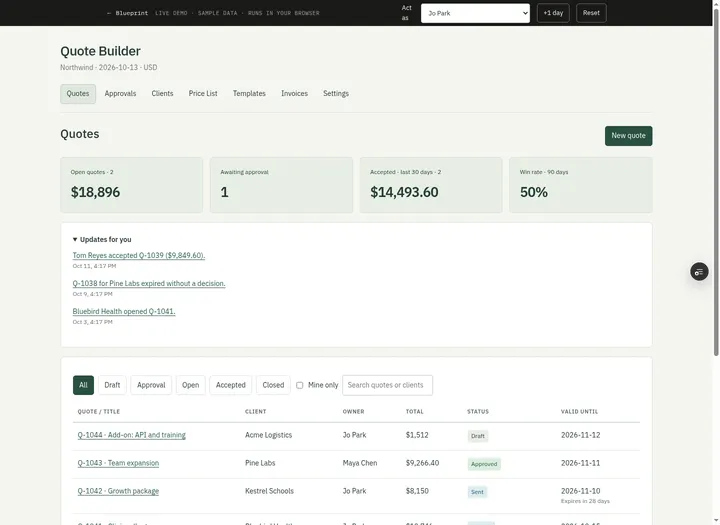 Open demo
The blueprint
Paste the whole spec into your AI builder, then send each prompt in the Build plan section one at a time. Check each phase before moving on.
How to use this file: paste this whole document into your AI builder (Claude, ChatGPT, Cursor, Lovable, Replit, Type) as context. Then send the build prompts in section 15 one at a time. Do not move to the next phase until the acceptance checks for the current phase pass.
1. The problem
"Writing a custom quote takes an hour, every single time."
A rep copies last month's quote in a doc, retypes the client's details, looks up prices in a spreadsheet, does the discount math by hand and exports a PDF. Nobody knows which version the client has, whether that 25% discount was ever approved, or whether the quote was opened at all. When the client says yes in an email, someone has to turn the quote into an invoice by retyping it again.
2. What the real product does
Research basis: PandaDoc pricing and help center (pandadoc.com/pricing, support.pandadoc.com articles 9714665 "Auto expirations", 9714706 "Pricing table. Discounts and taxes", 9714799 "Approval workflow", 9714822 "Review document analytics", pandadoc.com/features/quote/pricing-table, pandadoc.com/features/quote/product-catalog, pandadoc.com/quoting-software), Proposify (proposify.com/pricing, proposify.com/quoting-software) and Qwilr (qwilr.com/pricing, help.qwilr.com/article/175-getting-documents-accepted), October 2026.
What these tools do for quoting:
- Product catalog. One price list (name, description, unit, price, SKU) that reps pull line items from, so prices stay consistent. PandaDoc calls it the single source of truth for prices; Proposify includes a product catalog and content library from its Build plan ($49 per user per month, monthly billing).
- Pricing table. Line items with quantity, unit price, a line discount and a total discount (percent or flat), and tax. In PandaDoc the total discount applies to the subtotal after line discounts, and total tax applies to the subtotal.
- Templates and bundles. Reusable templates and product bundles so a common package is one click. PandaDoc Starter ($19 per seat per month) allows up to 5 templates; Business ($49) allows unlimited.
- Approval workflows. Proposify (Grow plan, $325 per month for 5 seats) lets you "add conditions that when met require certain roles to get approval before sending to a buyer. Conditions include price total, discount percentage, and line item discount percentage." PandaDoc routes a document to an approver only when a condition is met (document value, line item discount, total discount), with Approve or Reject plus a comment; a rejected document must be edited and resubmitted. In PandaDoc only Admins and Managers can approve.
- Tracking. The rep is told when the client opens the quote. PandaDoc shows times viewed and last view per recipient (Business and Enterprise plans).
- Expiry. PandaDoc expires documents automatically (60 days by default; Business plans can change it), counts from the moment of sending, can warn the signer 1 day before, shows a countdown when under 5 days, and lets you extend the expiration. Once expired, the client can no longer open it.
- Client acceptance. Qwilr's Accept block can be a single click with no e-signature: the client fills in their name (and email), clicks Accept, and sees a confirmation. Once accepted, a Qwilr page cannot be reversed, deleted or edited; you clone it to make a new version.
- After acceptance. Proposify converts accepted quotes into contracts; PandaDoc and Qwilr can collect payment.
What this blueprint keeps
Clients with terms, a price list, quotes with line items (quantity, unit price, line discount), a quote-level discount, tax and live totals, sequential quote numbers, templates (bundles), a manager approval rule for discounts over a threshold, statuses from draft to accepted, declined or expired, a valid-until date with automatic expiry and a reminder the day before, a client page with Accept (typed name and time) and Decline, a printable view, duplicate, and an invoice summary created from an accepted quote.
What this blueprint deliberately leaves out
Drag-and-drop document designer, rich media, legally binding e-signatures with signing certificates, collecting payment, CRM sync, recurring and volume pricing, multiple currencies, optional items the client can tick, multiple signers, page-level view analytics. These matter for large sales teams or regulated contracts. A team of 1 to 20 people that sends a few quotes a week does not need them in v1. Section 16 lists the most useful ones as variations.
3. Scope of v1
- One company (the seller), one currency (USD, set once). Amounts are integer cents.
- Two internal roles (sales rep, manager). Clients have no account; they use a private link.
- One approval rule: total discount over a threshold percent needs one manager's approval.
- Web app that works on a phone. The client page and the print view must look good on paper and on a phone.
4. Roles
| Role | Who | Can do |
|---|---|---|
| Sales rep | Anyone who sells | Create quotes. Edit, request approval, send, extend, take back to draft and invoice their own quotes. View and duplicate any quote. Create and edit clients. View the price list, templates and settings. |
| Manager | Sales lead, finance lead | Everything a rep can do, on any quote. Approve or reject discount approvals on quotes they do not own and did not submit. Manage the price list, templates and settings. |
| Client | The buyer, outside the company | Open the quote link, accept by typing their name, or decline with an optional reason. No sign-in. |
Everyone inside the company sees all quotes (it is a small team and deals get handed over). Only the actions above are restricted, and they are checked on the server. v1 has no team screen: people are added, changed and deactivated by whoever runs the app (in the database or your platform's user management). Deactivated people cannot sign in and get no approval notifications; their quotes keep them as owner.
5. Quote builder data model
All timestamps are UTC. Dates without a time (valid_until, issued_on, due_on) are YYYY-MM-DD. All IDs are strings. Percentages are stored as integer basis points: 1% = 100, 15% = 1500, 7.5% = 750.
Person
- id, name (required), email (required, unique)
- role: rep | manager
- active (boolean)
Settings (one row)
- company_name, company_address, company_email (shown on quotes and invoices)
- approval_threshold_bp (integer 0 to 10000, default 1500)
- validity_days (integer 1 to 365, default 30)
- default_tax_rate_bp (integer 0 to 2500, default 800; used for new clients)
- default_payment_terms_days (one of 0, 15, 30, 45, 60; default 30)
- next_quote_number (integer, starts at 1001), next_invoice_number (integer, starts at 2001)
Client
- id, name (required, unique ignoring case, max 80)
- contact_name (required), contact_email (required, valid email)
- address (optional, max 200)
- payment_terms_days (0, 15, 30, 45 or 60; 0 shows as "Due on receipt", others as "Net 30")
- tax_rate_bp (0 to 2500)
- created_at
Product (the price list)
- id, sku (required, unique, 2 to 20 characters), name (required, max 80), description (optional, max 200)
- unit (required, e.g. "per seat / year", "each", "per hour")
- unit_price_cents (integer, 0 to 100,000,000)
- active (boolean; archived products cannot be added to quotes)
Template (a bundle of price-list items)
- id, name (required, unique), description (optional)
- lines: list of { product_id, qty, discount_bp }
- created_by, updated_at
Quote
- id, number (integer, sequential, shown as Q-1042)
- owner_id (references Person), client_id (references Client)
- title (optional, max 80; lists show the client name when empty)
- status: draft | pending_approval | approved | sent | viewed | accepted | declined | expired
- valid_until (date)
- tax_rate_bp (copied from the client at creation, editable in draft)
- quote_discount_bp (0 to 10000)
- payment_terms_days (copied from the client at creation)
- notes (optional, shown to the client, max 2000)
- list_cents, discount_cents, tax_cents, total_cents (computed by section 6 on every save; stored so lists do not recompute)
- public_token (nullable; a random string of at least 24 characters, set on send, cleared on back to draft)
- sent_at, first_viewed_at, last_viewed_at (nullable timestamps), view_count (integer)
- accepted_at, accepted_by_name, declined_at, decline_reason, expired_at (nullable)
- expiry_reminder_for (nullable date; the valid_until a reminder was already sent for)
- duplicated_from_id (nullable), invoice_id (nullable)
- created_at, updated_at
QuoteLine
- id, quote_id, position (1, 2, 3 ...)
- product_id (nullable; null means a custom line)
- name, description, unit (copied from the product when added)
- unit_price_cents (copied from the product when added; typed for custom lines)
- qty (decimal with at most 2 places, more than 0, at most 100,000)
- discount_bp (0 to 10000)
Approval
- id, quote_id, requested_by, requested_at
- discount_bp (the total discount at request time, rounded half up to a whole basis point, for display only: section 6, step 10 decides approval), total_cents (the total the manager approved)
- status: pending | approved | rejected | cancelled
- decided_by, decided_at, comment (nullable)
Invoice (summary handed to accounting)
- id, number (integer, sequential, shown as INV-2001), quote_id (unique), client_id
- issued_on, due_on (dates)
- bill_to (copied: client name, contact name, email, address)
- lines (copied from the quote), list_cents, discount_cents, tax_cents, total_cents (copied, never recomputed)
- created_by, created_at
Event (activity log; append-only)
- id, quote_id, actor_kind: person | client | system, actor_id (nullable)
- type: created | edited | approval_requested | approved | rejected | approval_cancelled | sent | viewed | accepted | declined | expired | extended | withdrawn | duplicated | invoiced | reminder_sent
- data (JSON, nullable), created_at
Notification (outbox)
- id, person_id (nullable) or email (nullable), channel: in_app | email
- kind, quote_id, text, created_at, sent_at, error
6. Pricing math
Compute totals in this order. Round to the nearest cent at each step, halves round up. Never round percentages; compare them with integers.
- Line gross = unit_price_cents × qty.
- Line discount = line gross × discount_bp / 10000.
- Line net = line gross minus line discount.
- List subtotal (list_cents) = sum of line gross. Lines subtotal = sum of line net.
- Quote discount = lines subtotal × quote_discount_bp / 10000. The quote discount applies after line discounts, as in PandaDoc.
- Taxable amount = lines subtotal minus quote discount.
- Tax = taxable amount × tax_rate_bp / 10000.
- Total = taxable amount plus tax.
- Total discount (discount_cents) = sum of line discounts plus quote discount. Total discount percent = total discount / list subtotal (0 when the list subtotal is 0). Show it with one decimal ("10.6%").
- Needs approval when total discount × 10000 > approval_threshold_bp × list subtotal. Strictly greater: exactly 15.0% does not need approval.
Worked examples (seed data, threshold 15%)
| Quote | Lines | List | Discounts | Tax | Total | Approval |
|---|---|---|---|---|---|---|
| Q-1042 Kestrel Schools (Growth package, 0% tax) | Team seat × 25 at $150; Onboarding package $2,400; Data migration $1,200; Training session × 2 at $400 | $8,150 | $0 | $0 | $8,150 | No |
| Q-1039 Acme Logistics (8% tax) | Team seat × 40 at $150, 10% off ($600); Onboarding package $2,400; Premium support $1,800; quote discount 5% of $9,600 = $480 | $10,200 | $1,080 (10.6%) | 8% of $9,120 = $729.60 | $9,849.60 | No |
| Q-1040 Ridgeway Partners (8% tax) | Team seat × 100 at $150, 20% off ($3,000); Onboarding package $2,400 | $17,400 | $3,000 (17.2%) | 8% of $14,400 = $1,152 | $15,552 | Yes |
| Boundary | Team seat × 20, 15% off | $3,000 | $450 (15.0%) | No (not over) | ||
| Boundary | Team seat × 20, 15.5% off | $3,000 | $465 (15.5%) | Yes | ||
| Rounding | Integration work × 1.5 hours at $175, 7.5% off | $262.50 | $19.6875 rounds to $19.69 | net $242.81 |
7. Lifecycle
Quote status transitions
| Action | Who | From | To | Side effects |
|---|---|---|---|---|
| Create | Rep or manager | (none) | draft | Next quote number; valid_until = today + validity_days; tax and terms copied from the client; event created |
| Edit | Owner or manager | draft | draft | Totals recomputed; event edited |
| Request approval | Owner or manager | draft, only when it needs approval | pending_approval | Approval row (pending) with discount and total; notify every active manager except the owner and requester; event approval_requested |
| Approve | Manager who is not the owner or requester | pending_approval | approved | Approval approved; notify owner; event approved |
| Reject | Manager who is not the owner or requester | pending_approval | draft | Comment required; approval rejected; notify owner with the comment; event rejected |
| Send | Owner or manager | draft (no approval needed) or approved | sent | New public_token; sent_at; email the client contact the link; event sent |
| Client opens link | Client | sent, viewed | viewed | view_count + 1, last_viewed_at; on the first view also first_viewed_at, notify owner, event viewed |
| Accept | Client | sent, viewed (not past valid_until) | accepted | accepted_by_name, accepted_at; notify owner; email the client a confirmation; event accepted |
| Decline | Client | sent, viewed | declined | decline_reason (optional), declined_at; notify owner; event declined |
| Expire | Daily job, or the client opening an out-of-date link | sent, viewed | expired | expired_at; notify owner; event expired |
| Extend | Owner or manager | approved, sent, viewed | same | New valid_until; expiry_reminder_for cleared; event extended. The approval stays valid |
| Back to draft | Owner or manager | pending_approval, approved, sent, viewed | draft | The latest approval, pending or approved, becomes cancelled; public_token cleared so the old link stops working; view_count set to 0 and first_viewed_at, last_viewed_at and expiry_reminder_for cleared (the next send sets a new token and sent_at); event withdrawn (or approval_cancelled) |
| Duplicate | Rep or manager | any | new draft | New number, owner = the person duplicating; copies the client, title, notes, lines (same prices and discounts), quote discount, tax rate and payment terms; valid_until = today + validity days; events duplicated on both |
| Create invoice | Owner or manager | accepted, no invoice yet | accepted | Invoice with the next invoice number; event invoiced |
Final states: accepted, declined, expired. Nothing changes a quote in a final state except creating its invoice (accepted only). To quote again, duplicate it.
8. Quote builder business rules
- R1. Money is integer cents and percentages are integer basis points. Display amounts with thousands separators and two decimals only when cents are non-zero ($2,400 / $2,400.50).
- R2. Totals follow section 6 exactly, in that order, with rounding at each step. The server recomputes on save; it never trusts totals sent by the browser.
- R3. A price-list line keeps the price the product had when the line was added. Nobody can change that unit price on the quote. To sell for less, use a line or quote discount, so the approval rule sees it. Custom lines have a typed unit price of $0 or more.
- R4. A quote whose total discount is over the threshold (section 6, step 10) cannot be sent until a manager approves it. The check uses the threshold in Settings at the moment of sending or requesting approval.
- R5. A manager cannot approve or reject a quote they own or submitted for approval. Reject needs a comment of at least 3 characters.
- R6. An approval covers the quote exactly as approved. The quote is locked while awaiting approval and while approved. Back to draft cancels or clears the approval. Changing only the valid-until date (Extend) keeps it.
- R7. Quote numbers and invoice numbers are sequential, assigned at creation, never reused and never changed. Quotes are never deleted, so there are no gaps.
- R8. Only the quote's owner or a manager can edit, request approval, send, extend, take back to draft or invoice it. Anyone inside the company can view and duplicate any quote.
- R9. Editing is only possible in draft. A quote needs a client and at least one line to request approval or send. At most 50 lines.
- R10. valid_until must be today or later and at most 365 days ahead when saving, sending or extending. An extension must be later than the quote's current valid_until (it cannot shorten a quote; to shorten, take it back to draft and edit it). A quote is valid through the end of its valid_until day (company time zone; UTC in v1) and expired from the next day.
- R11. Accepting needs the client's typed full name (2 to 100 characters, at least one letter) and the "I accept" box ticked. It records the name and the time. It is refused once today is after valid_until, even if the daily job has not run yet.
- R12. Views are counted only from the client link, only while the quote is sent or viewed. Opening the quote inside the app never counts as a view.
- R13. One invoice per accepted quote. The invoice copies the lines and totals exactly (no recalculation, even if prices changed since). due_on = issued_on + the quote's payment terms days.
- R14. Every action writes one event on each quote it changes, with two exceptions: Duplicate writes
duplicatedon both the original and the copy (the copy has nocreatedevent), and only the first client view writesviewed(later views update view_count and last_viewed_at only). Events are never edited or deleted. - R15. Changing the price list, a client's tax rate or terms, or Settings never changes existing quotes. Archiving a product removes it from pickers only.
- R16. Templates contain only price-list items. Applying a template adds its lines at today's prices, after any existing lines. Items that have since been archived are skipped with a message ("Skipped 1 archived item: Legacy setup fee").
9. Quote builder screens
- Quotes (home). Four tiles: Open quotes (sent and viewed: count and total), Awaiting approval (count), Accepted in the last 30 days (count and total), Win rate over 90 days (accepted divided by accepted + declined + expired, by the date they reached that state). Below: "Updates for you" (latest in-app notifications). Then the quote list with filter tabs All, Draft, Approval (pending_approval and approved), Open (sent and viewed), Accepted, Closed (declined and expired), and a "Mine only" toggle. Columns: number, title, client, owner, total, status badge, valid until with a countdown ("Expires in 2 days", "Expires today") for open quotes. Button: New quote.
- New quote. The editor (screen 3) with no number yet. Pick the client first (required); start blank or from a template ("Use template" on the Templates screen opens it prefilled). The quote number is assigned on the first save.
- Quote editor. Client, title, valid until, tax rate, quote discount, notes for the client. Line table: item (name, unit), qty, unit price (plain text for price-list lines, an input for custom lines), discount %, line total, move up/down, remove. Add item (picker over active products), Add custom line, Apply template. A totals panel updates as you type: list price, line discounts, quote discount, tax (rate), total, and "10.6% total discount (limit 15%)". When over the limit, a warning says a manager must approve before sending. Inline errors per field; Save does nothing until they are fixed.
- Quote page (internal). Left: the quote as the client will see it. Right: status, owner, valid until, views ("Viewed 3 times, last Oct 12, 2:15 PM"), the client link with Copy, and the actions the viewer may take (Edit, Request approval, Approve / Reject with comment box, Send, Extend, Back to draft, Duplicate, Print, Create invoice, Save as template for managers). Approval box when awaiting approval or after a rejection (who, when, comment). Activity log (collapsed).
- Client page (
/q/<token>, no sign-in, not indexed). Company name and address, quote number, client, valid until, lines, totals, notes. Accept form (full name, "I accept this quote" box, Accept button) and Decline (optional reason). After a decision: "Accepted by Mark Bell on Oct 13, 2026, 2:15 PM" or "Declined". Expired: "This quote expired on Oct 20. Contact Jo Park at jo@northwind.example for an updated quote." An unknown or withdrawn token: "This quote link is no longer valid." Print button. - Print view. The quote page and client page print only the document: no navigation, buttons or side panel; one column; lines never cut in half across pages. Use the browser's print dialog (Save as PDF).
- Approvals (managers). Quotes awaiting approval, oldest first: number, client, rep, total, total discount %, waiting time. Approve from the row; Reject on the quote page (it needs a comment). A manager's own requests show "Waiting on another manager" with no buttons.
- Clients. List with contact, terms, tax, open quotes and accepted total. Add and edit. Client page shows its quotes.
- Price list. SKU, name, unit, price, active. Managers add, edit and archive or restore; reps see it read-only.
- Templates. Each template with its lines and list total, and "Use template". Managers create, edit and delete templates, and can save any quote's price-list lines as a template.
- Invoices. List (number, quote, client, issued, due, total) and an invoice summary page with Print and Download CSV.
- Settings. Company details, approval threshold, default validity, default tax rate, default terms. Managers edit; reps see read-only.
10. Notifications
| Trigger | Recipient | Channel | Content |
|---|---|---|---|
| Approval requested | Every active manager except the owner and requester | in-app, email | "Q-1040 for Ridgeway Partners ($15,552, 17.2% discount) needs your approval." |
| Approved / rejected | Owner | in-app, email | Who decided, and the comment |
| Quote sent | Client contact | "Jo Park from Northwind sent you quote Q-1042 ($8,150), valid until Nov 10." Link to the client page | |
| First view | Owner | in-app | "Kestrel Schools opened Q-1042." (the link has no sign-in, so name the client, not a person) |
| Accepted | Owner; client contact | in-app; email | "Mark Bell accepted Q-1042 ($8,150)." The client gets a confirmation with the quote details |
| Declined | Owner | in-app, email | With the reason |
| Expires tomorrow | Owner; client contact | in-app; email | "Q-1041 for Bluebird Health expires tomorrow." |
| Expired | Owner | in-app | "Q-1041 expired without a decision." |
Write every notification to the outbox first, then send. A failed email keeps its error and is retried by the next job run. A notification failure must never block the action.
11. Client link and email
- The link is
https://<your-app>/q/<public_token>. Generate the token with a cryptographically secure random generator (at least 24 characters, URL-safe). Never put the quote number or ID in the URL. - The page needs no sign-in. Add
<meta name="robots" content="noindex">and do not list these pages anywhere. - Look up the quote by token only. If no quote has that token (wrong, or taken back to draft), show "This quote link is no longer valid."
- Opening the page runs the expiry check for that quote first (R10), then counts the view (R12).
- Accept and Decline are POST requests that re-check the status and date on the server inside one transaction, so a double click or two people clicking cannot accept twice.
- Email can use any provider. If none is configured, write the email to the outbox and log it instead of sending.
12. Scheduled job and time
Run once a day shortly after midnight (on Vercel, a cron hitting /api/cron/daily protected by a CRON_SECRET header). Make it accept a "now" override in development so expiry can be tested without waiting.
- Expire. Every sent or viewed quote whose valid_until is before today becomes expired, with an event and an owner notification.
- Remind. Every sent or viewed quote whose valid_until is tomorrow, and whose expiry_reminder_for is not already that date, gets the "expires tomorrow" notifications; set expiry_reminder_for = valid_until so it is sent once. Extending clears it, so a new date gets its own reminder.
- Retry unsent emails.
The quote list shows "Expires in N days" for open quotes, "Expires today" on the last day, and highlights quotes with 3 days or fewer left.
13. Edge cases
- The price of a product changes after it was quoted: existing quotes keep the old price (R3, R15). Duplicating copies the quote's prices, not today's; applying a template uses today's.
- A product is archived: existing quotes and invoices are unchanged; it disappears from pickers; templates skip it (R16).
- A client edits nothing but asks for a change after the quote was sent: Back to draft, edit, send again. The old link stops working; the client gets a new one.
- The client accepts at 11:58 PM on the valid-until day: allowed. At 12:01 AM the next day: refused with the expired message, even if the job has not run.
- Two managers decide the same approval on stale screens: the second gets "This approval was already decided." (check status in the same transaction as the update).
- The client clicks Accept twice: the second click shows the accepted confirmation; it does not write a second event.
- The threshold is lowered while a quote is awaiting approval: the manager still decides; an approved quote stays approved.
- Every manager owns the quote or requested it: nobody could approve it, so Request approval is refused with "No other manager can approve this. Ask an admin to add a manager." and the quote stays in draft.
- A quote with a 100% line discount (a free item) is allowed; it counts toward the total discount.
- Quantity with more than 2 decimals, a negative price, or a discount over 100%: refused with a field error.
14. Seed data
Seller: Northwind, 18 Mill Road, Portland, OR 97205, sales@northwind.example. Threshold 15%, validity 30 days, default tax 8%, default terms Net 30. Dates below are relative to today (T).
| Person | Role | |
|---|---|---|
| Dana Ruiz (Sales manager) | dana@northwind.example | manager |
| Ana Lima (Finance lead) | ana@northwind.example | manager |
| Jo Park (Account executive) | jo@northwind.example | rep |
| Lee Park (Account executive) | lee@northwind.example | rep |
| Maya Chen (Account executive) | maya@northwind.example | rep |
| Client | Contact | Terms | Tax |
|---|---|---|---|
| Bluebird Health | Priya Shah, priya@bluebird.example | Net 30 | 8% |
| Acme Logistics | Tom Reyes, tom@acme.example | Net 30 | 8% |
| Ridgeway Partners | Hannah Kim, hannah@ridgeway.example | Net 45 | 8% |
| Olsen & Co | Erik Olsen, erik@olsen.example | Net 15 | 8% |
| Harbor Foods | Grace Liu, grace@harborfoods.example | Net 30 | 8% |
| Kestrel Schools | Mark Bell, mark@kestrel.example | Net 30 | 0% (tax exempt) |
| Pine Labs | Noor Haddad, noor@pinelabs.example | Net 30 | 8% |
| SKU | Product | Unit | Price |
|---|---|---|---|
| SEAT | Team seat | per seat / year | $150 |
| ONB | Onboarding package | each | $2,400 |
| MIG | Data migration | each | $1,200 |
| TRN | Training session (2 hours, remote) | per session | $400 |
| SUP | Premium support | per year | $1,800 |
| INT | Integration work | per hour | $175 |
| API | API access add-on | per year | $600 |
| OLD | Legacy setup fee (archived) | each | $500 |
Templates: Starter package (Team seat × 10, Onboarding, Training × 1: $4,300), Growth package (Team seat × 25, Onboarding, Data migration, Training × 2: $8,150), Enterprise rollout (Team seat × 100, Onboarding, Data migration, Training × 4, Premium support, Integration work × 20: $25,500).
| Quote | Client | Owner | Status | Lines | Total |
|---|---|---|---|---|---|
| Q-1036 | Olsen & Co | Lee | accepted T-28 by Erik Olsen; invoiced as INV-2001 | Starter package | $4,644 |
| Q-1037 | Harbor Foods | Maya | declined T-15 ("We went with a cheaper option for this year.") | Team seat × 30, Onboarding, 5% quote discount | $7,079.40 |
| Q-1038 | Pine Labs | Jo | expired (valid until T-5), never viewed | Team seat × 15, Training × 1 | $2,862 |
| Q-1039 | Acme Logistics | Jo | accepted T-2 by Tom Reyes, not invoiced | worked example in section 6 | $9,849.60 |
| Q-1040 | Ridgeway Partners | Lee | awaiting approval (requested 5 hours ago), valid until T+25 | worked example in section 6 | $15,552 |
| Q-1041 | Bluebird Health | Jo | viewed 3 times, valid until T+2 | Team seat × 50 at 10%, Onboarding, Training × 2 | $10,746 |
| Q-1042 | Kestrel Schools | Jo | sent T-2, not viewed, valid until T+28 | Growth package | $8,150 |
| Q-1043 | Pine Labs | Maya | approved by Dana T-1 ("OK for a 60-seat commitment."), valid until T+29 | Team seat × 60 at 18%, Data migration | $9,266.40 |
| Q-1044 | Acme Logistics | Jo | draft, valid until T+30 | API access add-on, Training × 2 | $1,512 |
Next quote number 1045; next invoice number 2002. With this seed the home tiles show Open quotes 2 ($18,896), Awaiting approval 1, Accepted in 30 days 2 ($14,493.60), Win rate 50%.
15. Quote builder build plan
Send these prompts one at a time after pasting this file. Each phase ends with checks you can run by clicking through the app. Load the seed data once, before Phase 1's checks; the checks of every phase then run in order on the same data, each phase continuing from where the previous one ended.
Phase 1: Foundation
Using the Quote Builder blueprint above, build Phase 1 only.

1. Set up the data model from section 5 exactly (Person, Settings, Client, Product, Template, Quote, QuoteLine, Approval, Invoice, Event, Notification) with a real database. Store money as integer cents and percentages as integer basis points.
2. Add sign-in with the platform's built-in auth or Google sign-in limited to our company email domain. A signed-in email must match an active Person; anyone else sees "Ask a manager to add you."
3. Build Clients, Price list and Settings (section 9, screens 8, 9 and 12) with validation from section 5. Reps see the price list and settings read-only; enforce this on the server.
4. Load the seed data from section 14 (people, settings, clients, products, templates; quotes come in Phase 2).
5. Add an "Act as" switcher visible only in development, so I can test as different people.

When you're done, list what you built and anything in the spec you had to interpret.
Acceptance checks
- The Act as switcher lists Dana Ruiz and Ana Lima as managers and Jo Park, Lee Park and Maya Chen as reps.
- The price list shows 7 active products and Legacy setup fee as archived. Acting as Jo, there are no edit controls.
- Acting as Dana, changing API access add-on to $650 saves and shows $650. A price of -5 is refused with an error.
- Adding a client with email "ivy@" is refused. Adding Lumen Studio (Ivy Moss, ivy@lumen.example) works and it shows Net 30 and 8% tax by default.
- Acting as Jo, Settings has no Save button. Acting as Dana, an approval threshold of 120% is refused with an error.
Phase 2: Quotes and pricing
Using the Quote Builder blueprint above, build Phase 2 only. This phase is quotes, the editor and templates.

1. Implement the pricing math in section 6 as a pure function with unit tests for every row of the worked-examples table, including the boundary and rounding rows.
2. Build screens 1 to 4 and 10 from section 9: the quote list with tiles and filters, New quote, the editor with live totals, the internal quote page, and Templates.
3. Implement Create, Edit and Duplicate from section 7 and rules R1 to R3, R7 to R9, R15 and R16. Recompute totals on the server on every save.
4. Write one Event per action (R14) and show the activity log on the quote page.
5. Load the seed quotes from section 14 with their history.

Do not build approvals, sending or the client page yet.

When you're done, list what you built and anything in the spec you had to interpret.
Acceptance checks
- Acting as Jo, a new quote for Acme Logistics with Team seat × 40 at 10%, Onboarding package, Premium support and a 5% quote discount shows list $10,200, discounts $1,080, tax $729.60, total $9,849.60 and "10.6% total discount" before saving.
- Saving it creates Q-1045 in Draft, owned by Jo.
- In the editor, a price-list line's unit price is not editable. Adding a custom line "Rush setup" at $300 to Q-1044 raises its total from $1,512 to $1,836.
- A quantity of 0 or a discount of 120% shows an error and nothing is saved.
- A new quote for Kestrel Schools from the Growth package template has 4 lines and a total of $8,150.
- Duplicating Q-1039 creates a draft owned by Jo with the same 3 lines, a total of $9,849.60 and a valid-until date 30 days from today.
- Acting as Jo, Lee's Q-1040 has no Edit button.
- The Open filter shows exactly Q-1041 and Q-1042.
Phase 3: Approval, sending and the client page
Using the Quote Builder blueprint above, build Phase 3 only. This phase is discount approval, sending and the client page.

1. Implement Request approval, Approve, Reject, Send, client view, Accept and Decline from section 7, with rules R4 to R6, R11 and R12. Enforce every permission on the server.
2. Build the Approvals screen (screen 7) and the approval box and actions on the quote page.
3. Build the client page (screen 5) exactly as section 11 describes: token lookup, no sign-in, noindex, view counting, and Accept / Decline as POSTs that re-check status inside a transaction.
4. Send the notifications in section 10 for these actions through the outbox. If no email provider is configured, log emails instead of sending.

When you're done, list what you built and anything in the spec you had to interpret.
Acceptance checks
- On Q-1045, changing the Team seat discount to 20% shows a warning that the 16.2% total discount needs manager approval. On the quote page there is no Send button, only Request approval.
- Jo requests approval. The status is Awaiting approval and, acting as Dana, Approvals lists Q-1040 and Q-1045.
- Dana rejects Q-1045 without a comment and is blocked. She rejects with "Keep seats at 10% max" and Jo sees the quote back in Draft with Dana's comment.
- Acting as Ana, approve Q-1040 from Approvals. Acting as Lee, send it: the status is Sent and a client link is shown.
- Acting as Dana, a quote she owns for Harbor Foods with Team seat × 10 at 50% goes to approval, and her Approvals list shows it as waiting on another manager with no Approve button. Acting as Ana, it can be approved.
- Adding a 15% quote discount to the Kestrel Schools draft gives exactly 15.0% total discount, and Jo can send it without approval.
- Jo sends Q-1044. Its status is Sent and it has a client link.
- Opening Q-1042's client link changes it to Viewed with 1 view. Opening it again shows 2 views and still Viewed, and Jo has exactly one "opened Q-1042" update.
- On Q-1042's client page, Accept without a name is refused. With "Mark Bell" and the box ticked, the page says "Accepted by Mark Bell" with the date and time, and the quote page shows Accepted with no Edit or Back to draft.
- On Q-1044's client page, Decline with "Budget moved to next quarter". The quote page shows Declined and the reason.
Phase 4: Expiry, print and invoices
Using the Quote Builder blueprint above, build Phase 4 only.

1. The daily job in section 12 at /api/cron/daily, protected by a CRON_SECRET header, with a "now" override in development. Show the countdowns on the quote list.
2. Extend and Back to draft from section 7, with R6 and R10.
3. The print view (screen 6) with print CSS for the quote page, the client page and the invoice.
4. Create invoice (R13) and the Invoices screens (screen 11), with Download CSV: one row per line with invoice number, issued, due, client, item, qty, unit price, discount %, line total, and the invoice totals on every row.
5. Managers: Save as template on the quote page.

When you're done, list what you built and anything in the spec you had to interpret.
Acceptance checks
- Q-1041 shows "Expires in 2 days". After the job runs for tomorrow, Jo has a "Q-1041 for Bluebird Health expires tomorrow" update. The next day it shows "Expires today". The day after, it is Expired and its client page says it expired, with no Accept button.
- Extending Q-1040 to a date 60 days ahead shows the new valid-until date. Extending it to yesterday is refused.
- Back to draft on the sent Kestrel Schools quote makes it a Draft, and its old client link shows "This quote link is no longer valid."
- Create invoice on Q-1039 creates INV-2002 with a total of $9,849.60, due 30 days after today. The Create invoice button is then gone and the quote links to the invoice.
- The invoice's Download CSV gives a file with a header row and one row per line (3 rows).
- Print on a quote opens the browser print dialog, and the printed page shows only the quote document (no demo bar, navigation or side panel).
16. Variations
- Optional line items the client can tick on the client page (Proposify and Qwilr call this interactive quoting).
- Recurring fees shown separately from one-time fees, with a first-year total.
- A second approval rule: any single line discount over a limit, or a deal size over an amount.
- Volume pricing tiers on a product (1 to 49 seats at $150, 50+ at $130).
- E-signature with a signing certificate instead of a typed name.
- Collect a deposit with Stripe Checkout on acceptance.
- Push the invoice to QuickBooks or Xero instead of a CSV.
- Multiple currencies, with the currency fixed per client.
- A Team screen in Settings where managers add people, change roles and deactivate them.
17. Build notes from our test build
We built this blueprint by sending the four phase prompts above, in order, to an AI builder (Claude, working in Type), then checked every acceptance item in a real browser.
Result: 29 of 29 acceptance checks passed in one final browser run on a freshly seeded database, plus 47 automated tests (every row of the pricing worked examples, including both boundary rows and the rounding row). Where a check implies a server-side refusal, the browser script also made the request directly and saw it refused.
Gaps the build found, now fixed in this spec:
- Sign-in matches on email, but the seed people had no emails. Section 14 now lists them.
- Nothing said how people are added or deactivated. Section 4 now says v1 has no team screen and how people are managed; a Team screen is listed under variations.
- Duplicate didn't say whether the quote discount, tax rate, terms, title and notes are copied, and a check depends on it. Section 7 now lists everything copied.
- R14's "exactly one event" contradicted Duplicate and repeat client views. R14 now states both exceptions.
- Approval stored the discount as whole basis points while section 6 says never to round. The stored figure is now display-only and rounded half up.
- When no other manager could approve, the spec showed a message but didn't say whether the request went through. It is now refused.
- R10's "later than the current date" could mean today or the current valid-until. It now means the current valid-until.
- Back to draft didn't say what "approval cleared" and "view tracking reset" change. Section 7 now lists the fields.
Added after the test: the build plan now says that the checks of all four phases run in order on one load of the seed data (a quote created in Phase 2 is used in Phase 3), which is how the test ran.
What we did not test:
- Production sign-in. Every check used the development "Act as" switcher.
- Sending email. Emails went to the outbox, not delivered.
- The scheduled daily job. It was run through its endpoint with the secret and a development date.
- The browser's own print dialog. The check confirmed the Print button calls the browser's print function and that the print layout shows only the quote; page breaks for very long quotes were not checked.
- Two people acting at the same moment (two managers approving, two Accept clicks). Covered by unit tests and a repeated Accept, not parallel browser sessions.
- Hosting. The test build ran on SQLite on one server. For a hosted deploy, use a managed Postgres (or your platform's database) and the same schema.
Field report
Building a PandaDoc replacement with AI, 29 checks and 8 spec gaps
We had an AI builder build a quote builder for a small sales team from our spec, one phase at a time, and checked every acceptance item in a real browser. It passed all 29 checks and exposed 8 gaps in the spec, under the median across our build tests. What it took, what it costs next to PandaDoc, and what we did not test.
The short answer
Yes, for a team of 1 to 20 people that sends quotes from a price list and does not need legally binding e-signatures. We gave Claude, working in Type, our Quote Builder blueprint and had it follow the four phase prompts in order. The final build passed 29 of 29 acceptance checks in one browser run on a freshly seeded database, with 47 automated tests covering every row of the pricing worked examples, boundary and rounding rows included. It handles a price list, quotes with line and quote-level discounts, tax and live totals, templates, manager approval for discounts over a threshold, a client link with Accept and Decline, automatic expiry, a print view and an invoice summary.
The build exposed 8 gaps in the spec, places where the builder had to guess because the spec was silent or two sections disagreed. That is under the median of 14.5 across our twenty-two build tests; the invoice reminders build had the most at 83. Every gap is now fixed in the published spec.
What it is not: a tested production deployment. Real sign-in, delivered email, a real scheduler, the browser's print dialog and hosting were not part of the test. The last section lists exactly what was and wasn't checked.
What we built, and what we left out
The blueprint copies the quoting part of PandaDoc that a small sales team uses. We read PandaDoc's pricing page and its help center articles on pricing tables, approvals and auto expirations in October 2026, and kept the rules a small team needs:
- A price list that holds its prices. A line keeps the price the product had when it was added, and nobody can change that unit price on the quote. To sell for less you use a discount, so the approval rule sees it. Later price changes never touch existing quotes.
- Pricing math in a fixed order. Line gross, line discount, lines subtotal, quote discount, tax, total, rounded to the cent at each step. Money is integer cents, percentages integer basis points. The seed quote for Acme Logistics comes to $9,849.60 and the spec shows every step.
- One approval rule, the PandaDoc way. A total discount strictly over the threshold (15% in the sample settings) cannot be sent until a manager approves it. Exactly 15.0% passes; 15.5% does not. A manager cannot approve their own quote, and rejecting needs a comment. The quote is locked while awaiting approval and while approved; extending the date keeps the approval, Back to draft cancels it.
- A client link, not an e-signature. Each sent quote gets a private token link with no sign-in. The client types their full name and ticks "I accept", or declines with an optional reason. Views are counted only from that link.
- Expiry that doesn't wait for the job. A quote is valid through its valid-until day. The daily job marks it expired the next day and sends an "expires tomorrow" reminder the day before, but the client page refuses Accept after the date even if the job has not run.
Left out on purpose: a drag-and-drop document designer, rich media, legally binding e-signatures with signing certificates, collecting payment, CRM sync, recurring and volume pricing, multiple currencies, optional items the client can tick, multiple signers and page-level view analytics. If your deals need those, that is what PandaDoc is for.
What it costs next to PandaDoc
PandaDoc prices per seat per month. On pandadoc.com/pricing in October 2026, Starter was $19 per seat per month with up to 5 templates and Business $49 per seat per month with unlimited templates:
| Team | PandaDoc Starter ($19 per seat per month billed yearly, up to 5 templates) | PandaDoc Business ($49 per seat per month billed yearly, unlimited templates) |
|---|---|---|
| 3 seats | $684 a year | $1,764 a year |
| 5 seats | $1,140 a year | $2,940 a year |
| 10 seats | $2,280 a year | $5,880 a year |
Proposify's Build plan is $39 per user per month billed yearly ($49 monthly), and its Grow plan, which adds discount-based approvals, is $65 per user per month billed yearly (proposify.com/pricing, checked November 2026; in October Grow was listed at $325 a month for 5 seats).
The build has no per-seat price, but it isn't free: you pay for hosting, a database, an email provider for the client and approval emails, and the time to build and look after it. On Starter with a few seats the saving is a few hundred dollars a year. The case for building is stronger when Starter's five-template limit would push you up a plan, when the approval rule is what you want, or when you want the quotes in your own database. Our build-or-buy guide has the full decision, and the PandaDoc alternatives page sets the two side by side.
How the build went, phase by phase
The builder received the blueprint as one Markdown file and sent itself the four phase prompts one at a time. The seed was loaded once, and the checks of every phase ran in order on the same data as browser scripts acting as the named person, so a quote Jo created in Phase 2 was the one sent for approval in Phase 3. After the last phase, all 29 checks ran again in one final pass on a fresh seed. Where a check implied a server-side refusal, the script also made the request directly and saw it refused.
- Foundation. The data model, sign-in for development, Clients, Price list and Settings with validation, and the seed people, clients, products and templates.
- Quotes and pricing. The pricing math as a pure function with a test per worked-example row, the quote list with tiles and filters, the editor with live totals, the quote page with its activity log, templates and Duplicate.
- Approval, sending and the client page. Request approval, Approve, Reject, Send, the Approvals screen, the token-only client page with view counting, and Accept and Decline as transactions that re-check status on the server.
- Expiry, print and invoices. The daily job behind a secret header with a development date override, countdowns, Extend and Back to draft, print CSS, Create invoice with CSV download, and Save as template.
Each phase prompt ends with one sentence: "list what you built and anything in the spec you had to interpret." That sentence is what surfaced the gaps.
The 8 gaps, grouped
The full list, with each fix, is in the blueprint's build notes. They fall into four groups.
People the spec assumed but never set up (2 gaps)
Sign-in matches an email to a Person, but the seed people had no email addresses. And nothing said how people are added or deactivated. The seed table now lists every email, and the roles section says v1 has no team screen and where people are managed instead.
Lesson: if sign-in keys on a field, the seed data must have it. Say how users get in even when there is no screen for it.
Actions that didn't say what they change (2 gaps)
Duplicate didn't say whether the quote discount, tax rate, terms, title and notes come along with the lines, and a check depends on the copy's total. Back to draft said the approval is "cleared" and view tracking "reset" without naming the fields. The lifecycle table now lists both.
Lesson: for every action, list the fields it touches. "Copies the quote" has two readings.
Rules that undercut each other (2 gaps)
R14 said every action writes exactly one event, but Duplicate writes one on both the original and the copy, and a second client view must not write a second viewed event; R14 now states both exceptions. And the approval stored the discount as whole basis points while the pricing section says never to round percentages. The stored figure is now display-only, rounded half up, and the comparison uses integers.
Lesson: when a rule says "exactly one" or "never", check it against every row of the lifecycle table.
Wording with two readings (2 gaps)
When every manager owns the quote or submitted it, the spec showed the message "No other manager can approve this" but didn't say whether the request went through. It is now refused and the quote stays in draft. And R10's "later than the current date" for an extension could mean today or the quote's current valid-until. It now means the valid-until, so an extension can never shorten a quote.
Lesson: an error message is not an outcome, and "current date" is never safe when two dates are in play. What AI app builders get wrong collects these patterns across all twenty-two builds.
One more change came out of the test without counting as a gap: the build plan now says the checks of all four phases run on a single load of the seed data, which is how the test ran.
What we did not test
- Production sign-in. Every check used the development "Act as" switcher.
- Sending email. Emails went to the outbox, not delivered.
- The scheduled daily job. It was run through its endpoint with the secret and a development date.
- The browser's own print dialog. The check confirmed the Print button calls the browser's print function and that the print layout shows only the quote; page breaks for very long quotes were not checked.
- Two people acting at the same moment. Two managers approving or two Accept clicks were covered by unit tests and a repeated Accept, not parallel browser sessions.
- Hosting. The test build ran on SQLite on one server. For a hosted deploy, use a managed Postgres or your platform's database with the same schema.
These gaps are not special to the quote builder. We list what every build left untested in Is an AI-built internal tool ready for production?.
Build it yourself
The Quote Builder blueprint is free: one Markdown file with the data model, the pricing math and worked examples, the 16 business rules, screens, seed data, the four phase prompts and all 29 acceptance checks, with the 8 fixes already in. Paste it into Claude, ChatGPT, Cursor, Lovable, Replit or Type and send the phases one at a time. If you find a gap we missed, tell us on the About page and we'll fix it and credit it in the build notes.
Quote Builder: questions people ask
How should quote totals be calculated?
In a fixed order, rounding to the nearest cent at each step: line gross (unit price times quantity), minus the line discount, summed into the lines subtotal; then the quote-level discount on that subtotal; then tax on what remains. For example, 40 seats at $150 with 10% off, plus $4,200 of other items and a 5% quote discount, gives a $9,120 taxable amount, $729.60 of tax at 8%, and a $9,849.60 total.
How does discount approval work?
The total discount (line discounts plus the quote discount) is compared with the list subtotal. If it is strictly over the threshold, 15% in the sample settings, the quote cannot be sent until a manager approves it. Exactly 15.0% does not need approval; 15.5% does. A manager cannot approve their own quote, and rejecting needs a comment.
What happens when a quote expires?
Each quote has a valid-until date, 30 days by default. A daily job marks sent quotes expired from the day after that date, and sends an "expires tomorrow" notification the day before, once per date. The client cannot accept after the date, even if the daily job has not run yet. The owner or a manager can extend the date, which keeps any approval and schedules a new reminder.
Can clients accept a quote online?
Yes. Each sent quote has a private link. The client types their full name, ticks "I accept" and the app records the name and the time; they can also decline. Views are counted only from the client link. This is a recorded acceptance, not an e-signature service with signing certificates.
What data model does a quote builder need?
People and settings (approval threshold, default validity), clients with terms and tax rate, a price list of products, templates (bundles of price-list items), quotes with numbered line items, approvals, invoices, an append-only event log and a notification outbox. Money is stored as integer cents and percentages as integer basis points.
How much does PandaDoc cost?
PandaDoc Starter is $19 per seat per month with up to 5 templates, and Business is $49 per seat per month with unlimited templates (checked October 2026). For 10 people on Business that is $5,880 a year.
Get new blueprints by email
One email when a new blueprint is published. Nothing else.
More blueprints
Simple CRM
We pay for a giant CRM and use about ten percent of it.
- No.
- 001
- Dept.
- Sales
- Status
- Tested
- Replaces
- HubSpot
Commission Calculator
Every month-end we spend two days arguing over the commission spreadsheet.
- No.
- 002
- Dept.
- Sales
- Status
- Tested
- Replaces
- QuotaPath
Content Calendar
Our content plan lives in four different docs and nobody trusts any of them.
- No.
- 004
- Dept.
- Marketing
- Status
- Tested
- Replaces
- CoSchedule