Free template · Build it with Claude, Cursor, Lovable or any AI app builder
Customer Feedback Inbox template
Customer feedback is scattered across email, calls and support tickets.
One inbox for customer feedback from every channel, tagged by theme so the most requested changes are easy to see.
By Sam Claassen · Updated · 4 build phases · 25/25 acceptance checks passed
- No.
- 012
- Department
- Support
- Build time
- 1–2 hrs
- Difficulty
- Intermediate
- Team size
- 3–50 people
- Replaces
- Productboard
- Your builder needs
- A database and sign-in, plus a scheduled job, sending email and receiving email or webhooks
- Status
- Build-tested Oct 28, 2026
Can you build your own customer feedback tool instead of paying for Productboard?
Yes, for a team of 3 to 50 people. This blueprint specifies one inbox for customer feedback from every channel: quotes captured by hand or sent in through a secured inbound endpoint, each tied to a customer account and its monthly revenue, linked to themes that rank by evidence, unique-account revenue or votes, promoted to an internal roadmap with an owner and a status history, and, when a theme ships, a follow-up list of every account that asked, with update emails. It is specified in four build phases with 25 acceptance checks. Our four-phase test build passed all 25 acceptance checks in one final browser run on a fresh database and has 157 automated tests; the 20 spec gaps it exposed are fixed here. Production sign-in, real email delivery and a hosted scheduler remain untested. It leaves out native integrations, a customer portal, AI summaries and segments.
Built and tested from this blueprint
We sent the 4 build prompts below to an AI builder, in order, and checked every acceptance item in a real browser, resetting to the seed before each phase's checks. One final browser run on a fresh database passed all 25 checks, and the build has 157 automated tests. The test build used a database, development sign-in, an outbox, the inbound endpoint called directly and a manually triggered retry job. Production sign-in, real email delivery and a hosted scheduler were not tested. The build exposed 20 spec gaps, now fixed.
- Acceptance checks passed
- 25/25
- Automated tests
- 157
- Spec gaps found and fixed
- 20
- Build phases
- 4
The full write-up of this build test, with every gap and what was not tested, is in the build-test report below.
Watch the build test
We gave Claude one Markdown spec for a customer feedback inbox for teams of 3 to 50 people and had it build the tool in four phases. It passed all 25 acceptance checks in a real browser, along with 157 automated tests, and exposed 20 gaps in the spec, from an outbox that no phase prompt built to seed people with no email addresses and CSV exports with no exact columns. What passed, what broke, what we didn't test, and when Productboard is still the better buy. 2:43.
Watch on YouTube · More build tests on our channel
Transcript
Here's how to reverse engineer Productboard from a written spec. Claude passed all twenty-five checks, but my spec never said to hide sign-in links from admins.
We gave Claude one Markdown file. It copies the part of Productboard a small team actually needs. One inbox for customer feedback, in the customer's own words. Each quote tied to an account and its monthly revenue. Themes ranked by evidence, revenue and votes. And when a theme ships, a list of every customer to tell.
The core rule is how revenue counts. Acme Corp pays two thousand four hundred dollars a month, and asked for single sign-on twice, in a ticket and on a call. That's two pieces of evidence, but the theme's revenue stays at the same amount, not double. Each account counts once per theme. And a vote never adds revenue.
Claude built it in four phases, one prompt each. The foundation, with customers, people and the outbox. Capture, the inbound endpoint and triage. Themes, votes, promotion and the roadmap. Then closing the loop, and CSV export. After every phase, the acceptance checks ran in a real browser, from fresh seed data.
Here's what it built. The themes screen ranks single sign-on first, with two pieces of evidence, one account and two votes. The theme page keeps its full status history. The inbox keeps each quote with its customer, revenue and source. The roadmap has five lanes, with an owner on every card. And when a theme ships, follow-ups lists every account to tell.
In one final run, on a fresh database, all twenty-five checks passed, along with one hundred and fifty-seven automated tests.
But the more useful result is what broke. The build exposed twenty gaps in the spec. Places where Claude had to guess. The outbox was in no phase prompt, yet later checks read emails there. The seed people had no email addresses. And the CSV exports had no exact columns. Every gap is now fixed in the spec.
Passing every check isn't the same as production-ready. We didn't test production sign-in, real email delivery, the hourly retry job on a real scheduler, or hosting. Those are yours to check before your team relies on it.
So is it worth building? Productboard doesn't publish prices. Its Business plan is sold through a demo, with a minimum of five makers, and Enterprise goes through sales. If you need native integrations with tools like Zendesk, Gong or Salesforce, or a portal where customers vote, buy Productboard. If you just need to know who asked, and who to tell when it ships, build it.
Everything is in one file. The data model, fifteen rules, seed data, four phase prompts, and all twenty-five checks, with the twenty fixes already in.
The full spec is free at personal software factory dot com. If you build it, tell me what broke. I'm Sam. See you tomorrow.
Made with AI from the real test-build screenshots. Narration and the on-camera intro and outro: an AI voice clone and avatar of Sam Claassen (HeyGen). Music: "Chill Wave" by Kevin MacLeod (incompetech.com), licensed under Creative Commons Attribution 4.0.
Build it or buy Productboard?
Productboard does not publish prices. Its pricing page lists Business ("Request demo"), with a minimum of 5 makers and 25 contributors, and Enterprise ("Contact sales"). Source: productboard.com/pricing, checked October 2026.
What this blueprint keeps
Customers (accounts) with email domains and monthly recurring revenue; manual capture of a quote from any channel; an inbound endpoint that turns forwarded emails or tickets into feedback, matched to a customer by email domain; an inbox with triage (link to a theme, dismiss with a reason, restore); themes ranked by evidence, unique-account revenue or votes; votes recorded per customer account; promotion of a theme to an internal roadmap with an owner; five statuses with a required note for every change; and, when a theme ships, a follow-up list of every account that asked or voted, with update emails through an outbox. Plus an activity log and CSV export.
What it leaves out
Native integrations with Zendesk, Gong, Slack, Intercom or Salesforce (v1 has one inbound endpoint that any forwarding service or automation tool can call), a customer-facing portal and public voting, AI summaries and AI themes, customer segments, feature hierarchies and custom prioritization formulas, timeline roadmaps and release planning, product usage data, and SSO. These matter to product organizations with many teams and thousands of customers. A team of 3 to 50 people needs one trusted list of what customers asked for, how much revenue is behind it, and who to tell when it ships.
Build it if
- Feedback arrives by email, calls and tickets, and nobody can say how many customers asked for something.
- You want each request tied to the account and the revenue behind it, counted once per account.
- You want to tell every customer who asked when it ships, without hunting through inboxes.
- A product management platform sold by demo is more than your team needs.
Buy Productboard if
- You need native integrations with Zendesk, Gong, Slack, Intercom or Salesforce.
- You want a customer-facing portal where customers vote and comment.
- You want AI summaries and themes, customer segments or custom prioritization formulas.
- Several product teams plan releases on timeline roadmaps.
Try the app
A working app loaded with sample data. Changes are saved in this browser only, not shared with other visitors. Use Reset to restore the examples. No real emails, payments or vendor changes are made.
- 1Capture feedback, create a theme, then assign the inbox item to that theme.
- 2Compare Acme’s two SSO messages with its single contribution to customer MRR.
- 3Vote as different customer accounts, assign a product owner and send a theme to the roadmap.
- 4Ship a request and mark interested customers contacted; no email is sent by the demo.
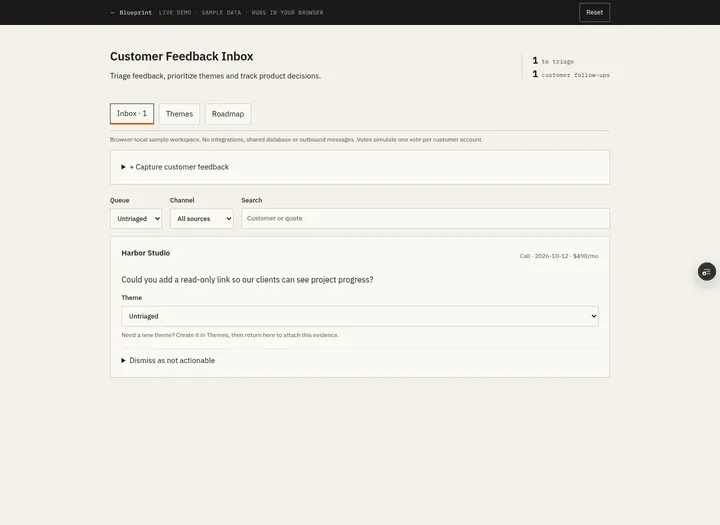 Open demo
The blueprint
Paste the whole spec into your AI builder, then send each prompt in the Build plan section one at a time. Check each phase before moving on.
How to use this file: paste this whole document into your AI builder (Claude, ChatGPT, Cursor, Lovable, Replit, Type) as context. Then send the build prompts in section 15 one at a time. Do not move to the next phase until the acceptance checks for the current phase pass.
1. The problem
"Customer feedback is scattered across email, calls and support tickets."
An account manager hears a request on a call, a support agent sees the same request in a ticket, and product sees neither. When the team finally talks about it, nobody can say how many customers asked, how much revenue they represent, or who to tell when it ships. The quotes that would settle the argument are buried in inboxes.
This blueprint is one inbox for customer feedback. Every piece of feedback keeps the customer's own words and the account it came from. Product links it to a theme, themes rank by evidence, revenue and votes, promoted themes go on an internal roadmap with a status history, and when a theme ships the app produces the list of accounts to tell.
2. What the real product does
Research basis: Productboard's pricing page (productboard.com/pricing) and customer feedback page (productboard.com/product/insights), October 2026.
What we verified:
- Plans and price. Productboard lists two plans, Business ("Request demo") and Enterprise ("Contact sales"). No prices are shown on the pricing page. Business lists a minimum of 5 makers, 25 contributors, 2 product portals, unlimited feedback notes, unlimited roadmaps and prioritization, manual and dynamic customer segments, feedback loop closing and product usage integrations (Amplitude, Mixpanel). Enterprise adds unlimited contributors, SAML SSO and SCIM, custom roles and permissions and a Salesforce integration.
- Collecting feedback. Feedback from support tickets, call recordings and chat messages (the product page names Zendesk, Gong and Slack) is captured into one place, then curated and routed. The pricing page lists a customer insights repository, customer boards and feedback forms.
- Customers and revenue. Feedback can be sorted, filtered and segmented by customer, with custom and aggregated company fields, so a team can focus on its most important accounts.
- Prioritization and roadmaps. A feature idea hierarchy, custom prioritization formulas, customizable feature statuses, timeline and column roadmaps and release planning.
- Closing the loop. The plan comparison lists "Feedback loop closing", "Notify idea & feedback contributors" and "Export list of feature requesters".
- Portals and AI. Product portals where customers vote (with custom voting questions), an embedded portal and moderation. An AI layer (Spark) with feedback summaries and findings; AI Themes are listed on Enterprise only.
What this blueprint keeps
Customers (accounts) with email domains and monthly recurring revenue; manual capture of a quote from any channel; an inbound endpoint that turns forwarded emails or tickets into feedback, matched to a customer by email domain; an inbox with triage (link to a theme, dismiss with a reason, restore); themes ranked by evidence, unique-account revenue or votes; votes recorded per customer account; promotion of a theme to an internal roadmap with an owner; five statuses with a required note for every change; and, when a theme ships, a follow-up list of every account that asked or voted, with update emails through an outbox. Plus an activity log and CSV export.
What this blueprint deliberately leaves out
Native integrations with Zendesk, Gong, Slack, Intercom or Salesforce (v1 has one inbound endpoint that any forwarding service or automation tool can call), a customer-facing portal and public voting, AI summaries and AI themes, customer segments, feature hierarchies and custom prioritization formulas, timeline roadmaps and release planning, product usage data, and SSO. These matter to product organizations with many teams and thousands of customers. A team of 3 to 50 people needs one trusted list of what customers asked for, how much revenue is behind it, and who to tell when it ships.
3. Scope of v1
- One company, one currency (USD). MRR is stored as integer cents per month.
- One inbox. Sources are labels chosen by whoever captures the feedback (Email, Call, Ticket, Chat, In-app, Other); the inbound endpoint sets Email or Ticket.
- Each piece of feedback belongs to at most one theme.
- Themes are internal. Nothing in this app is shown to customers except the follow-up emails a team member chooses to send.
- Email through an outbox. If no email provider is configured, emails are logged, not sent.
- Dates are shown in one team time zone (Settings; default America/New_York).
- Web app that works on a phone.
4. Roles
| Role | Who | Can do |
|---|---|---|
| Member | Everyone on the team | See everything. Capture feedback, assign customers, link and unlink themes, dismiss and restore, create themes, record and remove votes, promote a theme (choosing an owner), export CSV. |
| Theme owner | The person set as a promoted theme's owner | Change that theme's status (with a note), change its owner, and work its follow-up list. |
| Admin | One or more people | Everything above on every theme. Manage people, customers (including MRR) and settings. Read the outbox. Delete feedback (R14). |
Everyone can see everything, because the point is a shared view of what customers asked for. Only the actions above are restricted, and the server enforces them. Refusals: opening an admin page shows "Only admins can open this page."; any other admin-only action returns "Only admins can do this."; a status change by someone else returns "Only Sam Okafor (the owner) or an admin can change the status of Single sign-on." Controls a person cannot use are hidden.
5. Customer feedback inbox data model
All IDs are strings. Timestamps are UTC.
Person
- id, name (required), email (required, unique, stored lowercase), is_admin (boolean, default false), active (boolean, default true)
Settings (one row)
- company_name (required, max 60), time_zone (IANA name, default "America/New_York")
- follow_up_template (required, max 2,000 characters; may use {contact_first_name}, {theme_name} and {company_name})
Customer (an account)
- id, name (required, 1 to 80, unique ignoring case)
- domains (list of email domains, lowercase, without "@"; each domain belongs to at most one customer; may be empty)
- mrr_cents (integer, 0 or more), archived (boolean, default false)
Feedback
- id, customer_id (nullable: null means "Needs customer")
- source: email | call | ticket | chat | in_app | other
- from_name (optional, max 100), from_email (optional, valid email, stored lowercase)
- quote (required, 10 to 3,000 characters after trimming; the customer's words, never rewritten)
- received_at (timestamp; defaults to now), captured_by (nullable Person; null for inbound)
- external_id (optional, max 200; unique when present; set by the inbound endpoint)
- state: inbox | linked | dismissed; theme_id (set only when state is linked)
- dismiss_reason (5 to 300 characters, set only when dismissed)
- created_at
Theme
- id, name (required, 3 to 80 characters, unique ignoring case and surrounding spaces), description (optional, max 1,000)
- created_by, created_at
- promoted_at (nullable), owner_id (nullable; required once promoted)
- status: under_review | planned | in_progress | shipped | not_planned (nullable until promoted; shown as Under review, Planned, In progress, Shipped, Not planned)
Vote (one per customer account per theme)
- theme_id, customer_id, recorded_by, created_at; unique (theme_id, customer_id)
StatusChange (a theme's decision history; append-only)
- id, theme_id, from_status (nullable), to_status, note (5 to 500 characters), actor_id, created_at
FollowUp (one account to tell about one shipment)
- id, theme_id, shipped_change_id (the StatusChange that moved the theme to Shipped), customer_id
- status: pending | emailed | contacted | cancelled; done_by (nullable), done_at (nullable), note (optional, max 300)
- unique (shipped_change_id, customer_id)
Event (activity log; append-only, never updated or deleted)
- id, actor_id (nullable for inbound and the system), feedback_id (nullable), theme_id (nullable)
- type: captured | inbound_received | customer_assigned | linked | unlinked | dismissed | restored | theme_created | vote_added | vote_removed | promoted | status_changed | owner_changed | follow_up_emailed | follow_up_contacted | feedback_deleted | customer_changed
- data (JSON, nullable), created_at
- Cancelled follow-ups are recorded in the data of the
status_changedevent that left Shipped. Changes to people and settings are not logged in v1.
Notification (outbox)
- id, kind, to_email, person_id (nullable; empty for customer contacts), theme_id (nullable)
- subject, body (plain text), status: pending | sent | logged | failed, error (nullable), created_at, sent_at
6. Theme metrics and ranking
Compute these from the rows every time. Never store a running total.
- Evidence = the number of feedback rows with state linked and this theme_id.
- Accounts = the distinct customer_ids among that evidence. Feedback can only be linked once it has a customer (R3), so every piece of evidence has one.
- MRR = the sum of the current mrr_cents of those distinct accounts. Each account counts once per theme, however many quotes it gave.
- Votes = the number of Vote rows for the theme. A vote never adds evidence or MRR.
- Ranking. The Themes screen sorts by Evidence (the default), MRR or Votes, highest first; ties sort by theme name A to Z. Roadmap cards within a lane use the same Evidence order.
- A customer can be behind several themes. Never add theme MRR figures together and call the result revenue; show the company's total MRR separately on the Customers screen.
Worked examples (seed data in section 14)
| Theme | Evidence | Accounts | MRR | Votes |
|---|---|---|---|---|
| Single sign-on | 2 (Acme ticket, Acme call) | Acme Corp | $2,400 | 2 (Acme Corp, Harbor Studio) |
| CSV export | 1 (Ridgeway email) | Ridgeway | $890 | 0 |
| Slack alerts | 1 (Olsen in-app) | Olsen & Co | $149 | 0 |
- Sorted by Evidence: Single sign-on, CSV export, Slack alerts (CSV export and Slack alerts tie at 1 and sort by name). By MRR: Single sign-on, CSV export, Slack alerts. By Votes: Single sign-on, then CSV export and Slack alerts by name.
- Harbor Studio's vote on Single sign-on counts as a vote but adds no MRR: MRR comes only from accounts with evidence.
- Moving Acme's call from Single sign-on to Slack alerts: Single sign-on keeps 1 piece of evidence and still $2,400 (Acme's ticket remains); Slack alerts becomes 2 pieces from Olsen & Co and Acme Corp, $2,549.
- Dismissing Olsen's quote leaves Slack alerts with no evidence, so it cannot be promoted (R7).
7. Lifecycle
Feedback
| Action | Who | From | To | Side effects |
|---|---|---|---|---|
| Capture | Member | (none) | inbox | Customer required in the form; event captured |
| Inbound | The inbound endpoint (section 11) | (none) | inbox | Customer matched by from_email domain, or null; event inbound_received |
| Assign customer | Member | inbox | inbox | Only while state is inbox (the screen offers it on Needs customer cards; the server also accepts it to correct an Inbox item's customer); never to an archived customer; event customer_assigned |
| Link to theme | Member | inbox, linked | linked | Needs a customer (R3); moving to another theme replaces theme_id; event linked |
| Unlink | Member | linked | inbox | Clears theme_id; event unlinked |
| Dismiss | Member | inbox, linked | dismissed | Reason required; clears theme_id; event dismissed |
| Restore | Member | dismissed | inbox | Clears the reason; event restored |
| Delete | Admin | any | (removed) | R14 |
Theme
| Action | Who | From | To | Side effects |
|---|---|---|---|---|
| Create | Member | (none) | not promoted | Event theme_created |
| Promote | Member | not promoted | under_review | Needs evidence and an active owner (R7); StatusChange with the note "Promoted to the roadmap"; owner emailed if it is someone else |
| Change status | Theme owner or admin | any status | any different status | Note required (R8); StatusChange; entering Shipped creates the follow-up list (section 9); leaving Shipped cancels its pending follow-ups |
| Change owner | Theme owner or admin | promoted | same | New owner must be active; new owner emailed; event owner_changed |
A theme is never deleted. A promoted theme is never un-promoted; use Not planned.
8. Customer feedback inbox business rules
- R1. The customer's words are kept. The quote, from_name, from_email, source and received_at are never edited after capture. Fixing a mistake means dismissing the item and capturing it again.
- R2. One theme per piece of feedback. Linking to another theme moves it; it never copies it.
- R3. Evidence needs an account. Feedback with no customer stays in the "Needs customer" queue and cannot be linked: "Assign a customer before linking this to a theme."
- R4. Capture validation. Customer must exist and not be archived, source must be one of the six, the quote must be 10 to 3,000 characters after trimming, from_email (if given) must be a valid address, and received_at cannot be in the future. The capture form takes a date in the team time zone: today means now, an earlier date means midnight that day; a later date is refused with "The received date can't be in the future." Nothing is saved when any check fails.
- R5. Theme names. 3 to 80 characters, unique ignoring case and surrounding spaces: "A theme called Single sign-on already exists."
- R6. Votes. One per customer account per theme. Recording a vote for an account that already voted is refused: "Harbor Studio has already voted for Single sign-on." Removing a vote is a separate action. Archived customers cannot vote.
- R7. Promotion. A theme can be promoted only if it has at least one piece of evidence and an active owner is chosen: "Link at least one piece of feedback before promoting this theme." Votes alone are not enough. Promotion is not a commitment to build.
- R8. Status changes. Only promoted themes have a status. Changing it requires the theme owner or an admin, a status different from the current one ("Single sign-on is already Planned."), and a note of 5 to 500 characters. Any status can move to any other, so the history can record work that shipped early or a decision that was reversed. History is never edited.
- R9. Follow-up list. When a theme enters Shipped, create one pending FollowUp for each distinct non-archived account that has evidence on the theme or a vote for it at that moment. While the theme stays Shipped, an account that gains evidence or a vote is added to the same list. Leaving Shipped sets every pending follow-up of that shipment to cancelled; done ones stay as history. Shipping again starts a new list.
- R10. Follow-up actions. Only the theme owner or an admin can use Send update or Mark contacted; everyone else sees the list without the buttons. Mark contacted always needs a note of how (3 to 300 characters). Send update queues one email per contact address for that account on this theme (the distinct from_emails of its evidence on the theme), using follow_up_template, and marks the follow-up emailed. If the account has no contact address on this theme (for example it only voted), Send update is not offered and the follow-up can only be marked contacted, with a note of how. Each follow-up is done once; repeating either action is refused: "Ridgeway was already emailed on Oct 14 by Maya Chen."
- R11. Follow-up emails never include other customers' names, quotes, MRR, votes, notes or the theme's status history.
- R12. Customers. Only admins create, edit, archive or import customers and change MRR. In a CSV import the preview marks each row Ready or Not imported with its reason (a name or domain that already exists or repeats in the file, a bad MRR, the wrong number of columns); importing adds the ready rows and lists the skipped ones. A domain can belong to only one customer: "acme.example already belongs to Acme Corp." Changing MRR changes theme MRR everywhere, because MRR is always computed from current values.
- R13. Server checks. Every permission in section 4 and every rule here is enforced on the server, for every action and API call.
- R14. Delete. An admin can delete a piece of feedback (for example when a customer asks for their words to be removed). It removes the row and its follow-up email addresses from future lists; the event
feedback_deletedkeeps only the id, the account and the theme, never the quote or the sender. Older activity entries about it no longer show the quote. Emails already written to the outbox stay as the record of what was sent. - R15. Events. Every successful action writes the event in section 7. Events are never edited.
9. Customer feedback inbox screens
- Inbox (home). Tabs: Inbox (state inbox with a customer), Needs customer, Linked, Dismissed, each with a count that follows the active filters. Filters: source, customer and a text search (ignoring case) over the quote, sender name, sender email and customer name; filters combine. Each card shows the customer, MRR, source, sender, received date and the quote, with actions: Link to theme (choose an existing theme or type a new name; on Linked cards it is "Move to another theme", next to Unlink), Assign customer (Needs customer only), Dismiss (asks for a reason) and Restore (Dismissed only). Link to theme is shown on Needs customer cards too, and refused there with the R3 message. A Capture button opens the form: customer, source, sender name and email (optional), quote, received date.
- Themes. A New theme button, and every theme with Evidence, Accounts, MRR and Votes, sorted by the chosen metric (section 6), promoted themes labelled with their status. A note under the table: "MRR counts each account once per theme. Accounts can appear in several themes."
- Theme. Name, description, metrics, every quote with its account and sender, votes with Record vote (choose an account) and Remove, Promote (choose an owner), status with Change status, the status history, and, when Shipped, the follow-up list (R9 and R10). Earlier lists (from shipments the theme has left) stay visible below, collapsed, with each follow-up's status (Emailed, Contacted or Cancelled).
- Roadmap. Promoted themes in five lanes (Under review, Planned, In progress, Shipped, Not planned), each card showing owner, evidence, MRR and votes. On a phone the lanes stack vertically. Each lane shows "Nothing here yet." when empty.
- Follow-ups. Every pending follow-up across shipped themes, oldest shipment first, with Send update and Mark contacted.
- Admin: Customers. Create, edit and archive customers; CSV import with columns name, domains (separated by semicolons) and mrr (in dollars), with a preview of each row before importing; the company's total MRR, which counts non-archived customers only (archived customers are listed separately).
- Admin: People and Admin: Settings (company, time zone, follow-up template with a preview).
- Admin: Outbox. Every notification, newest first, with its recipient, subject, status and time, and its body when opened. Built in Phase 1, because later phases' checks read emails here. If sign-in works by emailed link, the Outbox shows those emails with the link replaced by "(sign-in link hidden)", so an admin can never use someone else's link.
- Activity. The event log, newest first, filterable by theme.
10. Notifications
| Trigger | Recipient | Subject |
|---|---|---|
| Promote, or change owner | The new owner, unless they made the change | "You own {theme} on the roadmap" |
| Status change by someone other than the owner | The theme owner | "{theme} is now {status}" (with the note) |
| Send update (R10) | Each contact address for that account | "{theme} is here" (follow_up_template) |
Write every notification to the outbox first, then send it. With no provider configured, set status logged. Failed sends are retried by the scheduled job (an hourly cron, protected by a CRON_SECRET header) up to 5 times after the first attempt, then left as failed; a notification still pending 15 minutes after it was written counts as failed. A notification failure never blocks the action that caused it.
11. The inbound endpoint
Any tool that can forward an email or call a webhook (an inbound email service, a help desk automation, Zapier) can send feedback in:
POST /api/inboundwith the headerAuthorization: Bearer <INBOUND_SECRET>(an environment variable). Compare the secret in constant time. A missing or wrong secret returns 401 and saves nothing.- JSON body:
external_id(required, max 200),from_email(required),from_name(optional),subject(optional),text(required),source(optional: email or ticket; default email),received_at(optional ISO timestamp; default now; never in the future). - The quote is the subject and the text joined by a blank line, trimmed and cut to 3,000 characters. Fewer than 10 characters returns 422.
- The customer is the one whose domains include the domain of from_email (exact domain; subdomains do not match). No match, or a match on an archived customer (section 12), means customer_id is null and the item goes to Needs customer.
- A repeated external_id returns 200 with the existing feedback id and saves nothing new, so retries are safe. Check the secret first, then the external_id, then the rest of the body, so a retry always gets 200.
- Successful requests return 201 with the new feedback id.
12. Edge cases
- The same person emails twice about SSO: two pieces of evidence, one account, MRR counted once.
- An account is archived: its existing evidence still counts in Evidence and MRR (history stays true), but it cannot vote, receive new captures or be added to a new follow-up list.
- MRR is corrected by an admin: every theme's MRR changes at once, because it is computed from current values (R12).
- A theme is moved from Shipped back to In progress with a pending follow-up for Ridgeway: the follow-up becomes cancelled; shipping again creates a new pending one.
- Feedback linked to a shipped theme after shipping (R9): its account is added to the current follow-up list if it is not already there.
- Two people link the same feedback at the same time: the second action sees the current theme in the same transaction and gets "Already linked to CSV export by Jo Park."
- Quotes are rendered as text, never as HTML.
13. Time
"Now" is read through one function that adds the development clock offset, so tests can move time forward. Dates are shown in Settings.time_zone.
14. Seed data
Settings: company "Northwind", time zone America/New_York, follow-up template "Hi {contact_first_name}, you asked us about {theme_name}. It's now live. Thanks for telling us, it helped us decide. The {company_name} team".
People: Dana Ruiz (admin, support lead), Maya Chen (product), Sam Okafor (product), Jo Park (support), Ben Cho (account manager). All active. Emails are first name at northwind.example (dana@northwind.example, maya@, sam@, jo@, ben@).
Customers:
| Customer | Domains | MRR |
|---|---|---|
| Acme Corp | acme.example | $2,400 |
| Ridgeway | ridgeway.example | $890 |
| Olsen & Co | olsen.example | $149 |
| Harbor Studio | harbor.example | $490 |
Feedback (T is the day the seed is loaded):
| # | Customer | Source | From | Quote | Received | State |
|---|---|---|---|---|---|---|
| F1 | Acme Corp | Ticket | Priya Shah, priya@acme.example | "We need SSO before we can roll this out to the whole company." | T-9 | Linked: Single sign-on |
| F2 | Acme Corp | Call (captured by Ben Cho) | Tom Becker, tom@acme.example | "IT keeps asking when we'll support SSO with Okta." | T-4 | Linked: Single sign-on |
| F3 | Ridgeway | Ella Brooks, ella@ridgeway.example | "Is there any way to export our project list to CSV?" | T-30 | Linked: CSV export | |
| F4 | Olsen & Co | In-app | Kim Olsen, kim@olsen.example | "Would love Slack alerts when a client approves something." | T-6 | Linked: Slack alerts |
| F5 | Harbor Studio | Call (captured by Ben Cho) | Rosa Diaz, rosa@harbor.example | "Can our clients see a progress link without logging in?" | T-1 | Inbox |
Themes:
| Theme | Promoted | Owner | Status history | Votes |
|---|---|---|---|---|
| Single sign-on | T-3 | Sam Okafor | Under review (T-3, "Promoted to the roadmap"), Planned (T-2, "Scheduled for this quarter") | Acme Corp, Harbor Studio |
| CSV export | T-28 | Maya Chen | Under review (T-28), In progress (T-14, "Started"), Shipped (T-1, "Released in version 2.14") | none |
| Slack alerts | not promoted | none |
CSV export's shipment has one pending follow-up: Ridgeway.
Who did what in the seed: F1 and F3 arrived through the inbound endpoint (captured_by empty, external_id "seed-ticket-f1" and "seed-email-f3"); F4 was captured by Jo Park; Ben Cho captured F2 and F5. Jo Park created Single sign-on, Maya Chen created CSV export and Sam Okafor created Slack alerts. Maya Chen promoted both promoted themes (each promotion's note is "Promoted to the roadmap"), each owner made their theme's later status changes, and Ben Cho recorded both votes. Write the matching events, and leave the outbox empty.
15. Customer feedback inbox build plan
Send these prompts one at a time after pasting this file. Each phase ends with checks you can run by clicking through the app. Start each phase's checks from a fresh load of the seed (the reset button); checks within a phase run in order on the same data.
Phase 1: Foundation
Using the Customer Feedback Inbox blueprint above, build Phase 1 only.

1. Set up the data model from section 5 exactly, with a real database.
2. Add sign-in with the platform's built-in auth or Google sign-in limited to our company email domain. A signed-in email must match an active Person; anyone else sees "Ask an admin to add you."
3. Build Admin: Customers (with the CSV import preview), Admin: People, Admin: Settings and Admin: Outbox (section 9, screens 6, 7 and 8). Only admins can use them; enforce R12 and R13 on the server. Later phases' checks read emails on the Outbox screen.
4. Load the seed data from section 14, with dates relative to today.
5. Add a "sign in as" switcher, a "move the clock forward" control and a "reset to seed data" button, all visible only in development.

Do not build the inbox or themes yet. When you're done, list what you built and anything in the spec you had to interpret.
Acceptance checks
- Signed in as Dana, Admin: Customers lists the four customers with their MRR and a company total of $3,929.
- Signed in as Jo, Admin: Customers says "Only admins can open this page." and a direct request to change Acme's MRR is refused.
- Adding a customer with the domain acme.example is refused with "acme.example already belongs to Acme Corp."
- Importing a CSV with the header "name,domains,mrr" and the rows "Kestrel,kestrel.example,1200" and "Bluebird,bluebird.example;bluebird.io,75" shows both rows as ready in the preview, then adds them with MRR $1,200 and $75.
Phase 2: Capture, inbound and triage
Using the Customer Feedback Inbox blueprint above, build Phase 2 only.

1. Build the Inbox screen with its tabs, filters, capture form and actions (section 9, screen 1), and the feedback lifecycle in section 7 with R1 to R5, R13 and R15.
2. Build the inbound endpoint exactly as section 11 describes, with tests for a wrong secret, a duplicate external_id, a domain match and no match.
3. Let members create a theme by typing a new name while linking (R5).
4. Build the Activity screen (screen 9).

Do not build ranking, votes, promotion or the roadmap yet. When you're done, list what you built and anything in the spec you had to interpret.
Acceptance checks
- The Inbox tab shows Harbor Studio's quote with its MRR ($490), source Call and sender Rosa Diaz; the Linked tab shows four items.
- Capturing a quote shorter than 10 characters, or with a received date in the future, is refused and saves nothing.
- Linking Harbor's quote to a new theme typed as "Client progress link" moves it to the Linked tab; typing "single sign-on" as a new theme name links to nothing and shows "A theme called Single sign-on already exists."
- A POST to /api/inbound with the wrong secret returns 401 and nothing appears.
- A POST with the right secret from lee@acme.example (external_id "zd-1001") puts the quote in the Inbox tab for Acme Corp with source Email; sending the same external_id again creates nothing new.
- A POST from nina@newco.example lands in Needs customer, and trying to link it to a theme is refused with "Assign a customer before linking this to a theme."
- Dismissing Olsen's quote requires a reason; Restore returns it to the Inbox tab with no theme.
- On the Linked tab, combining the Ticket source filter with the search "SSO" shows only Priya Shah's quote.
Phase 3: Themes, votes, promotion and the roadmap
Using the Customer Feedback Inbox blueprint above, build Phase 3 only.

1. Build the Themes and Theme screens (section 9, screens 2 and 3) with the metrics and ranking in section 6, computed on the server from current rows.
2. Implement votes (R6), promotion (R7), status changes (R8) and owner changes with their notifications (section 10). Status changes do not create or cancel follow-ups yet; Phase 4 adds that.
3. Build the Roadmap (screen 4).

Do not build the follow-up list yet. When you're done, list what you built and anything in the spec you had to interpret.
Acceptance checks
- Themes sorted by Evidence lists Single sign-on (2), CSV export (1), Slack alerts (1); Single sign-on shows 1 account, $2,400 and 2 votes.
- Recording another vote for Harbor Studio on Single sign-on is refused with "Harbor Studio has already voted for Single sign-on."; its MRR stays $2,400.
- Moving Tom Becker's call to Slack alerts makes Slack alerts 2 pieces of evidence and $2,549, while Single sign-on keeps $2,400.
- Signed in as Dana, promoting Slack alerts without an owner is refused; promoting it with Maya as owner puts it in the Under review lane and the outbox has "You own Slack alerts on the roadmap" for Maya.
- Creating a theme "Dark mode", recording a vote for Ridgeway and promoting it is refused with "Link at least one piece of feedback before promoting this theme."
- Signed in as Jo, changing Single sign-on's status is refused; signed in as Sam, moving it to In progress without a note is refused, and with the note "Work started" it moves lanes and the history shows both earlier entries plus the new one.
- Signed in as Dana, moving Single sign-on to Planned emails Sam "Single sign-on is now Planned".
Phase 4: Close the loop and export
Using the Customer Feedback Inbox blueprint above, build Phase 4 only.

1. Implement the follow-up list (R9), Send update and Mark contacted (R10, R11) on the Theme screen, and the Follow-ups screen (section 9, screen 5).
2. Add the hourly job that retries failed notifications, with a development-only "run job now" control.
3. Implement Delete for admins (R14).
4. Add CSV export of themes (name, status, owner, evidence, accounts, MRR, votes) and of feedback (customer, source, received date, theme, state). Feedback exports never include from_email. Use exactly these columns as lower-case headers (received_date for the date), screen labels for status, source and state, blanks for a missing status, owner, customer or theme, MRR in dollars with two decimals and dates as YYYY-MM-DD in the team time zone. Any member can export.

When you're done, list what you built and anything in the spec you had to interpret.
Acceptance checks (reset to seed data first)
- Follow-ups lists Ridgeway as pending for CSV export. Signed in as Maya, Send update queues one email to ella@ridgeway.example using the template, and the follow-up shows "Emailed by Maya Chen".
- Sending the update to Ridgeway again is refused with a message saying it was already emailed and by whom.
- Signed in as Sam, moving Single sign-on to Shipped with a note creates pending follow-ups for Acme Corp and Harbor Studio; Acme's Send update queues emails to priya@acme.example and tom@acme.example, and Harbor offers only Mark contacted.
- Moving Single sign-on back to In progress cancels its pending follow-ups; shipping it again creates a new pending list.
- Dana deletes Rosa Diaz's quote: it disappears everywhere, and its feedback_deleted activity entry contains no quote and no email address.
- Exporting themes downloads a CSV whose Single sign-on row has evidence 2, accounts 1, MRR 2400.00 and votes 2; the feedback CSV has no email column.
16. Variations
- Native integrations: a Zendesk or Intercom webhook, Slack message shortcuts, Gong call snippets.
- A public portal where customers vote and comment, with moderation.
- Customer segments (plan, region, size) and filters on the Themes screen.
- A weighted score (for example evidence × MRR) shown next to the raw metrics, never replacing them.
- Release notes generated from shipped themes.
- Duplicate detection that suggests themes for new quotes.
17. Build notes from our test build
We built this blueprint by sending the four phase prompts above, in order, to an AI builder (Claude, working in Type), then checked every acceptance item in a real browser, resetting to the seed data before each phase's checks. Where a check says something is refused, the person saw the reason on screen and a direct request got an error with nothing changed.
Result: 25 of 25 acceptance checks passed in one final browser run on a fresh database, plus 157 automated tests.
Gaps the build found, now fixed in this spec:
- Admin: Outbox (screen 8) was in no phase prompt, yet the Phase 3 and 4 checks read emails there, so two Phase 3 checks failed. Phase 1 now builds it.
- The Outbox showed every notification, which included live sign-in links an admin could use. Screen 8 now hides those links.
- The seed people had no email addresses. Section 14 now gives them.
- The seed did not say who captured F1, F3 and F4, who created, promoted and moved the themes, or who recorded the votes. Section 14 now says, including that F1 and F3 arrived through the inbound endpoint.
- Nothing said whether the company's total MRR counts archived customers. It counts non-archived customers only.
- Nothing said what a CSV import does with a bad row. The preview marks each row Ready or Not imported with its reason, and importing adds only the ready rows (R12).
- Section 4 gave no wording for a refused admin action or a status change by someone who is not the owner. It now gives both.
- Nothing said whether tab counts follow the filters, or whether search covers the sender's email. Both do now.
- Section 7 allowed Assign customer on any inbox item, while section 9 offered it on Needs customer cards only. Section 7 now says the screen offers it on Needs customer cards and the server also accepts it to correct an Inbox item.
- Unlink was in the lifecycle but on no screen, and nothing said Link to theme appears on Needs customer cards, where the R3 check needs it. Screen 1 now lists both.
- The capture form's received date had no time of day, so "never in the future" was unclear. R4 now says today means now and an earlier date means midnight in the team time zone, with the refusal message.
- Section 11 matched inbound mail to any customer by domain, while section 12 says archived customers receive no new captures. A match on an archived customer now goes to Needs customer, and the order of the endpoint's checks makes retries always return 200.
- The Themes screen had no default sort, and Roadmap lanes no card order. Both use Evidence.
- Section 7 says entering Shipped creates the follow-up list, while Phase 3 says not to build it. The Phase 3 prompt now says status changes don't touch follow-ups until Phase 4.
- Section 4 let the theme owner work the follow-up list but did not say who else can. R10 now limits Send update and Mark contacted to the owner or an admin, and says Mark contacted always needs a note.
- The Theme screen showed the follow-up list only while Shipped, so cancelled follow-ups could not be seen after moving back. Earlier lists now stay visible, collapsed, with each status.
- "Retried up to 5 times" did not say whether that counts the first attempt, or what happens to a notification stuck as pending. Section 10 now says both.
- R14 did not say what happens to emails already in the outbox, or to older activity entries that showed the quote. Both are now covered.
- The CSV exports had no exact headers or value formats. The Phase 4 prompt now gives them.
- Section 5 had no event type for cancelled follow-ups or for changes to people and settings. It now says where cancellations are recorded and that people and settings changes are not logged in v1.
What we did not test:
- Production sign-in. The build used single-use emailed sign-in links (the spec's platform auth or Google sign-in were not available), and every check used the development "sign in as" switcher.
- Sending email. Emails were logged in the outbox, not delivered.
- The hourly retry job on a real scheduler. It was run from the development control and its endpoint; a failing email provider was simulated only in automated tests.
- The inbound endpoint behind a real email-forwarding service or help desk. The checks called it directly.
- Two people linking the same feedback at the same moment from two browsers. This is covered by automated tests only.
- Hosting. The test build ran on SQLite on one server. For a hosted deploy, use a managed Postgres (or your platform's database) and the same schema.
Field report
Building a Productboard replacement with AI, 25 checks and 20 spec gaps
We had an AI builder build a customer feedback inbox from our spec, one phase at a time, and checked every acceptance item in a real browser. It passed all 25 checks in one final run and exposed 20 gaps in the spec, the ninth-most of our twenty-two build tests. What it costs next to Productboard, which publishes no prices, and what we did not test.
The short answer
Yes, for a team of 3 to 50 people that needs one trusted list of what customers asked for. We gave Claude, working in Type, our Customer Feedback Inbox blueprint and had it follow the four phase prompts in order, with a fresh builder for each phase that saw only the spec and the code so far. The final build passed 25 of 25 acceptance checks in one browser run on a fresh database, with 157 automated tests. It keeps each customer's words with their account, ranks themes by evidence, revenue or votes, and lists every account to tell when a theme ships.
The build exposed 20 gaps in the spec, places where the builder had to guess. That is the ninth-most of our twenty-two build tests, behind the invoice reminders build (83), the link shortener (69), the inventory tracker (63), the status page (58), the employee onboarding build (44), the internal knowledge base (30), the help desk (21) and the timesheets (21), and well above the median of 14.5. Every gap is now fixed in the published spec. The item-by-item results are published as acceptance-results.json.
What it is not: a tested production deployment. Production sign-in, delivered email and a hosted scheduler were not exercised. The last section lists exactly what was and wasn't checked.
What we built, and what we left out
We read Productboard's pricing and customer feedback pages in October 2026 and kept what a small team uses every week:
- The customer's words, never rewritten. A quote, its sender and its source are fixed once captured. Fixing a mistake means dismissing the item and capturing it again.
- Evidence needs an account. Feedback from an unknown sender waits in a Needs customer queue, and linking it is refused with "Assign a customer before linking this to a theme."
- Revenue counted once per account. Acme Corp's ticket and call about single sign-on are 2 pieces of evidence but $2,400 of MRR, not $4,800. Votes are counted separately and never add revenue.
- One inbound endpoint. Feedback posted with a secret is matched to a customer by email domain; retries never duplicate it.
- A roadmap with a reason for every move. Promotion needs evidence and an owner; every status change needs a note.
- Closing the loop. Shipping a theme lists every account that asked or voted. Send update emails each contact from a template; accounts that only voted are marked contacted with a note.
Left out on purpose: native integrations, a customer voting portal, AI summaries and themes, segments, prioritization formulas, timeline roadmaps, usage data and SSO. If several product teams plan releases across thousands of customers, that is what Productboard is for.
What it costs next to Productboard
Productboard does not publish prices. On productboard.com/pricing in October 2026, the page lists two plans: Business ("Request demo"), with a minimum of 5 makers and 25 contributors, and Enterprise ("Contact sales"). So there is no price to put next to the build, and we will not guess at one.
The build has no subscription price, but you pay for hosting, a database, an email provider and the time to build and look after it. Build when nobody can say how many customers asked for something or how much revenue is behind it. Buy when you need native integrations, a voting portal or AI themes. Our Productboard alternative page has the side-by-side.
How the build went, phase by phase
After each phase, its checks ran as Playwright scripts in Chromium, clicking through the app as the named person from a fresh seed, with direct requests wherever the server must refuse something.
- Foundation. The data model in SQLite, sign-in, the admin screens with CSV import, the seed and the development controls. All 4 checks passed.
- Capture, inbound and triage. The Inbox, the capture form, the inbound endpoint and the Activity log. All 8 checks passed.
- Themes, votes, promotion and the roadmap. Metrics computed from current rows, votes, promotion, status changes and the roadmap. Two checks failed: they read emails on Admin: Outbox, a screen no phase prompt asked for. We fixed the spec and a builder added the screen.
- Close the loop and export. Follow-up lists, the retry job, Delete and CSV exports. All 6 checks passed.
The final run reset to the seed before each phase and ran all 25 checks in one pass.
The 20 gaps, grouped
The full list, with each fix, is in the blueprint's build notes.
Screens, phases and checks out of step (4 gaps)
Admin: Outbox appeared in the screen list but in no phase prompt, while the Phase 3 and 4 checks read emails there. Unlink was in the lifecycle but on no screen, and a check needed Link on a Needs customer card, where the screen list did not offer it. The Theme screen showed follow-ups only "when Shipped", hiding cancelled ones. And section 7 said shipping creates the follow-up list while the Phase 3 prompt said not to build it.
Lesson: for every check, find the screen and the phase that let a person do it.
Seed facts, messages and events left unwritten (4 gaps)
The seed people had no email addresses, and the seed did not say who captured three of the quotes or who created, promoted and moved the themes. No refusal text existed for an admin-only action or a status change by someone who isn't the owner. Section 5 had no event type for cancelled follow-ups or changes to people and settings.
Lesson: if a check or a log will show it, the spec has to say it.
Archived accounts, imports, deletion and email (6 gaps)
The company's total MRR did not say whether archived customers count. A CSV import had no rule for one bad row among good ones. Inbound mail from an archived customer's domain was matched by one section and barred by another. Deleting a quote said nothing about emails already sent or older activity entries. Retries did not say whether the 5 included the first attempt. And because the Outbox lists every notification, admins could read live sign-in links.
Lesson: for every record, ask what happens when the account behind it is archived or deleted, and who can read each email.
Wording that left choices open (6 gaps)
Tab counts did not say whether they follow the filters. A received date with no time of day made "cannot be in the future" unclear. The Themes screen had no default sort. Section 7 allowed Assign customer on any inbox item while section 9 offered it on Needs customer cards only. Section 4 did not say who besides the owner may work a follow-up list. The CSV exports named columns but gave no headers or formats.
Lesson: whenever a sentence names a list, a date or an export, say its order, its time and its exact format.
See What AI app builders get wrong for the patterns across every build.
What we did not test
- Production sign-in. The build used single-use emailed sign-in links, and every check used the development "sign in as" switcher.
- Sending email. Emails were logged in the outbox, not delivered.
- The hourly retry job on a real scheduler. It ran from the development control and its endpoint; a failing email provider was simulated only in automated tests.
- The inbound endpoint behind a real forwarding service or help desk. The checks called it directly.
- Two people linking the same feedback at once. Covered by automated tests only.
- Hosting. The test build ran on SQLite on one server. For a hosted deploy, use a managed Postgres (or your platform's database) and the same schema.
We list what every build left untested in Is an AI-built internal tool ready for production?.
Build it yourself
The Customer Feedback Inbox blueprint is free: one Markdown file with the data model, 15 business rules, screens, worked examples, seed data, the four phase prompts and all 25 acceptance checks, with the 20 fixes already in. Paste it into Claude, ChatGPT, Cursor, Lovable, Replit or Type and send the phases one at a time. If you find a gap we missed, tell us on the About page and we'll fix it and credit it in the build notes.
Customer Feedback Inbox: questions people ask
How do you organize customer feedback?
Keep every piece as the customer's own words with the account it came from, then link it to a theme, one theme per piece. In this blueprint new feedback lands in an inbox, members link it to a theme or dismiss it with a reason, and feedback from an unknown sender waits in a Needs customer queue, because evidence without an account cannot be weighed.
How should feature requests be prioritized?
Look at three numbers side by side rather than one score: how many pieces of evidence a theme has, how much monthly revenue is behind it (each account counted once), and how many accounts voted. With the sample data, Single sign-on has 2 pieces of evidence, both from Acme Corp, so $2,400 of MRR, and 2 votes. The decision stays with the team; the app never ranks by a formula of its own.
Why count revenue once per account?
Because the same customer asking twice does not double the revenue at stake. If Acme Corp ($2,400 a month) sends a ticket and mentions it again on a call, the theme shows 2 pieces of evidence but $2,400, not $4,800. For the same reason, theme revenue figures should never be added together and called company revenue.
How do you close the loop with customers when a feature ships?
When a theme moves to Shipped, the app lists every account that gave evidence or voted. For accounts whose quotes came with an email address, Send update emails those people from a template; accounts that only voted are marked contacted with a note of how. Each account is followed up once per release, and the emails never mention other customers.
Can feedback be sent in automatically?
Yes, through one inbound endpoint secured with a secret token, which any email-forwarding service or automation tool can call. Each item is matched to a customer by the sender's email domain, and retries with the same external ID never create duplicates. Native integrations with tools like Zendesk or Gong are left out of v1.
What data model does a feedback tool need?
Person, Settings, Customer (with email domains and MRR in integer cents), Feedback (customer, source, sender, quote, received date, state, theme), Theme (with owner and status once promoted), Vote (one per account per theme), StatusChange (the decision history), FollowUp (one per account per shipment), an append-only Event log and a Notification outbox.
How much does Productboard cost?
Productboard does not publish prices. Its Business plan is sold through a demo and lists a minimum of 5 makers, and Enterprise is through sales (checked October 2026).
Get new blueprints by email
One email when a new blueprint is published. Nothing else.
More blueprints
Help Desk
Support requests land in a shared inbox and nobody knows who is answering what.
- No.
- 013
- Dept.
- Support
- Status
- Tested
- Replaces
- Zendesk
Status Page
When something breaks, half our support queue is people asking if it's down.
- No.
- 020
- Dept.
- Support
- Status
- Tested
- Replaces
- Statuspage
NPS Surveys
We send an NPS survey once a year from a form tool, and nobody reads the comments.
- No.
- 029
- Dept.
- Support
- Status
- Spec
- Replaces
- Delighted
All support and product blueprintsEvery blueprintHow we test blueprints