Free template · Build it with Claude, Cursor, Lovable or any AI app builder
Commission Calculator template
Every month-end we spend two days arguing over the commission spreadsheet.
Closed deals go in and payouts come out, calculated with your actual plan rules and a record of how each number was reached.
By Sam Claassen · Updated · 4 build phases · 24/24 acceptance checks passed
- No.
- 002
- Department
- Sales
- Build time
- 2 hrs
- Difficulty
- Intermediate
- Team size
- 3–30 reps
- Replaces
- QuotaPath
- Your builder needs
- A database and sign-in, nothing else
- Status
- Build-tested Oct 15, 2026
Can you build your own sales commission calculator instead of paying for QuotaPath?
Yes, for a team of 3 to 30 reps on one or two plans. This blueprint specifies a commission calculator that pays marginal tiers with an accelerator above quota, handles two-way deal splits, shows every rep a statement with the tier math line by line, locks each period with one finance approval, creates clawbacks when a paid deal is cancelled, and exports a CSV for payroll. The calculation is a pure function with worked examples down to the cent, specified in four build phases with 24 acceptance checks. We built it by sending the 4 phase prompts to Claude in order, and all 24 checks passed in a real browser. It leaves out CRM sync, multi-step approvals, draws, team roll-up plans and ASC 606 amortisation.
Built and tested from this blueprint
We sent the 4 build prompts below to an AI builder, in order, and checked every acceptance item in a real browser on a freshly seeded database. The test build ran as a full web app with a database, and every screen was also checked at phone width. Where the build exposed a gap in the spec, we fixed the spec.
- Acceptance checks passed
- 24/24
- Automated tests
- 48
- Spec gaps found and fixed
- 10
- Build phases
- 4
The full write-up of this build test, with every gap and what was not tested, is in the build-test report below.
Watch the build test
We gave Claude one Markdown spec for a small-team sales commission calculator and had it build the tool in four phases. It passed all 24 acceptance checks in a real browser, along with 48 automated tests, and exposed 10 gaps in the spec, from sign-in that had to match people by an email they didn't have to an approved month that recalculated to $8,860 instead of $10,060 because a deal cancelled after approval was left out. What passed, what broke, what we didn't test, and when QuotaPath is still worth paying for. 2:45.
Watch on YouTube · More build tests on our channel
Transcript
Here's how to reverse engineer QuotaPath from a written spec. We gave Claude one Markdown file, and checked twenty-four things in a real browser. Here's what passed, and what broke.
The spec copies the part of QuotaPath a small sales team actually uses. Plans with tiers, and an accelerator above quota. Closed deals, with an optional split between two reps. A statement for every rep that shows the math, line by line. And one finance approval that locks the month.
The core rule is that tiers are marginal, like tax brackets. Cy's monthly quota is sixty thousand dollars. His first thirty thousand pays five percent. The next twenty-eight thousand pays ten percent. Above quota, the accelerator pays fifteen. So his October commission is four thousand three hundred dollars, and his statement shows every slice.
Claude built it in four phases, one prompt each. The foundation, with reps, plans and deals. The calculation and the statements. Approval, locking, clawbacks and the payroll export. Then what reps see, with their own statement and a what-if calculator. After every phase, the acceptance checks ran in a real browser, from fresh seed data.
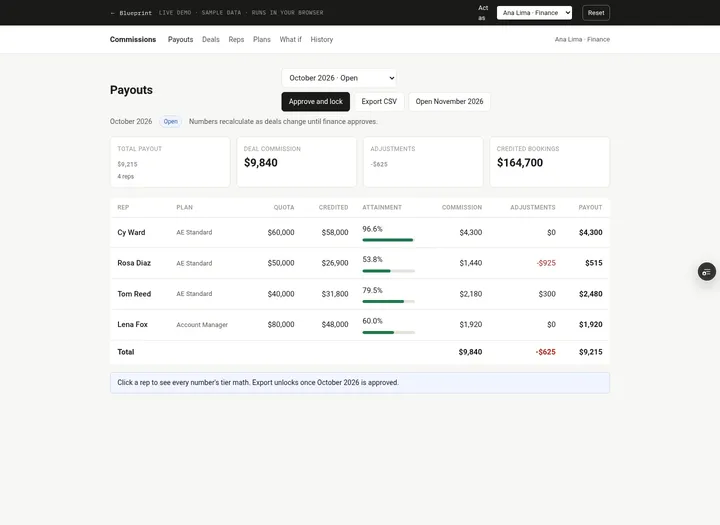
Here's what it built. The payouts screen shows each rep's quota, attainment, commission and payout for the month. Each statement walks through every deal, tier by tier, including a clawback for a cancelled deal. The what-if calculator shows a rep what one more deal would pay, without saving anything. And reps check their own statement on their phone.
In the final run, on a fresh database, all twenty-four checks passed, along with forty-eight automated tests.
But the more useful result is what broke. The build exposed ten gaps in the spec. Places where Claude had to guess. Sign-in had to match each person by email, but people had no email field. Recalculating an approved month left out a deal cancelled after approval, so August came to eight thousand, eight hundred and sixty dollars instead of ten thousand and sixty. And the what-if split could mean either rep's share. Every gap is now fixed in the spec.
Passing every check isn't the same as production-ready. We didn't test real sign-in, two people saving at the same moment, importing the export into a real payroll system, or hosting. Those are yours to check before a team relies on it.
So is it worth building? QuotaPath Growth is thirty-five dollars per user per month, plus a monthly platform fee, billed yearly. Every rep, manager and admin counts as a user. If you need CRM sync, draws or team roll-up plans, QuotaPath is worth paying for. If you have a few reps on one or two plans, you mostly need the tiers, the statements, and a month that stays locked.
The spec is free. The data model, fifteen rules, seed data, four phase prompts, and all twenty-four checks, with the ten fixes already in. Find it at personal software factory dot com.
Made with AI from the real test-build screenshots. Voice: Kokoro (open-source text to speech). Music: "Chill Wave" by Kevin MacLeod (incompetech.com), licensed under Creative Commons Attribution 4.0.
Build it or buy QuotaPath?
QuotaPath Growth is $35 per user per month and Premium is $50 per user per month, each plus a monthly platform fee, billed annually. QuotaPath says the platform fee covers the first five users, setup and support, and that every rep, manager and admin who uses the product counts as a user. Source: quotapath.com/pricing, checked October 2026.
What this blueprint keeps
Plans with marginal tiers and an accelerator above quota, monthly quotas per rep, closed deals with an optional two-way split, a per-period statement for each rep that shows the tier math line by line, a single finance approval that locks the period, clawback lines in a later period when a paid deal is cancelled, manual adjustment lines (SPIFs, corrections), a "what if I close this deal" calculator for reps, a CSV export for payroll, and an append-only history.
What it leaves out
CRM sync (v1 has finance enter closed deals; CSV import is a variation), multi-step approval chains, payout scheduling in instalments, payout eligibility rules (paid when invoiced or collected), draws, team and manager roll-up plans, multi-currency, ASC 606 amortisation, disputes inside the app, AI plan builders and plan modeling across a whole team. A team of 3 to 30 reps on one or two plans does not need them to stop arguing about the spreadsheet.
Build it if
- You have 3 to 30 reps on one or two plans with tiers, an accelerator and occasional splits.
- Month-end means arguing over a spreadsheet, and you want one calculation everyone can read.
- Finance enters or imports closed deals and approves once per month.
- Per-user pricing for every rep is hard to justify for a few plans.
Buy QuotaPath if
- You need closed deals synced automatically from your CRM and payouts synced to payroll.
- You run draws, manager and team roll-up plans, multi-currency or ASC 606 amortisation.
- You need multi-level approvals, plan modeling across the team, or in-app disputes.
- Commission errors have serious consequences and nobody can own and test the tool.
Try the app
A working app loaded with sample data. Changes are saved in this browser only, not shared with other visitors. Use Reset to restore the examples. No real emails, payments or vendor changes are made.
- 1Open September payouts, then October, to compare locked statements with live calculations.
- 2Act as Cy and inspect the tier slices behind his $4,300 October commission.
- 3Use What if with a $25,000 deal to preview the accelerator without saving a deal.
- 4As finance, open Northwind add-on and preview the clawbacks before cancelling it.
 Open demo
The blueprint
Paste the whole spec into your AI builder, then send each prompt in the Build plan section one at a time. Check each phase before moving on.
How to use this file: paste this whole document into your AI builder (Claude, ChatGPT, Cursor, Lovable, Replit, Type) as context. Then send the build prompts in section 14 one at a time. Do not move to the next phase until the acceptance checks for the current phase pass.
1. The problem
"Every month-end we spend two days arguing over the commission spreadsheet."
Closed deals live in the CRM. The commission plan lives in a PDF. The math lives in a spreadsheet one person understands. At month-end, finance pastes deals in, reps rebuild the numbers in their own sheets to check them, and every disagreement turns into a hunt through formulas. When a customer cancels after the rep was paid, someone edits last month's tab and nobody can say what was actually paid.
This blueprint replaces that with one place where the plan rules are written down once, every payout shows the exact math that produced it, and a month that finance has approved can no longer move.
2. What the real product does
Research basis (October 2026): QuotaPath pricing and product pages (quotapath.com/pricing, quotapath.com/automate-commission-tracking) and its help center: Payout Cycle Overview (help.quotapath.com/en/articles/6193525-payout-cycle-overview), Approvals Overview (help.quotapath.com/en/articles/9450038-approvals-overview), Approve Earnings (help.quotapath.com/en/articles/6236136-approve-earnings), Clawbacks Overview (help.quotapath.com/en/articles/15325102-clawbacks-overview), Schedule a Clawback (help.quotapath.com/en/articles/6193646-schedule-a-clawback) and the Building New Plans Guide (help.quotapath.com/en/articles/13162825-building-new-plans-guide). CaptivateIQ's product page (captivateiq.com). Salesforce's Spiff pages returned "not found" when we checked, so this blueprint makes no claims about Spiff specifically.
What these tools do for a small sales team:
- Plans. An admin builds a plan with quotas, rates and tiers, assigns reps to it, and sets effective dates. CaptivateIQ lists "tiers and accelerators, bonuses and SPIFs, draw structures, eligibility rules" as plan building blocks. QuotaPath's guide tells admins to check, by viewing as a rep, that "decelerators, accelerators, or bonuses are applying correctly".
- Deals in, earnings out. Closed deals sync from the CRM and each deal's earnings are calculated per rep. QuotaPath shows "a breakdown of reps who will receive commissions from the deal and why", plus attainment and effective rates.
- Approve, then pay. QuotaPath's payout cycle is three steps: approve earnings, schedule the payout, export a CSV for payroll. The Approvals page is a zero inbox of unapproved earnings, filtered to the pay period's deal dates. Reps who are not approvers can still open it "for transparency".
- Clawbacks. In QuotaPath a clawback is "a payout with a negative earnings amount". It appears when a deal that was already paid is removed or its earnings drop. Clawbacks are recorded per earnings component, can be dismissed, and are scheduled separately from normal payouts.
- Rep visibility and forecasting. Reps see their own earnings and attainment, and a forecast view that "translates their pipeline into actual earnings". Both vendors sell this as the end of "shadow accounting", where reps keep their own spreadsheet to check the company's.
- Locking. QuotaPath has a "Locked Plan Data" feature that stops syncing changes into a date range, and archives plans once they are paid out.
What this blueprint keeps
Plans with marginal tiers and an accelerator above quota, monthly quotas per rep, closed deals with an optional two-way split, a per-period statement for each rep that shows the tier math line by line, a single finance approval that locks the period, clawback lines in a later period when a paid deal is cancelled, manual adjustment lines (SPIFs, corrections), a "what if I close this deal" calculator for reps, a CSV export for payroll, and an append-only history.
What this blueprint deliberately leaves out
CRM sync (v1 has finance enter closed deals; CSV import is a variation), multi-step approval chains, payout scheduling in instalments, payout eligibility rules (paid when invoiced or collected), draws, team and manager roll-up plans, multi-currency, ASC 606 amortisation, disputes inside the app, AI plan builders and plan modeling across a whole team. A team of 3 to 30 reps on one or two plans does not need them to stop arguing about the spreadsheet.
3. Scope of v1
- One company, one currency (USD). All money is stored as integer cents. Rates are integer basis points (1 bp = 0.01%, so 10% is stored as 1000).
- Periods are calendar months ("2026-10"). A deal belongs to the month of its close date.
- Quotas are monthly and set per rep in whole dollars.
- A deal is credited to one rep, or split between two reps by a whole percentage.
- Two roles: rep and finance admin.
- Web app that works on a phone. No emails or Slack messages in v1.
4. Roles
| Role | Who | Can do |
|---|---|---|
| Rep | Anyone on a commission plan | See their own statement for any period, their own deals, and their plan's rates. Use the what-if calculator for themselves. Nothing else; reps never change inputs. |
| Finance admin | Finance lead, head of ops | Everything: add, edit and cancel deals; manage reps, quotas and plans; add adjustments; see every statement and the payouts summary; approve a period; open the next period; export CSV. |
Reps cannot see each other's statements or payouts, and the server refuses it, not just the menu (R11). Any finance admin can approve; v1 has one approval step. The first finance admin is created at setup; after that, finance admins are added and deactivated on the Reps page with the role Finance and no plan or quota, using the same rep_added and rep_updated events.
5. Commission calculator data model
All timestamps are UTC ISO strings. IDs are strings.
Person
- id
- name (required, unique)
- email (required, unique, case-insensitive; the address the person signs in with)
- title (e.g. "Account Executive")
- role: rep | finance
- plan_id (reps only; references Plan; the plan used for open periods)
- quota_cents (reps only; monthly quota; integer, > 0, whole dollars so it is a multiple of 100)
- active (boolean)
Plan
- id
- name (required, unique)
- tiers: ordered list of { from_pct, rate_bps }, 1 to 6 entries
- from_pct: whole percent of quota where the tier starts. The first tier starts at 0. Each tier runs until the next tier's start; the last tier has no end.
- rate_bps: 0 to 10000 (0% to 100%, up to two decimals)
- A tier that starts at 100% or above is an accelerator.
Period
- id ("YYYY-MM")
- status: open | approved
- approved_by (Person id), approved_at
- snapshot (JSON; the full statements for every rep, frozen at approval; null while open)
Deal
- id
- number (integer, sequential: #1001, #1002 …; never reused)
- name (required, max 80 chars, e.g. "Bluebird new logo")
- amount_cents (integer, > 0, max $10,000,000)
- close_date (YYYY-MM-DD)
- period_id (the month of close_date; must exist and be open when the deal is added or edited)
- owner_id (the rep who closed it)
- split_rep_id (nullable; a different rep)
- split_pct (nullable; whole percent 1 to 99 credited to split_rep_id; required when split_rep_id is set)
- status: closed | cancelled
- cancel_reason, cancelled_at (nullable)
- created_by, created_at
Adjustment (a signed line on a rep's statement that does not count toward attainment)
- id
- period_id (must be open when created)
- rep_id
- kind: clawback | manual
- amount_cents (signed integer, non-zero; clawbacks are negative)
- reason (required, min 3 chars)
- deal_id, source_period_id (clawbacks only: the cancelled deal and the approved period it was paid in)
- created_by, created_at
Event (history; append-only, never edited or deleted)
- id, at, actor_id, period_id (nullable)
- type: deal_added | deal_edited | deal_cancelled | clawback_created | adjustment_added | plan_created | plan_updated | rep_added | rep_updated | period_opened | period_approved
- text (a readable sentence, e.g. "Clawback -$1,540 for Tom Reed in October 2026: #1011 Northwind add-on was paid in September 2026")
Statement (calculated, not stored, except inside Period.snapshot)
- rep, period, status, plan name and tiers, quota_cents, credited_cents, attainment_tenths
- deal_lines: for each deal, in credit order: deal number and name, close date, deal amount, share %, credit_cents, start_cents and end_cents (cumulative credited bookings before and after this deal), slices (tier, rate_bps, slice amount, commission), commission_cents
- adjustments: kind, reason, amount_cents, source period
- commission_cents (sum of deal lines), adjustments_cents (sum of adjustments), payout_cents (the two added)
6. How a payout is calculated
This is the core of the product. It must be a pure function of (deals, adjustments, rep's plan and quota) with unit tests for every worked example below. Same inputs, same cents, every time.
- R1. Credit order. A rep's credited deals in a period are taken in close-date order, then by deal number. Each deal's credit sits on top of the credit before it: the first deal runs from $0, the next starts where the first ended, and so on.
- R2. Splits. For a split deal, the split rep's credit is amount × split_pct / 100, rounded half up to the cent. The owner gets the rest (amount minus the split credit), so the two credits always add up to the deal amount exactly.
- R3. Rounding. Integer cents everywhere. The only rounding happens on each tier slice of each deal line: slice_cents × rate_bps / 10,000, rounded half up to the nearest cent. Compute it in integers: floor((2 × slice × rate + 10,000) / 20,000). A deal line's commission is the sum of its rounded slices. Statement totals are plain sums of lines. Nothing is rounded twice. Clawbacks copy the exact cents that were paid.
- R4. Tiers are marginal. Tier start points in cents are quota_cents × from_pct / 100 (exact, because quotas are whole dollars). Each part of a deal's credit is paid at the rate of the tier it falls in, like tax brackets. A deal that crosses a tier boundary is split into slices, one per tier, and the statement shows every slice.
- R5. Attainment is credited bookings / quota, shown to one decimal and rounded down: floor(credited × 1000 / quota) tenths of a percent. It is display only; the tiers use the cent thresholds from R4, not the displayed percent. Adjustments and clawbacks never change attainment.
Rounding worked example
$12,345.65 at 10%: 1,234,565 × 1000 / 10,000 = 123,456.5 cents, rounds up to 123,457 cents = $1,234.57.
In the seed data, Rosa's Kestrel new logo deal is $21,612.45 at 10% = $2,161.245, so the line pays $2,161.25. The statement shows both numbers so nobody has to guess.
Worked examples (with the seed data in section 13)
AE Standard plan: 0% to 50% of quota at 5%, 50% to 100% at 10%, 100%+ at 15% (accelerator). Account Manager plan: 0% to 100% at 4%, 100%+ at 6% (accelerator).
| Rep, period | Deal and credit | Range covered | Tier math | Commission |
|---|---|---|---|---|
| Cy, October (quota $60,000) | Bluebird new logo $72,500, Cy 80% = $58,000 | $0 to $58,000 | $30,000 at 5% = $1,500; $28,000 at 10% = $2,800 | $4,300 (attainment 96.6%) |
| Rosa, October (quota $50,000) | Bluebird new logo, Rosa 20% = $14,500 | $0 to $14,500 | $14,500 at 5% = $725 | $725 |
| Rosa, October | Ridgeway upsell $12,400 | $14,500 to $26,900 | $10,500 at 5% = $525; $1,900 at 10% = $190 | $715 |
| Lena, September (quota $80,000) | Acme renewal $88,000 | $0 to $88,000 | $80,000 at 4% = $3,200; $8,000 at 6% = $480 | $3,680 (attainment 110.0%) |
| Tom, September (quota $40,000) | Northwind add-on $26,500, Tom 60% = $15,900 | $19,000 to $34,900 | $1,000 at 5% = $50; $14,900 at 10% = $1,490 | $1,540 |
| Cy, September | Northwind add-on, Cy 40% = $10,600 | $45,000 to $55,600 | $10,600 at 10% = $1,060 | $1,060 |
| Rosa, September | Kestrel new logo $21,612.45 | $27,000 to $48,612.45 | $21,612.45 at 10% = $2,161.245, rounded to $2,161.25 | $2,161.25 |
| Any AE at $60,000 quota | One $75,000 deal | $0 to $75,000 | $30,000 at 5% = $1,500; $30,000 at 10% = $3,000; $15,000 at 15% = $2,250 | $6,750 |
| Cy what-if, October | A new $25,000 deal | $58,000 to $83,000 | $2,000 at 10% = $200; $23,000 at 15% = $3,450 | +$3,650 (96.6% → 138.3%) |
7. Lifecycle
Period
| Action | Who | From | To | Side effects |
|---|---|---|---|---|
| Open next period | Finance | (none) | open | Creates the month after the latest period, or the current calendar month if there are no periods yet. Event period_opened. Several periods may be open at once (October waiting for approval while November deals arrive). |
| Approve | Finance | open | approved | Only if every earlier period is approved (R6). Calculates every rep's statement and stores it in snapshot. Sets approved_by, approved_at. Event period_approved with the total. |
There is no "unapprove". Mistakes found after approval are fixed with an adjustment or a clawback in an open period (R7).
Deal
| Action | Who | From | To | Side effects |
|---|---|---|---|---|
| Add | Finance | (none) | closed | Its period must exist and be open. Event deal_added |
| Edit | Finance | closed | closed | Old and new period must both be open. Event deal_edited |
| Cancel (period open) | Finance | closed | cancelled | Reason required. The deal drops out and the open period recalculates (R9). Event deal_cancelled |
| Cancel (period approved) | Finance | closed | cancelled | Reason required. One clawback line per rep who was paid on it, in an open period (R10). Events clawback_created (one per line) and deal_cancelled |
Cancelled is final. To undo a mistaken cancellation, add the deal again.
8. Commission calculator business rules
R1 to R5 are in section 6.
- R6. Approval. Only finance approves. Periods are approved in order: approving November while October is open fails with "Approve October 2026 first. Periods are approved in order." A period is approved once.
- R7. Locked means locked. Once a period is approved, nothing can change it: no adding, editing or moving deals into it, no adjustments, and its statements are always read from the snapshot. The error says what to do instead: "October 2026 is approved and locked, so you can't add or move deals into it. Use a clawback or adjustment in an open period instead."
- R8. Plan and quota changes apply to open periods immediately and never to approved ones. The history records the old and new values.
- R9. Cancelling a deal in an open period removes it from the calculation. No clawback is needed because nothing was paid.
- R10. Cancelling a deal in an approved period leaves that period exactly as approved. For each rep whose snapshot line for that deal paid more than $0, create a clawback adjustment of minus exactly that line's commission, in the earliest open period (or one finance picks). Do not recalculate the old period's tiers: the clawback reverses what that deal paid, nothing more. If no period is open, refuse with "Open a period first. The clawback has to land in an open period." The cancel form previews the clawback lines before finance confirms.
- R11. Visibility. A rep sees only their own statement and the deals they are credited on. Opening another rep's statement, by link or by API, returns "You can only see your own statement." The payouts summary, reps, plans, history and export are finance only; a rep who opens or requests them gets "Only finance can see this."
- R12. What if. A rep enters a deal amount (and optionally the % credited to another rep, like split_pct on a deal; the rep's own credit follows R2) for an open period. The calculator credits it after every deal already in the period, using R2 to R5, and shows the tier slices, the extra commission, and attainment and payout before and after. Nothing is saved.
- R13. Export is finance only and only for approved periods, so payroll never receives a number that can still move. One row per rep: period, rep, plan, quota, credited_bookings, attainment_pct, deal_commission, adjustments, payout, approved_by (the approver's name), approved_at (UTC ISO timestamp). Money columns are plain numbers with two decimals (3611.25), no currency symbols or thousands separators.
- R14. History. Every change writes exactly one event (a cancellation with two clawbacks writes three). Events are never edited or deleted.
- R15. Display. Money shows thousands separators and two decimals only when cents are non-zero ($4,300 / $2,161.25). Negative amounts show a minus sign (-$925).
9. Commission calculator screens
Finance sees: Payouts, Deals, Reps, Plans, History. A rep sees: My statement, My deals, What if.
- Payouts (finance home). Period switcher (August 2026 · Approved, September 2026 · Approved, October 2026 · Open). Totals: payout total, reps, status. Table: rep, plan, quota, credited, attainment, commission, adjustments, payout; each row opens the statement. Buttons: Approve and lock (open periods; asks for confirmation and shows the total), Export CSV (approved periods only; for an open period it explains why not), Open next period.
- Statement (one rep, one period). Header: rep, plan, period, status badge (Open or Approved by Ana on Oct 2). Four numbers: credited bookings, attainment with a progress bar against quota, commission, payout. "How you're paid": the plan's rate card. Deal lines, each showing deal, close date, amount, share ("80% of $72,500, split with Rosa Diaz"), the range it covers ("$0 → $58,000 of a $60,000 quota"), and one row per tier slice ("Tier 1 (0% to 50%) · $30,000 at 5% = $1,500"; accelerator slices are labelled). When a slice was rounded, show the exact value too ("$2,161.245, rounded to $2,161.25"). Adjustments with reason; clawbacks name the deal and the period it was paid in. Finance on an open period gets an Add adjustment form.
- Deals. Period filter. Table: number, deal, close date, rep (and split), amount, status. Finance: Add deal. Deal page: details, credit per rep, Edit (open periods), Cancel with a reason and a preview of any clawbacks.
- Reps (finance). Name, title, sign-in email, role, plan, monthly quota, editable inline. Add person.
- Plans (finance). Each plan's tiers with an editor (start %, rate %) and a live example: "A rep with a $60,000 quota who closes $75,000 earns $6,750."
- What if (reps for themselves; finance picks a rep). Amount, optional split %, period (open periods only). Result: the tier slices for the new deal, "+$3,650", attainment 96.6% → 138.3%, payout $4,300 → $7,950.
- History (finance). Every event, newest first, with who and when.
All screens must work on a phone (390px wide) without sideways scrolling.
10. Export to payroll
v1 has no payroll API. The export is a CSV file in the format of R13 that finance uploads to payroll (QuotaPath's own cycle ends the same way: "Export CSV to upload into payroll"). File name: payouts-2026-09.csv. One header row, then one row per rep in the snapshot, in the same order as the Payouts table.
11. Periods and time
There are no scheduled jobs. Periods are calendar months, and the only thing that moves a period forward is finance clicking Open next period and Approve. Deal close dates decide the period; the time a deal was entered does not. A deal with a close date in a month that has no period yet is refused with "There is no December 2026 period. Finance opens periods on the Payouts page."
12. Edge cases
- A rep's payout goes negative. If Rosa's Kestrel deal ($2,161.25 paid in September) is cancelled in October, her October payout is $515 - $2,161.25 = -$1,646.25. Show it as negative and export it as negative; payroll decides how to recover it. Carrying it forward automatically is a variation.
- A split deal is cancelled after it was paid. Each rep gets their own clawback line for exactly what they were paid (R10).
- A plan changes mid-month. Open periods recalculate with the new rates; approved periods do not (R8). The history shows the change.
- Two deals close on the same day. Credit order falls back to deal number (R1), so the result never depends on the order rows come back from the database.
- Rounding on splits. $1,000.01 split 50/50: the split rep gets $500.01 (half up), the owner $500.00. They add up to the deal.
- A rep with no plan or quota cannot be credited on a deal: "Cy Ward has no plan or quota. Set one on the Reps page first."
- Someone edits on a stale screen after approval. Every write re-checks the period status inside the same transaction as the change.
- A rep opens a link to someone else's statement. Refused by R11, with the message, not a blank page.
13. Seed data
| Person | Title | Role | Plan | Monthly quota |
|---|---|---|---|---|
| Ana Lima | Finance lead | Finance | ||
| Dana Ruiz | Head of Ops | Finance | ||
| Cy Ward | Senior Account Executive | Rep | AE Standard | $60,000 |
| Rosa Diaz | Account Executive | Rep | AE Standard | $50,000 |
| Tom Reed | Account Executive | Rep | AE Standard | $40,000 |
| Lena Fox | Account Manager | Rep | Account Manager | $80,000 |
| Plan | Tiers |
|---|---|
| AE Standard | 0% to 50%: 5% · 50% to 100%: 10% · 100%+: 15% (accelerator) |
| Account Manager | 0% to 100%: 4% · 100%+: 6% (accelerator) |
| # | Close date | Deal | Amount | Rep (split) | Notes |
|---|---|---|---|---|---|
| 1001 | 2026-08-06 | Acme new logo | $32,000 | Cy | |
| 1002 | 2026-08-14 | Harbor new logo | $18,500 | Rosa | Cancelled Oct 3 ("Customer cancelled within the 60-day out clause"); clawback -$925 in October |
| 1003 | 2026-08-20 | Olsen & Co upsell | $22,000 | Tom | |
| 1004 | 2026-08-27 | Bluebird renewal | $64,000 | Lena | |
| 1005 | 2026-08-28 | Ridgeway new logo | $40,000 | Cy 70%, Rosa 30% | |
| 1006 | 2026-09-03 | Pine Labs new logo | $27,000 | Rosa | |
| 1007 | 2026-09-10 | Kestrel new logo | $21,612.45 | Rosa | The rounding example |
| 1008 | 2026-09-15 | Bluebird upsell | $45,000 | Cy | |
| 1009 | 2026-09-18 | Acme renewal | $88,000 | Lena | Reaches the accelerator |
| 1010 | 2026-09-24 | Olsen & Co renewal | $19,000 | Tom | |
| 1011 | 2026-09-29 | Northwind add-on | $26,500 | Tom 60%, Cy 40% | |
| 1012 | 2026-10-01 | Northwind renewal | $48,000 | Lena | |
| 1013 | 2026-10-05 | Acme upsell | $31,800 | Tom | |
| 1014 | 2026-10-08 | Bluebird new logo | $72,500 | Cy 80%, Rosa 20% | |
| 1015 | 2026-10-09 | Ridgeway upsell | $12,400 | Rosa |
Adjustments: Harbor clawback (above), and Dana's +$300 for Tom in October, "Q4 kickoff SPIF: first multi-year deal of the quarter".
Periods: August 2026 approved by Ana on Sep 3, September 2026 approved by Ana on Oct 2, October 2026 open. From Phase 3 on, build the seed by running the real actions in order (add deals, approve August, and so on), so the snapshots are produced by the same code as everything else.
Resulting payouts (your build must match these to the cent):
| Period | Cy | Rosa | Tom | Lena | Total |
|---|---|---|---|---|---|
| August 2026 (approved) | $4,500 | $1,800 | $1,200 | $2,560 | $10,060 |
| September 2026 (approved) | $4,060 | $3,611.25 | $2,490 | $3,680 | $13,841.25 |
| October 2026 (open) | $4,300 | $515 | $2,480 | $1,920 | $9,215 |
14. Commission calculator build plan
Send these prompts one at a time after pasting this file. Each phase ends with checks you can run by clicking through the app. Start each phase's checks from a fresh load of the seed (the Reset seed button); checks within a phase run in order on the same data.
Phase 1: Foundation
Using the Commission Calculator blueprint above, build Phase 1 only.

1. Set up the data model from section 5 exactly (Person, Plan with tiers, Period, Deal, Adjustment, Event) with a real database. Money is integer cents, rates are integer basis points. Never store money as a float.
2. Add sign-in with the platform's built-in auth. A signed-in email must match an active Person; anyone else sees "Ask finance to add you." Add an "Act as" switcher and a "Reset seed" button, both visible only in development, so I can test as each person and start each phase's checks from the seed.
3. Build Reps and Plans (section 9, screens 4 and 5) for finance, without the Plans screen's live example for now, with the tier validation from section 5: first tier at 0%, starts strictly increasing, rates 0% to 100%, at most 6 tiers.
4. Build Deals (screen 3): list by period, add and edit with an optional split. Enforce the deal rules in section 5 and R7 for approved periods, on the server.
5. Load the seed data from section 13, including the periods and their statuses. (Approving, cancelling and adjustments come in Phase 3; for now load the seed periods' statuses, the #1002 cancellation and the two October adjustments as given. Phase 3 rebuilds the seed with the real actions.)
6. Write one Event per change (R14).

Do not calculate commissions yet. When you're done, list what you built and anything in the spec you had to interpret.
Acceptance checks (use the Act as switcher)
- Reps shows Cy, Rosa and Tom on AE Standard with quotas $60,000, $50,000 and $40,000, and Lena on Account Manager at $80,000.
- Plans shows AE Standard as "0% to 50%: 5% · 50% to 100%: 10% · 100%+: 15% (accelerator)".
- As Ana, add "Harbor renewal", $10,000, closing 2026-10-12, for Lena. It appears in October's deals as #1016.
- Adding a deal split 100% with Rosa is refused with "Split must be a whole percent from 1 to 99."
- Adding a deal dated 2026-08-20 is refused with the "August 2026 is approved and locked" message.
- Acting as Cy, the menu has no Payouts, Reps, Plans or History, and there is no Add deal button.
Phase 2: The calculation and statements
Using the Commission Calculator blueprint above, build Phase 2 only. This phase is the calculation and the statements.

1. Implement section 6 (R1 to R5) as one pure function that takes a rep's deals, adjustments, plan and quota and returns a Statement (section 5). Integer math only, rounding exactly as R3. Add unit tests for every row of the worked-examples table and the rounding example.
2. Build the Statement screen (section 9, screen 2) with every deal line's tier slices, the exact value when a slice was rounded, and adjustments.
3. Build the Payouts screen (screen 1) without the Approve and Export buttons for now. For open periods calculate live.
4. Approved seed periods: until Phase 3 adds snapshots, calculate them live too, counting deals that were cancelled after the period was approved (they were paid in it), so August shows $10,060.
5. Add the live example to the Plans screen, using the same calculation function.

When you're done, list what you built and anything in the spec you had to interpret.
Acceptance checks
- Cy's October statement shows Bluebird new logo at "80% of $72,500", credit $58,000, with "$30,000 at 5% = $1,500" and "$28,000 at 10% = $2,800", commission $4,300 and attainment 96.6%.
- Rosa's October statement shows her 20% share of Bluebird new logo ($725) before Ridgeway upsell ($715, across two tiers), the Harbor clawback of -$925, and a payout of $515.
- Lena's September statement shows the accelerator: "$80,000 at 4% = $3,200" and "$8,000 at 6% = $480", labelled as accelerator.
- Rosa's September statement shows Kestrel new logo as "$21,612.45 at 10% = $2,161.25" and the exact $2,161.245 before rounding.
- Payouts shows October at $9,215 and September at $13,841.25, matching section 13 to the cent.
Phase 3: Approve, lock, clawbacks and export
Using the Commission Calculator blueprint above, build Phase 3 only.

1. Approve and lock (R6, R7): store every rep's statement as the period snapshot; approved periods are always read from the snapshot. Re-check the period status inside the same transaction as every write.
2. Open next period.
3. Cancel deal with a reason (R9, R10), including the clawback preview on the cancel form.
4. Manual adjustments on the Statement screen for finance (open periods only).
5. Plan and quota changes reach open periods only (R8).
6. Export CSV for approved periods (R13) and the History screen (R14).
7. Rebuild the seed with the real actions (add deals, approve August and September, cancel #1002, add the October adjustments), so the snapshots come from the same code.

When you're done, list what you built and anything in the spec you had to interpret.
Acceptance checks
- Ana cancels #1011 Northwind add-on (September) with the reason "Customer churned". The form first previews -$1,540 for Tom and -$1,060 for Cy. Afterwards October shows both clawbacks and September still totals $13,841.25.
- Ana adds a -$150 adjustment for Lena in October ("Correction: duplicate SPIF"). Lena's October payout becomes $1,770.
- Ana changes AE Standard's second tier from 10% to 12%. Cy's October commission becomes $4,860; his September statement still shows $4,060.
- Ana opens November 2026, then tries to approve November and gets "Approve October 2026 first."
- Ana approves October. It shows Approved by Ana Lima, the Approve button is gone, and adding a deal dated 2026-10-20 is refused as locked.
- Export CSV on September downloads payouts-2026-09.csv with a header and 4 rows; Rosa's row has payout 3611.25 and approved_by Ana Lima. On an open period, export is refused with a reason.
- History lists the cancellation, both clawbacks, the adjustment, the plan change and the approval, with who did each.
Phase 4: Rep statements and the what-if calculator
Using the Commission Calculator blueprint above, build Phase 4 only. This phase is what reps see.

1. Reps land on their own statement (section 9, screen 2) with a period switcher, see My deals (only deals they are credited on) and the What if screen (screen 6).
2. Enforce R11 on the server: a rep asking for another rep's statement, the payouts summary or the export is refused with the messages in R11.
3. Implement R12 using the same calculation function as statements, so the what-if can never disagree with the real statement.

When you're done, list what you built and anything in the spec you had to interpret.
Acceptance checks
- Acting as Cy, the app opens on Cy's own October statement ($4,300).
- Cy opens a link to Rosa's October statement and sees "You can only see your own statement."
- Cy's deals for October show only #1014 Bluebird new logo.
- In What if, Cy enters $25,000 and sees +$3,650, made of "$2,000 at 10% = $200" and "$23,000 at 15% = $3,450", attainment 96.6% → 138.3%, payout $4,300 → $7,950.
- With a 50% split the same deal shows +$1,775.
- Cy's statement still shows $4,300 afterwards: the what-if saved nothing.
15. Variations
- Retroactive tiers: once a rep crosses a tier, every dollar in the period is paid at the higher rate (simpler to explain, more expensive, and needs a "true-up" line).
- Quarterly or annual quotas with monthly payouts against year-to-date attainment.
- Import closed-won deals from your CRM as a CSV, matched on deal ID so re-imports update rather than duplicate.
- Pay on collection: commission becomes payable when the invoice is paid, not when the deal closes.
- Negative balances carry forward automatically into the next period instead of being exported as negative.
- Rep sign-off: each rep acknowledges their statement (or flags a line with a question) before finance approves.
- Email each rep their statement when the period is approved.
- Manager overrides: a sales manager earns a small rate on their team's credited bookings.
- SPIF rules (for example $500 per new logo above $50,000) instead of manual adjustment lines.
16. Build notes from our test build
We built this blueprint by sending the four phase prompts above, in order, to an AI builder (Claude, working in Type), then checked every acceptance item in a real browser.
Result: 24 of 24 acceptance checks passed in one final browser run on a freshly seeded database, plus 48 automated tests (every row of the worked-examples table and the rounding example, section 13's payouts to the cent, the business rules, approval and cancellation, permissions, the CSV and the what-if). Every screen was also checked 390 pixels wide, as finance and as a rep, with no sideways scrolling.
Gaps the build found, now fixed in this spec:
- Sign-in had to match an email to a Person, but Person had no email. Added the email field (section 5) and screen 4.
- Phase 1 asked for the Plans screen's live example while saying not to calculate yet. The example moved to Phase 2.
- Nothing added or removed finance admins. Added to section 4.
- The Phase 1 seed needed a cancellation and adjustments that only exist from Phase 3. Phase 1 now loads them as given and Phase 3 rebuilds the seed with the real actions.
- Some checks change data that later phases' checks rely on. Each phase's checks now start from a fresh seed (section 14).
- Calculating approved August live left out deal #1002, cancelled after approval, giving $8,860 instead of $10,060. Phase 2 now counts deals cancelled after approval.
- The CSV check didn't match R13's column order, and approved_by was an ID. R13 now exports the approver's name, and the check names the payout column.
- Open next period was undefined when no period exists. Section 7 now opens the current month.
- Phase 4 referred to refusal messages that didn't exist. Added "Only finance can see this." to R11.
- The what-if split % could mean either rep's share. R12 now matches split_pct on a deal.
What we did not test:
- Production sign-in. Every browser check used the development "Act as" switcher.
- Two people writing at the same moment. Every write re-checks the period status inside its transaction, but we did not run a multi-session test.
- Importing the CSV into a real payroll system.
- Other browsers and real phones. We tested in Chromium, including a 390-pixel-wide window.
- Hosting. The test build ran on SQLite on one server. For a hosted deploy, use a managed Postgres (or your platform's database) and the same schema.
Field report
Building a QuotaPath replacement with AI, 24 checks and 10 spec gaps
We had an AI builder build a sales commission calculator from our spec, one phase at a time, and checked every acceptance item in a real browser. It passed all 24 checks, with payouts matching the spec to the cent, and exposed 10 gaps in the spec, most of them in the build plan. What it costs next to QuotaPath, and what we still haven't tested.
The short answer
Yes, for a sales team of 3 to 30 reps on one or two plans. We gave Claude, working in Type, our Commission Calculator blueprint and had it follow the four phase prompts in order. The final build passed 24 of 24 acceptance checks in one browser run on a freshly seeded database, with 48 automated tests. It handles marginal tiers with an accelerator above quota, two-way deal splits, a monthly statement per rep that shows every tier slice, one finance approval that locks the month, clawbacks when a paid deal is cancelled, a what-if calculator for reps and a CSV export for payroll.
The build exposed 10 gaps in the spec, places where the builder had to guess because the spec was silent, asked for things in the wrong order or used a word two ways. That is the thirteenth-most of our twenty-two build tests, under the median of 14.5. Every gap is now fixed in the published spec.
What it is not: a tested production deployment. Production sign-in, a real payroll import, other browsers and hosting were not part of the test. The last section lists exactly what was and wasn't checked.
What we built, and what we left out
The blueprint copies the part of QuotaPath a small team uses at month-end. We read QuotaPath's pricing page and help center articles on payout cycles, approvals and clawbacks in October 2026, and kept these rules:
- Marginal tiers, like tax brackets. Up to six tiers per plan, each starting at a percentage of quota. A deal that crosses a boundary is split into slices, and the statement shows every slice.
- Integer money, one rounding rule. Cents and basis points throughout. The only rounding is on each tier slice, half up to the cent, and the statement shows the exact value next to the rounded one.
- Splits that add up. The split rep's credit is rounded half up and the owner gets the rest, so the two credits always equal the deal amount.
- One approval, then locked. Periods are approved in order, and an approved month is read from a stored snapshot. Nothing can be added, edited or moved into it; the error says to use a clawback or adjustment instead.
- Clawbacks that reverse exactly what was paid. Cancelling a deal in an approved month creates one negative line per rep who was paid on it, in an open month, previewed before finance confirms.
- Reps see only their own numbers. The server refuses another rep's statement, the payouts summary and the export. The what-if calculator uses the same function as the statement, so the two can never disagree.
Left out on purpose: CRM sync (finance enters closed deals; CSV import is a listed variation), multi-step approvals, payout scheduling in instalments, pay-on-collection rules, draws, team and manager roll-up plans, multi-currency, ASC 606 amortisation, in-app disputes and AI plan builders. If you need those, QuotaPath has them.
What it costs next to QuotaPath
QuotaPath prices per user. On quotapath.com/pricing in October 2026, Growth was $35 per user per month and Premium $50 per user per month, each plus a monthly platform fee, billed annually. QuotaPath says the fee covers the first five users, setup and support, and that every rep, manager and admin who uses the product counts as a user. Ten reps and two finance admins are twelve users. If the platform fee covers the first five, that leaves seven paid users: $2,940 a year on Growth or $4,200 on Premium, plus the platform fee itself, whose amount we did not record. Get a full quote before comparing.
The build has no per-user price, but it isn't free: you pay for hosting, a database and the time to build and look after it. v1 sends no email. Build when per-user pricing for every rep is hard to justify for one or two plans and finance already enters closed deals once a month. Keep paying when you need CRM and payroll sync, draws or roll-up plans, or when a commission error has serious consequences and nobody can own and test the tool. Our build-or-buy guide has the full decision, and the QuotaPath alternatives page has the feature-by-feature table.
How the build went, phase by phase
The builder received the blueprint as one Markdown file and sent itself the four phase prompts one at a time. After each phase, that phase's acceptance checks ran as browser scripts that click through the app as the named person, from a fresh load of the seed. After the last phase, all 24 checks ran again in one pass, and every screen was checked 390 pixels wide.
- Foundation. The data model in integer cents and basis points, sign-in that matches an email to a person, the Reps, Plans and Deals screens, the seed data, and one history event per change. No commission math yet.
- The calculation and statements. Rules R1 to R5 as one pure function with unit tests for every worked example, the statement screen with its tier slices, the Payouts screen, and the live example on the Plans screen.
- Approve, lock, clawbacks and export. Approval that stores a snapshot, Open next period, cancelling a deal with a clawback preview, adjustments, plan changes that reach open months only, the CSV export, History, and rebuilding the seed by running the real actions.
- Rep statements and the what-if calculator. Reps land on their own statement and see only their own deals; the server refuses everything else. The what-if uses the same function as the statement.
Each phase prompt ends with one sentence: "list what you built and anything in the spec you had to interpret." That sentence is what surfaced the gaps.
The 10 gaps, grouped
The full list, with each fix, is in the blueprint's build notes. They fall into four groups.
The phases asked for things in the wrong order (3 gaps)
Phase 1 asked for the Plans screen's live example while saying not to calculate yet; the example moved to Phase 2. The Phase 1 seed needed a cancellation and adjustments that only exist as actions from Phase 3, so Phase 1 now loads them as given and Phase 3 rebuilds the seed with the real actions. And some checks changed data that later phases' checks relied on, so each phase's checks now start from a fresh seed.
Lesson: read the build plan as the builder will, one phase at a time; nothing in one phase may depend on the next.
Things the spec required but never defined (3 gaps)
Sign-in had to match an email to a Person, but Person had no email field. Nothing said how finance admins are added or removed, so the Reps page now handles them. Open next period had no rule for the first press, when no period exists; it now opens the current month.
Lesson: for every rule, ask where its data lives and which screen does the action.
The checks and the spec disagreed (2 gaps)
Calculating approved August live, before snapshots existed, left out deal #1002, cancelled after approval, so the total came to $8,860 instead of $10,060; Phase 2 now counts deals cancelled after approval. The CSV check didn't match R13's column order, and approved_by was an ID; R13 now exports the approver's name and the check names the payout column.
Lesson: run every acceptance check against the spec's own tables before a builder does.
Words a rep could read two ways (2 gaps)
Phase 4 referred to refusal messages the rules never wrote down; "Only finance can see this." is now in R11. And the what-if calculator's split percentage could mean either rep's share, so R12 now says it matches split_pct on a deal.
Lesson: every refusal needs its sentence, and every percentage needs to say whose share it is. See What AI app builders get wrong for the patterns across every build.
What we did not test
- Production sign-in. Every browser check used the development "Act as" switcher.
- Two people writing at the same moment. Every write re-checks the period status inside its transaction, but we did not run a multi-session test.
- Importing the CSV into a real payroll system.
- Other browsers and real phones. We tested in Chromium, including a 390-pixel-wide window.
- Hosting. The test build ran on SQLite on one server. For a hosted deploy, use a managed Postgres (or your platform's database) and the same schema.
We list what every build left untested in Is an AI-built internal tool ready for production?.
Build it yourself
The Commission Calculator blueprint is free: one Markdown file with the data model, the 15 business rules, worked examples to the cent, screens, seed data, the four phase prompts and all 24 acceptance checks, with the 10 fixes already in. Paste it into Claude, ChatGPT, Cursor, Lovable, Replit or Type and send the phases one at a time. If you find a gap we missed, tell us on the About page and we'll fix it and credit it in the build notes.
Commission Calculator: questions people ask
How do tiered commission rates work?
In this blueprint tiers are marginal, like tax brackets: each part of a rep's credited bookings is paid at the rate of the tier it falls in. With a $60,000 quota and tiers of 5% up to 50% of quota, 10% from 50% to 100%, and 15% above quota, one $75,000 deal pays $30,000 at 5% ($1,500), $30,000 at 10% ($3,000) and $15,000 at 15% ($2,250): $6,750 in total.
How are split deals credited?
A deal can be split between two reps by a whole percentage. The split rep's credit is the amount times the split percentage, rounded half up to the cent, and the owner gets the rest, so the two credits always add up to the deal amount exactly. Each rep's credit then runs through their own plan's tiers in close-date order.
How do you avoid rounding errors in commission calculations?
Store money as integer cents and rates as integer basis points, and round only once per tier slice of each deal line, half up to the cent. Statement totals are plain sums of those lines, and clawbacks copy the exact cents that were paid. For example, $21,612.45 at 10% is $2,161.245, which pays $2,161.25, and the statement shows both numbers.
What is a commission clawback?
A negative line that takes back commission already paid on a deal that was later cancelled. In this blueprint, cancelling a deal in an approved (locked) period never edits that period; it creates a clawback line for the exact amount paid, for each rep who was paid on it, in an open period, so history stays true and the rep sees why their payout dropped.
What does a rep see?
Their own statement only: each deal, the tier slices it fell into, the rate and the commission, plus attainment against quota and any adjustments or clawbacks. A "what if I close this deal" calculator shows the extra commission from a new deal without saving anything. For example, a rep at 96.6% of a $60,000 quota who closes another $25,000 earns $3,650 more, because most of it falls in the 15% accelerator tier.
How much does QuotaPath cost?
QuotaPath Growth is $35 per user per month and Premium is $50 per user per month, each plus a monthly platform fee, billed annually (checked October 2026). QuotaPath counts reps, managers and admins as users, and says the platform fee covers the first five users.
Get new blueprints by email
One email when a new blueprint is published. Nothing else.
More blueprints
Simple CRM
We pay for a giant CRM and use about ten percent of it.
- No.
- 001
- Dept.
- Sales
- Status
- Tested
- Replaces
- HubSpot
Quote Builder
Writing a custom quote takes an hour, every single time.
- No.
- 003
- Dept.
- Sales
- Status
- Tested
- Replaces
- PandaDoc
Content Calendar
Our content plan lives in four different docs and nobody trusts any of them.
- No.
- 004
- Dept.
- Marketing
- Status
- Tested
- Replaces
- CoSchedule