Free template · Build it with Claude, Cursor, Lovable or any AI app builder
Client Onboarding Tracker template
Client onboarding lives in one person's head, and things fall through the cracks.
Every new client moves through the same stages and checklist, so onboarding no longer depends on one person's memory.
By Sam Claassen · Updated · 4 build phases · 28/28 acceptance checks passed
- No.
- 006
- Department
- Ops
- Build time
- 1–2 hrs
- Difficulty
- Intermediate
- Team size
- 2–25 people
- Replaces
- Rocketlane
- Your builder needs
- A database and sign-in, plus a scheduled job, sending email and links that work without a staff sign-in
- Status
- Build-tested Oct 29, 2026
Can you build your own client onboarding tracker instead of paying for Rocketlane?
Yes. A team of 2 to 25 people onboarding a few clients a month can build its own tracker from this blueprint: reusable templates with checklist tasks per stage, one project per client copied from a template, a strict gate at the end of each stage (Kickoff, Setup, Training, Live), handoffs that change the owner with a note, due dates with overdue rules and a daily digest, a board of every client by stage, and an optional read-only progress link for the client. It is specified in four build phases with 28 acceptance checks. Our four-phase test build passed all 28 acceptance checks in one final browser run on a fresh database and has 119 automated tests; the 18 spec gaps it exposed are fixed here. Production sign-in, real email delivery and a hosted scheduler remain untested. It leaves out client logins, Gantt timelines, task dependencies, time tracking and billing.
Built and tested from this blueprint
We sent the 4 build prompts below to an AI builder, in order, and checked every acceptance item in a real browser, resetting to the seed before each phase's checks. One final browser run on a fresh database passed all 28 checks, and the build has 119 automated tests. The test build used a database, development sign-in, an outbox, a development clock and a manually triggered digest job. Production sign-in, real email delivery and a hosted scheduler were not tested. The build exposed 18 spec gaps, now fixed.
- Acceptance checks passed
- 28/28
- Automated tests
- 119
- Spec gaps found and fixed
- 18
- Build phases
- 4
The full write-up of this build test, with every gap and what was not tested, is in the build-test report below.
Watch the build test
We gave Claude one Markdown spec for a client onboarding tracker for teams of 2 to 25 people and had it build the tool in four phases. It passed all 28 acceptance checks in a real browser, along with 119 automated tests, and exposed 18 gaps in the spec, from Live projects that still counted as active, so their owners could never be deactivated, to nothing stopping an admin deactivating the last admin. What passed, what broke, what we didn't test, and when Rocketlane is still the better buy. 2:46.
Watch on YouTube · More build tests on our channel
Transcript
Here's how to reverse engineer Rocketlane from a written spec. Claude passed all twenty-eight checks, and found eighteen gaps in my spec.
We gave Claude one Markdown file. It copies the part of Rocketlane a small team actually needs for client onboarding. Templates with a checklist for every stage. One project per client, copied from a template. Handoffs that pass the project to a new owner, with a note. And a read-only link that shows the client their progress.
The core rule is the stage gate. Every client moves through four stages: kickoff, setup, training and live. A project can only leave a stage when every task in it is done, or skipped with a reason. Bluebird is in setup, with two tasks still open. So the handoff to training is refused, and the app names the open tasks.
Claude built it in four phases, one prompt each. The foundation, with people, templates and sign-in. Projects, checklists and stage gates. Notifications, the daily digest, and projects on hold. Then the client link, handoffs and CSV export. After every phase, the acceptance checks ran in a real browser, from fresh seed data.
Here's what it built. The board shows every client by stage, with three in progress and four overdue tasks. Bluebird's project page shows the setup checklist, with training locked until setup is done. A new project previews all six tasks and their due dates. Each morning, a digest lists what's overdue. And the client's link shows only shared tasks, never internal ones.
In one final run, on a fresh database, all twenty-eight checks passed, along with one hundred and nineteen automated tests.
But the more useful result is what broke. The build exposed eighteen gaps in the spec. Places where Claude had to guess. A live project still counted as active, so its owner could never be deactivated. Nothing stopped an admin deactivating the last admin. And digest items named only the client, which is ambiguous once a client has two projects. Every gap is now fixed in the spec.
Passing every check isn't the same as production-ready. We didn't test production sign-in, real email delivery, the hourly job on a real scheduler, or hosting. Those are yours to check before your team relies on it.
So is it worth building? Rocketlane's Standard plan is forty-nine dollars per team member per month, billed annually, with a minimum of five. That's at least two thousand nine hundred and forty dollars a year. Premium is sixty-nine. If clients need to log in and tick off their own tasks, or you bill for time, buy Rocketlane. If you run the same checklist for a few clients a month, build it.
Everything is in one file. The data model, eighteen rules, seed data, four phase prompts, and all twenty-eight checks, with the eighteen fixes already in.
The full spec is free at personal software factory dot com. If you build it, tell me what broke. I'm Sam. See you tomorrow.
Made with AI from the real test-build screenshots. Narration and the on-camera intro and outro: an AI voice clone and avatar of Sam Claassen (HeyGen). Music: "Chill Wave" by Kevin MacLeod (incompetech.com), licensed under Creative Commons Attribution 4.0.
Build it or buy Rocketlane?
Rocketlane lists Standard at $49 and Premium at $69 per team member per month, billed annually, each with a minimum of 5 team members, and Enterprise at custom pricing. An AI Fills add-on is $29 per user per month. Source: rocketlane.com/pricing, checked October 2026.
What this blueprint keeps
Reusable templates with checklist tasks, default owners and due-date offsets per stage; one project per client engagement, copied from a template; a strict gate at the end of each stage; handoffs that change the project owner and carry a note; due dates, overdue rules and a daily digest; an internal board by stage across all clients; shared versus internal tasks; a bulk date shift; a read-only client progress link; an append-only activity log; CSV export.
What it leaves out
Client logins, and a portal where clients tick off their own tasks, approve, comment or upload files (v1 has a read-only link instead). Role placeholders, dynamic template conditions and task-to-task dependencies (v1 has one gate per stage). Gantt timelines, baselines and critical path. Milestone CSAT surveys. Time tracking, resource planning, budgets, invoicing and revenue recognition. AI agents. CRM, Jira and Slack integrations. Embedding the portal in your own product. These matter to services teams running many billable implementations at once. A team of 2 to 25 people onboarding a few clients a month does not need them. If you need several of them, Rocketlane is worth paying for.
Build it if
- Onboarding lives in one person's head or a spreadsheet, and steps get missed.
- You onboard a few clients a month with the same stages and checklist every time.
- You want a hard rule: a stage cannot be handed off until its tasks are done or skipped with a reason.
- A five-seat minimum at $49 or more per seat is more than the job needs.
Buy Rocketlane if
- Clients need to log in to a portal to tick off their own tasks, approve, comment or upload files.
- You need Gantt timelines, task dependencies, role placeholders or dynamic template conditions.
- You run billable implementations and need time tracking, resource planning, budgets or invoicing.
- You rely on CRM, Jira or Slack integrations, or milestone CSAT surveys.
Try the app
A working app loaded with sample data. Changes are saved in this browser only, not shared with other visitors. Use Reset to restore the examples. No real emails, payments or vendor changes are made.
- 1Complete Northwind’s kickoff checklist, then hand off to Sam and inspect the Handoffs feed.
- 2Change an open task’s owner and due date; watch overdue counts and progress update.
- 3Add a template step, create a Ridgeway project, and compare its checklist with existing clients.
- 4Reload to check local persistence, then Reset to restore all four sample client projects.
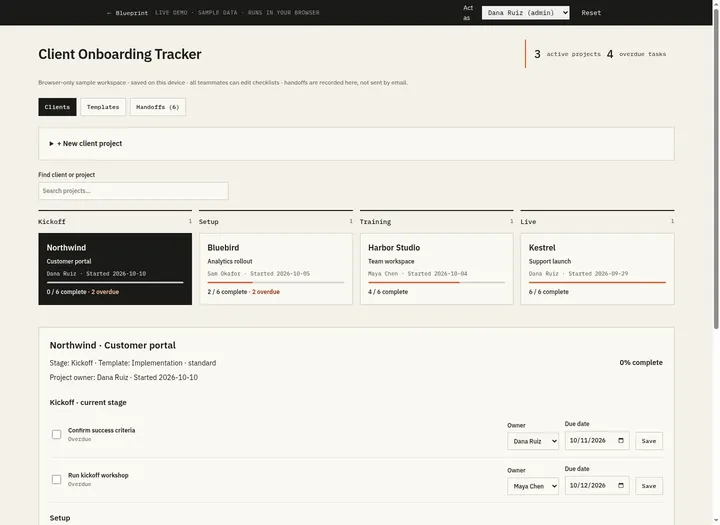 Open demo
The blueprint
Paste the whole spec into your AI builder, then send each prompt in the Build plan section one at a time. Check each phase before moving on.
How to use this file: paste this whole document into your AI builder (Claude, ChatGPT, Cursor, Lovable, Replit, Type) as context. Then send the build prompts in section 16 one at a time. Do not move to the next phase until the acceptance checks for the current phase pass.
1. The problem
"Client onboarding lives in one person's head, and things fall through the cracks."
A new client signs. One person knows the steps: agree what success looks like, run the kickoff, import the client's data, check access, train their champions, sign off go-live. The steps live in that person's notes and in chat. Nobody else can say which client is ready to move on, who owns the next step, or which promise to the client is already late. When that person is out, onboarding stalls.
2. What the real product does
Research basis: Rocketlane's product, pricing and help-center pages (rocketlane.com, rocketlane.com/pricing, help.rocketlane.com/support/solutions/articles/67000692193-how-to-create-project-templates-, help.rocketlane.com/support/solutions/articles/67000699280-project-plan, help.rocketlane.com/support/solutions/articles/67000738577-how-to-invite-customers-to-your-portal), October 2026. Rocketlane describes itself as an "agentic PSA" (professional services automation) platform. For onboarding, this is what we verified:
- Templates. A project template lists phases and the tasks inside them. Each phase and task has a start day and a duration counted from the start of the project. An assignee can be a role placeholder, such as "Implementation Manager", that is replaced by a real person once the project begins.
- Projects from templates. A template is imported when a project is created. Dynamic conditions can leave phases or tasks out based on project fields (their example: a kickoff meeting only for projects with ARR over $100K).
- Project plan. A board view shows each phase as a column with its tasks under it. A timeline view shows a Gantt chart with dependencies, a critical path, baselines and a bulk "Shift dates" action. Each phase has a status: To do, In progress, Completed or Blocked. A task with a dependency cannot be completed until the task it depends on is finished.
- Shared and private work. Phases and tasks are either shared with the customer or private to your team. A "Present" mode for kickoff calls hides private items. Tasks can be filtered by the company responsible: yours, the customer's or a partner's.
- Customer portal. Customers are invited by link, from inside a project, or through a portal embedded in your own product. They sign in with a magic link sent to their email. Invite links expire after 7 days, and access can be limited to the customer's email domains.
- Milestones. Marking a task as a milestone sends the customer a CSAT survey when the task is completed.
- Beyond onboarding. The same product covers time tracking and timesheets, resource planning, project budgets, invoicing and revenue recognition, AI agents (sold as "Nitro"), and integrations including Salesforce, HubSpot, Jira, Slack and Zapier.
- Pricing. The pricing page lists Standard at $49 and Premium at $69 per team member per month, billed annually, each with a minimum of 5 team members, and Enterprise at custom pricing. Every plan lists unlimited projects and unlimited customer members. The branded customer portal, magic-link login and milestone CSAT appear from Standard up; resource and financial management from Premium. An "AI Fills" add-on is listed at $29 per user per month.
What this blueprint keeps
Reusable templates with checklist tasks, default owners and due-date offsets per stage; one project per client engagement, copied from a template; a strict gate at the end of each stage; handoffs that change the project owner and carry a note; due dates, overdue rules and a daily digest; an internal board by stage across all clients; shared versus internal tasks; a bulk date shift; a read-only client progress link; an append-only activity log; CSV export.
What this blueprint deliberately leaves out
Client logins, and a portal where clients tick off their own tasks, approve, comment or upload files (v1 has a read-only link instead). Role placeholders, dynamic template conditions and task-to-task dependencies (v1 has one gate per stage). Gantt timelines, baselines and critical path. Milestone CSAT surveys. Time tracking, resource planning, budgets, invoicing and revenue recognition. AI agents. CRM, Jira and Slack integrations. Embedding the portal in your own product. These matter to services teams running many billable implementations at once. A team of 2 to 25 people onboarding a few clients a month does not need them. If you need several of them, Rocketlane is worth paying for.
3. Scope of v1
- One process, client onboarding, in four fixed stages: Kickoff → Setup → Training → Live. Live is the finish line and has no tasks.
- Several templates (for example "Implementation · standard"), each a checklist of tasks per stage. A project copies its template once, when it is created.
- One team time zone, set by an admin, decides what "today" is. Due dates are calendar dates with no time.
- Team members sign in. Clients never sign in; a client can be sent a read-only progress link.
- Web app that works on a phone, plus email notifications and a daily digest through an outbox.
4. Roles
| Role | Who | Can do |
|---|---|---|
| Member | Everyone on the team | See every project, task and handoff. Create projects. Complete or reopen their own tasks in a project's current stage. Comment. |
| Project owner | The member who owns a project right now (it usually changes at each handoff) | On that project: complete or reopen any task in the current stage; add, edit and skip tasks; shift dates; hand off; change owner; put on hold and resume; edit the client and project name; create and revoke the client link. |
| Admin | One or more people | Everything a project owner can do, on every project. Cancel projects. Manage people, templates and settings. View the outbox. Export CSV. |
A person can hold several roles. Everyone can see everything (that is how onboarding stops living in one head); only the actions above are restricted.
5. Client onboarding tracker data model
All timestamps are UTC. All IDs are strings (UUID or similar). Dates (start_date, due_date) are calendar dates without a time, stored as YYYY-MM-DD. Text is trimmed before it is checked or saved.
Settings (one row)
- company_name (required; shown on the client progress page), time_zone (IANA name, default "UTC"; "today" is the current date in this zone)
- last_digest_on (nullable date; set by the scheduled job, section 13)
Person
- id, name (required), title (optional, e.g. "Customer success lead")
- email (required, unique, compared case-insensitively)
- is_admin (boolean, default false), active (boolean, default true)
Template
- id, name (required, 1 to 80 characters, unique case-insensitively), description (optional, max 500 characters)
- active (boolean, default true; inactive templates are hidden from New project)
- created_at, updated_at
TemplateTask (one checklist item in a template)
- id, template_id
- stage: kickoff | setup | training (never live); position (integer; order within the stage)
- title (required, 1 to 160 characters), description (optional, max 1,000 characters)
- default_owner_id (nullable, references Person; empty means "the project owner")
- offset_days (integer, 0 to 365; the task is due this many days after the project's start date)
- visible_to_client (boolean, default true; false marks the task Internal)
Project (one client engagement)
- id, client_name (required, 1 to 80 characters), name (required, 1 to 100 characters, e.g. "Customer portal")
- template_id, template_name (copy of the template's name at creation)
- owner_id (references Person; the current project owner), created_by_id
- start_date (date); stage: kickoff | setup | training | live; status: active | on_hold | cancelled
- stage_started_at (timestamp; set at creation and at every handoff)
- on_hold_since, hold_reason (nullable; set while on hold, cleared on resume)
- cancelled_at, cancel_reason (nullable)
- live_at (nullable timestamp; set by the handoff to Live)
- created_at, updated_at
- (client_name, name) is unique, compared case-insensitively, among projects that are not cancelled.
Task (a project's copy of a template task, or a task added to one project)
- id, project_id, template_task_id (nullable; empty for tasks added by hand)
- stage: kickoff | setup | training; position (integer; order within the stage)
- title, description (same limits as TemplateTask); visible_to_client (boolean)
- owner_id (references Person); due_date (date; never before the project's start_date)
- status: open | done | skipped; skip_reason (nullable; required when skipped)
- closed_at, closed_by_id (nullable; set when done or skipped, cleared when reopened or unskipped)
- created_at, updated_at
Handoff (the stage history)
- id, project_id, from_stage, to_stage, from_owner_id, to_owner_id
- note (optional, max 1,000 characters), by_id, created_at
Event (the activity log; append-only, never updated or deleted)
- id, project_id, task_id (nullable), actor_id (nullable for system actions), created_at
- type: project_created | project_updated | owner_changed | task_added | task_updated | task_completed | task_reopened | task_skipped | task_unskipped | dates_shifted | handed_off | put_on_hold | resumed | cancelled | reassigned | commented | link_created | link_revoked
- comment (nullable; comment text, handoff note, or skip, hold or cancel reason); data (JSON, nullable; e.g. old and new due date, from and to owner, days shifted)
ClientLink
- id, project_id, token (unique; at least 128 random bits, URL-safe)
- created_by_id, created_at, revoked_at (nullable), last_viewed_at (nullable)
Notification (outbox; makes notifications testable and retryable)
- id, person_id, project_id (nullable), subject, body
- kind: project_created | stage_started | handed_off | owner_changed | task_assigned | went_live | on_hold | resumed | cancelled | commented | digest
- status: queued | sent | logged | failed
- attempts (integer), created_at, sent_at, error
Progress, overdue counts and days in stage are computed from tasks and dates, never stored.
6. Creating a project from a template
Run this when someone creates a project. It must be deterministic: the same template, start date and owner always produce the same tasks. The New project screen shows the result as a preview before anything is saved.
- Validate. Client name and project name (R13), a real calendar date for the start date (past dates are allowed), an active project owner, and a usable template (R10).
- Copy tasks. For each template task, in stage order (Kickoff, Setup, Training) and then by position, create a Task with the same stage, position, title, description and visible_to_client, with status open.
- Due dates. due_date = start_date + offset_days, counted in calendar days on the date itself (R15).
- Owners. The owner is the template task's default owner if one is set and active; otherwise the project owner. When an inactive default owner is replaced, say so in the preview and record it in the project_created event data.
- Save. stage = kickoff, status = active, owner_id = the chosen owner, stage_started_at = now, template_name = the template's current name. Write one project_created event and the notifications in section 11, in the same transaction.
- Stale template. If the template's updated_at changed after the preview was shown, refuse with "The template changed. Review the new preview." and show the new preview.
Worked examples ("Implementation · standard" from section 15, owner Dana)
| Case | Start date | Resulting tasks (owner, due date) |
|---|---|---|
| Ridgeway · Partner portal | 2026-10-13 | Kickoff: Confirm success criteria (Dana, Oct 14), Run kickoff workshop (Maya, Oct 15) · Setup: Import client data (Sam, Oct 18), Verify access and permissions (Ben, Oct 19, Internal) · Training: Train client champions (Maya, Oct 22), Approve go-live checklist (Dana, Oct 23) |
| Same, with Ben inactive | 2026-10-13 | As above, except Verify access and permissions goes to Dana. The preview says "Ben Cho is inactive; assigned to Dana Ruiz." |
| Year end | 2026-12-28 | Due Dec 29, Dec 30, Jan 2, Jan 3, Jan 6, Jan 7 (2027) |
| Leap year | 2028-02-25 | Due Feb 26, Feb 27, Mar 1, Mar 2, Mar 5, Mar 6 |
| Daylight saving ends (America/New_York) | 2026-10-31 | Due Nov 1, Nov 2, Nov 5, Nov 6, Nov 9, Nov 10. Adding 24-hour periods to a midnight timestamp gets this wrong (Nov 1 twice). |
| A task is added to the template after Ridgeway exists | 2026-10-13 | Ridgeway keeps its six tasks (R9). Only projects created afterwards get the new task. |
7. Stage gates, progress and overdue
Stages run in a fixed order: Kickoff → Setup → Training → Live. Reaching Live means onboarding is done.
- Gate. A project leaves its current stage only when every task in that stage is done or skipped, and only one stage forward (R3, R4).
- Progress = (done + skipped) ÷ all tasks, as a whole percent rounded half up (R8).
- Overdue. An open task on an active project whose due date is before today (R7). Due today is not overdue. Days overdue = today − due date. Tasks in later stages count too: an overdue later-stage task means the plan has slipped.
- Days in stage = today − the date of stage_started_at, in the team time zone.
Worked example (seed from section 15 loaded on 2026-10-13, so Northwind started on Oct 10)
| Project | Stage | Closed / all | Progress | Overdue (owner, days) | Due today |
|---|---|---|---|---|---|
| Northwind · Customer portal | Kickoff | 0 / 6 | 0% | Confirm success criteria (Dana, 2), Run kickoff workshop (Maya, 1) | none |
| Bluebird · Analytics rollout | Setup | 2 / 6 | 33% | Import client data (Sam, 3), Verify access and permissions (Ben, 2) | none |
| Harbor Studio · Team workspace | Training | 4 / 6 | 67% | none | Train client champions (Maya) |
| Kestrel · Support launch | Live | 6 / 6 | 100% | none | none |
The Board header reads "3 in progress · 4 overdue tasks".
Walk-through: Dana completes "Confirm success criteria" and Maya completes "Run kickoff workshop" on Northwind. Progress is 2 / 6 = 33% and nothing is overdue. Dana hands off to Sam: the stage becomes Setup, the project owner becomes Sam, the Setup tasks still belong to Sam and Ben, and one Handoff row is written. A second handoff is refused until both Setup tasks are done or skipped. If Sam skips "Import client data" with the reason "Client has no legacy data", progress is 3 / 6 = 50%, and the gate still waits for "Verify access and permissions".
8. Lifecycle
Project
| Action | Who | From | To | Side effects |
|---|---|---|---|---|
| Create | Any member | (none) | Kickoff, active | Section 6. Event project_created |
| Hand off | Project owner, admin | Kickoff, Setup or Training; active | Next stage | Gate (R3, R4). owner_id = chosen next owner, stage_started_at = now, one Handoff row, event handed_off. To Live: live_at = now |
| Change owner | Project owner, admin | active or on_hold, not Live | same | Stage unchanged. Event owner_changed |
| Edit details | Project owner, admin | active or on_hold, not Live | same | Client and project name only (R13). Event project_updated |
| Shift dates | Project owner, admin | active or on_hold, not Live | same | R17. Event dates_shifted |
| Put on hold | Project owner, admin | active, not Live | on_hold | Reason of 3+ characters required. on_hold_since = now. Event put_on_hold |
| Resume | Project owner, admin | on_hold | active | Optional shift by the days on hold (R18). Event resumed, with the shift in its data |
| Cancel | Admin | active or on_hold, not Live | cancelled | Reason of 3+ characters required. The client link stops working. Event cancelled |
| Comment | Anyone | any | same | Event commented |
Final states: Live and cancelled. Nothing changes a project in a final state except comments and, for Live, the client link (section 12).
Task
| Action | Who | From | To | Conditions |
|---|---|---|---|---|
| Complete | Task owner, project owner, admin | open | done | The task's stage is the current stage and the project is active (R2). Sets closed_at, closed_by_id |
| Reopen | Task owner, project owner, admin | done | open | Same conditions. Clears closed_at and closed_by_id |
| Skip | Project owner, admin | open | skipped | Current or later stage; project active or on hold. Reason required (R12) |
| Unskip | Project owner, admin | skipped | open | Current or later stage; project active or on hold |
| Edit | Project owner, admin | open | open | Current or later stage; project active or on hold. Title, owner, due date, client visibility (R11) |
| Add | Project owner, admin | (none) | open | Current or later stage; project active or on hold. Placed at the end of its stage |
9. Client onboarding tracker business rules
- R1. Signed-in team members can see everything. Any member can create a project, comment, and complete or reopen their own tasks (R2). Every other change to a project is limited to its current owner and admins; cancelling and every Admin screen are limited to admins. Check permissions on the server for every action; hiding buttons is not enough.
- R2. A task can be completed or reopened only while the project is active and the task's stage is the current stage, by the task owner, the project owner or an admin. When someone other than the task owner does it, the activity log says so: "Completed by Dana Ruiz for Maya Chen". Refusals: a later-stage task, "Training hasn't started yet. This task starts after Setup."; a project on hold, "This project is on hold. Its tasks can be completed or reopened after it resumes."; a Live or cancelled project, "This project is live; its tasks are locked." (or cancelled); anyone else, "Only the task owner, the project owner or an admin can complete this task." Other owner-only actions say "Only the project owner or an admin can do this."
- R3. Gate: a handoff is allowed only if the project is active, its stage is not Live, and every task in the current stage is done or skipped. Otherwise refuse and name the open tasks: "Kickoff isn't finished: 2 open tasks (Confirm success criteria, Run kickoff workshop)." Check the gate and change the stage in one transaction. The Hand off form sends the stage the person is handing off from; if the project has already left it, refuse with "This project already moved to Setup." (naming the stage it is in now).
- R4. A handoff moves exactly one stage forward, never skips a stage and never moves back. The next owner must be an active person (keeping the current owner is allowed). It does not change task owners or due dates. The note is optional.
- R5. Live and cancelled are final (section 8). Once a stage is handed off, its tasks are locked for good.
- R6. due_date = start_date + offset_days in calendar days, with no business-day logic. No task's due date may be earlier than its project's start date.
- R7. A task is overdue when it is open, its project is active, and its due date is before today. Due today is not overdue. Overdue counts include tasks in later stages.
- R8. Progress = (done + skipped) ÷ all tasks, rounded half up to a whole percent. A project with no tasks shows 0%.
- R9. Creating a project copies the template's tasks and stores the template's name. Editing, renaming or deactivating a template never changes existing projects.
- R10. A template can start a project only if it is active and has at least one task in each of Kickoff, Setup and Training. Incomplete templates can be saved and are labelled, for example "Incomplete: needs Setup and Training tasks".
- R11. Open tasks in the current or a later stage can be edited by the project owner or an admin. A done task must be reopened before it can be edited ("Reopen the task first."). Tasks are never deleted; skip them instead.
- R12. Skipping requires a reason of at least 3 characters. Skipped tasks count as closed for the gate and for progress. Unskipping returns the task to open and clears the reason.
- R13. Client name 1 to 80 characters, project name 1 to 100, template name 1 to 80 and unique (case-insensitive), task title 1 to 160. Person name 1 to 100 and title up to 100, email up to 254, company name 1 to 100, a comment 1 to 2,000, and a skip, hold or cancel reason 3 to 1,000. The pair (client name, project name) is unique, case-insensitive, among projects that are not cancelled.
- R14. Every successful action writes exactly one Event row ("Reassign all" writes one per affected project). Events are never edited or deleted; there is no API or UI to do so. A refused action writes nothing and changes nothing. An action that would change nothing (saving an unchanged task or project, or changing the owner to the current owner) is refused with "Nothing changed."
- R15. "Today" is the current date in Settings.time_zone. Do date arithmetic on dates, never by adding 24-hour periods to timestamps.
- R16. Only active people can own projects or tasks or appear in owner pickers. A person who owns open tasks on projects that are active or on hold, or owns such a project, cannot be deactivated: refuse and say how many of each they own. Live and cancelled projects do not count here (a Live project keeps status active, and a cancelled project's open tasks can never be closed). "Reassign all to…" moves all of it to one active person in one transaction. Nobody can deactivate themselves, and the last active admin can't be deactivated or lose admin rights.
- R17. Shift dates moves the due date of every open task on the project by N whole days (−365 to 365, not 0). If any new due date would fall before the start date, nothing moves.
- R18. While a project is on hold, its tasks cannot be completed or reopened, it cannot be handed off, its tasks are not overdue, and it is left out of digests. Planning still works: edit, add, skip, unskip, shift dates, change owner. Resume proposes a shift equal to the whole days since on_hold_since; the person resuming can change it to any value, including 0. R17's limit applies: if the shift would move any open task before the start date, the resume is refused and the project stays on hold.
10. Client onboarding tracker screens
- Board (home). Four columns: Kickoff, Setup, Training, Live. Header: "3 in progress · 4 overdue tasks" (in progress means not Live and not cancelled, so projects on hold count; the header counts only the projects that match the current search and filters). Each card: client name, project name, owner, progress bar with percent, "2 overdue" (or, when nothing is overdue, "1 due today"), "In Setup 6d" (or "Live since Oct 9"), and an On hold badge. In each column, sort by overdue tasks (most first), then by days in stage (longest first), then by client and project name. Search by client or project (case-insensitive), filter by owner ("Me" or any person) and template. Cancelled projects and projects live for more than 30 days are hidden unless "Show cancelled" or "Show older live projects" is on. Button: New project. On a phone the columns stack. Empty column: "No projects in Setup."
- New project. Client name, project name, template (active templates; incomplete ones are listed but disabled, with their label), start date (default today), project owner (default the signed-in person). A live preview of section 6: tasks grouped by stage with owner, due date and the Internal tag, plus warnings such as "2 tasks will already be overdue" and "Ben Cho is inactive; assigned to Dana Ruiz." Button: Create project.
- Project detail. Header: client and project name, template name, owner, status, start date, progress, overdue count, and a stage tracker showing when each stage started. One checklist per stage: checkbox, title, owner, due date with "2 days overdue" or "due today", Internal tag, who closed it and when, skip reason. The current stage is expanded. Earlier stages are locked. Later stages are visible, with disabled checkboxes and "Starts after" the stage before them (for example "Starts after Setup"). For the project owner and admins: edit task, skip or unskip, add task, Shift dates, Change owner, Put on hold or Resume, Edit details, and Cancel (admins only). Hand off panel: next owner, optional note, Hand off button. Keep the button enabled and show the server's gate message when it refuses. If the next stage already has overdue tasks, suggest Shift dates. Client link panel (section 12). Comments. Activity log (collapsed by default): every event with actor, time and comment.
- My tasks. The signed-in person's open tasks, grouped: Overdue, Due today, Next 7 days, Later, Waiting for an earlier stage, Paused (project on hold). Overdue, Due today, Next 7 days (tomorrow to 7 days from today) and Later hold only tasks in their project's current stage; an open task in a later stage goes under Waiting for an earlier stage even when it is overdue, and still shows "N days overdue". Live and cancelled projects are left out. Sorted by due date, then client. Tick a current-stage task straight from the list. Empty state: "Nothing assigned to you."
- Handoffs. Newest first: time, client and project, from stage → to stage, previous owner → new owner, who handed off, note, link to the project. Filter: last 7 days, last 30 days, all (the default), by calendar date in the team time zone. Empty state: "No handoffs yet."
- Projects. Table of all projects: client, project, template, stage, status, owner, start date, progress, overdue, days in stage, live date. Filters: stage, status, owner, template, search. Admins get Export CSV: one row per project matching the filters, with columns client, project, template, stage, status, owner, start_date, live_date, tasks_total, tasks_done, tasks_skipped, tasks_open, overdue, progress_percent, days_in_stage, days_to_live (live date − start date; blank until Live). Stage and status use the stored values (setup, on_hold), and owner is the person's name. The first row is a header with exactly these column names. Dates are YYYY-MM-DD in the team time zone.
- Admin: Templates. List with name, task count per stage, and status: Usable, Incomplete (with the label from R10) or Inactive. Editor: name, description, active; tasks grouped by stage with title, default owner, offset days, Internal toggle and description; add, edit, remove, move up and down. Under the editor, a live example listing every task: "A project starting today gets: Confirm success criteria (Dana Ruiz), due Oct 14 …". Warn next to any task whose default owner is inactive. Note at the top: "Changes apply to new projects only."
- Admin: People. Name, email, title, admin, active, open tasks owned, projects owned. Actions: add, edit, deactivate (R16), "Reassign all to…".
- Admin: Settings. Company name, time zone. In development only: the clock control and "Reload seed data".
- Admin: Outbox. Notifications newest first: created, recipient, kind, subject, status, attempts, error. Click a row to read the body. In development only: "Run job now".
- Client progress page. Public, read-only, no sign-in (section 12).
All screens must work on a phone. Use native checkboxes and labelled inputs, and show overdue as text, not only as colour.
11. Notifications
| Trigger | Recipient | Content |
|---|---|---|
| Project created | Project owner, unless they created it | "Jo Park created Ridgeway · Partner portal and made you the owner. Your Kickoff tasks: Confirm success criteria, due Oct 14." |
| Stage started (creation, or a handoff to Setup or Training) | Owners of open tasks in the new stage, except the actor and the project owner | "Setup has started on Northwind · Customer portal. Your tasks: Verify access and permissions, due Oct 16." One email per person, listing all their tasks in that stage |
| Handed off to you, or made owner | The new project owner, unless they did it | "Dana Ruiz handed Northwind · Customer portal to you at Setup. Note: Data export arrives Friday. Your tasks: Import client data, due Oct 15." |
| Task assigned (edit, add, reassign all) | The new task owner, unless they did it | "Sam Okafor assigned you Verify access and permissions on Bluebird · Analytics rollout, due Oct 11." Reassign all sends one email listing everything moved |
| Went live | Admins, except the actor | "Kestrel · Support launch is live, 10 days after its start date." |
| On hold, resumed, cancelled | The project owner and owners of open tasks on the project, except the actor | The reason, or on resume the number of days the dates moved |
| Comment | The project owner, unless they wrote it | The comment |
| Daily digest | Each active person with at least one item (section 13) | Overdue, Due today, On your projects, Late across the team |
Write every notification to the outbox in the same transaction as the action, then send after commit. If no email provider is configured, mark the row "logged" instead of sending. If sending fails, keep the row as failed with the error and retry on the next scheduled run, up to 5 attempts in total. A notification failure must never block or undo an action. Seeding writes no notifications.
12. Client progress link
A read-only page a client can open without signing in. It is optional: a team that doesn't want it can skip step 1 of Phase 4 and its link checks.
- Actions. On the project page, the project owner or an admin can create a link, copy it, replace it (revoke the old link and create a new one, written as one link_created event that records the replaced link) or revoke it. One active link per project. The panel shows when the link was created and last viewed. Each view sets last_viewed_at and writes no Event (a view is not an action under R14).
- Token. At least 128 random bits from a secure random generator, URL-safe, in the path
/p/<token>. Never write it to logs. - What the page shows. The company name ("Copperline"), client and project name, the stage tracker with the current stage highlighted (or "Live since Oct 9"), a count such as "2 of 5 done" (done or not needed, out of the tasks shown), and every task whose visible_to_client is true, grouped by stage: title, owner's first name, and "Done Oct 7", "Not needed" or "Due Oct 15". A project on hold shows "Paused".
- What it never shows. Internal tasks, comments, the activity log, reasons for skips, holds or cancellation, email addresses, overdue labels, or other projects. Build the page from its own query that selects only the fields above, so an Internal task cannot leak through the page's HTML or data.
- When it stops working. When revoked, when the project is cancelled, or once more than 30 days have passed since go-live (today minus the date of live_at in the team time zone is over 30; on day 30 it still works, the same rule the Board uses for older live projects). Unknown, revoked, cancelled and expired links all show the same page: "This link is not active. Ask your Copperline contact for a new one." Creating a link for a cancelled project, or one live for more than 30 days, is refused.
- Headers.
Cache-Control: no-store(so a revoke takes effect at once),X-Robots-Tag: noindex,Referrer-Policy: no-referrer.
13. Scheduled job, digest and time
Scheduled job (runs every hour: a platform cron calling /api/cron/tick, protected by a CRON_SECRET header sent as Authorization: Bearer <CRON_SECRET>, which is what Vercel Cron sends; a missing or wrong value gets 401):
- Digest. If the time in the team time zone is 08:00 or later and last_digest_on is before today, build one digest per active person, queue the non-empty ones, and set last_digest_on to today, all in one transaction. A day the job misses entirely is not sent late.
- Delivery. Send queued notifications and retry failed ones (up to 5 attempts).
Digest contents. Only active projects count. Each task appears at most once per digest. Each item reads "Task · Client" as in the table below, with the project name added ("Task · Client · Project") when the client has more than one project that isn't cancelled. Overdue items add "(N days)", and items owned by someone else add their first name: "(Ben, 2 days)".
- Overdue: your open tasks in their project's current stage, due before today, with days overdue.
- Due today: your open tasks in their project's current stage, due today.
- On your projects: overdue tasks on projects you own, in any stage, that the two sections above don't already list, with their owner. This includes your own overdue tasks in later stages (section 14).
- Late across the team (admins only): tasks 3 or more days overdue on any project, not already listed above.
Worked example (seed data, job run at 08:00 on the day the seed was loaded): five digests.
| Person | Overdue | Due today | On your projects | Late across the team |
|---|---|---|---|---|
| Dana | Confirm success criteria · Northwind (2 days) | none | Run kickoff workshop · Northwind (Maya, 1 day) | Import client data · Bluebird (Sam, 3 days) |
| Ana | none | none | none | Import client data · Bluebird (Sam, 3 days) |
| Maya | Run kickoff workshop · Northwind (1 day) | Train client champions · Harbor Studio | none | not an admin |
| Sam | Import client data · Bluebird (3 days) | none | Verify access and permissions · Bluebird (Ben, 2 days) | not an admin |
| Ben | Verify access and permissions · Bluebird (2 days) | none | none | not an admin |
Jo and Lee get nothing. A run at 07:00 sends nothing; a second run at 09:00 the same day sends nothing.
14. Edge cases
- Two people hand off the same project at once: the second gets "This project already moved to Setup." (R3).
- Someone ticks a task on a stale screen after its stage was handed off: "Kickoff is finished; its tasks are locked." (R5).
- A start date in the past is allowed. The preview warns how many tasks will already be overdue.
- A later-stage task passes its due date: it counts as overdue and appears in the project owner's digest, but cannot be completed until its stage starts. The owner can shift dates or skip it.
- The next stage already has overdue tasks at handoff: the panel suggests Shift dates; the handoff is not blocked.
- An admin changes the time zone: "today" may change, so a task can move between due today and overdue. Due dates themselves never change.
- Work found missing during Training that belongs to Setup: add a task to Training. Stages never move back.
15. Seed data
Company name: Copperline. Time zone: America/New_York. last_digest_on: empty. Emails are first name at copperline.example (dana@copperline.example).
| Person | Title | Admin |
|---|---|---|
| Dana Ruiz | Head of Ops | yes |
| Ana Lima | Finance lead | yes |
| Maya Chen | Customer success lead | no |
| Sam Okafor | Engineering lead | no |
| Ben Cho | IT | no |
| Jo Park | Account manager | no |
| Lee Park | Engineer | no |
Template "Implementation · standard" (active, usable)
| Stage | Position | Task | Default owner | Offset days | Client sees it |
|---|---|---|---|---|---|
| Kickoff | 1 | Confirm success criteria | Dana | 1 | yes |
| Kickoff | 2 | Run kickoff workshop | Maya | 2 | yes |
| Setup | 1 | Import client data | Sam | 5 | yes |
| Setup | 2 | Verify access and permissions | Ben | 6 | no (Internal) |
| Training | 1 | Train client champions | Maya | 9 | yes |
| Training | 2 | Approve go-live checklist | Dana | 10 | yes |
Template "Enterprise · draft" (active, incomplete): one Kickoff task, "Complete security questionnaire", Ben, offset 3, client sees it.
Projects. All four use "Implementation · standard", were created by Jo at 09:00 on their start date, and had Dana as Kickoff owner. Dates are relative to the day the seed is loaded (the examples in this document use 2026-10-13).
| Client | Project | Start date | Stage | Owner | Stage started | Done tasks |
|---|---|---|---|---|---|---|
| Northwind | Customer portal | 3 days ago | Kickoff | Dana | 3 days ago | none (0 of 6) |
| Bluebird | Analytics rollout | 8 days ago | Setup | Sam | 6 days ago | Kickoff tasks (2 of 6) |
| Harbor Studio | Team workspace | 9 days ago | Training | Maya | 3 days ago | Kickoff and Setup tasks (4 of 6) |
| Kestrel | Support launch | 14 days ago | Live | Dana | 4 days ago (live_at) | all (6 of 6) |
Each project has the template's six tasks, with owners and due dates from section 6 (24 tasks in all). Each done task was completed by its owner at 16:00 team time on its due date. Nothing is skipped.
Handoffs (each at 17:00 team time, newest first):
| When | Project | Stages | Owner change | By |
|---|---|---|---|---|
| 3 days ago | Harbor Studio | Setup → Training | Sam → Maya | Sam |
| 4 days ago | Kestrel | Training → Live | Maya → Dana | Maya |
| 6 days ago | Bluebird | Kickoff → Setup | Dana → Sam | Dana |
| 7 days ago | Harbor Studio | Kickoff → Setup | Dana → Sam | Dana |
| 8 days ago | Kestrel | Setup → Training | Sam → Maya | Sam |
| 12 days ago | Kestrel | Kickoff → Setup | Dana → Sam | Dana |
One comment on Bluebird from Sam, 2 days ago: "Waiting on the client's data export." Write the matching events (project_created, task_completed, handed_off, commented) so every activity log has history. No client links and no notifications are seeded.
16. Client onboarding tracker build plan
Send these prompts one at a time after pasting this file. Each phase ends with checks you can run by clicking through the app. Start each phase's checks from a fresh load of the seed (the Reload seed data button); checks within a phase run in order on the same data.
Phase 1: Foundation
Using the Client Onboarding Tracker blueprint above, build Phase 1 only.

1. Set up the data model from section 5 exactly (Settings, Person, Template, TemplateTask, Project, Task, Handoff, Event, ClientLink, Notification) with a real database.
2. Add sign-in. Use the platform's built-in auth or Google sign-in limited to our company email domain. A signed-in email must match an active Person; anyone else sees "Ask an admin to add you."
3. Build Admin → People, Admin → Templates and Admin → Settings (section 10, screens 7 to 9) with create, edit and deactivate (the R16 check on deactivating someone who still owns work comes in Phase 3, but nobody can deactivate themselves or the last active admin). Only admins can open them; anyone else sees "Admins only." Check this on the server, not only in the menu. Enforce the limits in section 5 and R13 on the server, and label each template as R10 describes.
4. Load the seed data from section 15, with dates relative to today.
5. Development only: a "sign in as" switcher listing active people; a clock control that moves "now" forward or back by a day or an hour, or sets it to a given date and time in the team time zone (the Phase 3 checks need 07:00 and 08:00 today), showing the app's current date in the header while it is moved; and "Reload seed data", which deletes all data and rebuilds the seed relative to the app's today. Every date and time calculation must read "now" from this one clock.

Do not build project screens yet. When you're done, list what you built and anything in the spec you had to interpret.
Acceptance checks
- Admin → People lists the seven people from section 15 with their titles. Dana and Ana are admins.
- Signed in as Jo, there is no Admin menu, and opening the Admin → Templates address directly shows "Admins only." Signed in as Ana, all three Admin screens open.
- Admin → Templates shows "Implementation · standard" as Usable with six tasks (owners Dana, Maya, Sam, Ben, Maya, Dana; offsets 1, 2, 5, 6, 9, 10; "Verify access and permissions" marked Internal) and "Enterprise · draft" as "Incomplete: needs Setup and Training tasks".
- Dana cannot save a new template named "implementation · STANDARD" (duplicate name) or a task with offset 366. A task with offset 365 saves.
- Dana deactivates Lee: he disappears from the sign-in-as switcher and from the default-owner picker. Reactivating him brings him back in both places.
- Moving the clock forward one day changes the date in the header and moves every date in the Templates live example one day later. Moving it back restores them.
Phase 2: Projects, checklists and stage gates
Using the Client Onboarding Tracker blueprint above, build Phase 2 only.

1. Implement project creation (section 6) as a pure function, with unit tests for every row of its worked-examples table.
2. Implement progress, overdue and days in stage (section 7) as pure functions, with unit tests for the seed table in section 7.
3. Build screens 1 to 4 and 6 from section 10: Board, New project with the live preview, Project detail, My tasks and Projects (without CSV export).
4. Implement these actions from section 8: create, hand off, change owner, edit details, comment, and every task action. Enforce rules R1 to R15, and the owner rule in the first sentence of R16, on the server, not only by hiding buttons.
5. Write exactly one Event row per action (R14) and show the activity log on the project page. Write a Handoff row for every handoff and show stage start dates in the stage tracker.
6. Check the gate and change the stage in one database transaction, so two people cannot hand off the same project twice.

Do not send notifications yet; just write rows to the Notification table with status queued. When you're done, list what you built and anything in the spec you had to interpret.
Acceptance checks (reload the seed data first; sign in as each person with the switcher)
- The Board shows Northwind · Customer portal in Kickoff (Dana, 0%, "2 overdue"), Bluebird · Analytics rollout in Setup (Sam, 33%, "2 overdue"), Harbor Studio · Team workspace in Training (Maya, 67%, "1 due today") and Kestrel · Support launch in Live (Dana, 100%). The header reads "3 in progress · 4 overdue tasks".
- Jo creates client "Ridgeway", project "Partner portal", from "Implementation · standard", starting today, owner Dana. The preview and the saved project both show six tasks due 1, 2, 5, 6, 9 and 10 days from today, owned by Dana, Maya, Sam, Ben, Maya and Dana. Ridgeway appears in Kickoff below Northwind.
- Creating "ridgeway" / "Partner Portal" again is refused as a duplicate; "Ridgeway" / "Billing migration" is accepted. "Enterprise · draft" is listed but disabled, and a direct request that uses it is refused.
- Signed in as Jo, Northwind's checkboxes are disabled and a direct request to complete "Confirm success criteria" is refused. Signed in as Maya, "Train client champions" on Northwind shows "Starts after Setup" and a direct request to complete it is refused.
- Dana presses Hand off on Northwind and sees "Kickoff isn't finished: 2 open tasks (Confirm success criteria, Run kickoff workshop)." Dana and Maya each complete their own task. Northwind shows 33% and no overdue label.
- Dana hands Northwind off to Sam with the note "Data export arrives Friday". The card moves to Setup with owner Sam; "Import client data" still belongs to Sam and "Verify access and permissions" to Ben; the Kickoff checkboxes are locked. A second handoff is refused until Setup is finished.
- On Bluebird, Sam skips "Import client data" with the reason "Client has no legacy data" (progress 50%), then reassigns "Verify access and permissions" to Lee. Signed in as Lee, it is listed under Overdue in My tasks; he completes it (67%). Sam hands off to Maya and Bluebird moves to Training.
- On Harbor Studio, Maya completes "Train client champions" and then cannot change its owner until she reopens it. Setting the due date of "Approve go-live checklist" to the day before the project's start date is refused.
- Kestrel has no Hand off button and its checkboxes are locked; a direct request to reopen "Approve go-live checklist" is refused. Northwind's activity log lists its creation, both completions and the handoff with its note, each with actor and time.
Phase 3: Notifications, digest, holds and people changes
Using the Client Onboarding Tracker blueprint above, build Phase 3 only.

1. Deliver the notifications in section 11 from the Notification outbox. Use any email provider we have; if none is configured, mark rows "logged" instead of sending. Build Admin → Outbox (section 10, screen 10).
2. Build the scheduled job in section 13 at /api/cron/tick, protected by a CRON_SECRET header: the 08:00 daily digest, delivery and retries. In development, let the job take an optional "now", and add "Run job now" to Admin → Outbox, using the development clock.
3. Add put on hold, resume with the proposed shift, shift dates and cancel (section 8, R17, R18). Enforce them on the server.
4. Add R16 to Admin → People: block deactivating anyone who still owns open tasks or projects that are active or on hold (not Live or cancelled, as R16 says), and add "Reassign all to…". Show the inactive-owner warning in Admin → Templates.
5. Add tests for the seed digest table in section 13, for no second digest on the same day, and for a failed send being retried on the next run.

When you're done, list what you built and anything in the spec you had to interpret.
Acceptance checks (reload the seed data first)
- With the clock at 07:00 today (team time), Run job now creates no digests. At 08:00 it creates exactly five, for Dana, Ana, Maya, Sam and Ben. Running it again at 09:00 creates none.
- The digests match the table in section 13. Sam's lists "Import client data · Bluebird (3 days)" under Overdue and "Verify access and permissions · Bluebird (Ben, 2 days)" under On your projects. Maya's lists "Train client champions · Harbor Studio" under Due today. Ana's contains only "Import client data · Bluebird (Sam, 3 days)".
- Dana completes both Northwind Kickoff tasks (the activity log shows "Completed by Dana Ruiz for Maya Chen") and hands off to Sam with a note. The outbox gains exactly two emails: the handoff to Sam, with the note and "Import client data", and "Setup has started on Northwind · Customer portal" to Ben. With no email provider configured, both show "logged".
- Sam puts Bluebird on hold with the reason "Client paused for budget review". Its card shows On hold and no overdue label. Signed in as Ben, "Verify access and permissions" cannot be ticked and a direct request is refused. Ben, Maya and Dana each get an on-hold email; Sam does not.
- Move the clock 5 days forward. Sam resumes Bluebird; the dialog proposes moving open due dates 5 days later and he accepts. Each open task is due 5 days later than before, and the card shows "2 overdue" again (3 days and 2 days).
- Signed in as Sam, Harbor Studio has no Cancel action and a direct request is refused. Dana cancels it with the reason "Client churned": it leaves the Board (it shows with "Show cancelled"), its checkboxes are locked, and Maya gets a cancellation email.
- Dana tries to deactivate Ben and is told he owns 2 open tasks. She uses "Reassign all to…" Lee: both "Verify access and permissions" tasks (Northwind and Bluebird) move to Lee, Lee gets one email listing them, and Ben can now be deactivated. Admin → Templates warns that Ben Cho is inactive, and a new project from "Implementation · standard" gives that task to its project owner.
Phase 4: Client link, handoffs and export
Using the Client Onboarding Tracker blueprint above, build Phase 4 only.

1. Build the client progress link exactly as section 12: create, copy, replace and revoke on the project page (project owner and admins, checked on the server), and the public read-only page at /p/<token>.
2. Build the Handoffs screen (section 10, screen 5).
3. Add Export CSV for admins on the Projects screen, with the columns in section 10, screen 6. Check the admin role on the server.
4. Add tests: an Internal task never appears in the public page's HTML or data; unknown, revoked, cancelled and expired links all return the same "not active" page.

When you're done, list what you built and anything in the spec you had to interpret.
Acceptance checks (reload the seed data first)
- Sam creates a client link on Bluebird. In a private window, without signing in, it shows Copperline, "Bluebird · Analytics rollout", the stage tracker at Setup, "2 of 5 done" and five tasks. "Verify access and permissions", Sam's comment, email addresses and overdue labels do not appear.
- After the page is opened, Bluebird's link panel shows a "Last viewed" time. Signed in as Jo, Bluebird has no link actions and a direct request to create one is refused.
- Sam revokes the link. Reloading the page shows "This link is not active. Ask your Copperline contact for a new one." A newly created link works; the old one stays inactive.
- Dana creates a link for Kestrel: it shows "Live since" the go-live date 4 days ago and "5 of 5 done". With the clock moved 27 days forward, the same link shows the not-active page, and Kestrel is gone from the Live column unless "Show older live projects" is on. Then move the clock back 27 days.
- Handoffs lists the six seeded handoffs newest first: Harbor Studio Setup → Training (Sam Okafor → Maya Chen, 3 days ago) at the top, Kestrel Kickoff → Setup (12 days ago) at the bottom.
- Signed in as Dana, Projects → Export CSV downloads four rows. Bluebird's has stage "setup", progress_percent 33 and overdue 2; Kestrel's has days_to_live 10. Signed in as Jo, there is no Export button and a direct request is refused.
17. Variations
- Custom stages per template, such as a Data migration stage, or Hypercare after Live.
- Client logins with client-owned tasks, approvals and file uploads.
- Task dependencies inside a stage, and business-day due dates with team holidays.
- Slack direct messages for handoffs and the daily digest.
- Create a project automatically when a deal is marked won in your CRM.
- A one-question satisfaction survey emailed to the client at go-live.
- A stage-duration report: median days per stage, per template, per quarter.
- Moving a project back one stage, with a required reason.
18. Build notes from our test build
We built this blueprint by sending the four phase prompts above, in order, to an AI builder (Claude, working in Type), then checked every acceptance item in a real browser, resetting to the seed data before each phase's checks. Where a check says something is refused, the person saw the reason on screen and a direct request got an error with nothing changed.
Result: 28 of 28 acceptance checks passed in one final browser run on a fresh database, plus 119 automated tests.
Gaps the build found, now fixed in this spec:
- R2 gave no wording for refusing a task in a later stage, on a project on hold, on a Live or cancelled project, or by someone who isn't allowed. R2 now quotes all four, plus the message for other owner-only actions.
- The edge case "This project already moved to Setup." needs the server to know which stage the person was handing off from, and nothing said the request carries it. R3 now says the Hand off form sends that stage.
- Section 5 gave no limits for a person's name, title or email, the company name, comments, or skip, hold and cancel reasons. R13 now gives them.
- R14 says every successful action writes one event, but not whether saving with no change counts. Such an action is now refused with "Nothing changed."
- R16 blocked deactivating anyone who owns "a project that is active", but a Live project keeps status active, and open tasks on a cancelled project can never be closed, so both would block for ever. R16 now leaves Live and cancelled projects out.
- Nothing stopped an admin deactivating themselves or the last admin. R16 and the Phase 1 prompt now forbid both.
- R18 let the person resuming pick any shift, but not what happens if it moves a task before the start date. R17's limit now applies and the project stays on hold.
- The Board header did not say whether its counts follow the search and filters, or how ties sort. They follow the filters, and ties sort by client and project name.
- My tasks listed six groups but not where an overdue task in a later stage goes. It goes under Waiting for an earlier stage and still shows how many days overdue it is.
- The Handoffs screen had three filters and no default, while the Phase 4 check expects handoffs from 12 days ago. "All" is now the default.
- The CSV export did not say whether owner is a name or an email, or that the file has a header row. Section 10 now says both.
- R14 counts every action as an event, and section 12 says each view of the client page sets last_viewed_at. Section 12 now says a view writes no event.
- "30 days after go-live" did not say whether the link still works on day 30. It works through day 30 and stops after, the same rule the Board uses for older live projects.
- The scheduled job was "protected by a CRON_SECRET header" without naming the header. Section 13 now says
Authorization: Bearer <CRON_SECRET>, and that anything else gets 401. - Digest items named only the client, which is ambiguous once a client has two projects (Ridgeway in the Phase 2 checks). Section 13 now adds the project name in that case and gives the format of each item.
- "On your projects" listed "other" overdue tasks, which leaves out the owner's own later-stage tasks that section 14 says appear there. The rule now includes them.
- The Phase 3 checks need the clock at 07:00 and 08:00 today, but the Phase 1 prompt only asked for a clock that moves forward or back. It now also sets a given date and time.
- A Phase 3 check credited "Verify access and permissions (2 days)" to Ben's digest, but it belongs under On your projects in Sam's, with Ben named. The check now says so.
What we did not test:
- Production sign-in. Google sign-in limited to the company domain was built, but every check used the development "sign in as" switcher.
- Sending email. Notifications and digests were logged in the outbox, not delivered, and a failing provider was simulated only in automated tests.
- The hourly job on a real scheduler. It was run from "Run job now" with the development clock; the cron endpoint and its secret were exercised only in automated tests.
- Copying the client link to the clipboard, and opening it on a real client's device. The checks read the link from the panel and opened it in a signed-out browser.
- Two people handing off the same project at the same moment from two browsers. This is covered by automated tests only.
- Hosting. The test build ran on SQLite on one server. For a hosted deploy, use a managed Postgres (or your platform's database) and the same schema.
Field report
Building a Rocketlane replacement with AI, 28 checks and 18 spec gaps
We had an AI builder build a client onboarding tracker from our spec, one phase at a time, and checked every acceptance item in a real browser. It passed all 28 checks in one final run and exposed 18 gaps in the spec, tied for the tenth-most of our twenty-two build tests. What it costs next to Rocketlane, and what we did not test.
The short answer
Yes, for a team of 2 to 25 people onboarding a few clients a month. We gave Claude, working in Type, our Client Onboarding Tracker blueprint and had it follow the four phase prompts in order, with a fresh builder for each phase that saw only the spec and the code so far. The final build passed 28 of 28 acceptance checks in one browser run on a fresh database, with 119 automated tests. It copies a template checklist for each client, gates every stage, sends a daily digest of what is late, and gives the client a read-only progress link.
The build exposed 18 gaps in the spec, places where the builder had to guess. That ties the hiring pipeline (18) for the tenth-most of our twenty-two build tests, behind the invoice reminders build (83), the link shortener (69), the inventory tracker (63), the status page (58), the employee onboarding build (44), the internal knowledge base (30), the help desk (21), the timesheets (21) and the customer feedback inbox (20), and is above the median of 14.5. Every gap is now fixed in the published spec. The item-by-item results are published as acceptance-results.json.
What it is not: a tested production deployment. The last section lists exactly what was and wasn't checked.
What we built, and what we left out
We read Rocketlane's product, pricing and help pages in October 2026 and kept what a small team uses every week:
- Templates copied once. A project copies its template's tasks, owners and due-date offsets; later template edits never change it.
- A strict gate per stage. Kickoff, Setup, Training, Live. Pressing Hand off too early shows "Kickoff isn't finished: 2 open tasks (Confirm success criteria, Run kickoff workshop)." and nothing moves.
- Handoffs with a note. One stage forward, optionally to a new owner, recorded in a Handoffs history.
- Overdue that counts the whole plan. A late task in a later stage still counts, so the Board header reads "3 in progress · 4 overdue tasks" on the seed data.
- Holds that pause the clock. A held project has no overdue tasks; resuming proposes shifting open due dates by the days on hold.
- A client link, not a client login. The page shows "2 of 5 done" and the shared tasks only. Revoked, cancelled and expired links all show "This link is not active. Ask your Copperline contact for a new one."
Left out on purpose: client logins and a client portal, role placeholders, task dependencies, Gantt timelines, milestone surveys, time tracking, resource planning, billing, AI agents and integrations. For many billable implementations at once, that is what Rocketlane is for.
What it costs next to Rocketlane
On rocketlane.com/pricing in October 2026, Rocketlane lists Standard at $49 and Premium at $69 per team member per month, billed annually, each with a minimum of 5 team members, and Enterprise at custom pricing. An AI Fills add-on is $29 per user per month. With the five-seat minimum, that is at least $2,940 a year on Standard.
The build has no subscription price, but you pay for hosting, a database, email and the time to look after it. Build when onboarding lives in one person's head. Buy when clients must work in a portal, or you need time tracking and billing. Our Rocketlane alternative page has the side-by-side.
How the build went, phase by phase
After each phase, its checks ran as Playwright scripts in Chromium, clicking through the app as the named person from a fresh seed, with direct requests wherever the server must refuse something.
- Foundation. The data model in SQLite, sign-in, Admin → People, Templates and Settings, the seed and the development controls. All 6 checks passed.
- Projects, checklists and stage gates. Project creation and the progress rules as pure functions, the Board, the live preview, the project page, My tasks and Projects. All 9 checks passed.
- Notifications, digest, holds and people changes. The outbox, the 08:00 digest, holds, shifts, cancel and "Reassign all to…". All 7 checks passed, including the five digests in the worked example.
- Client link, handoffs and export. The public page, the Handoffs screen and Export CSV. All 6 checks passed.
No check failed because the build was wrong; the only failures were selector mistakes in our own test scripts. All 18 gaps came from decisions the builders listed as made alone. The final run reset to the seed before each phase and ran all 28 checks in one pass.
The 18 gaps, grouped
The full list, with each fix, is in the blueprint's build notes.
Counting rules that read two ways (6 gaps)
R16 blocked deactivating anyone who owns a project that is active, but a Live project keeps the status active, and open tasks on a cancelled project can never be closed, so both would have blocked for ever. "On your projects" in the digest asked for other people's overdue tasks, which left out the owner's own later-stage tasks that section 14 says appear there. My tasks had six groups but no home for an overdue task in a later stage. The Board header did not say whether it follows the filters. The client link stopped 30 days after go-live without saying whether day 30 counts. And R14 makes every action an event, while each client-page view also writes to the database.
Lesson: when a rule counts something, say which statuses and which days are in and which are out.
Actions with an unwritten edge (4 gaps)
The spec quoted "This project already moved to Setup." for simultaneous handoffs, but never said the request names the stage it is leaving. Saving a task with nothing changed would either write an event for nothing or break R14. Resume let the person pick any shift, without saying what happens if it moves a task before the start date. And nothing stopped an admin deactivating themselves or the last admin.
Lesson: for every action, write down the case where it does nothing, does too much, or locks everyone out.
Words, limits and formats left out (6 gaps)
R2 gave no wording for refusing a task that hasn't started, sits on a held project or belongs to someone else. Names, comments and reasons had no length limits. The scheduled job was "protected by a CRON_SECRET header" without naming the header. The CSV export did not say whether owner is a name or an email. Digest items named only the client, which is ambiguous once Ridgeway has two projects. And the Handoffs screen had three filters and no default.
Lesson: anything a person reads or a machine parses needs its exact text, length and format.
The test tools and the checks themselves (2 gaps)
The Phase 3 checks set the clock to 07:00 and 08:00, but Phase 1 only asked for a clock that moves forward or back. And one check credited Ben's task to Ben's digest, when the worked example puts it in Sam's.
Lesson: read each check against the worked example it tests, and make sure an earlier phase builds every control it uses.
See What AI app builders get wrong for the patterns across every build.
What we did not test
- Production sign-in. Google sign-in limited to the company domain was built, but every check used the development "sign in as" switcher.
- Sending email. Notifications and digests were logged in the outbox, not delivered.
- The hourly job on a real scheduler. It ran from "Run job now"; the cron endpoint was covered by automated tests only.
- The client link on a client's device. Checks opened it in a signed-out browser.
- Two simultaneous handoffs of one project. Automated tests only.
- Hosting. The test build ran on SQLite on one server. For a hosted deploy, use a managed Postgres (or your platform's database) and the same schema.
We list what every build left untested in Is an AI-built internal tool ready for production?.
Build it yourself
The Client Onboarding Tracker blueprint is free: one Markdown file with the data model, 18 business rules, screens, worked examples, seed data, the four phase prompts and all 28 acceptance checks, with the 18 fixes already in. Paste it into Claude, ChatGPT, Cursor, Lovable, Replit or Type and send the phases one at a time. If you find a gap we missed, tell us on the About page and we'll fix it and credit it in the build notes.
Client Onboarding Tracker: questions people ask
What should a client onboarding checklist include?
The same stages for every client, each with tasks that have an owner and a due date counted from the project's start. In this blueprint the stages are Kickoff, Setup, Training and Live, a template such as "Implementation · standard" holds the tasks for each stage, and each task can be shared with the client or kept internal.
What is a stage gate in client onboarding?
A rule that a project cannot move to the next stage until every task in the current stage is done or skipped with a reason. Handoffs move exactly one stage forward, never back, and can hand the project to a new owner with a note. That stops a client reaching training before setup is really finished.
How are due dates and overdue tasks calculated?
Each template task has an offset in calendar days, and a project's due date is its start date plus that offset. A task is overdue when it is open, its project is active and its due date is before today in the team's time zone; due today is not overdue. Projects on hold have no overdue tasks and drop out of digests until they resume.
How do you share onboarding progress with a client?
With a read-only link the project owner creates. It shows the stage tracker, a count such as "2 of 5 done", and only the tasks marked as visible to the client, never internal tasks, comments or reasons. It stops working when revoked, when the project is cancelled, or more than 30 days after go-live, and every invalid link shows the same message.
What data model does an onboarding tracker need?
Settings (team time zone), Person, Template and TemplateTask (the reusable checklist with stage, default owner and day offset), Project (client, template name, stage, owner, start date, status), Task (each project's copy, with owner, due date, done or skipped), Handoff (the stage history), Event (an append-only log), ClientLink and Notification (an outbox for emails and the daily digest).
How much does Rocketlane cost?
Rocketlane lists Standard at $49 and Premium at $69 per team member per month, billed annually, with a minimum of 5 team members on each, and Enterprise at custom pricing (checked October 2026). That is at least $2,940 a year on Standard.
Get new blueprints by email
One email when a new blueprint is published. Nothing else.
More blueprints
Approval Workflow
Purchase requests get lost in Slack, and nobody knows who approved what.
- No.
- 007
- Dept.
- Ops
- Status
- Tested
- Replaces
- Kissflow
Project Status Board
Every Monday I rebuild the same status report from scratch.
- No.
- 008
- Dept.
- Ops
- Status
- Tested
- Replaces
- Monday.com
Equipment Tracker
Nobody knows who has which laptop, or when its warranty ends.
- No.
- 016
- Dept.
- Ops
- Status
- Spec
- Replaces
- Asset Panda
All operations blueprintsEvery blueprintHow we test blueprints