Free template · Build it with Claude, Cursor, Lovable or any AI app builder
Testimonial Wall template
Our best customer quotes are buried in emails and call notes.
A form that collects customer quotes, a queue to approve them, and a wall you can embed on your site.
By Sam Claassen · Updated · 4 build phases · 32/32 acceptance checks passed
- No.
- 005
- Department
- Marketing
- Build time
- 1 hr
- Difficulty
- Beginner
- Team size
- 1–10 people
- Replaces
- Senja
- Your builder needs
- A database and sign-in, plus a scheduled job, sending email and links that work without a staff sign-in
- Status
- Build-tested Oct 17, 2026
Can you build your own testimonial wall instead of paying for Senja?
Yes, for text testimonials. A team of 1 to 10 people can build a public collection form, personal invitations with one reminder, a review queue, and a public wall plus an embed for its website from this blueprint. Customers give permission with an unticked checkbox whose exact wording is stored, can withdraw it later from a private link, and nothing is published without that permission. It is specified in four build phases with 32 acceptance checks. It leaves out video, imports from review sites, automatic approval and AI features.
Built and tested from this blueprint
We sent the 4 build prompts below to an AI builder, in order, and checked every acceptance item in a real browser, resetting to the seed before each phase's checks. The test build ran as a full web app with a database, a public collection form, private customer links, an outbox, an hourly job and an embeddable wall. It exposed 11 gaps in the spec, and we fixed them all.
- Acceptance checks passed
- 32/32
- Automated tests
- 42
- Spec gaps found and fixed
- 11
- Build phases
- 4
The full write-up of this build test, with every gap and what was not tested, is in the build-test report below.
Watch the build test
We gave Claude one Markdown spec for a small-team testimonial wall and had it build the tool in four phases. It passed all 32 acceptance checks in a real browser, along with 42 automated tests, and exposed 11 gaps in the spec, from a second moderator silently replacing the featured quote to a quote starting with = that could run as a spreadsheet formula in the CSV export. What passed, what broke, what we didn't test, and when Senja is still worth paying for. 3:03.
Watch on YouTube · More build tests on our channel
Transcript
Hey, I'm Sam. Every week, I hand Claude one written spec and see if it can replace a tool people pay for. This week, it's Senja, the testimonial wall. Let's see how it did.
Here's how to reverse engineer Senja from a written spec. We gave Claude one Markdown file, and checked thirty-two things in a real browser. Here's what passed, and what broke.
The spec copies the part of Senja a small team collecting customer quotes actually uses. A public form, with an optional star rating. Personal invitations, with one reminder. A review step before anything goes live. And one wall, as a public page and an embed for your website.
The core rule is permission. Only the customer can tick the permission box, and it's never pre-ticked. The exact wording they agreed to is kept. Without permission, approval is refused. And customers can withdraw from their private link. The quote leaves the wall right away.
Claude built it in four phases, one prompt each. The foundation, with sign-in, people and settings. Collecting testimonials, with the form, the private page and invitations. Review, publishing and the public wall. Then the embed, reminders, export and deletion. After every phase, the acceptance checks ran in a real browser, from fresh seed data.
Here's what it built. The review queue shows every quote with its rating, permission and status, and only the actions its state allows. Each testimonial keeps the exact permission wording, the invitation it came from, and a full history. The embed settings preview the same selection as the public wall. And customers fill in the form on their phone, with the box unticked until they tick it.
In the final run, on a fresh database, all thirty-two checks passed, along with forty-two automated tests.
But the more useful result is what broke. The build exposed eleven gaps in the spec. Places where Claude had to guess. A second moderator could silently replace the featured quote. A quote starting with an equals sign could run as a formula in the CSV export. And the embed's security header blocked the test page opened from disk. Every gap is now fixed in the spec.
Passing every check isn't the same as production-ready. We didn't test real sign-in, sending email, the hourly job on a real scheduler, or embedding on a real website. Those are yours to check before a team relies on it.
So is it worth building? Senja is free for up to fifteen testimonials. Starter is twenty-nine dollars a month, and Pro is fifty-nine. If you want video testimonials, or imports from review sites, use Senja. If you collect a few dozen text quotes for one website, you mostly need the form, the permission, and the wall.
The spec is free. The data model, eighteen rules, seed data, four phase prompts, and all thirty-two checks, with the eleven fixes already in. Find it at personal software factory dot com.
That's the Senja build. If you try the spec yourself, tell me what broke for you in the comments. I'm Sam. See you next week.
Made with AI from the real test-build screenshots. Narration and the on-camera intro and outro: an AI voice clone and avatar of Sam Claassen (HeyGen). Music: "Chill Wave" by Kevin MacLeod (incompetech.com), licensed under Creative Commons Attribution 4.0.
Build it or buy Senja?
Senja's Free plan is $0 with 15 testimonials (newer ones are hidden until you upgrade). Starter is $29 per month with unlimited testimonials, 3 forms, 1 project and 2 seats. Pro is $59 per month with unlimited forms, 5 projects and 5 seats, plus $5 per month per extra seat and $10 per extra project. Yearly billing gives 2 months free. Source: senja.io/pricing, checked October 2026.
What this blueprint keeps
A public text form with an optional star rating, personal invitations with one reminder, a manual review step (Senja's approved gate, split here into approve and publish), one public wall plus an embed, a featured quote, rating filters and CSV export. It also makes three things explicit that matter when you publish customers' names: the exact permission wording each customer agreed to, a private link where customers withdraw permission themselves, and a history of every decision.
What it leaves out
Video and reels, imports from review sites and social networks, automatic approval, editing or excerpting a customer's words, multiple forms and walls, widget templates, custom domains and branding, rewards, AI analysis, translation, widget analytics, rich snippets, Zapier, API and webhooks. These matter when testimonials are a large program across several products and channels. A team of 1 to 10 people collecting a few dozen text quotes for one website does not need them in v1. If video, or importing reviews you already have, is the point, use Senja: its free plan includes both, up to 15 testimonials.
Build it if
- You collect a few dozen text quotes for one website and want them on a wall you control.
- You want a record of exactly what each customer agreed to before their name was published.
- You have outgrown 15 testimonials on a free plan but do not need video or imports.
- You want customers to be able to withdraw permission themselves, without emailing you.
Buy Senja if
- Video testimonials or video reels matter to you.
- You want to import reviews you already have from sites such as Google, Capterra or Trustpilot.
- You need many forms, widgets and walls across several products, with analytics.
- You want rich snippets, translation, rewards or AI analysis.
Try the app
A working app loaded with sample data. Changes are saved in this browser only, not shared with other visitors. Use Reset to restore the examples. No real emails, payments or vendor changes are made.
- 1Collect a customer story with publishing permission; approve it, then publish it to the wall.
- 2Try approving Lee’s private feedback: permission is required, not assumed.
- 3Feature a published quote, then simulate withdrawal and watch it leave the wall.
- 4Filter the wall by rating, reload to keep local changes, or Reset to restore samples.
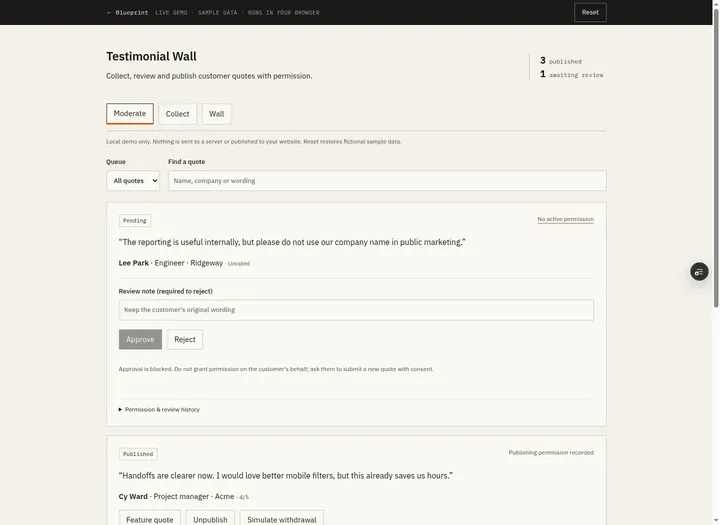 Open demo
The blueprint
Paste the whole spec into your AI builder, then send each prompt in the Build plan section one at a time. Check each phase before moving on.
How to use this file: paste this whole document into your AI builder (Claude, ChatGPT, Cursor, Lovable, Replit, Type) as context. Then send the build prompts in section 15 one at a time. Do not move to the next phase until the acceptance checks for the current phase pass.
1. The problem
"Our best customer quotes are buried in emails and call notes."
A customer writes "this saved us a week every month" in a support reply, or says it on a renewal call. Someone pastes it into Slack. Months later marketing wants it for the homepage: nobody can find it, nobody knows whether the customer agreed to be quoted by name, and when the customer asks to be taken down, nobody knows where it appears.
v1 is small: a public form customers fill in themselves (or a personal link pre-filled with what they already said), a permission checkbox whose exact wording is kept, a review queue, and one wall, as a public page and an embed, that only ever shows quotes with current permission.
2. What the real product does
Research basis: Senja's pricing page and help center (senja.io/pricing, support.senja.io/what-do-approved-and-unapproved-mean-rfswt, and the help center collections support.senja.io/collect-testimonials-jwfc3, support.senja.io/manage-testimonials-h516k and support.senja.io/share-testimonials-p1slv), October 2026.
Senja runs one loop: collect, approve, share.
- Collection. A simple or multistep form collects text and video testimonials. Customers can be invited one at a time or in bulk, with follow-ups.
- Import. Testimonials left elsewhere (text, video, screenshots) can be imported. The pricing FAQ names 35 sources, including X, Facebook, Google, Capterra and Trustpilot.
- Approval. Every testimonial is approved or unapproved, and only approved ones can be used in widgets and Walls of Love. Each form either approves new testimonials automatically or leaves them for manual review. Web, spreadsheet and manual imports are approved by default. Unapproved testimonials can still be shared as a link.
- Managing. Search, filters and tags. Help articles cover editing a testimonial, showing part of a long one, anonymous or initials-only display, removing a customer's email, and finding testimonials "with public or private consent".
- Sharing. Every plan has unlimited widgets (over 20 templates, added to a site without code), unlimited Walls of Love (a shareable page with a call to action) and view and click analytics. A widget or Wall of Love set to auto-add picks up newly approved testimonials, including where it is embedded. Paid plans add custom domains and your own branding; Pro adds star-rating rich snippets for search results.
- Extras. Rewards for customers who leave a testimonial, AI analysis and case studies, translation (Pro), video reels, Zapier, an API and webhooks (Starter and up).
Pricing on senja.io/pricing, monthly billing: Free is $0 with 15 testimonials (newer ones are hidden until you upgrade). Starter is $29 per month with unlimited testimonials, 3 forms, 1 project and 2 seats. Pro is $59 per month with unlimited forms, 5 projects and 5 seats (extra seats $5, extra projects $10 per month). Yearly billing gives 2 months free.
What this blueprint keeps
A public text form with an optional star rating, personal invitations with one reminder, a manual review step (Senja's approved gate, split here into approve and publish), one public wall plus an embed, a featured quote, rating filters and CSV export. It also makes three things explicit that matter when you publish customers' names: the exact permission wording each customer agreed to, a private link where customers withdraw permission themselves, and a history of every decision.
What this blueprint deliberately leaves out
Video and reels, imports from review sites and social networks, automatic approval, editing or excerpting a customer's words, multiple forms and walls, widget templates, custom domains and branding, rewards, AI analysis, translation, widget analytics, rich snippets, Zapier, API and webhooks. These matter when testimonials are a large program across several products and channels. A team of 1 to 10 people collecting a few dozen text quotes for one website does not need them in v1. If video, or importing reviews you already have, is the point, use Senja: its free plan includes both, up to 15 testimonials.
3. Scope of v1
- One company, one collection form, one wall (a public page plus an embed for your website).
- Text testimonials with an optional 1 to 5 star rating. No photos, logos or video; cards show initials.
- Customers never sign in. They use the form, a personal invitation link, or the private link they get after submitting.
- Email goes through an outbox (section 11). With no provider configured, emails are logged instead of sent.
- The form, the wall and the queue work on a phone.
4. Roles
| Role | Who | Can do |
|---|---|---|
| Customer | Anyone with the form link or an invitation link. No account | Submit a testimonial. See its status and withdraw permission on their private page |
| Member | Anyone on the team | See every testimonial, its history and the wall preview. Create invitations and cancel their own. Copy the embed code |
| Moderator | Whoever owns the website copy, usually 1 or 2 people | Everything a member can, plus approve, reject, publish, unpublish, feature, record a withdrawal, cancel any invitation |
| Admin | One or more people | Everything a moderator can, plus manage people and settings, read the outbox, export CSV, delete rejected or withdrawn testimonials |
Every staff member sees every testimonial. Only the actions are restricted, and the server checks them on every request. The form, the thank-you page, the private page, the wall and the embeds are the only pages without sign-in.
5. Testimonial wall data model
All timestamps are UTC. IDs are strings (UUID or similar). Text lengths are counted after trimming. Tokens come from a cryptographically secure generator: at least 24 URL-safe characters, unique.
Person (staff only)
- id, name (required), email (required, unique, lowercase), active (boolean, default true), created_at
- role: member | moderator | admin
Settings (one row)
- company_name and wall_title (required, max 80 each), form_intro (required, max 500)
- permission_text (required, 20 to 500 chars): the sentence next to the permission checkbox
- permission_version (integer, starts at 1, +1 each time permission_text changes)
- form_open (boolean, default true), time_zone (IANA name, default "America/New_York"; for dates in emails and on public pages)
Testimonial
- id, submitted_at, updated_at
- name (required, 2 to 80 chars), email (required, valid, max 254, never public)
- company, job_title (optional, max 100 each; job_title is labelled "Role" on the form)
- quote (required, 20 to 1,000 chars; plain text, line breaks kept, never rendered as HTML)
- rating (nullable integer 1 to 5; null means no rating, never zero stars)
- consent (boolean; true only when the customer ticked the box)
- consent_text (the exact sentence the customer agreed to; empty when not given), consent_version (nullable integer), consent_at (nullable), withdrawn_at (nullable)
- status: pending | approved | rejected | published | withdrawn; featured (boolean, default false)
- source: form | invitation; invitation_id (nullable); manage_token (for the customer's private link)
- review_note (nullable, max 300, private), reviewed_by_id, reviewed_at (nullable)
- published_at (nullable; the most recent publish)
Invitation
- id, token, created_by_id (references Person)
- name (required, 2 to 80), email (required), company, job_title (optional): used to pre-fill the form
- prefill_quote (optional, max 1,000): the words the customer already used
- source: email | call | chat | other, source_note (optional, max 300, private)
- status: open | completed | cancelled | expired
- created_at (the email is queued then), expires_at (created_at + 14 days), reminded_at, completed_at (nullable)
- testimonial_id (nullable; the testimonial it produced)
Event (append-only history; never copies the customer's quote, email or name)
- id, testimonial_id (nullable), invitation_id (nullable), created_at
- actor_type: person | customer | system, actor_id (when a person)
- type: submitted | approved | rejected | published | unpublished | featured | unfeatured | withdrawn | deleted | invitation_created | invitation_completed | invitation_reminded | invitation_cancelled | invitation_expired | settings_changed
- note (nullable; review or withdrawal note), data (JSON, nullable; e.g. old and new permission_version)
Notification (the outbox)
- id, to_email, person_id (nullable, for staff), testimonial_id (nullable; empty for invitation and invitation_reminder), invitation_id (nullable), reply_to (nullable; the invitation creator's email for invitation emails)
- kind: submission_received | new_submission | invitation | invitation_reminder | published | withdrawal_confirmed | withdrawn_alert
- subject, body (plain text)
- status: queued | sent | logged | failed, created_at, sent_at, error
FormAttempt (rate limiting): id, ip_hash (SHA-256 of the IP plus a server secret; never the raw IP), created_at.
6. The collection form and consent
The form is at /share. An invitation link, /share/<invitation token>, shows it pre-filled (section 12).
Fields, under Settings.form_intro: Your name (required); Email (required, with the help text "Private. We use it to confirm your submission and send you a link to withdraw permission."); Company; Role; Rating (No rating by default, or 1 to 5 stars); Your words (required, with a character counter); and a checkbox, never pre-ticked, labelled with Settings.permission_text. Under it: "If you tick the box, we may show your words, rating, name, role and company on our website. We never show your email. If you leave it unticked, only our team will read it." Hidden: permission_version, and a honeypot field named website that people and screen readers never see.
On submit, the server:
0. For /share/<token>: if the invitation is not open, or now is at or after expires_at (mark it expired), refuses with the section 12 message for its state and saves nothing. Completing the invitation in step 6 is a conditional update (status still open), so two tabs cannot both use one invitation.
- Refuses with "We're not collecting testimonials right now." if form_open is false, unless this is an open invitation link.
- If
websiteis filled in, shows the normal thank-you page with a freshly generated token that is not stored (its link shows "This link is not valid."), and saves nothing: no testimonial, FormAttempt, event or email. - Refuses with "Too many submissions from your network. Please try again in an hour." if this IP hash has 5 FormAttempts in the last 60 minutes.
- Validates every field (section 5), e.g. "Please write at least 20 characters." On error it shows the form again with the customer's input and each error next to its field.
- If the box is ticked but permission_version is not current, refuses with "Our permission wording changed while you were writing. Please read it again and tick the box.", keeping the input, showing the new wording and unticking the box.
- In one transaction, creates the testimonial: pending, not featured. If ticked: consent true, with consent_text, consent_version and consent_at from the current wording and time. If not: consent false and those fields empty. It generates manage_token, completes the invitation if there is one (source invitation), records a FormAttempt, writes the events and queues the emails in section 11.
- Shows the thank-you page: "Thank you, Cy. We've received your words.", then "Nothing goes on our website until our team has reviewed it." or "You didn't give permission to publish, so only our team will read this.", then "Keep this link to check the status or withdraw permission at any time:" with
/t/<manage_token>. The confirmation email has the same link.
The private page (/t/<manage_token>) shows the customer's words, name, role, company, rating and date sent, and the first status line that matches:
| Testimonial | Status line |
|---|---|
| withdrawn | "You withdrew permission on 14 Oct 2026. It is not shown on our website." |
| consent false | "You didn't give permission to publish this, so only our team can read it." |
| pending | "Waiting for review." |
| approved | "Approved. Not on our website yet." |
| published | "On our website since 12 Oct 2026.", with a link to the wall |
| rejected | "We won't publish this one. Thank you for sending it." |
When consent is true the page also has Withdraw permission. It asks "Withdraw permission? Your words will be removed from Northwind's website right away. To share them again you would need to send them again." and then applies R8. Staff notes and other testimonials never appear here. An unknown token shows "This link is not valid."
Seed permission wording, version 1: "I give Northwind permission to publish this quote, rating, name, role and company on its website. I can withdraw permission at any time." Have your organization review its own wording; this blueprint is a product design, not legal advice.
7. Lifecycle
| Action | Who | From | To | Side effects |
|---|---|---|---|---|
| Submit | Customer | (none) | pending | Section 6. Event submitted. Emails: submission_received, new_submission |
| Approve | Moderator, admin | pending | approved | Needs consent (R4). Optional note. Event approved |
| Reject | Moderator, admin | pending | rejected | Note required (R4). Event rejected. No email |
| Publish | Moderator, admin | approved | published | R5. Sets published_at. Event published. Email: published |
| Unpublish | Moderator, admin | published | approved | Clears featured. Event unpublished |
| Feature | Moderator, admin | published | published | Clears the previous featured one in the same transaction (R7). Event featured, and unfeatured on the previous one |
| Unfeature | Moderator, admin | published | published | Event unfeatured |
| Withdraw | Customer, on the private page | any but withdrawn, while consent is true | withdrawn | R8. Event withdrawn. Emails: withdrawal_confirmed, withdrawn_alert |
| Record withdrawal | Moderator, admin | same as Withdraw | withdrawn | Note required, 5 to 300 chars, saying how the customer asked. Otherwise as Withdraw |
| Delete | Admin | rejected, withdrawn | (deleted) | R14 |
Rejected and withdrawn testimonials can never be approved or published again.
Invitations start open and end completed (the customer submits through the link), cancelled (by its creator, a moderator or an admin) or expired (section 12). Every change writes an event.
Worked examples: actions shown to a moderator (seed data)
| Seed testimonial | Status, consent | Actions |
|---|---|---|
| Cy Patel | pending, given | Approve, Reject, Record withdrawal |
| Lee Hart | pending, not given | Reject. Approve is disabled: "No permission to publish" |
| Omar Haddad | approved, given | Publish, Record withdrawal |
| Ana Moreno | published, featured | Unpublish, Unfeature, Record withdrawal |
| Ben Adler | published | Unpublish, Feature, Record withdrawal |
| Felix Wong | rejected, given | Record withdrawal (admins also: Delete) |
| Kai Jensen | withdrawn | None (admins: Delete) |
Members see no action buttons.
8. Testimonial wall business rules
- R1. The server decides status and consent. A new testimonial is always pending and not featured, and its consent fields come only from the checkbox.
- R2. Only the customer gives permission. The box is never pre-ticked, not even on invitation links. Nothing on the staff side sets consent to true, and staff cannot type in a testimonial: to capture a quote from an email or a call, send an invitation.
- R3. Customer wording is never edited. No staff action changes name, email, company, job_title, rating, quote or consent fields. To shorten a quote, invite the customer with the shorter wording pre-filled; the new submission gets its own permission.
- R4. Only pending testimonials can be approved or rejected. Approve requires consent = true, otherwise the server refuses with "No permission to publish." Reject requires a note of 5 to 300 characters; an approval note is optional, max 300.
- R5. Approval is not publication. Publish requires status approved, consent = true and no withdrawn_at, checked in the same transaction as the update.
- R6. Unpublish returns a testimonial to approved and clears featured. It can be published again.
- R7. At most one testimonial is featured, and only a published one. Featuring another clears the old one in the same transaction. The Feature request carries the id of the testimonial that was featured when the moderator loaded the page (or none); if the featured testimonial has changed since, it is refused with "
was featured by in the meantime." and nothing changes. Enforce it in the database too (a unique index on featured where featured is true, if your database supports partial indexes). - R8. Withdrawal is allowed while consent = true and status is not withdrawn. In one transaction: consent = false, withdrawn_at = now, status = withdrawn, featured = false. Keep consent_text, consent_version and consent_at as evidence. It cannot be undone; to share again, the customer submits again.
- R9. The wall shows a testimonial only if status = published AND consent = true AND withdrawn_at is empty. The query checks all three, not just the status.
- R10. Public pages and embeds include only name, job_title, company, rating, quote and featured. Never email, notes, consent details, tokens or invitation details.
- R11. Every action writes one Event for each testimonial or invitation it changes. Events are never edited, and only Delete (R14) removes them.
- R12. Status checks and updates happen in one transaction. When two people act on the same testimonial, the second gets a message such as "Already published by Jo Park" and nothing changes.
- R13. Roles (section 4) are checked on the server. A member who calls the approve endpoint directly gets a 403.
- R14. Delete is admin only, for rejected or withdrawn testimonials. It removes the testimonial, its events, its outbox rows and its invitation, then writes one
deletedevent with the admin, the time and the old id. The private link then shows "This link is not valid." - R15. Changing permission_text increases permission_version and writes a
settings_changedevent. Existing testimonials keep the consent_text they agreed to. - R16. The form is protected by the honeypot, at most 5 saved submissions per IP hash per 60 minutes, and server-side checks of every limit.
- R17. An invitation produces at most one testimonial. Its link works only while it is open and before expires_at, even when form_open is false.
- R18. The wall is a selection, not a review site. It never shows a total count or an average rating, never says "all reviews", and says which ratings it shows when a minimum is set.
9. The wall and the embed
Selection (one pure function for the public wall, the embeds and the preview on screen 4):
- Keep testimonials that pass R9.
- With a minimum rating (4 or 5), keep only those rated at least that. Unrated testimonials appear only without a minimum.
- Put the featured testimonial first (if still in the list), then the rest by submitted_at, newest first.
- Embeds only: keep the first
limit.
Worked examples (fresh seed data, section 14)
Published in the seed: Ana Moreno (5 stars, featured, sent 40 days ago), Ben Adler (5, 30 days ago), Rosa Lind (no rating, 21 days ago), Hugo Brandt (4, 14 days ago), Theo Grant (3, 9 days ago).
| View | Shows, in order |
|---|---|
/wall |
Ana (featured), Theo, Hugo, Rosa, Ben |
/wall?min_rating=4 |
Ana (featured), Hugo, Ben |
/wall?min_rating=5 |
Ana (featured), Ben |
/embed/wall?min_rating=4&limit=2 |
Ana (featured), Hugo |
/wall after Jo approves and publishes Cy |
Ana (featured), Cy, Theo, Hugo, Rosa, Ben |
/wall after Jo features Ben |
Ben (featured), Theo, Hugo, Rosa, Ana |
/wall after Ana withdraws |
Theo, Hugo, Rosa, Ben, nothing featured; /embed/featured is empty |
Never on the wall in the seed: Cy Patel (pending), Lee Hart (no permission), Omar Haddad (approved, not published), Felix Wong (rejected), Kai Jensen (withdrawn).
Pages
/wall: heading Settings.wall_title, then "A selection of what our customers told us, shared with their permission." Filter links: All ratings, 4 stars and up, 5 stars (?min_rating=4,?min_rating=5). With a filter on: "Showing 4 and 5 star ratings only." or "Showing 5 star ratings only." With nothing to show: "No testimonials yet."/embed/wall: the same cards with no heading or filter links, on a transparent background. Parameters:min_rating(4 or 5; other values ignored) andlimit(1 to 50, default 50). With a minimum, the same "Showing ..." line in small text under the cards. With nothing to show, it renders nothing./embed/featured: only the featured testimonial, for a homepage; empty when nothing is featured.
Cards: the quote in quotation marks with its line breaks; stars with a text equivalent ("Rated 4 out of 5"), or nothing when unrated; initials in a circle; the name; then job title and company, whichever exist. The featured card spans the full width. Text wraps at phone width.
The snippet (screen 4 fills in the chosen options):
<div data-testimonial-wall="https://<your-app>/embed/wall?min_rating=4&limit=6"></div>
<script src="https://<your-app>/embed.js" async></script>
/embed.js puts an iframe in every element with data-testimonial-wall (that URL, title="Customer testimonials", width 100%, no border, loading="lazy"). The embed pages post { "type": "testimonial-wall:height", "height": <pixels> } to their parent on load and whenever their height changes; embed.js resizes the iframe only for messages from your app's origin whose source is that iframe. Screen 4 also offers a plain <iframe> snippet, 800 pixels high, for sites that do not allow scripts.
Headers
/embed/walland/embed/featured:Content-Security-Policy: frame-ancestors * file:(any website, and local test files; CSP's*alone does not match pages opened from disk). Every other page:frame-ancestors 'none'andX-Frame-Options: DENY./walland the embeds:Cache-Control: no-store, so an unpublish or withdrawal shows on the next load. If you add a CDN later, cache for 60 seconds at most: a cached copy of a withdrawn quote is still published./t/...and/share/<token>:Referrer-Policy: no-referrerandnoindex, so tokens do not leak.
10. Testimonial wall screens
Staff screens need sign-in. Forms keep what was typed and show each error next to its field; success shows only after the server has saved. Status and permission are written out, never shown by color alone.
- Queue (home). Cards: quote, name, role and company, rating ("No rating"), permission ("Permission to publish", "Private: no permission" or "Permission withdrawn"), status, age ("Sent 2 days ago"), source ("Form" or "Invitation from Sam Okafor"), and the actions allowed for the state and the viewer (section 7). Filters: Pending (the default, oldest first), then Approved, Published, Rejected, Withdrawn and All, each newest first (by submitted_at). Search matches name, company and quote within the filter. Admins see Export CSV. Empty state: "Nothing waiting for review."
- Testimonial detail. The card plus email, permission evidence (exact consent_text, version and time, or "No permission given"), withdrawn time, review note and reviewer, published_at, the invitation it came from with its private note, the private link with Copy (moderators and admins), and the history: every event with actor, time and note. Reject and Record withdrawal open a dialog for the note. Next to Approve is an optional "Approval note (private, up to 300 characters)" field; on Queue cards, Approve acts at once, without a note.
- Invitations. List: customer, company, created by, status, created, reminded, expires; Copy link and Cancel on open ones. New invitation: name, email, company, role, words they used, source, private note. In development: "Run scheduled job now" (section 12).
- Wall and embed. Live preview using section 9, a minimum-rating picker (All ratings, 4 stars and up, 5 stars), a limit, both snippets with those options filled in, Copy buttons and a link to
/wall. - Admin: People. Name, email, role, active; add, edit, deactivate. Nobody can deactivate themselves or change their own role.
- Admin: Settings. The Settings fields, with the current permission version and the note "Changing this creates a new version. Testimonials already received keep the wording their authors agreed to."
- Admin: Outbox. Every notification, newest first: time, to, kind, subject, status, error; click to read the body.
- Collection form, public:
/shareand/share/<token>(sections 6 and 12). - Thank-you page, public (section 6).
- Private page, public:
/t/<manage_token>(section 6). - Public wall:
/wall(section 9). - Embeds:
/embed/walland/embed/featured(section 9).
Development only, on every staff screen: an "Act as" switcher listing every person (inactive ones marked), "Reset to seed data" (deletes everything, reloads section 14 and resets the clock), and a clock control that moves the app's "now" forward by whole days.
11. Notifications
| Trigger | To | Kind | Subject and content |
|---|---|---|---|
| Submitted | Customer | submission_received | "We received your words". Whether permission was given, and the private link |
| Submitted | Active moderators and admins | new_submission | "New testimonial from Cy Patel (Acme)". The words, "4 stars. Permission to publish: yes.", a link |
| Invitation created | Customer | invitation | "Sam Okafor from Northwind asked for a few words". The link, and if pre-filled "We started it with what you told us. Change anything you like. Nothing is published without your permission." Reply-To: the creator |
| Invitation open 3 days | Customer | invitation_reminder | "Reminder: Sam Okafor from Northwind asked for a few words". Same link and the expiry date. Once |
| Published | Customer | published | "Your words are on Northwind's website". Links to /wall and the private page |
| Withdrawn (either way) | Customer | withdrawal_confirmed | "You withdrew permission". The date, and that the words will not be shown |
| Withdrawn (either way) | Active moderators and admins | withdrawn_alert | "Ben Adler withdrew permission" (on their private page, or "recorded by Jo Park"). Plus "It was removed from the wall." or "Nothing is featured now." when true |
Write every notification to the outbox first, then send. With no email provider configured, set status logged instead of sending. Failed sends keep their error and are retried by the next job run. A notification problem never blocks or undoes an action.
12. Invitations, the scheduled job and time
Invitations turn a quote buried in an email or call notes into a testimonial. A team member enters the customer's details, pastes the words they used and says where. Saving creates an open invitation and queues its email. Opening /share/<token>:
- open and before expires_at: the form, headed "Sam Okafor from Northwind invited you to share a few words", pre-filled, with the permission box unticked. The customer can change anything.
- expired, or open at or after expires_at (mark it expired): "This link has expired. Ask Northwind for a new one."
- completed: "You've already sent your words. Thank you."
- cancelled: "This link is no longer active." Unknown token: "This link is not valid."
Scheduled job (hourly; on Vercel, a cron hitting /api/cron/tick, protected by Authorization: Bearer <CRON_SECRET>, which is what Vercel Cron sends; without CRON_SECRET configured, the endpoint refuses every request with 401):
- Expire open invitations whose expires_at has passed.
- Remind open invitations created 72 hours or more ago with no reminded_at; set reminded_at. Expire runs first, so an expired invitation is never reminded.
- Retry notifications that failed, or are still queued after 5 minutes.
- Prune FormAttempt rows older than 24 hours.
Time. All server code reads the time through one function, which adds the development clock offset (section 10). Use real elapsed time: 3 days is 72 hours. Public pages and emails show dates in Settings.time_zone; staff screens use the viewer's time zone.
13. Edge cases
- The customer withdraws while a moderator publishes, or two moderators feature different testimonials at once: R12 and R7. The second action fails with a message ("Permission was withdrawn") and changes nothing.
- Someone submits under another person's name: approval is the check. The detail page shows the email, and invitation submissions came through a link sent to a known address. If in doubt, ask or reject.
- The same customer sends twice: both arrive pending. Publish one and reject the other with "Duplicate".
- A customer asks by email to be removed and has lost the link: a moderator records the withdrawal with the email as the note, or copies the private link from the detail page and replies with it.
- A customer asks for their data to be deleted: withdraw first if consent is true, then an admin deletes (R14).
- Your website's Content-Security-Policy blocks frames from your app: add your app's origin to its
frame-src. The link to/wallstill works.
14. Seed data
Northwind is a small software company that sells an approvals app to other small businesses. Staff emails end in @northwind.example. T is the moment the seed is loaded; "T − 40d" means 40 days earlier.
| Person | Role | Active | |
|---|---|---|---|
| Maya Chen (Marketing lead) | maya@northwind.example | admin | yes |
| Jo Park (Content marketer) | jo@northwind.example | moderator | yes |
| Sam Okafor (Account manager) | sam@northwind.example | member | yes |
| Alex Kim (Former contractor) | alex@northwind.example | member | no |
Settings: company_name "Northwind", wall_title "What our customers say", form_intro "Tell us what changed for your team since you started using Northwind. We read every response.", permission_text version 1 (section 6), form_open true, time_zone "America/New_York".
| Customer | Role, company | Rating | Consent | Status | Sent | |
|---|---|---|---|---|---|---|
| Ana Moreno | Finance Manager, Harbor Studio | ana@harborstudio.example | 5 | yes | published, featured | T − 40d |
| Ben Adler | Operations Lead, Bluebird | ben@bluebird.example | 5 | yes | published | T − 30d |
| Rosa Lind | Founder, Olsen & Co | rosa@olsen.example | none | yes | published | T − 21d |
| Hugo Brandt | Finance Director, Kestrel Schools | hugo@kestrelschools.example | 4 | yes | published | T − 14d |
| Theo Grant | Office Manager, Pine Street Dental | theo@pinestreetdental.example | 3 | yes | published | T − 9d |
| Omar Haddad | IT Manager, Fieldstone Labs | omar@fieldstonelabs.example | 4 | yes | approved | T − 5d |
| Cy Patel | Office Manager, Acme | cy@acme.example | 4 | yes | pending | T − 2d |
| Lee Hart | Director, Ridgeway | lee@ridgeway.example | none | no | pending | T − 1d |
| Felix Wong | Owner, Bramble Bakery | felix@bramblebakery.example | 5 | yes | rejected | T − 12d |
| Kai Jensen | COO, Larkspur Labs | kai@larkspurlabs.example | 5 | withdrawn | withdrawn | T − 60d |
Consent "yes" means consent_text is the version 1 wording, consent_version 1 and consent_at the sent time. Lee Hart has none. Kai Jensen keeps that version 1 evidence from T − 60d, with consent false and withdrawn_at T − 3d.
Their words:
- Ana Moreno: "Northwind saved us a week every month. Month-end used to mean chasing approvals by email. Now every approval is in one place, with a name and a time next to it."
- Ben Adler: "We set it up in one afternoon. The next morning the whole team was using it, and nobody asked for a training session."
- Rosa Lind: "Our approvals finally have a paper trail. When our accountant asked who signed off on a purchase, we found it in ten seconds."
- Hugo Brandt: "Rolling it out to forty staff took a week, mostly because we were careful. It has been reliable ever since."
- Theo Grant: "It does the job. The reports could be more flexible, but approvals no longer get lost, which is what we needed."
- Omar Haddad: "Single sign-on worked the first time, and our IT team has not had a single ticket about it since."
- Cy Patel: "The team actually uses it, which is a first for us. Filtering requests on a phone is fiddly, but on a laptop it is quick and clear."
- Lee Hart: "Please keep this private. Our first two weeks were rough because the import kept failing, but your support team fixed it within a day."
- Felix Wong: "We approve every order for our biggest client, Harbor Foods, about $40,000 a month, and nothing slips through."
- Kai Jensen: "Approvals that took days now take minutes. I would recommend Northwind to any operations team."
History (seed the matching events): Ana was approved and published by Jo at T − 39d and featured by Maya the same day. Ben came from Sam's invitation and was approved and published by Jo at T − 29d. Rosa, Hugo and Theo were approved and published by Jo one day after they were sent. Omar was approved by Jo at T − 4d with the note "Good for the IT page." Felix was rejected by Jo at T − 11d with the note "Names a client and their spend. We can't publish that." Kai was approved and published by Jo at T − 59d and withdrew on his private page at T − 3d. Cy and Lee have only a submitted event.
| Invitation for | Created by | Words they used | Source, private note | Status | Created |
|---|---|---|---|---|---|
| Ben Adler, Operations Lead, Bluebird (ben@bluebird.example) | Sam Okafor | "We set it up in one afternoon." | call, "Renewal call, said this unprompted" | completed at T − 30d | T − 32d |
| Nora Quinn, Head of Finance, Lumen Studio (nora@lumenstudio.example) | Sam Okafor | "Approvals don't get lost in Slack anymore." | email, "Reply to our renewal email" | open, not reminded | T − 1d |
The outbox starts empty.
15. Testimonial wall build plan
Send these prompts one at a time after pasting this file. Each phase ends with checks you can run by clicking through the app. Press Reset to seed data before each phase's checks, and open public pages in a private window.
Phase 1: Foundation
Using the Testimonial Wall blueprint above, build Phase 1 only.

1. Set up the data model from section 5 exactly (Person, Settings, Testimonial, Invitation, Event, Notification, FormAttempt) with a real database.
2. Add staff sign-in. Use the platform's built-in auth or Google sign-in limited to our company email domain. A signed-in email must match an active Person; anyone else sees "Ask an admin to add you." Customers never sign in.
3. Build Admin: People and Admin: Settings (section 10, screens 5 and 6), admin only, enforced on the server. Changing the permission wording follows R15.
4. Build the Queue and Testimonial detail (screens 1 and 2) read-only, with filters, search, permission evidence and history.
5. Load the seed data from section 14, including each testimonial's history events.
6. Add the development-only tools in section 10: "Act as", "Reset to seed data" and the clock control. Read the time through one function (section 12).

When you're done, list what you built and anything in the spec you had to interpret.
Acceptance checks
- Act as lists Maya Chen (admin), Jo Park (moderator), Sam Okafor (member) and Alex Kim (inactive). Choosing Alex shows "Ask an admin to add you."
- Acting as Sam, the Admin pages are not in the menu and their URLs return 403. Acting as Maya, both open.
- The Queue opens on Pending with Cy Patel, then Lee Hart, whose card says "Private: no permission" and "No rating". All shows 10 testimonials.
- Under All, searching "bluebird" shows only Ben Adler. Withdrawn shows only Kai Jensen.
- Kai Jensen's detail page shows the version 1 wording given 60 days ago, "Permission withdrawn" 3 days ago, and the history submitted, approved, published, withdrawn.
- Acting as Maya, adding Rui Costa (rui@northwind.example) as a member works and he appears in Act as. Another person with jo@northwind.example is refused. Maya cannot deactivate herself.
- Moving the clock 2 days ahead makes Cy Patel's card say "Sent 4 days ago". Reset to seed data brings back "Sent 2 days ago" and removes Rui.
Phase 2: Collecting testimonials
Using the Testimonial Wall blueprint above, build Phase 2 only.

1. Build the collection form, the thank-you page and the private page (section 10, screens 8 to 10) exactly as section 6 describes, with the server steps in that order. No sign-in on these pages.
2. Implement Submit and Withdraw (section 7) with R1, R2, R8, R11, R12, R15 and R16, enforced on the server.
3. Build Invitations (screen 3) and the invitation link as section 12 describes, with R17.
4. Write the emails in section 11 for these actions to the outbox and build Admin: Outbox (screen 7). If no email provider is configured, mark emails logged instead of sending.
5. Add the section 9 headers for the form, the invitation link and the private page.
6. Add automated tests for field validation, the honeypot, the rate limit and the permission-version check.

When you're done, list what you built and anything in the spec you had to interpret.
Acceptance checks
- Signed out, submit /share as Ivy Moss (ivy@pinewood.example) with the words "Great tool." The form says "Please write at least 20 characters." and keeps her name and email. Nothing is added to the Queue.
- Resubmit with "Our support tickets dropped by half in the first month." and the box unticked. The thank-you page says only the team will read it. Acting as Jo, Ivy Moss is pending with "No rating" and "Private: no permission".
- Submit Grace Holm (grace@birch.example, Office Manager, Birch & Co, 5 stars, "Month-end close went from five days to two, and nobody chases signatures anymore.") with the box ticked. Admin: Outbox has "We received your words" to Grace with a /t/ link, and "New testimonial from Grace Holm (Birch & Co)" to Maya and Jo, none to Sam. Her detail page shows the version 1 wording and time.
- Grace's /t/ link says "Waiting for review." Withdraw and confirm: it now says she withdrew permission today, the Queue shows her Withdrawn with the wording kept, and the Outbox has "You withdrew permission" to Grace and "Grace Holm withdrew permission" to Maya and Jo.
- With the browser's developer tools, add
<input name="status" value="published">to the form and submit Paul Diaz (paul@copperlane.example) with the box ticked. Paul is pending, not published. - Acting as Sam, invite Nina Shah (nina@copperlane.example, Copper Lane) with the words "We stopped losing purchase requests in email." The Outbox has "Sam Okafor from Northwind asked for a few words" to Nina. Signed out, her link shows the form pre-filled with the box unticked. After she submits with the box ticked, the Queue shows "Invitation from Sam Okafor", the invitation is Completed, and the link says "You've already sent your words. Thank you."
- Signed out, fill in /share as Rita Cole (rita@harborfoods.example) with the box ticked, without submitting. Acting as Maya, change the permission wording; Settings shows version 2. Rita's submit is refused with "Our permission wording changed while you were writing..." with her words kept and the box unticked. Resubmitted, her detail page shows the version 2 wording; Ana Moreno's still shows version 1.
- Acting as Maya, turn off Form open. Signed out, /share shows "We're not collecting testimonials right now.", while Nora Quinn's invitation link (Copy link on Invitations) still shows the form.
Phase 3: Review, publishing and the public wall
Using the Testimonial Wall blueprint above, build Phase 3 only.

1. Implement Approve, Reject, Publish, Unpublish, Feature, Unfeature and Record withdrawal (section 7) with R3 to R8 and R11 to R13. Enforce every permission on the server, not only by hiding buttons.
2. Add these actions to screens 1 and 2, showing exactly the actions in the worked-examples table in section 7.
3. Implement the selection in section 9 as one pure function, with unit tests for every row of its worked-examples table.
4. Build /wall (screen 11) with that function, R9, R10, R18 and the section 9 headers.
5. Do every status check and update in one transaction (R12) and enforce the single featured testimonial in the database (R7).
6. Send the published and withdrawal emails in section 11 through the outbox.

When you're done, list what you built and anything in the spec you had to interpret.
Acceptance checks
- Acting as Sam, Cy Patel's card has no Approve button, and a direct request to the approve endpoint returns 403. Cy stays pending.
- Signed out, /wall shows "What our customers say" and five cards: Ana Moreno (featured, full width), Theo Grant, Hugo Brandt, Rosa Lind, Ben Adler. Rosa's card has no stars, and there is no count or average rating.
- Acting as Jo, approve Cy Patel: /wall still has five cards. Publish her: /wall shows Ana (featured), Cy, Theo, Hugo, Rosa, Ben, and the Outbox has "Your words are on Northwind's website" to cy@acme.example.
- On Lee Hart, Approve is disabled with "No permission to publish". Reject with an empty note is refused; with "Private feedback, passed to support" Lee shows Rejected.
- Jo features Ben Adler. /wall shows Ben first as the featured card and Ana as an ordinary card. Ana's history shows "unfeatured" and Ben's "featured", both by Jo.
- /wall?min_rating=4 says "Showing 4 and 5 star ratings only." and shows Ben (featured), Cy, Hugo, Ana. /wall?min_rating=5 shows Ben and Ana. Rosa Lind appears only under All ratings.
- Jo unpublishes Hugo Brandt: he leaves /wall, shows Approved and has a Publish button again.
- Copy Ben Adler's private link from his detail page and open it signed out: it says "On our website since" with the date 29 days ago. Withdraw and confirm. /wall no longer shows Ben and has no featured card. Ben's detail page keeps his version 1 wording and consent time, has no Publish button, and a direct publish request is refused.
- Jo records a withdrawal on Rosa Lind with an empty note: refused. With "Rosa asked by email to be removed": Rosa is Withdrawn, her history shows Jo and the note, and the Outbox has "You withdrew permission" to rosa@olsen.example.
Phase 4: Embed, reminders, export and deletion
Using the Testimonial Wall blueprint above, build Phase 4 only.

1. Build /embed/wall, /embed/featured and /embed.js exactly as section 9 describes, with the height messages and headers.
2. Build the Wall and embed screen (section 10, screen 4).
3. Build the scheduled job in section 12 at /api/cron/tick, protected by `Authorization: Bearer <CRON_SECRET>` (section 12), plus the development-only "Run scheduled job now" button on Invitations. The job uses the app's clock, including the development offset.
4. Add Export CSV for admins on the Queue, enforced on the server: one row per testimonial with name, email, company, job_title, rating, quote, status, consent (yes or no), consent_text, consent_version, consent_at, withdrawn_at, published_at, featured, source and submitted_at. ISO 8601 UTC times. Quote fields so commas and line breaks stay in one cell. Cells whose text starts with =, +, -, @, a tab or a carriage return are written with a leading apostrophe (') so spreadsheets show them as text instead of running them as formulas; every other cell is exactly as stored.
5. Add Delete for admins (R14), with a confirmation that names the customer.

When you're done, list what you built and anything in the spec you had to interpret.
Acceptance checks
- On Wall and embed, choose "4 stars and up" and limit 3. The script snippet's URL ends in
/embed/wall?min_rating=4&limit=3, and the preview shows Ana (featured), Hugo, Ben. - Paste that snippet into a new file, test.html, on your computer and open it in the browser. It shows the same three cards and "Showing 4 and 5 star ratings only.", and the frame grows to fit with no inner scroll bar.
- Add
<iframe src="https://<your-app>/"></iframe>to test.html and reload. The browser refuses to show the staff app in that frame, while the testimonials still show. - Withdraw Ana Moreno from her private link and reload test.html: it shows Hugo and Ben only, and /embed/featured is empty. The page source of /embed/wall contains "Bluebird" but not "bluebird.example".
- Move the clock 3 days ahead and press Run scheduled job now. Nora Quinn's invitation shows a reminded time, and the Outbox has exactly one "Reminder: Sam Okafor from Northwind asked for a few words" to nora@lumenstudio.example. At 4 days ahead, running the job again adds no second reminder.
- Move the clock 14 days ahead and run the job. Nora's invitation shows Expired, and her link says "This link has expired. Ask Northwind for a new one."
- Acting as Maya, Export CSV has a header and 10 rows. Ana's quote is in one cell exactly as written, and Kai Jensen's row has status withdrawn, consent no, and consent_at and withdrawn_at filled. Acting as Jo, there is no Export button and the export URL returns 403.
- Acting as Maya, copy Felix Wong's private link, then delete Felix (rejected). He disappears from All, and his link says "This link is not valid." Hugo Brandt (published) has no Delete action.
16. Variations
- Ask happy customers automatically after a support ticket closes: create an invitation from your help desk's webhook.
- Video testimonials recorded in the browser, behind the same permission step.
- Different walls per product or page: tag testimonials and add a
tagparameter to the embeds. - Customer photos and company logos, uploaded on the form and named in the permission wording.
- Let a customer approve a shorter excerpt from their private page instead of submitting again (R3).
- Bulk invitations from a CSV of customers.
17. Build notes from our test build
We built this blueprint by sending the four phase prompts above, in order, to an AI builder (Claude, working in Type), then checked every acceptance item in a real browser, pressing "Reset to seed data" before each phase's checks.
Result: 32 of 32 acceptance checks passed in one final browser run on a fresh database, plus 42 automated tests. Three extra browser checks also passed: the actions each role sees, the embed script ignoring height messages from other pages, and the scheduled job refusing requests without its secret.
Gaps the build found, now fixed in this spec:
- The seed staff had no email addresses, though a Phase 1 check depends on jo@northwind.example. Section 14 now lists them.
- The Queue's sort order for filters other than Pending was ambiguous. Each is now newest first.
- Nothing said what happens when someone submits through a cancelled, expired or already-used invitation link. Section 6 now refuses it before saving anything.
- The honeypot's "normal thank-you page" includes a private link, but nothing is saved. It now shows a link that is not stored and says "This link is not valid."
- A notification's testimonial had to be optional for invitation emails, and the invitation's Reply-To had nowhere to live. Section 5 now says both.
- R7 let a second moderator silently replace a featured testimonial, while an edge case said the second action fails. Feature now carries what the moderator saw and is refused if it changed.
- No screen said where the optional approval note is typed. The detail screen now has the field; Approve on a Queue card has no note.
- Sections 7 and 11 disagreed on whether staff are alerted when a moderator records a withdrawal. They are, either way.
frame-ancestors *blocks the Phase 4 test.html opened from disk, because*doesn't match local files. The header now addsfile:; the test build used this to pass the check.- Customer text was exported to CSV exactly as typed, so a quote starting with = could run as a spreadsheet formula. Such cells now get a leading apostrophe.
- The scheduled job's secret header wasn't named. It is now
Authorization: Bearer <CRON_SECRET>, and without a secret configured every request is refused.
What we did not test:
- Production sign-in. The build trusts a sign-in header from the hosting platform, but every check used the development "Act as" switcher.
- Sending email. Emails were logged in the outbox, not delivered; retrying a failed send is covered by an automated test only.
- The hourly job on a real scheduler. It ran from the development button, with time moved by the development clock.
- Embedding on a real HTTPS website or behind a CDN. The embed was tested from a local test.html.
- Other browsers and real phones. We tested in Chromium, including a 390-pixel-wide window.
- Hosting. The test build ran on SQLite on one server. For a hosted deploy, use a managed Postgres (or your platform's database) and the same schema.
Field report
Building a Senja replacement with AI, 32 checks and 11 spec gaps
We had an AI builder build a testimonial collection form, review queue and public wall from our spec, one phase at a time, and checked every acceptance item in a real browser. It passed all 32 checks and exposed 11 gaps in the spec, the twelfth-most of our twenty-two build tests. What it costs next to Senja, and what we did not test.
The short answer
Yes, for text testimonials on one website. We gave Claude, working in Type, our Testimonial Wall blueprint and had it follow the four phase prompts in order. The final build passed 32 of 32 acceptance checks in one browser run on a fresh database, with 42 automated tests. It covers a public form with a permission checkbox, invitations with one reminder, a review queue, a public wall and an embed, withdrawal from a private link, CSV export and deletion.
The build exposed 11 gaps in the spec, places where the builder had to guess because the spec was silent, ambiguous or contradicted itself. That is the twelfth-most of our twenty-two build tests, behind the invoice reminders build (83), the link shortener (69), the inventory tracker (63), the status page (58), the employee onboarding build (44), the internal knowledge base (30), the help desk (21), the timesheets (21), the customer feedback inbox (20), the hiring pipeline (18) and the client onboarding tracker (18), and under the median of 14.5. Every gap is now fixed in the published spec.
What it is not: a tested production deployment. Real sign-in, delivered email, a real scheduler, embedding on a live website and hosting were not part of the test. The last section lists exactly what was and wasn't checked.
What we built, and what we left out
The blueprint copies the part of Senja a team of 1 to 10 people uses to collect a few dozen text quotes for one website. We read Senja's pricing page and help center in October 2026 and kept its collect, approve, share loop, with the permission side made explicit:
- Only the customer gives permission. The box is never pre-ticked, even on an invitation link, and the exact wording, version and time are stored. Staff cannot tick it or type in a quote; to capture a remark from a call, they send an invitation with the words pre-filled.
- Approve, then publish. Senja has one approved gate; the blueprint splits it. Approve needs permission or is refused with "No permission to publish." Reject needs a note.
- The wall checks three things. A quote is shown only if it is published, has permission and has not been withdrawn. One pure function drives the public page, the embed and the preview.
- Customers withdraw themselves. Every submission gets a private link. Withdrawing there removes the quote from the wall on the next load and keeps the permission evidence.
- Nothing private leaks. Public pages carry only name, role, company, rating and quote, and the wall never shows a count or an average rating, because it is a selection.
Left out on purpose: video and reels, imports from review sites and social networks, automatic approval, editing a customer's words, multiple forms and walls, widget templates, custom domains, rewards, AI analysis, translation, analytics, rich snippets, Zapier, an API and webhooks. If video, or importing reviews you already have, is the point, Senja's free plan includes both.
What it costs next to Senja
Senja charges a flat monthly price per plan, with a set number of seats included. On senja.io/pricing in October 2026, with monthly billing (yearly billing gives 2 months free):
| Plan | Price | Included |
|---|---|---|
| Free | $0 | 15 testimonials; newer ones are hidden until you upgrade |
| Starter | $29 per month | Unlimited testimonials, 3 forms, 1 project, 2 seats |
| Pro | $59 per month | Unlimited forms, 5 projects, 5 seats; extra seats $5 and extra projects $10 per month |
The build has no monthly price and no testimonial limit, but it isn't free: you pay for hosting, a database, an email provider, and the time to build and look after it. Against Starter the saving is a few hundred dollars a year. Build when you have outgrown 15 testimonials but do not need video or imports, or when you want a record of what each customer agreed to and a way for them to withdraw it without emailing you. Our build-or-buy guide has the full decision.
How the build went, phase by phase
The builder received the blueprint as one Markdown file and sent itself the four phase prompts one at a time. After each phase, that phase's acceptance checks ran in a real browser after Reset to seed data. After the last phase, all 32 checks ran again in one final pass.
- Foundation. The data model, staff sign-in, Admin: People and Settings with permission versioning, the read-only queue and detail page, seed data with history, and the development tools.
- Collecting testimonials. The public form with its server steps in order, the thank-you and private pages, invitations with pre-filled links, the outbox, security headers, and tests for the honeypot, rate limit and permission version.
- Review, publishing and the public wall. The seven moderator actions, each in one transaction and enforced on the server; the selection function with unit tests for every worked example; /wall with its headers.
- Embed, reminders, export and deletion. The two embed pages and embed.js with height messages, the Wall and embed screen with snippets, the hourly job, CSV export with formula protection, and Delete for admins.
Each phase prompt ends with one sentence: "list what you built and anything in the spec you had to interpret." That sentence is what surfaced the gaps.
The 11 gaps, grouped
The full list, with each fix, is in the blueprint's build notes. They fall into four groups.
Seed data and screens the checks depended on (3 gaps)
A Phase 1 check refuses a duplicate jo@northwind.example, but the seed staff had no email addresses. The Queue's sort order was defined for Pending only; every other filter is now newest first. And an optional approval note was allowed without saying where it is typed; the detail page now has the field, and Approve on a Queue card acts without one.
Lesson: every check needs seed data that can make it fail, and every optional field needs a screen.
Public links with undefined states (3 gaps)
Nothing said what happens when someone submits through a cancelled, expired or used invitation link; the server now refuses before saving anything. The honeypot was to show the normal thank-you page, but that page includes a private link and nothing was saved to link to; it now shows an unstored token whose link says "This link is not valid." And frame-ancestors * blocked the Phase 4 test page opened from disk, because * does not match local files; the header now adds file:.
Lesson: for every public URL, write down what each state shows, including the states you hope nobody reaches.
Rules that contradicted their own edge cases (2 gaps)
R7 let a second moderator silently replace the featured testimonial, while the edge cases said the second action fails. Feature now carries the id the moderator saw and is refused if it has changed. Sections 7 and 11 disagreed on whether staff are alerted when a moderator records a withdrawal for a customer. They are, either way.
Lesson: when a rule and an edge case describe the same moment, one of them will drift. Say it once and refer to it.
Data, export and the job's outside edges (3 gaps)
Invitation emails have no testimonial yet, so the Notification's testimonial had to be optional, and the invitation's Reply-To had nowhere to live. Exported quotes went out exactly as typed, so one starting with = could run as a spreadsheet formula; such cells now get a leading apostrophe. And the job's secret header was never named; it is now Authorization: Bearer <CRON_SECRET>, and every request is refused when no secret is configured.
Lesson: anything that leaves the app, whether an email, a file or a cron call, needs its exact format written down. See What AI app builders get wrong for the patterns across every build.
What we did not test
- Production sign-in. The build trusts a sign-in header from the hosting platform, but every check used the development "Act as" switcher.
- Sending email. Emails were logged in the outbox, not delivered. Retrying a failed send is covered by an automated test only.
- The hourly job on a real scheduler. It ran from the development button, with time moved by the development clock.
- Embedding on a real HTTPS website or behind a CDN. The embed was tested from a local test.html.
- Other browsers and real phones. We tested in Chromium, including a 390-pixel-wide window.
- Hosting. The test build ran on SQLite on one server. For a hosted deploy, use a managed Postgres (or your platform's database) and the same schema.
These gaps are not special to the testimonial wall. We list what every build left untested in Is an AI-built internal tool ready for production?.
Build it yourself
The Testimonial Wall blueprint is free: one Markdown file with the data model, the 18 business rules, screens, seed data, the four phase prompts and all 32 acceptance checks, with the 11 fixes already in. Paste it into Claude, ChatGPT, Cursor, Lovable, Replit or Type and send the phases one at a time. Our Senja alternative page has the side-by-side. If you find a gap we missed, tell us on the About page and we'll fix it and credit it in the build notes.
Testimonial Wall: questions people ask
Do you need permission to publish a customer testimonial?
This blueprint treats permission as required. The submission form has an unticked checkbox with your permission wording, the exact text and version the customer agreed to are stored with the testimonial, and the server refuses to approve or publish anything without it. Staff cannot tick it for the customer or type in a quote themselves. For legal requirements in your country, check with your own adviser.
How do you collect testimonials from customers?
Two ways: a public form anyone can open, and personal invitations. An invitation turns a quote already buried in an email or call notes into a request: a team member pastes the customer's words, the customer gets a link with them pre-filled, edits if they like, and ticks the permission box. Unanswered invitations get one reminder after 72 hours.
What is the difference between approving and publishing a testimonial?
Approval is a moderator's decision that the quote is genuine and usable. Publishing puts it on the wall. Keeping them separate lets you approve a backlog and choose what to show, unpublish without rejecting, and feature one quote at the top. A testimonial is only shown if it is published, has permission and has not been withdrawn, and the wall query checks all three.
Can customers withdraw their testimonial?
Yes. After submitting, each customer gets a private link where they can withdraw permission at any time. Withdrawing removes the quote from the wall and embeds immediately, clears it as featured, and keeps a record of what was agreed and when it was withdrawn. An admin can then delete it completely.
Can you edit a customer's testimonial?
Not in this blueprint. No staff action changes the customer's name, company, rating or words, because the permission covers those exact words. To shorten a quote, invite the customer again with the shorter wording pre-filled and let them approve it.
How does the embed work?
The public wall is a page, and the embed shows the same selection inside your website, limited to a number of quotes and optionally to 4 or 5 stars. Public pages and embeds show only name, job title, company, rating and quote, never email addresses or internal notes. The wall never claims to show all reviews or an average rating, because it is a selection.
How much does Senja cost?
Senja's Free plan covers 15 testimonials, Starter is $29 per month with 2 seats, and Pro is $59 per month with 5 seats, with 2 months free on yearly billing (checked October 2026).
Get new blueprints by email
One email when a new blueprint is published. Nothing else.
More blueprints
Content Calendar
Our content plan lives in four different docs and nobody trusts any of them.
- No.
- 004
- Dept.
- Marketing
- Status
- Tested
- Replaces
- CoSchedule
Link Shortener
Our UTM tags are a mess and nobody knows which links still work.
- No.
- 021
- Dept.
- Marketing
- Status
- Tested
- Replaces
- Bitly
Simple CRM
We pay for a giant CRM and use about ten percent of it.
- No.
- 001
- Dept.
- Sales
- Status
- Tested
- Replaces
- HubSpot
All marketing blueprintsEvery blueprintHow we test blueprints