Free template · Build it with Claude, Cursor, Lovable or any AI app builder
Time-Off Tracker template
I can never tell who's out next week until they're already gone.
A shared calendar of who is off and when, a request and approval flow, and each person's remaining days.
By Sam Claassen · Updated · 4 build phases · 32/32 acceptance checks passed
- No.
- 010
- Department
- People
- Build time
- 1 hr
- Difficulty
- Beginner
- Team size
- 5–100 people
- Replaces
- Timetastic
- Your builder needs
- A database and sign-in, plus a scheduled job, sending email and links that work without a staff sign-in
- Status
- Build-tested Oct 15, 2026
Can you build your own time-off tracker instead of paying for Timetastic?
Yes, though Timetastic is inexpensive, so build it for fit and control rather than to save money. A team of 5 to 100 people can build a shared calendar of who is off, requests approved or declined by each person's approver, half days, public holidays that are never charged, a yearly allowance with capped carry-over, a weekly "out next week" email and a calendar feed from this blueprint. It is specified in four build phases with 32 acceptance checks. We built it by sending the 4 phase prompts to Claude in order, and all 32 checks passed in a real browser. It leaves out accruals, ready-made holiday lists for thousands of regions, maximum-absent limits, Slack and Teams integrations, and single sign-on.
Built and tested from this blueprint
We sent the 4 build prompts below to an AI builder, in order, and checked every acceptance item in a real browser, resetting to the seed before each phase's checks. The test build ran as a full web app with a database, sign-in, an outbox, an hourly job and a calendar feed. It exposed 7 gaps in the spec, and we fixed them all.
- Acceptance checks passed
- 32/32
- Automated tests
- 71
- Spec gaps found and fixed
- 7
- Build phases
- 4
The full write-up of this build test, with every gap and what was not tested, is in the build-test report below.
Watch the build test
We gave Claude one Markdown spec for a time-off tracker for teams of 5 to 100 people and had it build the tool in four phases. It passed all 32 acceptance checks in a real browser, along with 71 automated tests, and exposed 7 gaps in the spec, from Admin allowances writing rows when someone merely viewed last year to a team calendar that didn't say whether a holiday or a day off wins. What passed, what broke, what we didn't test, and when Timetastic is still worth paying for. 2:51.
Watch on YouTube · More build tests on our channel
Transcript
Here's how to reverse engineer Timetastic from a written spec. Claude passed all thirty-two checks, and found seven gaps in my spec.
We gave Claude one Markdown file. It copies the part of Timetastic a small team actually uses. A shared calendar of who's off. Requests that go to each person's approver. Half days, and public holidays that are never charged. And a yearly allowance, with capped carry-over.
The core rule is how leave is counted. Every day has a morning and an afternoon. Days the person doesn't work, and public holidays, are skipped. So Maya's request from Thursday, December twenty-fourth to Monday the twenty-eighth costs two days, not five. Christmas is a holiday, and the weekend is skipped. And her balance is worked out from her requests every time, so it can never drift.
Claude built it in four phases, one prompt each. The foundation, with people, teams, leave types and holidays. Requests, balances and approvals. Who's out, the team calendar and notifications. Then year end, export and the calendar feed. After every phase, the acceptance checks ran in a real browser, from fresh seed data.
Here's what it built. Who's out shows who's off today and next week, with requests waiting for approval listed apart. The team calendar marks everyone's leave by day, with pending requests dashed. The approver sees Approve and Decline on top, with an also-out warning and the balance. Admin allowances shows every balance, including Priya at minus one day. And on a phone, a new request previews one and a half days.
In the final run, on a fresh database, all thirty-two checks passed, along with seventy-one automated tests.
But the more useful result is what broke. The build exposed seven gaps in the spec. Places where Claude had to guess. Just viewing last year created allowance rows, which then blocked closing the current year. The team calendar didn't say whether a holiday or a day off wins. And a pending request that had already started had nowhere to show on Who's out. Every gap is now fixed in the spec.
Passing every check isn't the same as production-ready. We didn't test production sign-in, sending email, subscribing to the calendar feed, the hourly job on a real scheduler, or hosting. Those are yours to check before a team relies on it.
So is it worth building? Honestly, not to save money. Timetastic Business is a dollar fifty per user per month, and Pro is two dollars fifty. For twenty people on Business, that's three hundred and sixty dollars a year. If you need holiday lists for many regions, accruals, or Slack and Teams, buy Timetastic. Build it when you want your own rules and data, next to your other internal tools.
Everything is in one file. The data model, seventeen rules, seed data, four phase prompts, and all thirty-two checks, with the seven fixes already in.
The full spec is free at personal software factory dot com. If you build it, tell me what broke. I'm Sam. See you tomorrow.
Made with AI from the real test-build screenshots. Narration and the on-camera intro and outro: an AI voice clone and avatar of Sam Claassen (HeyGen). Music: "Chill Wave" by Kevin MacLeod (incompetech.com), licensed under Creative Commons Attribution 4.0.
Build it or buy Timetastic?
Timetastic Business is $1.50 and Pro is $2.50 per user per month, paid monthly with no minimum term, after a free trial of one month. Pro adds leave accruals, annual booking limits per leave type, single sign-on, Microsoft Teams and absence insights. Rota & Time Clock is a separate plan at $5.50 per user per month. Source: timetastic.co.uk/pricing, checked October 2026.
What this blueprint keeps
A shared team calendar and a "who's out" view, requests approved or declined by the person's approver, leave types that do or don't count against the allowance and do or don't need approval, a working week per person, half days, company public holidays that are never charged, a yearly allowance with capped carry-over, admin corrections with a note, a history of every action, email notifications through an outbox (including a weekly "out next week" email), CSV export, and a calendar feed people can subscribe to.
What it leaves out
Ready-made holiday lists for thousands of regions (an admin types in the company's holidays once a year), more than one holiday list, a leave year per person, allowances in hours and custom session times, accrual and pro-rata calculation, carry-over expiry, maximum-absent limits and locked dates (v1 shows overlaps as a warning instead), per-type allowances and booking limits, approving straight from the email, mobile apps, Slack, Teams and Google Workspace integrations, two-way calendar sync, single sign-on, absence insights, and rota and time-clock features. If you need those, Timetastic's per-user price is low enough that buying it is probably the better choice.
Build it if
- You want leave rules that match your company exactly: working weeks per person, half days, your holidays, your carry-over cap.
- You already run internal tools and want time off in the same place, with its data in your database.
- You want approvals, balances and history you can extend, for example with an export your payroll needs.
- You want a reliable "who's out next week" view more than a feature list.
Buy Timetastic if
- You mainly want it to cost little and just work: at $1.50 to $2.50 per user per month, Timetastic is likely cheaper than your time to build and maintain one.
- You need public holiday lists for many countries and regions, or a leave year per person.
- You need accruals, per-type booking limits, maximum-absent limits or locked dates.
- You want Slack, Microsoft Teams or Google Workspace integrations, two-way calendar sync or single sign-on.
Try the app
A working app loaded with sample data. Changes are saved in this browser only, not shared with other visitors. Use Reset to restore the examples. No real emails, payments or vendor changes are made.
- 1Request November 2–6 as Maya and see five days reserved.
- 2Switch to Alex to approve or decline Maya’s pending request.
- 3Cancel your future approved leave and watch the balance return.
- 4Try overlapping dates, then inspect the team calendar and history.
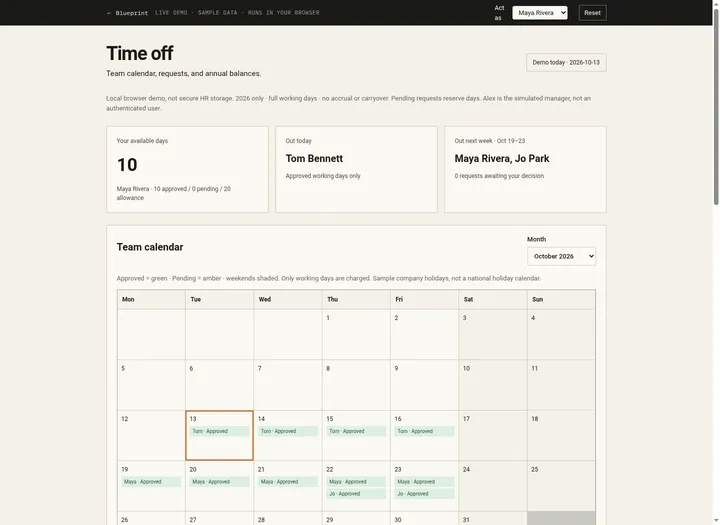 Open demo
The blueprint
Paste the whole spec into your AI builder, then send each prompt in the Build plan section one at a time. Check each phase before moving on.
How to use this file: paste this whole document into your AI builder (Claude, ChatGPT, Cursor, Lovable, Replit, Type) as context. Then send the build prompts in section 16 one at a time. Do not move to the next phase until the acceptance checks for the current phase pass.
1. The problem
"I can never tell who's out next week until they're already gone."
Someone emails their manager for a week off. The manager replies "fine", nobody updates the spreadsheet, and the team finds out on Monday when the desk is empty. Balances are worked out by hand, so the person and the spreadsheet disagree. Half days, public holidays and part-time weeks make the arithmetic worse, and at year end nobody is sure how many days roll over.
2. What the real product does
Research basis: Timetastic's product, pricing and help-centre pages (timetastic.co.uk/features, timetastic.co.uk/pricing, help.timetastic.co.uk/en/articles/13193324-getting-started-how-to-set-up-timetastic, help.timetastic.co.uk/en/articles/13193331-timetastic-setting-your-annual-carry-forward), October 2026.
What we verified:
- Wallchart. A shared calendar of who is in and who is off, filterable by department, with leave-type icons and approval status. You can book from it, and pending requests sit next to everyone else's time off, so overlaps are visible before approving.
- Requests and approvals. An employee picks dates and the request goes to their manager, who can approve or decline from the email. Each department has one manager who approves its bookings. Admins can approve anyone's request and can book or cancel leave for anyone, including past leave.
- Leave types. Common types come preset (holidays, sick leave, maternity and others) and you can add as many as you need. Each type sets whether it deducts from the annual allowance, whether it needs approval, whether it counts toward the department's maximum absent, and whether it shows as busy in calendar integrations.
- Work schedules. Each person has a weekly schedule split into a morning and an afternoon session (by default Monday to Friday, 09:00 to 12:00 and 13:00 to 17:00). Deductions from the allowance follow the schedule.
- Public holidays. Lists for over 3,000 regions, set per person by country and region. Public holidays never deduct from the allowance.
- Carry forward. An admin sets a company-wide maximum. At the end of each person's leave year, unused allowance up to that maximum rolls over automatically, once. Carried days are used first, can be set to expire after a number of months, and can be edited per person afterwards.
- Limits and permissions. Departments can cap how many people are absent at once, and dates can be locked. Employees can't change their entitlement, can't see other people's allowances, and can cancel only future bookings. Managers see their own people's remaining allowance; directors get read-only access to everyone.
- Reports and integrations. Excel downloads by year, a full backup and an audit trail. Calendar sync with Outlook, Google and Apple calendars. Slack and Google Workspace on both leave plans, Microsoft Teams on Pro.
- Pricing (timetastic.co.uk/pricing): Business $1.50 and Pro $2.50 per user per month, paid monthly with no minimum term, after a 30-day free trial. Pro adds leave accruals, annual booking limits per leave type, single sign-on, Microsoft Teams and absence insights. Rota & Time Clock is a separate plan at $5.50 per user per month.
What this blueprint keeps
A shared team calendar and a "who's out" view, requests approved or declined by the person's approver, leave types that do or don't count against the allowance and do or don't need approval, a working week per person, half days, company public holidays that are never charged, a yearly allowance with capped carry-over, admin corrections with a note, a history of every action, email notifications through an outbox (including a weekly "out next week" email), CSV export, and a calendar feed people can subscribe to.
What this blueprint deliberately leaves out
Ready-made holiday lists for thousands of regions (an admin types in the company's holidays once a year), more than one holiday list, a leave year per person, allowances in hours and custom session times, accrual and pro-rata calculation, carry-over expiry, maximum-absent limits and locked dates (v1 shows overlaps as a warning instead), per-type allowances and booking limits, approving straight from the email, mobile apps, Slack, Teams and Google Workspace integrations, two-way calendar sync, single sign-on, absence insights, and rota and time-clock features. If you need those, Timetastic's per-user price is low enough that buying it is probably the better choice.
3. Scope of v1
- One company and one leave year: the calendar year, 1 January to 31 December.
- Leave is booked in days and half days (a morning or an afternoon). No hours.
- Each person has a working week (the weekdays they work). Default Monday to Friday.
- One list of company public holidays, entered by an admin.
- One annual allowance per person per year. Each leave type either counts against it or doesn't.
- One approval step: the person's approver, or an admin, approves or declines.
- Dates are calendar dates in one team time zone, set by a
TEAM_TIME_ZONEenvironment variable (default America/New_York). "Today" means today in that time zone. - Web app that works on a phone. Email notifications through an outbox. CSV export. A read-only calendar feed.
4. Roles
| Role | Who | Can do |
|---|---|---|
| Employee | Everyone who can sign in | See Who's out and the team calendar. Request leave for themselves. Cancel their own pending requests, and their approved leave until it starts. See their own balance and history. |
| Approver | Whoever is set as a person's approver | Approve or decline that person's pending requests. See that person's balance, notes and history. |
| Admin | One or more people | Manage people, teams, leave types, holidays, allowances and settings. Record leave for anyone, including past dates. Approve, decline or cancel any request, except deciding their own. Close a year, export CSV, read the outbox. |
A person can hold several roles. Nobody approves or declines their own request, admins included. Everyone can see who is off and when; notes, reasons, balances and history are private to the person, their approver and admins (R16).
5. Time-off tracker data model
All timestamps are UTC. Leave dates are calendar dates (YYYY-MM-DD, no time, no zone). All IDs are strings (UUID or similar). Every day amount is an integer number of half-days: 1 day = 2, half a day = 1. Display rules are in R17.
Settings (one row)
- company_name (required)
- carry_over_cap (half-days, 0 or more; default 10 = 5 days; 0 means nothing carries over)
Team
- id, name (required, unique)
Person
- id
- name (required)
- email (required, unique, stored lower-case)
- team_id (required, references Team)
- approver_id (nullable, references Person; never the person themselves)
- is_admin (boolean, default false)
- working_days (list of ISO weekday numbers, 1 = Monday to 7 = Sunday; at least one; default 1 to 5)
- annual_allowance (half-days; default 40 = 20 days; used when a new year's Allowance row is created)
- borrow_limit (half-days, 0 or more, default 0; how far below zero their available balance may go)
- calendar_token (random, unique, at least 32 characters; section 13)
- active (boolean, default true)
LeaveType
- id
- name (required, unique)
- code (2 letters, unique; shown on the calendar, e.g. "AL")
- color (hex)
- counts_against_allowance (boolean)
- needs_approval (boolean)
- position (integer; display order)
- active (boolean)
PublicHoliday
- id, date (unique), name (required)
Allowance (one row per person per leave year)
- id, person_id, year (integer); unique (person_id, year)
- entitlement (half-days, 0 or more)
- carried_over (half-days, may be negative; written only when the previous year is closed, section 9)
- adjustment (half-days, may be negative, default 0)
- adjustment_note (required when adjustment is not 0)
When a balance is needed for a year that has no row, use entitlement = the person's annual_allowance, carried_over 0 and adjustment 0. Write the row only when something is saved for that year (a request, an allowance change, or the carry-over from closing the previous year); viewing a year never creates a row.
YearClose (a row means the year is closed)
- year (integer, unique), carry_over_cap (the cap that was used), closed_by, closed_at
Request (one booking of leave)
- id
- person_id (whose leave it is)
- leave_type_id
- year (the year of start_date)
- start_date, start_half (am | pm)
- end_date, end_half (am | pm)
- days (half-days, more than 0; set once at creation, section 6)
- counts_against_allowance (boolean; copied from the leave type at creation)
- status: pending | approved | declined | cancelled
- note (optional, trimmed, max 500 characters)
- created_by (the person, or the admin who recorded it)
- decided_by, decided_at, decision_note (nullable; decision_note holds the reason when declined)
- cancelled_by, cancelled_at, cancel_reason (nullable)
- created_at, updated_at
LeaveDay (one row per half-day session that a pending or approved request takes)
- id, request_id, person_id, date, half (am | pm)
- unique (person_id, date, half): this key makes double booking impossible (R5)
- Written with the request. Deleted when the request is declined or cancelled.
Event (history; append-only, never updated or deleted)
- id
- request_id (nullable)
- person_id (whose leave or allowance the event is about)
- actor_id (nullable for system actions)
- type: requested | recorded | approved | declined | cancelled | allowance_changed | carried_over
- note (nullable)
- data (JSON, nullable; e.g. old and new values for an allowance change)
- created_at
Notification (outbox)
- id, person_id (recipient), request_id (nullable)
- kind: needs_approval | booked | recorded | approved | declined | cancelled | weekly_digest | year_closed
- subject, body
- status: queued | sent | logged | failed
- attempts (integer), error (nullable), created_at, sent_at (nullable)
DigestRun
- week_start (date; the Monday of the week the digest covers; unique), created_at
6. Counting leave days
Every date has two sessions: morning (am) and afternoon (pm). A request takes a set of sessions on the person's working days. Its days is the number of sessions taken, in half-days.
Run this when a request is previewed and when it is saved. The preview and the save must call the same server-side function.
- Validate the dates (R1, R2) and the halves (R3).
- For each calendar date d from start_date to end_date, inclusive:
- Skip d if its weekday is not in the person's working_days.
- Skip d if it is a public holiday.
- Take the morning, unless d is the start date and start_half is pm.
- Take the afternoon, unless d is the end date and end_half is am.
- If no session was taken, refuse with "No working days in this range." (R4).
- Otherwise
days= the number of sessions. The preview also lists every skipped date with its reason ("Fri 25 Dec: Christmas Day", "Sat 26 Dec: not a working day").
On the form, the first day is "Full day" (start_half am) or "Afternoon only" (pm), and the last day is "Full day" (end_half pm) or "Morning only" (am). A one-day request offers "Full day" (am to pm), "Morning only" (am to am) or "Afternoon only" (pm to pm).
Worked examples (with the seed data in section 15)
| Person | Request | Days | Why |
|---|---|---|---|
| Maya (Mon to Fri) | Mon 2 – Fri 6 Nov | 5 | Five working days |
| Maya | Thu 24 – Mon 28 Dec | 2 | 25 Dec is Christmas Day; 26 and 27 Dec are a weekend |
| Maya | Thu 24 Dec (afternoon only) – Mon 28 Dec | 1.5 | Half of 24 Dec plus 28 Dec |
| Maya | Sat 7 – Sun 8 Nov | refused | No working days in this range |
| Jo (Mon to Fri) | Mon 2 – Mon 30 Nov | 19 | 26 and 27 Nov are holidays |
| Jo | Mon 2 – Fri 27 Nov | 18 | Same holidays |
| Priya (Mon to Thu) | Mon 7 – Fri 11 Sep | 3 | 7 Sep is Labor Day; she doesn't work Fridays |
| Priya | Mon 9 – Fri 13 Nov | 4 | She doesn't work Fridays |
| Alex (Mon to Fri) | Mon 21 – Thu 24 Dec (morning only) | 3.5 | Half of 24 Dec |
7. Balances
For one person and one leave year:
- total = entitlement + carried_over + adjustment
- approved = the sum of
daysof their approved requests in that year that count against the allowance - pending = the same sum for their pending requests
- available = total - approved - pending
Compute these from the rows every time. Never keep a running balance that actions add to or subtract from. "Approved" includes past and future leave, so don't label it "taken". Leave types that don't count against the allowance (Sick leave, Unpaid leave) never change a balance.
Limit. For a type that counts against the allowance, a request is refused if it would leave available below minus the person's borrow_limit (R8). Reaching exactly 0 is allowed. The check runs when the request is saved and again when it is approved.
Worked example (Maya, 2026, total 20 days)
| Step | Approved | Pending | Available |
|---|---|---|---|
| Seed: 3–7 Aug approved, 19–23 Oct pending | 5 | 5 | 10 |
| Maya requests Mon 2 – Fri 6 Nov | 5 | 10 | 5 |
| Alex approves 19–23 Oct (no second charge) | 10 | 5 | 5 |
| Alex declines 2–6 Nov | 10 | 0 | 10 |
| Maya cancels 19–23 Oct | 5 | 0 | 15 |
Exactly zero. Jo has 18 days available. A 19-day request (Mon 2 – Mon 30 Nov) is refused; an 18-day request (Mon 2 – Fri 27 Nov) is accepted and leaves 0.
Borrowing. Priya's 2026 total is 16 and she has 17 approved days, so her available is -1. Her borrow_limit is 2 days, so one more day (Mon 9 Nov) takes her to -2 and is accepted. Another day (Tue 10 Nov) would take her to -3 and is refused.
8. Requests and approvals
Status transitions
| Action | Who | From | To | Side effects |
|---|---|---|---|---|
| Request | Anyone, for themselves | (none) | pending; approved if the leave type doesn't need approval | Count days (section 6), check R2 to R9, write LeaveDay rows, event requested (or recorded when approved straight away), notify the approver |
| Record for someone | Admin | (none) | approved | Same checks, but earlier dates are allowed (R6); event recorded; notify the person |
| Approve | The person's approver or an admin, never the person (R9) | pending | approved | Recheck R8; set decided_by and decided_at; event approved; notify the person |
| Decline | Same as approve | pending | declined | Reason required (R10); delete LeaveDay rows; event declined; notify the person |
| Cancel | The person (R11) or an admin | pending, approved | cancelled | Delete LeaveDay rows; event cancelled; notify the approver (when the person cancels) or the person (when an admin cancels) |
Final states: declined and cancelled. Approved leave can only be cancelled. Nothing can be edited: to change dates, cancel and request again.
Business rules
- R1. Dates. Leave dates are calendar dates with no time. Reject impossible dates such as 2026-02-30 (parse, format back, compare) instead of rolling them into March. Step through dates one calendar day at a time, never by adding 24 hours to a local time, so daylight-saving changes can't skip or repeat a day.
- R2. Range. The end date is on or after the start date ("End date is before start date."), and both are in the same year ("Leave can't cross 31 December. Book each year separately.").
- R3. Halves. Only the choices in section 6 are valid. A one-day request can't run from the afternoon to the morning.
- R4. Something to book. A request must take at least one session: "No working days in this range."
- R5. No double booking. A person's pending and approved requests can't share a session: "Overlaps your Annual leave, Mon 2 – Fri 6 Nov." Declined and cancelled requests don't block. Other people's leave never blocks; it appears as a warning: "Also out: Jo Park, Thu 22 – Fri 23 Oct" (or "Also out (pending): ..."). The LeaveDay unique key enforces this even when two requests arrive at once.
- R6. No past starts. People request leave starting today or later: "Leave can't start in the past." Only an admin recording leave for someone else may use earlier dates.
- R7. Computed balances. Balances are always computed as in section 7. There is no stored running total.
- R8. Allowance limit. Refuse a request that would take available below minus the borrow_limit: "Not enough allowance: you have 18 days available." When the person may borrow: "Not enough allowance: this would take you to -3 days; the lowest allowed is -2 days." (When an admin records leave, name the person instead of "you".) Check and save in one transaction that locks the person's Allowance row for that year, so two requests at once can't both use the last days.
- R9. Who decides. A pending request can be approved or declined by the person's approver (if active) or by any active admin, never by the person themselves. If the person has no active approver, admins decide and are the ones notified. If no one could decide (no active approver and no other active admin), refuse requests that need approval: "No one can approve your leave. Ask an admin to set your approver." The approver is looked up when the decision is made, so changing someone's approver moves their pending requests too.
- R10. Decisions. Declining needs a reason of at least 3 characters. An approval note is optional. A pending request can be decided at any time while its year is open, even after its start date. Check the status inside the same transaction as the update: the second of two simultaneous decisions fails with "This request was already decided."
- R11. Cancelling. The person can cancel their pending request at any time, and their approved leave while its start date is today or later. After that: "This leave has started. Ask an admin to cancel it." An admin can cancel any pending or approved request; cancelling someone else's leave needs a reason of at least 3 characters. Cancelling gives the days back at once.
- R12. Day counts are fixed.
days, the LeaveDay rows and counts_against_allowance are set when a request is saved and never recalculated. Later changes to holidays, working days or leave types affect new requests only. - R13. History. Every request action and allowance change writes exactly one Event row (closing a year writes one per person). Changes to people, teams, leave types, holidays and settings are not recorded as events in v1. Events are never edited or deleted, and there is no UI or API to do so.
- R14. Closed years. Once a year is closed (section 9), nothing in it changes: no requests or recordings with dates in it, no decisions, no cancellations, no allowance edits. "2026 is closed."
- R15. People. A person can't be their own approver: "Someone can't approve their own leave." Only active people can be picked as approvers. There must always be at least one active admin. Deactivated people can't sign in and disappear from Who's out, the calendar, the digest and the feed; their records stay.
- R16. Privacy. Everyone signed in sees who is off, the leave type, the dates and whether it is pending or approved. Notes, decline and cancel reasons, history and balances are visible only to the person, their approver and admins. The server enforces this, not only the screens.
- R17. Display. Days: "5 days", "1 day", "0.5 days", "1.5 days", "0 days", "-1 day" (plain hyphen for minus). Dates: "Mon 2 Nov", with the year added when it isn't the current year. Ranges use an en dash with spaces: "Mon 2 – Fri 6 Nov", "Mon 30 Nov – Fri 4 Dec". In a message that already names the year (such as "Decide or cancel 1 pending request in 2026 first: …"), dates in that year omit the year.
9. Year end and carry-over
The leave year is the calendar year. Unused allowance moves into the next year once, when an admin closes the year in Admin → Allowances.
Closing year Y
- Refuse if Y is already closed, if Y isn't over (today must be in a later year), if an earlier year that has Allowance rows is still open, or if any request in Y is still pending: "Decide or cancel 1 pending request in 2026 first: Maya Rivera, Mon 19 – Fri 23 Oct."
- For each active person with an Allowance row for Y: remaining = their available for Y (section 7).
- If remaining is 0 or less, carried = remaining (borrowed days are paid back in full). Otherwise carried = the smaller of remaining and Settings.carry_over_cap. Forfeited = remaining - carried.
- Set carried_over on the person's Allowance row for Y+1 to
carried, creating the row if needed. Set it, don't add to it. - Write one
carried_overevent per person (data: year, remaining, carried, forfeited), the YearClose row, and a "year closed" notification to each of those people. Do all of it in one transaction.
Before closing, Admin → Allowances shows a preview table (person, total, approved, remaining, carried, forfeited) and asks for confirmation. From 1 January until the previous year is closed, admins see a banner on Who's out and Admin → Allowances: "2026 is not closed yet. Close it to carry over unused days."
People can book next year's leave before the old year is closed. It uses next year's own allowance; carried_over stays 0 and the balance card says "Carry-over from 2026 is added when an admin closes 2026."
Worked example (seed data, after Alex approves Maya's 19–23 Oct request; cap 5 days)
| Person | 2026 total | Approved | Remaining | Carried into 2027 | Forfeited | 2027 total |
|---|---|---|---|---|---|---|
| Rosa Quinn | 25 | 10 | 15 | 5 | 10 | 30 |
| Alex Morgan | 25 | 23.5 | 1.5 | 1.5 | 0 | 26.5 |
| Maya Rivera | 20 | 10 | 10 | 5 | 5 | 25 |
| Tom Bennett | 25 | 13 | 12 | 5 | 7 | 30 |
| Jo Park | 20 | 2 | 18 | 5 | 13 | 25 |
| Leo Grant | 25 | 9 | 16 | 5 | 11 | 30 |
| Priya Nair | 16 | 17 | -1 | -1 | 0 | 15 |
After closing, Rosa's 2027 balance is 30 total, 5 pending (4–8 Jan) and 25 available.
10. Time-off tracker screens
Navigation: Who's out, Team calendar, My time off, Approvals (approvers and admins), Admin (admins), My settings. Admin pages show "Admins only" to everyone else, and the server refuses their actions.
- Who's out (home). "Out today": approved leave that takes a session today, one line each: "Tom Bennett · Design · Annual leave · Tue 13 – Fri 16 Oct · back Mon 19 Oct". "Out next week (Mon 19 – Sun 25 Oct)": approved leave that takes a session in next Monday-to-Sunday week, same format. "Waiting for approval next week": pending requests in that week, listed apart so pending leave never looks confirmed. Pending requests that take a session today are listed under "Waiting for approval today" (shown only when there are any), so leave that has started without a decision never looks confirmed or disappears. Also a balance line for the signed-in person ("Available: 10 of 20 days") and, for approvers and admins, "2 requests waiting for you". Empty states: "Nobody is out today." and "Nobody is out next week."
- Back on: the first date after the end date that is one of the person's working days, not a public holiday and not covered by their other approved leave. If the last day is morning only, they are back that afternoon ("back Thu 24 Dec, afternoon").
- Team calendar. One month at a time. Rows are active people grouped by team; columns are the days of the month with weekday initial and date. Cells:
- Leave: the type code, plus " am" or " pm" for a half day, plus "?" while pending (with a dashed border): "AL", "AL am", "AL?", "SK". Two half days on one date show both, morning first.
- Public holiday: "PH" in every row, including on days the person doesn't work; the column header shows the holiday name on hover or tap.
- Any other day the person doesn't work: grey, no text.
- Today's column is highlighted. Clicking a leave cell shows the person, type, dates, days and status (and the note for those allowed to see it, R16). Filter by team (All or one team). Buttons: previous month, next month, Today. On a phone the name column stays fixed and the days scroll sideways.
- New request. Leave type (active types only), first day and its half, last day and its half (section 6), note. A live preview from the server: days, skipped dates with reasons, "Available after: 5 days" for types that count, and "Also out" warnings for others in the same team with pending or approved leave on any of the same dates. Errors appear inline and the form keeps what was typed. Admins also get a "For" picker to record leave for someone else.
- My time off. Year tabs (last year, this year, next year). Balance card: Allowance (entitlement), Carried over, Adjustment (with its note, when not 0), Approved, Pending, Available. When borrowing is allowed, show "You can go down to -2 days". Requests: upcoming, then past, then declined and cancelled (collapsed), each with dates, type, days, status and a Cancel button when R11 allows. Cancel asks for confirmation.
- Request detail. Person, type, dates with halves, days, status, the dates taken and skipped, note, decision note or reason, "Also out" warnings. Actions for the viewer: Approve (optional note) and Decline (reason) for the approver and admins; Cancel for the person and admins. History: one line per event, "Requested by Maya Rivera", "Recorded by Rosa Quinn", "Declined by Alex Morgan: Coverage gap", each with its time. The email link opens this page and the approver sees Approve and Decline without scrolling.
- Approvals. Pending requests the signed-in person can decide (never their own), oldest first: person, type, dates, days, how long it has waited, available after approval, "Also out" warnings, and Approve and Decline on each row. Admins get two tabs: "Waiting for me" (they are the approver, or the person has no active approver) and "All pending". Empty state: "Nothing waiting for you."
- Admin → People. Name, email, team, approver, admin, working days, annual allowance, borrow limit, active. Create, edit, deactivate; add and rename teams here. A row whose approver is inactive shows "Approver inactive: admins decide."
- Admin → Leave types. Name, code, color, counts against allowance, needs approval, active, order. Deactivated types can't be picked for new requests; existing requests keep theirs.
- Admin → Holidays. Pick a year; list date, weekday and name; add, edit, delete. When a holiday falls on dates already booked, show "2 existing requests include this date; their day counts don't change." with links (R12).
- Admin → Allowances. Pick a year. One row per active person, plus inactive people who have an Allowance row for that year (marked "Inactive"; they are left out when the year is closed): entitlement, carried over, adjustment and note, total, approved, pending, available. Entitlement and adjustment are editable while the year is open; each change writes an
allowance_changedevent. The carry-over cap setting. The year-end banner, preview and Close button (section 9). - Admin → Outbox. Every notification, newest first: time, recipient, kind, subject, status (queued, sent, logged, failed) and error. Click a row to read the body.
- Admin → Export. Pick a year. "Requests CSV" (
time-off-requests-2026.csv): one row per request starting that year, ordered by start date then name: person, email, team, leave_type, start_date, start_half, end_date, end_half, days, counts_against_allowance, status, requested_at, decided_by, decided_at, decision_note, cancelled_at. "Balances CSV" (time-off-balances-2026.csv): one row per person with an Allowance row that year: person, email, team, year, entitlement, carried_over, adjustment, approved, pending, available. Days are decimals (3.5), dates areYYYY-MM-DD, timestamps (requested_at, decided_at, cancelled_at) are UTC in ISO 8601 (2026-10-09T13:00:00Z), counts_against_allowance isyesorno, missing values are left empty, and fields with commas, quotes or line breaks are quoted. - My settings. The person's calendar feed link (section 13) with Copy, Preview and Regenerate.
All screens must work on a phone.
11. Notifications
| Trigger | Recipient | Subject (seed example) |
|---|---|---|
| Request needs approval | The approver; if none, every active admin except the person | "Maya Rivera requested Annual leave: Mon 2 – Fri 6 Nov (5 days)" |
| Leave booked that needs no approval | The approver, for information; if none, admins | "Leo Grant booked Sick leave: Tue 13 Oct (1 day)" |
| Admin records leave for someone | That person | "Rosa Quinn recorded Sick leave for you: Mon 12 Oct (1 day)" |
| Approved | The person | "Approved: Annual leave, Mon 19 – Fri 23 Oct" |
| Declined | The person | "Declined: Annual leave, Mon 2 – Fri 6 Nov" (the body includes the reason) |
| Cancelled by the person | The approver (admins if none) | "Maya Rivera cancelled Annual leave: Mon 19 – Fri 23 Oct" |
| Cancelled by an admin | The person | "Rosa Quinn cancelled your Annual leave: Mon 19 – Fri 23 Oct" (with the reason) |
| Weekly digest (section 12) | Every active person | "Out next week: Mon 19 – Sun 25 Oct" |
| Year closed (section 9) | Each person in the close | "Your 2027 allowance: 25 days" (body: "20 days for 2027 plus 5 days carried over from 2026") |
Every email links to the request, or to Who's out for the digest. Write each notification to the outbox with status queued in the same transaction as the action, then send it after the transaction commits. If no email provider is configured, set the status to logged instead of sending. If sending fails, set failed with the error; the scheduled job retries it, up to 5 attempts. A notification failure never blocks or undoes the action.
Weekly digest body (seed example):
Out next week (Mon 19 – Sun 25 Oct)
- Jo Park (Design): Annual leave, Thu 22 – Fri 23 Oct. Back Mon 26 Oct.

Waiting for approval
- Maya Rivera (Design): Annual leave, Mon 19 – Fri 23 Oct.
When nobody is off or waiting, send it anyway with "Nobody is off next week.", so people learn to trust it.
12. Time and the scheduled job
Clock. Every server-side use of the current time (today, timestamps, the scheduled job) goes through one now() function. Today is the date of now() in TEAM_TIME_ZONE.
Development toolbar (development only; it must not exist or respond in production):
- Sign in as any person.
- The clock: shows "Today: Tue 13 Oct 2026", can be set to any date and time, and has "+1 day". It is stored on the server and now() returns it.
- "Run scheduled job now" (Phase 3), using the development clock.
- "Reset to seed data": reloads section 15 and sets the clock to Tue 13 Oct 2026, 10:00.
Scheduled job (runs every hour; any scheduler works, e.g. on Vercel a cron hitting /api/cron/tick protected by a CRON_SECRET header):
- Weekly digest. If now is between Friday 09:00 and Sunday 23:59 in the team time zone and there is no DigestRun for the coming Monday, create the DigestRun and queue one digest per active person (section 11). The unique week_start means a second run that weekend does nothing.
- Retry queued and failed notifications that have had fewer than 5 attempts.
Year end is not automatic. An admin closes the year (section 9).
13. Calendar feed
Each person gets a private link to subscribe to in Google Calendar ("From URL"), Outlook ("Subscribe from web") or Apple Calendar ("New Calendar Subscription"): https://<your-app>/calendar/<calendar_token>.ics. Calendar apps can't sign in, so the token is the password. Calendar apps refresh subscribed feeds on their own schedule, not instantly.
- Contents: one event per approved request of active people, for requests starting last year, this year or next year. Pending, declined and cancelled requests are left out.
- Each event:
UID:<request id>@<your-app host>;DTSTAMP(updated_at in UTC, e.g.20261013T140000Z);DTSTART;VALUE=DATE:the start date asYYYYMMDD;DTEND;VALUE=DATE:the day after the end date (all-day end dates are exclusive);SUMMARY:<name>: <leave type>, plus " (morning)" or " (afternoon)" for a one-day half-day request;DESCRIPTIONwith the days and the back-on date;TRANSP:TRANSPARENT, so other people's leave doesn't make the subscriber look busy. - Wrapper:
BEGIN:VCALENDAR,VERSION:2.0,PRODID:-//<company_name>//Time-Off Tracker//EN,CALSCALE:GREGORIAN,METHOD:PUBLISH,X-WR-CALNAME:<company_name> time off, the events,END:VCALENDAR. End lines with CRLF, escape commas, semicolons and backslashes in text, and fold lines longer than 75 bytes. - Response:
text/calendar; charset=utf-8. With?preview=1, return the same text astext/plainso it can be read in a browser. - Security: an unknown token, or the token of a deactivated person, returns 404 "Not found". Regenerate creates a new token, and the old link stops working at once.
Example: Tom's 13–16 Oct leave becomes DTSTART;VALUE=DATE:20261013, DTEND;VALUE=DATE:20261017, SUMMARY:Tom Bennett: Annual leave.
14. Edge cases
- Leave over New Year is refused (R2): book 28–31 Dec and 4–8 Jan as two requests.
- An admin adds a public holiday on a date someone already booked: the request keeps its day count (R12). To give the day back, cancel and rebook, or add an adjustment.
- A person's working days change: existing requests keep their counts; new ones use the new week.
- The approver is away: any admin can decide (R9). Changing the person's approver moves their pending requests to the new approver.
- An approver is deactivated: their people's requests go to admins until a new approver is set, and Admin → People flags those people.
- A pending request reaches its start date: it can still be decided (R10), and Who's out lists it under "Waiting for approval today".
- Two decisions at once: the second fails with "This request was already decided." (R10).
- Two requests at once for the last days: the Allowance row lock lets only one through (R8).
- An admin lowers an entitlement below what is already approved: allowed. Available goes negative, existing leave is untouched, and new requests are refused until it recovers.
- Closing a year carries a negative balance into next year, below leave already booked for next year: existing bookings stay; new requests are refused until available is back within the limit.
- Someone signs in whose email isn't in People, or who is inactive: "Ask an admin to add you."
- A feed link is shared by mistake: Regenerate in My settings.
15. Seed data
Company: Fernhill Studio. Teams: Design, Engineering, Operations. Carry-over cap: 5 days. Clock: Tue 13 Oct 2026, 10:00 (America/New_York). The dates are fixed, not relative to today, so every worked example and check gives the same answer.
| Person | Team | Approver | Admin | Works | Annual allowance | Borrow limit | |
|---|---|---|---|---|---|---|---|
| Rosa Quinn (Operations lead) | rosa@fernhill.example | Operations | Alex Morgan | yes | Mon to Fri | 25 days | 0 |
| Alex Morgan (Design lead) | alex@fernhill.example | Design | Rosa Quinn | no | Mon to Fri | 25 days | 0 |
| Maya Rivera (Designer) | maya@fernhill.example | Design | Alex Morgan | no | Mon to Fri | 20 days | 0 |
| Tom Bennett (Designer) | tom@fernhill.example | Design | Alex Morgan | no | Mon to Fri | 25 days | 0 |
| Jo Park (Designer) | jo@fernhill.example | Design | Alex Morgan | no | Mon to Fri | 20 days | 0 |
| Leo Grant (Engineering lead) | leo@fernhill.example | Engineering | Rosa Quinn | no | Mon to Fri | 25 days | 0 |
| Priya Nair (Engineer) | priya@fernhill.example | Engineering | Leo Grant | no | Mon to Thu | 16 days | 2 days |
| Order | Leave type | Code | Color | Counts against allowance | Needs approval |
|---|---|---|---|---|---|
| 1 | Annual leave | AL | #2f7d6d | yes | yes |
| 2 | Sick leave | SK | #c2553f | no | no |
| 3 | Unpaid leave | UL | #6b5ca5 | no | yes |
Public holidays: 2026: Thu 1 Jan New Year's Day, Mon 25 May Memorial Day, Fri 3 Jul Independence Day (observed), Mon 7 Sep Labor Day, Thu 26 Nov Thanksgiving, Fri 27 Nov Day after Thanksgiving, Fri 25 Dec Christmas Day. 2027: Fri 1 Jan New Year's Day.
Allowances: a 2026 row and a 2027 row for everyone, with entitlement = annual allowance, carried over 0 and adjustment 0.
Requests (all full days unless noted). Requests are made at 09:00 and decided at 10:00 team time on the dates shown. Each gets the LeaveDay rows and the history events its status implies.
| # | Person | Type | Dates | Days | Status and history |
|---|---|---|---|---|---|
| 1 | Maya Rivera | Annual leave | Mon 19 – Fri 23 Oct 2026 | 5 | Pending. Requested Fri 9 Oct. Note: "Family visit. Handover notes are in the Design folder." |
| 2 | Maya Rivera | Annual leave | Mon 3 – Fri 7 Aug 2026 | 5 | Requested Mon 15 Jun, approved by Alex Tue 16 Jun |
| 3 | Tom Bennett | Annual leave | Tue 13 – Fri 16 Oct 2026 | 4 | Requested Mon 21 Sep, approved by Alex Tue 22 Sep. Note: "Moving house." |
| 4 | Tom Bennett | Annual leave | Mon 18 – Fri 29 May 2026 | 9 | Requested Mon 2 Mar, approved by Alex Tue 3 Mar (25 May is Memorial Day) |
| 5 | Tom Bennett | Annual leave | Mon 30 Nov – Fri 4 Dec 2026 | 5 | Requested Thu 1 Oct, declined by Alex Fri 2 Oct: "Launch week. Could you move it a week later?" |
| 6 | Jo Park | Annual leave | Thu 22 – Fri 23 Oct 2026 | 2 | Requested Mon 5 Oct, approved by Alex Tue 6 Oct |
| 7 | Jo Park | Annual leave | Mon 14 – Fri 18 Sep 2026 | 5 | Requested Thu 20 Aug, cancelled by Jo while pending Mon 24 Aug |
| 8 | Alex Morgan | Annual leave | Mon 13 – Fri 24 Apr 2026 | 10 | Requested Mon 2 Feb, approved by Rosa Tue 3 Feb |
| 9 | Alex Morgan | Annual leave | Mon 6 – Fri 17 Jul 2026 | 10 | Requested Mon 27 Apr, approved by Rosa Tue 28 Apr |
| 10 | Alex Morgan | Annual leave | Mon 21 – Thu 24 Dec 2026, last day morning only | 3.5 | Requested Mon 14 Sep, approved by Rosa Tue 15 Sep |
| 11 | Rosa Quinn | Annual leave | Mon 10 – Fri 21 Aug 2026 | 10 | Requested Mon 11 May, approved by Alex Tue 12 May |
| 12 | Rosa Quinn | Annual leave | Mon 4 – Fri 8 Jan 2027 | 5 | Pending. Requested Mon 5 Oct |
| 13 | Leo Grant | Sick leave | Thu 1 – Fri 2 Oct 2026 | 2 | Recorded by Rosa Mon 5 Oct (approved) |
| 14 | Leo Grant | Annual leave | Mon 22 Jun – Fri 3 Jul 2026 | 9 | Requested Mon 6 Apr, approved by Rosa Tue 7 Apr (3 Jul is a holiday) |
| 15 | Leo Grant | Annual leave | Mon 16 – Fri 20 Nov 2026 | 5 | Requested Tue 1 Sep, approved by Rosa Wed 2 Sep, cancelled by Leo Wed 7 Oct |
| 16 | Priya Nair | Annual leave | Mon 1 – Tue 23 Jun 2026 | 14 | Requested Mon 9 Mar, approved by Leo Tue 10 Mar (she works Mon to Thu) |
| 17 | Priya Nair | Unpaid leave | Wed 24 – Thu 25 Jun 2026 | 2 | Requested Mon 9 Mar, approved by Leo Tue 10 Mar |
| 18 | Priya Nair | Annual leave | Mon 7 – Fri 11 Sep 2026 | 3 | Requested Mon 3 Aug, approved by Leo Tue 4 Aug (7 Sep is Labor Day) |
Resulting 2026 balances (check these after loading):
| Person | Total | Approved | Pending | Available |
|---|---|---|---|---|
| Rosa Quinn | 25 | 10 | 0 | 15 |
| Alex Morgan | 25 | 23.5 | 0 | 1.5 |
| Maya Rivera | 20 | 5 | 5 | 10 |
| Tom Bennett | 25 | 13 | 0 | 12 |
| Jo Park | 20 | 2 | 0 | 18 |
| Leo Grant | 25 | 9 | 0 | 16 |
| Priya Nair | 16 | 17 | 0 | -1 |
In 2027, Rosa has 5 days pending (20 available); everyone else has their full allowance available. On the seed date, Tom is out today, Jo is out next week, and Maya's request for next week is still waiting for Alex.
16. Time-off tracker build plan
Send these prompts one at a time after pasting this file. Each phase ends with checks you can run by clicking through the app. Start each phase's checks from fresh seed data (development toolbar: "Reset to seed data", clock Tue 13 Oct 2026, 10:00) and run them in order; later checks build on earlier ones.
Phase 1: Foundation
Using the Time-Off Tracker blueprint above, build Phase 1 only.

1. Set up the data model from section 5 exactly (Settings, Team, Person, LeaveType, PublicHoliday, Allowance, YearClose, Request, LeaveDay, Event, Notification, DigestRun) with a real database. Store every day amount as integer half-days.
2. Add sign-in. Use the platform's built-in auth or Google sign-in limited to our company email domain. A signed-in email must match an active Person; anyone else sees "Ask an admin to add you."
3. Build Admin → People, Leave types, Holidays and Allowances (section 10, screens 7 to 10), leaving out the balance columns and year end for now. Only admins can open them ("Admins only" for everyone else), and the server refuses admin actions from anyone else. Enforce R1 for holiday dates, R15, and the adjustment note rule in section 5.
4. Load the seed data from section 15 exactly, including every request with its LeaveDay rows and history events.
5. Add the development toolbar from section 12: "sign in as", the clock (shown as "Today: Tue 13 Oct 2026", settable, with "+1 day"; every server-side read of the current time must use it), and "Reset to seed data". None of it may exist or respond in production.

Do not build requests, approvals or calendars yet. When you're done, list what you built and anything in the spec you had to interpret.
Acceptance checks
- Admin → People lists 7 active people with the teams and approvers in section 15: Maya, Tom and Jo have Alex Morgan as approver, Alex and Leo have Rosa Quinn, Rosa has Alex Morgan, and Priya has Leo Grant, with working days Monday to Thursday and a borrow limit of 2 days.
- Signed in as Jo, the Admin pages show "Admins only" (also when opened by URL) and a direct API call to save a person is refused. Signed in as Rosa, they open.
- Setting Tom's approver to Tom Bennett is refused with "Someone can't approve their own leave." Deactivating Leo Grant removes him from the approver picker and Priya's row shows "Approver inactive: admins decide."
- Admin → Leave types shows Annual leave (AL, counts against allowance, needs approval), Sick leave (SK, doesn't count, no approval) and Unpaid leave (UL, doesn't count, needs approval). Admin → Holidays for 2026 lists 7 holidays, including Fri 3 Jul "Independence Day (observed)". Adding a second holiday on 2026-12-25 is refused, and a direct API call with 2026-02-30 is refused as an invalid date.
- Admin → Allowances for 2026 shows entitlements Rosa 25, Alex 25, Maya 20, Tom 25, Jo 20, Leo 25 and Priya 16 days, each with 0 days carried over, and the carry-over cap reads 5 days. Saving a +1 day adjustment for Jo without a note is refused; with the note "Worked the launch weekend" it saves.
- The development toolbar shows "Today: Tue 13 Oct 2026" and "+1 day" changes it to "Today: Wed 14 Oct 2026". "Reset to seed data" sets it back to Tue 13 Oct 2026, makes Leo active again and removes Jo's adjustment.
Phase 2: Requests, balances and approvals
Using the Time-Off Tracker blueprint above, build Phase 2 only.

1. Implement the day count in section 6 as one pure server-side function, with unit tests for every row of the worked-examples table, plus 2026-02-30, an end date before the start date, and a range that crosses 31 December.
2. Implement balances exactly as section 7, computed from the rows every time, with a unit test for each step of Maya's worked example. Add the approved, pending and available columns to Admin → Allowances.
3. Build screens 3 to 6 from section 10: New request with the live preview (the preview and the save call the same function), My time off, Request detail with history, and Approvals. Admins can record leave for someone else from New request.
4. Implement every transition in section 8 and rules R1 to R13 and R15 to R17 (R14 arrives with year end in Phase 4). Enforce them on the server, not only by hiding buttons, and refuse direct API calls that break them.
5. Save a request, its LeaveDay rows and its event in one transaction that locks the person's Allowance row for that year (R5, R8). Check the status inside the same transaction for every decision and cancellation (R10).
6. Write the Notification rows from section 11 with status "queued", but don't send anything yet.

When you're done, list what you built and anything in the spec you had to interpret.
Acceptance checks (sign in as each person with the development toolbar)
- Signed in as Maya, My time off for 2026 shows Allowance 20 days, Carried over 0 days, Approved 5 days, Pending 5 days, Available 10 days. Signed in as Priya, it shows Allowance 16 days, Approved 17 days, Available -1 day and "You can go down to -2 days".
- As Maya, a New request for Annual leave Thu 24 – Mon 28 Dec previews 2 days and lists Fri 25 Dec (Christmas Day), Sat 26 Dec and Sun 27 Dec as skipped; choosing "Afternoon only" for the first day changes it to 1.5 days. She then requests Mon 2 – Fri 6 Nov: the preview shows 5 days and "Available after: 5 days", and after submitting, the request is Pending and her Available is 5 days.
- Maya's requests for Thu 5 – Fri 6 Nov ("Overlaps your Annual leave, Mon 2 – Fri 6 Nov."), Sat 7 – Sun 8 Nov ("No working days in this range.") and Mon 12 Oct ("Leave can't start in the past.") are all refused, and her Available stays 5 days.
- Signed in as Tom, Maya's Mon 19 – Fri 23 Oct request has no Approve or Decline buttons and a direct API call to approve it is refused. Signed in as Rosa, her own Mon 4 – Fri 8 Jan 2027 request has no Approve button even though she is an admin, and the API refuses it too.
- Signed in as Alex, Approvals lists three requests, oldest first: Rosa Quinn (Mon 4 – Fri 8 Jan 2027), Maya Rivera (Mon 19 – Fri 23 Oct, with "Also out: Jo Park, Thu 22 – Fri 23 Oct") and Maya Rivera (Mon 2 – Fri 6 Nov). Alex approves the October request, and Maya's balance shows Approved 10 days, Pending 5 days, Available 5 days.
- Alex tries to decline Maya's Mon 2 – Fri 6 Nov request without a reason and is blocked. With "Coverage gap" it is declined: Maya sees the reason on the request, her Available is back to 10 days, and the history shows "Requested by Maya Rivera" and "Declined by Alex Morgan: Coverage gap", each with a time.
- Maya cancels her approved Mon 19 – Fri 23 Oct leave and her Available becomes 15 days. Her Mon 3 – Fri 7 Aug leave has no Cancel button, and a direct API call to cancel it is refused.
- Jo requests Annual leave Mon 2 – Mon 30 Nov. The preview shows 19 days and submitting is refused with "Not enough allowance: you have 18 days available." With the end date changed to Fri 27 Nov (18 days) it is accepted and her Available shows 0 days.
- Priya requests Annual leave for Mon 9 Nov. It is accepted and her Available shows -2 days. A second request for Tue 10 Nov is refused with "Not enough allowance: this would take you to -3 days; the lowest allowed is -2 days."
Phase 3: Who's out, team calendar and notifications
Using the Time-Off Tracker blueprint above, build Phase 3 only.

1. Build Who's out (screen 1, now the home page) and the Team calendar (screen 2) exactly as section 10, including back-on dates, the cell text and the team filter. Respect R16.
2. Send the notifications in section 11 from the outbox. Email can use any provider we have; if none is configured, mark each notification "logged" instead of sending. A failed send must never block or undo the action that caused it.
3. Build Admin → Outbox (screen 11).
4. Build the scheduled job in section 12 at /api/cron/tick, protected by a CRON_SECRET header: the weekly digest and retries. Add "Run scheduled job now" to the development toolbar; it runs the job with the development clock.

When you're done, list what you built and anything in the spec you had to interpret.
Acceptance checks
- Signed in as Jo, Who's out shows under Out today "Tom Bennett · Design · Annual leave · Tue 13 – Fri 16 Oct · back Mon 19 Oct", under Out next week (Mon 19 – Sun 25 Oct) Jo Park for Thu 22 – Fri 23 Oct, and under Waiting for approval next week Maya Rivera for Mon 19 – Fri 23 Oct. Maya is not listed under Out next week.
- The Team calendar for October 2026 shows "AL" in Tom's row on 13–16 Oct, "AL" in Jo's row on 22–23 Oct, "AL?" in Maya's row on 19–23 Oct and "SK" in Leo's row on 1–2 Oct. Priya's cells on Fridays 2, 9, 16, 23 and 30 Oct are grey with no text.
- The Team calendar for December 2026 shows "AL" in Alex's row on 21–23 Dec and "AL am" on 24 Dec, "PH" in every row on 25 Dec, and nothing in Tom's row on 1–4 Dec (that request was declined). Filtering by Engineering shows only Leo Grant and Priya Nair.
- Leo books Sick leave for today. It is approved straight away, Who's out lists him under Out today with "back Wed 14 Oct", his 2026 Available stays 16 days, and Admin → Outbox has an email to Rosa Quinn: "Leo Grant booked Sick leave: Tue 13 Oct (1 day)".
- Rosa records Sick leave for Jo for yesterday, Mon 12 Oct. It is saved as approved, the request history shows "Recorded by Rosa Quinn", and the outbox has an email to Jo: "Rosa Quinn recorded Sick leave for you: Mon 12 Oct (1 day)".
- Maya requests Annual leave Mon 2 – Fri 6 Nov. Admin → Outbox shows an email to Alex Morgan with the subject "Maya Rivera requested Annual leave: Mon 2 – Fri 6 Nov (5 days)" and the status "logged".
- Alex declines that request with the reason "Team offsite that week". The outbox has an email to Maya, "Declined: Annual leave, Mon 2 – Fri 6 Nov", whose body contains "Team offsite that week".
- Set the clock to Fri 16 Oct 2026, 09:00 and run the scheduled job. The outbox has 7 emails "Out next week: Mon 19 – Sun 25 Oct", one per active person, each listing Jo Park (Thu 22 – Fri 23 Oct, back Mon 26 Oct) and, under Waiting for approval, Maya Rivera. Running the job again adds no digest emails.
- Alex approves Maya's Mon 19 – Fri 23 Oct request. The outbox has "Approved: Annual leave, Mon 19 – Fri 23 Oct" to Maya, and Who's out now lists Maya under Out next week and nothing under Waiting for approval next week.
Phase 4: Year end, export and calendar feed
Using the Time-Off Tracker blueprint above, build Phase 4 only.

1. Year end exactly as section 9: the "not closed yet" banner, the preview and Close in Admin → Allowances, all in one transaction, with carried_over events and "year closed" notifications. Then enforce R14 on the server for every action.
2. Admin → Export (screen 12) with the requests CSV and the balances CSV.
3. The calendar feed in section 13 and My settings (screen 13): the link with Copy, Preview (?preview=1) and Regenerate. Add unit tests that DTEND is the day after the end date and that pending, declined and cancelled requests are left out.

When you're done, list what you built and anything in the spec you had to interpret.
Acceptance checks
- Signed in as Rosa, My time off for 2027 shows Allowance 25 days, Carried over 0 days with "Carry-over from 2026 is added when an admin closes 2026.", Pending 5 days (her Mon 4 – Fri 8 Jan request) and Available 20 days.
- Admin → Export for 2026: the requests CSV has 17 rows, and Alex's 21–24 Dec row shows days 3.5 and end_half am. The balances CSV has 7 rows, and Maya's row reads entitlement 20, carried_over 0, adjustment 0, approved 5, pending 5, available 10.
- Signed in as Jo, My settings → Preview shows a calendar with 13 events, including
SUMMARY:Tom Bennett: Annual leavewithDTSTART;VALUE=DATE:20261013andDTEND;VALUE=DATE:20261017. There is no event for Maya's pending 19–23 Oct request, Tom's declined 30 Nov – 4 Dec request or Leo's cancelled 16–20 Nov request. - Jo clicks Regenerate. Her old feed link now returns "Not found", and the new link shows the same 13 events.
- Set the clock to Mon 4 Jan 2027, 10:00. Admin → Allowances shows "2026 is not closed yet. Close it to carry over unused days.", and closing 2026 is refused with "Decide or cancel 1 pending request in 2026 first: Maya Rivera, Mon 19 – Fri 23 Oct."
- Alex approves Maya's 19–23 Oct request. The 2026 close preview then shows these carried amounts: Rosa 5 days (of 15 remaining), Alex 1.5 days (of 1.5), Maya 5 days (of 10), Tom 5 days (of 12), Jo 5 days (of 18), Leo 5 days (of 16) and Priya -1 day (of -1).
- Rosa closes 2026. For 2027, Maya shows Carried over 5 days and Available 25 days, Priya shows Carried over -1 day and Available 15 days, and Rosa shows Pending 5 days and Available 25 days. The outbox has 7 "Your 2027 allowance" emails, including "Your 2027 allowance: 25 days" to Maya.
- 2026 is now read-only: Rosa recording Sick leave for Jo on Wed 30 Dec 2026 is refused with "2026 is closed.", and Admin → Allowances for 2026 has no edit controls.
17. Variations
- Several holiday lists (offices in different countries), assigned per person.
- A leave year that starts in another month, or on each person's start date.
- Accrual (allowance builds up month by month) and pro-rata allowances for joiners and leavers.
- Carry-over that expires: carried days are used first and lapse after a set number of months.
- A maximum number of people off per team at once, and locked dates, as a warning or a hard stop.
- Allowances per leave type (for example 10 sick days) and leave in hours.
- Approval reminders, and escalation to an admin when an approver doesn't act.
- Slack or Teams messages with Approve buttons (the Approval Workflow blueprint shows the pattern).
- Show "Away" instead of the leave type to colleagues, for privacy.
- Two-way sync that writes events into each person's own Google or Outlook calendar instead of a subscribed feed.
- Editing a pending request, and partial cancellation when someone comes back early.
18. Build notes from our test build
We built this blueprint by sending the four phase prompts above, in order, to an AI builder (Claude, working in Type), then checked every acceptance item in a real browser, resetting to the seed data before each phase's checks. Where a check says something is refused, the person saw the reason on screen and a direct request got an error with nothing changed.
Result: 32 of 32 acceptance checks passed in one final browser run on a fresh database, plus 71 automated tests. We then ran the full browser suite and the automated tests again ourselves, with the same result.
Gaps the build found, now fixed in this spec:
- Admin → Allowances listed active people only, but a Phase 1 check expects the row of a person an earlier check deactivated. It now also lists inactive people who have an Allowance row that year, marked "Inactive".
- R13 said every action writes one event, but there was no event type for changes to people, teams, leave types, holidays or settings. R13 now says which actions are recorded.
- "Create the row when a balance is needed" meant that just viewing last year created Allowance rows, which then blocked closing the current year. Section 5 now says viewing never writes.
- The team calendar didn't say whether a public holiday or a day the person doesn't work wins. "PH" wins, as the Christmas Day check expects.
- A pending request that has started had nowhere to appear on Who's out. It is now listed under "Waiting for approval today".
- R17 adds the year to dates outside the current year, but the year-end refusal message was checked without it. Dates in a message that already names the year now omit it.
- The export didn't define the format of timestamps or of the yes/no column. Screen 12 now does.
What we did not test:
- Production sign-in. Google sign-in was built, but every check used the development "sign in as" switcher.
- Sending email. Emails were logged in the outbox, not delivered.
- Subscribing to the calendar feed from Google, Outlook or Apple Calendar. Only the feed's contents were checked.
- The hourly job on a real scheduler. Its endpoint was called directly with its secret.
- Simultaneous writes from several server processes.
- Hosting. The test build ran on SQLite on one server. For a hosted deploy, use a managed Postgres (or your platform's database) and the same schema.
Field report
Building a Timetastic replacement with AI, 32 checks and 7 spec gaps
We had an AI builder build a small-team time-off tracker from our spec, one phase at a time, and checked every acceptance item in a real browser. It passed all 32 checks on a fresh database and exposed 7 gaps in the spec, fewer than the median. What it took, why Timetastic's price changes the build-or-buy answer, and what we still haven't tested.
The short answer
Yes, though for a different reason than most of our blueprints. We gave Claude, working in Type, our Time-Off Tracker blueprint and had it follow the four phase prompts in order. The final build passed 32 of 32 acceptance checks in one browser run on a fresh database, with 71 automated tests. It handles leave in days and half days, one approver per person, working weeks, public holidays that are never charged, balances computed from the rows, capped carry-over at year end, a who's-out view and team calendar, email through an outbox, CSV export and a calendar feed.
It was one of the smoother of our twenty-two build tests. The build exposed 7 gaps in the spec, places where the builder had to guess because the spec was silent or two parts of it disagreed. That is fewer than the median of 14.5 across the twenty-two blueprints. Every gap is now fixed in the published spec.
What it is not: a tested production deployment. Production sign-in, email delivery, a real scheduler, subscribing to the feed from a real calendar app and hosting were not part of the test. The last section has the list.
What we built, and what we left out
The blueprint copies the part of Timetastic a team of 5 to 100 uses: a wallchart of who is off, requests that go to one approver, leave types, holidays, allowances and carry-forward. We read Timetastic's features, pricing and help-centre pages in October 2026 and kept their rules where a small team needs them:
- Days counted in sessions. Every date is a morning and an afternoon. A request skips days the person doesn't work and public holidays, then counts the sessions taken. Maya's Thursday 24 to Monday 28 December is 2 days; afternoon only on the 24th makes it 1.5.
- Balances that can't drift. Available is entitlement plus carried over plus adjustment, minus approved, minus pending, computed from the requests every time. A request that would go below zero is refused unless the person has a borrow limit, and the check runs again at approval inside a transaction that locks the allowance row.
- One approver, never yourself. The person's approver or any admin decides; nobody decides their own, admins included. Declining needs a reason.
- Who's out, and who might be. The home page lists who is out today and next week, with the date they're back, and lists pending requests apart so unconfirmed leave never looks confirmed. The team calendar shows "AL", "AL?" while pending, "PH" on holidays, and grey for days someone doesn't work.
- Year end by hand, once. An admin closes the year after seeing a preview. Unused days carry over up to the company cap, the rest are forfeited, and a closed year is read-only.
- An outbox and a private calendar feed. Every notification is queued in the same transaction as the action, then sent, logged or retried, including a weekly "Out next week" digest. Each person gets an .ics link with approved leave as free all-day events.
Left out on purpose: holiday lists for thousands of regions, a leave year per person, allowances in hours, accruals, carry-over expiry, maximum-absent limits and locked dates, per-type booking limits, approving from the email, mobile apps, Slack, Teams and Google Workspace integrations, two-way calendar sync and single sign-on. If you need those, Timetastic's price is low enough that buying is probably the better choice, and the blueprint says so.
What it costs next to Timetastic
Timetastic prices per user per month, paid monthly with no minimum term, after a free trial of one month. On the prices we saw on timetastic.co.uk/pricing in October 2026:
| Team | Timetastic Business ($1.50 per user per month) | Timetastic Pro ($2.50 per user per month) |
|---|---|---|
| 10 people | $180 a year | $300 a year |
| 20 people | $360 a year | $600 a year |
| 50 people | $900 a year | $1,500 a year |
Pro adds leave accruals, annual booking limits per leave type, single sign-on, Microsoft Teams and absence insights.
The build has no per-seat price, but it isn't free: you pay for hosting, a database, an email provider, and the time to build and look after it. Hosting, email and a little upkeep each month can easily cost more than the $180 to $600 a year a team of 10 to 20 pays Timetastic, so this is not a build to save money. Build it when you want the rules to match your company exactly, when you want leave in the same database as your other internal tools, or when you need an export for payroll. Otherwise buy Timetastic. Our build-or-buy guide has the full decision, and the Timetastic alternatives page puts the two side by side.
How the build went, phase by phase
The builder received the blueprint as one Markdown file and was sent the four phase prompts one at a time. Before each phase's checks, the tester reset to the seed data (seven people, 18 requests, clock set to Tuesday 13 October 2026) and ran the checks as browser scripts clicking through the app as the named person. After the last phase, all 32 ran again on a fresh database.
- Foundation. The twelve tables with every day amount stored as integer half-days, sign-in for development, the admin pages for people, leave types, holidays and allowances, the seed data, and the development toolbar with its settable clock.
- Requests, balances and approvals. The day count as one pure function with unit tests for every worked example, balances computed from the rows, the New request form with its live preview, My time off, Request detail, Approvals, and every rule enforced on the server inside transactions.
- Who's out, team calendar and notifications. The home page and the monthly calendar, sending from the outbox with "logged" when no provider is configured, Admin → Outbox, and the hourly job that sends the digest once and retries failed emails.
- Year end, export and calendar feed. The close-year preview and transaction, R14 enforced everywhere, the two CSVs, and the .ics feed with Copy, Preview and Regenerate.
Each phase prompt ends with one sentence: "list what you built and anything in the spec you had to interpret." That sentence is what surfaced the gaps.
The 7 gaps, grouped
The full list, with each fix, is in the blueprint's build notes. They fall into three groups.
Rows that appeared or disappeared at the wrong time (2 gaps)
Admin → Allowances listed active people only, but a Phase 1 check deactivates Leo and a later check still expects his row; it now also lists inactive people who have an allowance row that year, marked "Inactive". And "create the row when a balance is needed" meant that just viewing last year wrote allowance rows, which then blocked closing the current year; section 5 now says viewing never writes.
Lesson: say which actions write to the database. A read that writes comes back as a bug somewhere else.
Rules that promised more than the model could hold (2 gaps)
R13 said every action writes one event, but the event type list had nothing for changes to people, teams, leave types, holidays or settings; R13 now lists exactly which actions are recorded. The export didn't define the format of timestamps or of the yes/no column; screen 12 now does.
Lesson: for every "every" in a spec, check that the data model can store it, and for every exported file, write down each column's format.
Screens where two things landed on the same spot (3 gaps)
The team calendar didn't say whether a public holiday or a non-working day wins when both apply; "PH" wins, as the Christmas Day check expects. A pending request that had already started had nowhere to appear on Who's out, so it vanished; it is now listed under "Waiting for approval today". And R17 adds the year to dates outside the current year, while the year-end refusal message was checked without it; dates in a message that already names the year now omit it.
Lesson: for every cell, list and message, ask what shows when two rules apply at once. These gaps look trivial on paper and fail a browser check every time. The same pattern turned up in the help desk, which tied with the timesheets at 21 gaps, behind only the invoice reminders build at 83, the link shortener at 69, the inventory tracker at 63, the status page at 58, the employee onboarding build at 44 and the internal knowledge base at 30; see What AI app builders get wrong for the patterns across all twenty-two.
What we did not test
- Production sign-in. Google sign-in was built, but every check used the development "sign in as" switcher.
- Sending email. Emails were logged in the outbox, not delivered.
- Subscribing to the calendar feed. Only the feed's contents were checked, not a subscription from Google, Outlook or Apple Calendar.
- The hourly job on a real scheduler. Its endpoint was called directly with its secret.
- Simultaneous writes from several server processes. The transaction and lock rules ran against one process.
- Hosting. The test build ran on SQLite on one server. For a hosted deploy, use a managed Postgres or your platform's database with the same schema.
These gaps are not special to time off. We list what every build left untested in Is an AI-built internal tool ready for production?.
Build it yourself
The Time-Off Tracker blueprint is free: one Markdown file with the data model, the 17 business rules, the day-count and balance rules with worked examples, screens, seed data, the four phase prompts and all 32 acceptance checks, with the 7 fixes already in. Paste it into Claude, ChatGPT, Cursor, Lovable, Replit or Type and send the phases one at a time. If you find a gap we missed, tell us on the About page and we'll fix it and credit it in the build notes.
Time-Off Tracker: questions people ask
How do you count leave days with half days and public holidays?
Split every date into a morning and an afternoon. For each date in the request, skip days the person does not work and public holidays, then count the sessions taken, starting with the afternoon if the first day is afternoon only and ending with the morning if the last day is morning only. For example, Thursday 24 to Monday 28 December 2026 is 2 days for someone working Monday to Friday, because the 25th is Christmas Day and the 26th and 27th are a weekend.
How should a leave balance be calculated?
Total = this year's entitlement + days carried over + any admin adjustment. Available = total minus approved days minus pending days, counting only leave types that come out of the allowance. Compute it from the requests every time instead of keeping a running balance, so it can never drift. A request that would take available below zero is refused, unless the person has a borrow limit.
How does carry-over work at the end of the year?
An admin closes the year once it is over and nothing is pending. Each person's unused days carry into the next year up to a company cap, and the rest are forfeited; borrowed days are paid back in full. With a 5-day cap, someone with 15 days left carries 5 and forfeits 10. The app shows a preview of every person before the admin confirms.
Who approves time off?
Each person has an approver, usually their manager, and an admin can also approve or decline. Nobody can approve their own leave. Leave types can skip approval altogether, and the approval check re-runs the balance limit at the moment of approving, in case other leave was approved in the meantime.
Can time off show up in Google Calendar or Outlook?
Yes. Each person gets a private calendar feed link (an .ics URL) to subscribe to in Google Calendar, Outlook or Apple Calendar. It contains approved leave only, as all-day events marked as free so they do not block anyone's availability. Calendar apps refresh subscribed feeds on their own schedule, so changes are not instant.
What data model does a time-off tracker need?
Settings, Team, Person (working days, approver, borrow limit), LeaveType (counts against allowance, needs approval), PublicHoliday, Allowance (per person per year: entitlement, carried over, adjustment), YearClose, Request (dates, half days, status, days), LeaveDay (one row per half-day session taken), Event (an append-only history), Notification (an outbox) and DigestRun for the weekly email.
How much does Timetastic cost?
Timetastic Business is $1.50 and Pro $2.50 per user per month, month to month with no minimum term, with a free trial of one month (checked October 2026). For 20 people on Business that is $360 a year.
Get new blueprints by email
One email when a new blueprint is published. Nothing else.
More blueprints
Hiring Pipeline
We're hiring for three roles and tracking candidates in a spreadsheet.
- No.
- 011
- Dept.
- People
- Status
- Tested
- Replaces
- Greenhouse
Employee Onboarding
Every new hire's first week depends on who remembers what.
- No.
- 015
- Dept.
- People
- Status
- Tested
- Replaces
- BambooHR
Shift Scheduling
The schedule lives in a spreadsheet and every change happens by text.
- No.
- 018
- Dept.
- People
- Status
- Spec
- Replaces
- When I Work
All people and hr blueprintsEvery blueprintHow we test blueprints