Free template · Build it with Claude, Cursor, Lovable or any AI app builder
SaaS Spend Tracker template
Nobody knows how many software tools we're actually paying for.
Every tool with its annual cost, owner, renewal date and notice deadline, and a reminder 30 days before the last day to cancel.
By Sam Claassen · Updated · 4 build phases · 31/31 acceptance checks passed
- No.
- 009
- Department
- Finance
- Build time
- 1 hr
- Difficulty
- Beginner
- Team size
- 10–200 people
- Replaces
- Zylo
- Your builder needs
- A database and sign-in, plus a scheduled job and sending email
- Status
- Build-tested Oct 16, 2026
Can you build your own SaaS spend tracker instead of paying for Zylo?
Yes, if you can list your tools by hand or from a CSV. A company of 10 to 200 people can build one shared inventory of every paid tool from this blueprint, with an owner and department for each, the annualized cost, renewal date, auto-renew and notice period, seats purchased and used with an estimate of unused seat cost, and a reminder to the owner 30 days before every notice deadline. Our four-phase test build passed all 31 acceptance checks in two recorded full browser runs and has 99 automated tests; the six spec gaps it exposed are fixed here. Production sign-in, real email delivery and a hosted scheduler remain untested. It leaves out automatic discovery from financial systems, usage pulled from SSO, license reclamation and price benchmarks.
Built and tested from this blueprint
We sent the 4 build prompts below to an AI builder, in order, and checked every acceptance item in a real browser, resetting to the seed before each phase's checks. Two recorded full browser runs passed all 31 checks; we also re-ran the 99 automated tests. The test build used a database, development sign-in, an outbox and a manually triggered renewal job. Production sign-in, real email delivery and a hosted scheduler were not tested. The build exposed 6 spec gaps, now fixed.
- Acceptance checks passed
- 31/31
- Automated tests
- 99
- Spec gaps found and fixed
- 6
- Build phases
- 4
The full write-up of this build test, with every gap and what was not tested, is in the build-test report below.
Watch the build test
We gave Claude one Markdown spec for a SaaS spend tracker for companies of 10 to 200 people and had it build the tool in four phases. It passed all 31 acceptance checks in a real browser, along with 99 automated tests, and exposed 6 gaps in the spec, from people who could be deactivated but never reactivated to a late cancellation that had no place in the history. What passed, what broke, what we didn't test, and when Zylo is still the better buy. 2:46.
Watch on YouTube · More build tests on our channel
Transcript
Here's how to reverse engineer Zylo from a written spec. Claude passed all thirty-one checks, and found six gaps in my spec.
We gave Claude one Markdown file. It copies the part of Zylo a smaller company actually needs. One shared list of every paid tool, each with an owner and a department. The yearly cost, the renewal date and the notice period. Seats bought and seats used. And a reminder thirty days before the last day to cancel.
The core rule is the notice deadline. A contract renews on its renewal date, but you have to cancel before its notice period starts. Zoom renews on December first with thirty days' notice, so the last day to cancel is November first. The owner's reminder comes thirty days before that deadline, not before the renewal, because by then it's often too late.
Claude built it in four phases, one prompt each. The foundation, with people, departments and settings. The inventory, the money rules and department totals. Renewals, status changes and reminders. Then CSV import and export. After every phase, the acceptance checks ran in a real browser, from fresh seed data.
Here's what it built. The inventory shows a thirty-four thousand one hundred and twenty dollar annual run rate, and the estimated cost of unused seats. GitHub's page shows its cost, its renewal, and a history of every change. Renewals groups tools by notice deadline, with four to decide within thirty days. The CSV import previews every row, and stays locked until the errors are fixed. And on a phone, the tiles fit in two columns.
In the final run, on a fresh database, all thirty-one checks passed, along with ninety-nine automated tests. A second full browser run passed all thirty-one too.
But the more useful result is what broke. The build exposed six gaps in the spec. Places where Claude had to guess. Admins could deactivate a person, but never bring them back. Restoring a cancelled tool could give it an owner who had already left. And a late cancellation had no place in the history. Every gap is now fixed in the spec.
Passing every check isn't the same as production-ready. We didn't test production sign-in, real email delivery, the daily job on a real scheduler, or hosting. Those are yours to check before your company relies on it.
So is it worth building? Zylo doesn't publish prices. Its Core, Premium and Enterprise plans are all sold by quote. If you have hundreds of tools and need them found in your accounting data, with seat usage pulled in automatically, buy Zylo. If your tools fit in a spreadsheet, and renewals keep slipping past the notice deadline, build it.
Everything is in one file. The data model, nineteen rules, seed data, four phase prompts, and all thirty-one checks, with the six fixes already in.
The full spec is free at personal software factory dot com. If you build it, tell me what broke. I'm Sam. See you tomorrow.
Made with AI from the real test-build screenshots. Narration and the on-camera intro and outro: an AI voice clone and avatar of Sam Claassen (HeyGen). Music: "Chill Wave" by Kevin MacLeod (incompetech.com), licensed under Creative Commons Attribution 4.0.
Build it or buy Zylo?
Zylo does not publish prices. Its pricing page lists three plans, Core, Premium and Enterprise, and asks you to request a quote. Cost allocation and the full API are listed under Premium. Source: zylo.com/pricing, checked October 2026.
What this blueprint keeps
One shared list of every paid tool, each with an owner and a department. The billing cycle and the total price per cycle, annualized. Renewal date, auto-renew and notice period, with the notice deadline worked out for you. Seats purchased and seats used, with an estimate of what the unused seats cost. A status: active, cancelling or cancelled. A reminder to the owner 30 days before every notice deadline. Totals by department. A history of every change. CSV import and export.
What it leaves out
Automatic discovery from accounting, expense or card data. Usage pulled from SSO or from the apps themselves (owners type in seats used). Contract upload and term extraction. License reclamation and deprovisioning workflows. Price benchmarks. AI and usage-based spend tracking. Cost allocation by user or by custom rules (each tool belongs to one department). Invoices and actual payments: the app tracks what contracts cost per year, not cash already spent. Negotiation services. If you have hundreds of tools bought through many channels, or you need seat usage collected automatically, a SaaS management platform such as Zylo does that work and this blueprint does not.
Build it if
- Nobody knows how many tools you pay for, and the list fits in a spreadsheet you could import.
- Tools auto-renew because nobody noticed the notice deadline.
- You want each tool to have one owner who gets the renewal reminder and answers for the seats.
- An enterprise SaaS management platform sold by quote is more than your company needs.
Buy Zylo if
- You have hundreds of tools bought through many channels and need them discovered from accounting and expense data.
- You need seat usage collected automatically from SSO or the apps, with reclamation workflows.
- You want contract ingestion, price benchmarks or negotiation services.
- You need cost allocation by user or custom rules, or AI and usage-based spend tracking.
Try the app
A working app loaded with sample data. Changes are saved in this browser only, not shared with other visitors. Use Reset to restore the examples. No real emails, payments or vendor changes are made.
- 1As Ana, add a $100/month subscription and watch the annualized run rate rise by $1,200.
- 2Open Figma, mark it cancelled locally, then restore it and inspect its history.
- 3Compare Zoom's December renewal with its November cancellation deadline.
- 4Advance a day and inspect the alerts; existing reminders are not duplicated.
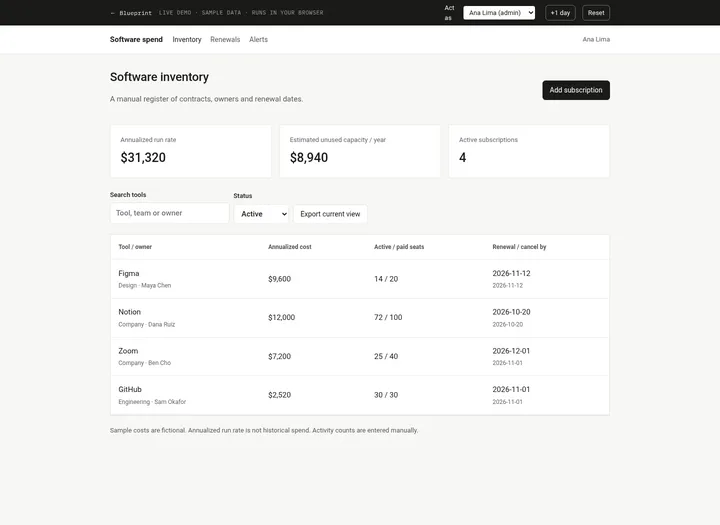 Open demo
The blueprint
Paste the whole spec into your AI builder, then send each prompt in the Build plan section one at a time. Check each phase before moving on.
How to use this file: paste this whole document into your AI builder (Claude, ChatGPT, Cursor, Lovable, Replit, Type) as context. Then send the build prompts in section 15 one at a time. Do not move to the next phase until the acceptance checks for the current phase pass.
1. The problem
"Nobody knows how many software tools we're actually paying for."
Each team buys the tools it needs, on a company card or on an invoice that lands in someone's inbox. Nobody owns the full list. Finance sees the charges but not who uses the tool or when the contract ends. The renewal date alone is not enough: a contract with 30 days' notice has to be cancelled a month before it renews, so by the time the charge arrives it is too late to drop the tool or cut seats.
2. What the real product does
Research basis: Zylo's product, pricing and use-case pages (zylo.com, zylo.com/product, zylo.com/pricing, zylo.com/solutions/renewal-savings, zylo.com/solutions/license-waste, zylo.com/solutions/allocate-costs), October 2026.
Zylo describes itself as a system of record for SaaS and AI spend, built for enterprise IT, procurement, software asset management and FinOps teams. What we verified:
- Discovery. Zylo continuously analyzes financial systems (ERP, accounts payable, expense platforms) to find software purchases, matches the spend to applications and categorizes it automatically. It also offers AI-powered contract ingestion.
- System of record. Application ownership, contract terms, license entitlements and spend are kept in one place, with reporting on spend, usage and vendors.
- License usage. Usage signals from integrations with supported SaaS applications are compared with purchased licenses to find inactive users and underused seats. Reclamation workflows survey users and create follow-up tasks for IT to remove or reassign licenses.
- Renewals. A renewal calendar shows upcoming renewals, contract owners and the spend involved. Renewals can be prioritized by spend and by what renews in the next 12 months. Zylo advises starting preparation about 120 days before a renewal, and says this data helps avoid costly auto-renewals.
- Cost allocation. Spend can be allocated to users, departments or business units by license assignment, usage or custom rules, with cost per user and showback reports.
- Beyond seats. Tracking of AI and usage-based spend, price benchmarks from Zylo's spend dataset, an AI assistant (Clarity AI), a Model Context Protocol (MCP) connection for other AI tools, and services for SaaS operations and negotiation.
- Pricing. Three plans: Core, Premium and Enterprise. No prices are published; the pricing page asks you to request a quote. Core lists app discovery, spend visibility, usage data connections, integrations, automated alerts and reports, and app comparisons. Cost allocation, price benchmarks, Okta and Entra actions, Jira automations and the full API are listed under Premium.
What this blueprint keeps
One shared list of every paid tool, each with an owner and a department. The billing cycle and the total price per cycle, annualized. Renewal date, auto-renew and notice period, with the notice deadline worked out for you. Seats purchased and seats used, with an estimate of what the unused seats cost. A status: active, cancelling or cancelled. A reminder to the owner 30 days before every notice deadline. Totals by department. A history of every change. CSV import and export.
What this blueprint deliberately leaves out
Automatic discovery from accounting, expense or card data. Usage pulled from SSO or from the apps themselves (owners type in seats used). Contract upload and term extraction. License reclamation and deprovisioning workflows. Price benchmarks. AI and usage-based spend tracking. Cost allocation by user or by custom rules (each tool belongs to one department). Invoices and actual payments: the app tracks what contracts cost per year, not cash already spent. Negotiation services. If you have hundreds of tools bought through many channels, or you need seat usage collected automatically, a SaaS management platform such as Zylo does that work and this blueprint does not.
3. Scope of v1
- One company, one currency (set by an admin; default USD). Money is stored as integer cents.
- Tools are entered by hand or imported from CSV. Nothing is discovered automatically.
- Billing cycles: monthly, quarterly and annual.
- Reminders by email through an outbox, plus an in-app list. No Slack in v1.
- A web app that works on a phone.
- The app records decisions. It never contacts a vendor and never cancels anything itself.
4. Roles
| Role | Who | Can do |
|---|---|---|
| Member | Everyone on the team | See every tool, total, renewal, department and history. Export CSV. See their own notifications. |
| Owner | The person named as a tool's owner | On their own tools: edit details except owner and department, update seats used, record a renewal, mark cancelling, undo cancelling, mark cancelled. Receives that tool's reminders. |
| Admin | Finance (one or more people) | Everything an owner can do, on every tool. Add tools, change owner and department, restore cancelled tools, import CSV, manage people and departments, change settings, see the whole notification outbox. |
A person can be an owner and an admin. Everyone sees everything: knowing what the company already pays for stops a second team buying the same kind of tool. Only the actions above are restricted, and the server checks them.
5. Saas spend tracker data model
All timestamps are UTC. renews_on and ended_on are calendar dates with no time. "Today" is the current date in the company time zone (Settings). All IDs are strings (UUID or similar).
Person
- id
- name (required)
- email (required, unique ignoring case)
- is_admin (boolean, default false)
- active (boolean, default true)
Department
- id
- name (required, 2 to 60 characters, unique ignoring case)
Tool (one row per paid subscription or contract)
- id
- name (required, trimmed, 2 to 100 characters; unique ignoring case among active and cancelling tools, R13)
- owner_id (references Person; must be active while the tool is active or cancelling)
- department_id (references Department; the budget that pays for it)
- billing_cycle: monthly | quarterly | annual
- cycle_price_cents (integer, 0 to 100,000,000): the total charged each billing cycle for the whole subscription. Never a per-seat price.
- renews_on (date): the day the current term ends and the next one starts. For a cancelling tool, the day it ends.
- auto_renew (boolean, default true): the vendor renews it unless notice is given
- notice_days (integer, 0 to 365, default 0): days of notice the contract requires before renews_on
- seats_purchased (integer, 0 to 100,000; 0 means not seat-based)
- seats_used (integer, 0 to seats_purchased; typed in by the owner)
- status: active | cancelling | cancelled
- status_reason (nullable text, 3 to 200 characters; given when marked cancelling or cancelled)
- ended_on (nullable date; set when the tool becomes cancelled)
- link (optional http or https URL to the contract, order form or billing page, max 500 characters)
- notes (optional, max 1,000 characters)
- version (integer, starts at 1, goes up on every change; R18)
- created_at, updated_at
Computed values (never stored): annualized cost (R1), unused seat cost (R3), notice deadline (R5), reminder date (R6). Compute them in one shared module that every screen, the daily job and the CSV export use.
HistoryEvent (append-only, never updated or deleted)
- id
- tool_id
- actor_id (nullable; empty means the daily job)
- type: created | edited | renewed | auto_renewed | status_changed | reminder_queued
- source: form | csv | job
- changes (JSON: field → {from, to}, e.g. {"seats_used": {"from": 14, "to": 12}}; a status_changed event made after the notice deadline also holds "late_notice": true)
- reason (nullable text)
- created_at
Notification (outbox; makes reminders testable and retryable)
- id
- recipient_id (references Person)
- kind: renewal_reminder | owner_assigned
- tool_id (nullable; empty when one notice lists several tools)
- dedupe_key (nullable, unique; for reminders
reminder:{tool_id}:{renews_on}:{notice_deadline}:{recipient_id}) - subject, body (the text as sent)
- status: queued | sent | logged | failed
- attempts (integer, default 0), last_error (nullable), created_at, sent_at
Settings (one row)
- currency_code (default USD; changes the symbol only, amounts are never converted)
- time_zone (IANA name, default UTC)
- dev_clock_offset_days (integer, default 0; development only, ignored in production)
6. Money: annualized cost, run rate and unused seats
- R1. Annualized cost. Monthly: cycle price × 12. Quarterly: cycle price × 4 ($450 a quarter is $1,800 a year). Annual: the cycle price. The cycle price is the total for the whole subscription, so a $1,000-a-month plan with 100 seats costs $12,000 a year, not $1,200,000. Never multiply by seats.
- R2. Annual run rate is the sum of annualized cost over active tools. Cancelling tools are shown separately as "Ending", with their end dates. Cancelled tools count nowhere. The run rate is what the current tools cost per year from now on. It is not money already spent, and the app never draws a spending history from today's list.
- R3. Unused seat cost = annualized cost × (seats purchased - seats used) ÷ seats purchased, rounded to the nearest cent, halves up. In integers: (annualized_cents × unused_seats × 2 + seats_purchased) ÷ (2 × seats_purchased), dropping the remainder; use 64-bit integers. It is zero when seats purchased is 0 (a flat-fee tool). It assumes every seat costs the same, so it is an estimate of waste, not a promise of savings.
- R4. Totals (company and department) add up the per-tool values, so department totals always match the company total. Show money with thousands separators, and with two decimals only when cents are non-zero ($9,600 / $666.67).
Worked examples (seed data, section 14)
| Tool | Price per cycle | Annualized | Seats used / purchased | Unused seat cost |
|---|---|---|---|---|
| Figma | $9,600 / year | $9,600 | 14 / 20 | $9,600 × 6 ÷ 20 = $2,880 |
| Notion | $1,000 / month | $12,000 | 72 / 100 | $12,000 × 28 ÷ 100 = $3,360 |
| Zoom | $7,200 / year | $7,200 | 25 / 40 | $7,200 × 15 ÷ 40 = $2,700 |
| GitHub | $210 / month | $2,520 | 30 / 30 | $0 |
| Monday.com (cancelling) | $2,400 / year | $2,400 | 0 / 20 | not counted; shown under Ending |
| Loom (cancelled) | $1,500 / year | $1,500 | 0 / 15 | not counted |
Company totals: annual run rate $31,320, 4 active tools, 141 of 190 seats used, unused seat cost $8,940. Ending: 1 tool, $2,400 a year.
Totals by department (the Departments screen):
| Department | Active tools | Annual run rate | Unused seat cost | Ending |
|---|---|---|---|---|
| Design | 1 | $9,600 | $2,880 | none |
| Engineering | 1 | $2,520 | $0 | none |
| Finance | 0 | $0 | $0 | none |
| IT | 1 | $7,200 | $2,700 | none |
| Ops | 1 | $12,000 | $3,360 | 1 tool, $2,400 |
| Total | 4 | $31,320 | $8,940 | 1 tool, $2,400 |
Rounding example: $1,000 a year for 3 seats with 1 used leaves 2 unused: 100,000 × 2 ÷ 3 = 66,666.67 cents, stored as 66,667 and shown as $666.67.
7. Renewal dates, notice deadlines and reminders
- R5. Notice deadline = renews_on minus notice_days, in calendar days. It is the last day to cancel or change the contract before the next term. With 0 notice days it is the renewal date itself. notice_days is the contract's notice period, never a reminder setting. Show both dates wherever a renewal appears.
- R6. Reminders. Reminder date = notice deadline minus 30 days. The owner of every active tool gets one renewal reminder once today reaches the reminder date. The daily job checks every tool, and the same check runs for one tool right after any change to it (the follow-up steps, section 8), so a tool that is already inside its window gets its reminder at once. Cancelling and cancelled tools never get reminders.
- R7. No duplicates. At most one reminder per tool, renewal date, notice deadline and owner (the dedupe_key, enforced by a unique index). Running the job twice queues nothing new. A new renewal date, notice period or owner makes a new key, so the next reminder is queued when it is due. Earlier reminders stay in the outbox with their original recipient.
- R8. Auto-renewal. When an active tool with auto_renew on has a renews_on before today, the job moves renews_on forward by whole billing cycles (1, 3 or 12 months) until it is today or later. Price and seats stay the same. It writes one auto_renewed event ("Renewed automatically: Oct 20 → Nov 20, 2026"). Adding months keeps the day of the month; when that day does not exist, use the last day of the month (Jan 31 + 1 month = Feb 28, or Feb 29 in a leap year).
- R9. Manual renewals. An active tool with auto_renew off whose renews_on is before today shows as "Renewal date passed". It stays in the run rate and at the top of the Renewals screen until someone records a renewal or marks it cancelled. The app never assumes it lapsed.
- R10. Term end. When a cancelling tool's renews_on is before today, the job sets it to cancelled with ended_on = renews_on and writes a status_changed event with the reason "Term ended".
- R11. Recording a renewal is allowed on active tools only. The new renewal date must be after both today and the current renews_on: "The new renewal date must be after today and after the current renewal date (Nov 12, 2026)." Price, billing cycle and seats purchased may change in the same step; otherwise they stay as they were.
Worked examples (seed data; T is the day the seed was loaded, here Tuesday Oct 13, 2026)
First run of the daily job on T:
| Tool | Renews on | Auto-renew | Notice | Notice deadline | Reminder date | Result |
|---|---|---|---|---|---|---|
| Figma | Nov 12 (T+30) | no | 0 | Nov 12 (T+30) | Oct 13 (T) | Reminder to Maya, on its reminder date |
| Notion | Oct 20 (T+7) | yes | 0 | Oct 20 (T+7) | Sep 20 (T-23) | Reminder to Dana at once (already inside its window) |
| Zoom | Dec 1 (T+49) | yes | 30 | Nov 1 (T+19) | Oct 2 (T-11) | Reminder to Ben. The deadline is Nov 1, not Dec 1 |
| GitHub | Nov 1 (T+19) | yes | 0 | Nov 1 (T+19) | Oct 2 (T-11) | Reminder to Sam |
| Monday.com | Oct 25 (T+12) | yes | 14 | Oct 11 (T-2) | Sep 11 (T-32) | None: cancelling |
| Loom | ended Aug 29 (T-45) | None: cancelled |
Four reminders in total. Then, as the days pass:
| Today | What changes |
|---|---|
| T+1 (Oct 14) | Nothing new. Still four reminders. |
| T+8 (Oct 21) | Notion auto-renews: Oct 20 → Nov 20. Its new reminder date is Oct 21, so Dana gets a reminder for Nov 20. The run rate does not change. |
| T+13 (Oct 26) | Monday.com's term ended on Oct 25. It becomes cancelled, ended on Oct 25. |
| T+20 (Nov 2) | GitHub auto-renews: Nov 1 → Dec 1, and Sam gets a reminder for Dec 1. Zoom's notice deadline (Nov 1) has passed, so the Renewals screen moves it to "Notice deadline passed". |
| T+31 (Nov 13) | Figma does not auto-renew and Nov 12 has passed: "Renewal date passed". It still counts in the run rate. |
An annual tool rolls a year at a time: on Dec 2, Zoom moves from Dec 1, 2026 to Dec 1, 2027, and its next reminder is not due until Oct 2, 2027.
8. Lifecycle
| Action | Who | From | To | Rules and side effects |
|---|---|---|---|---|
| Add | Admin | (none) | active | R12 to R16. Event created. Owner notified if someone else added it |
| Edit | Owner or admin; only admins change owner or department | active, cancelling | same | Event edited with the changed fields. A new owner is notified |
| Record renewal | Owner or admin | active | active | R11. Event renewed |
| Mark cancelling | Owner or admin | active | cancelling | Reason required (R19). Late-notice warning (below). Event status_changed |
| Undo cancelling | Owner or admin | cancelling | active | Only while renews_on is today or later. Event status_changed |
| Mark cancelled | Owner or admin | active, cancelling | cancelled | Reason required. ended_on = the earlier of today and renews_on. Event status_changed |
| Restore | Admin | cancelled | active | A new renews_on, today or later, is required, and the name must be free (R13). If the owner is no longer active, a new active owner is required too (R16): "Maya Chen is no longer active. Choose a new owner." Clears ended_on and status_reason. Event status_changed |
| Auto-renew | Daily job | active | active | R8. Event auto_renewed |
| Term ends | Daily job | cancelling | cancelled | R10. Event status_changed |
After every action by a person, the follow-up steps run for that tool: steps 2 to 4 of the daily job (section 11), that is R10, R8, then R6.
Late notice. Marking a tool cancelling after its notice deadline shows a warning before anything is saved: "The notice deadline for Zoom was Nov 1, 2026. The vendor may renew it anyway. If they will, record the renewal first, then mark it cancelling." After confirming, the event records late_notice: true and History shows "(after the notice deadline)".
No delete. A tool added by mistake is marked cancelled with that reason, so the history stays complete. Marking a tool cancelling or cancelled records a decision; cancel with the vendor yourself.
9. Saas spend tracker business rules
- R12. Every permission in section 4 is checked on the server for every action, including CSV import and direct API calls. Hiding a button is not enough. A signed-in email that does not match an active Person sees only "Ask a finance admin to add you."
- R13. Tool names are trimmed and unique ignoring case among active and cancelling tools: "A tool named Figma already exists." A cancelled tool's name can be reused; restoring it is refused while a current tool has that name.
- R14. Seats are whole numbers. Seats used cannot be more than seats purchased: "Seats used (25) cannot be more than seats purchased (20)." When seats purchased is 0, seats used must be 0, and screens show "Not seat-based" instead of 0 / 0.
- R15. Prices are whole cents from $0 to $1,000,000 per cycle (a free plan at $0 is allowed); negative amounts and more than two decimals are refused. Dates must be real calendar dates (no Feb 30).
- R16. Every active or cancelling tool has an active owner. Deactivating a person who owns any of them asks for one new owner for all of those tools, and does both in one transaction. At least one active admin must remain: "At least one active admin is required."
- R17. Every successful change writes one HistoryEvent per tool it changes (created, edited, renewed or status_changed), with actor, source and changed fields. The follow-up steps write their own events. History is never edited or deleted, and there is no API or UI to do so. A failed action saves nothing: validate first, then write the tool, its event and any notification in one transaction.
- R18. Edits carry the tool's version. If the tool changed since the form was opened (by a person or by the daily job), the save is refused: "Someone else changed Figma. Reload to see their changes."
- R19. Cancelled tools are read-only until restored: no edits, no renewals. Marking a tool cancelling or cancelled needs a reason of at least 3 characters: "Give a reason of at least 3 characters."
10. Saas spend tracker screens
- Inventory (home). Tiles for the whole company: Annual run rate, Active tools, Seats used of purchased, Estimated unused seat cost, Ending (cancelling tools: count and annualized cost). Table: tool, owner, department, price ("$1,000 / month"), annualized, renews on, notice deadline, auto-renew, seats used / purchased, status. Search by tool, owner or department. Filters: status (Current = active and cancelling, the default; Active; Cancelling; Cancelled; All), department, owner, "My tools". Buttons: Add tool and Import CSV for admins; Export CSV for everyone (exports the current view). Empty state: "No tools match these filters."
- Tool detail. Header: name, status badge (with the reason when cancelling or cancelled), owner, department. Cost: price per cycle, annualized, unused seat cost. Renewal: renews on (or "Ends on" when cancelling), auto-renew, notice days, notice deadline, reminder date, and days left ("Notice deadline in 19 days", "Notice deadline passed 3 days ago", "Renewal date passed"). Seats, link, notes. The actions this viewer may take (section 8): Edit, Record renewal, Mark cancelling, Undo cancelling, Mark cancelled, Restore. History, newest first: time, who ("Daily job" for the job), what changed ("Seats used 14 → 12").
- Add / edit tool. All fields from section 5. Label the price "Price per billing cycle (total for all seats)". Under the form, a live preview: "Annualized: $12,000 · Notice deadline: Oct 20, 2026 · Reminder on: Sep 20, 2026". Errors appear next to the fields and keep what was typed. Owners see owner and department read-only. When an auto-renewing tool is saved with a past date, it rolls forward (R8) and the form says so: "Renewal date moved to Nov 20, 2026 because Notion renews monthly."
- Record renewal (a dialog on the detail page). New renewal date (default: one billing cycle after the current one), price per cycle, billing cycle and seats purchased (defaults: the current values), optional note. Shows the old and new annualized cost before saving.
- Renewals. Active tools in groups, each sorted by notice deadline, then name: Renewal date passed (R9); Notice deadline passed (the renewal is still ahead); Decide within 30 days (deadline from today to today + 30); Deadline in 31 to 90 days; Later. Each row: tool, owner, renews on, auto-renew, notice deadline, days left, annualized, seats used / purchased. Below the groups, "Ending" lists cancelling tools with their end dates.
- Departments. One row per department: active tools, annual run rate, unused seat cost, ending (count and annualized). A total row that equals the Inventory tiles. Clicking a department opens the Inventory filtered to it. Export CSV.
- Notifications. Everyone sees their own, newest first, each linking to its tool. Admins also get an "All (outbox)" tab: recipient, kind, tool, subject, status, attempts, last error, created and sent times.
- Import CSV (admins). Upload, preview, import (section 12).
- Admin: People. Name, email, admin, active, tools owned (active and cancelling). Add, edit, deactivate (R16) and reactivate. Reactivating sets active back to true; it does not give back tools that were reassigned.
- Admin: Departments. Add, rename and delete. Duplicate names are refused: "A department called Ops already exists." A department that has tools of any status cannot be deleted: "Ops has 2 tools. Move them first."
- Admin: Settings. Currency and time zone.
Non-admins who open an admin page see "Only finance admins can open this page." In development only, a small toolbar on every page holds the "sign in as" switcher, the clock ("Today is Oct 13, 2026" with +1 day, +7 days, +30 days and Back to real today), Run daily job now and Reset seed data; none of it exists in production. All screens work on a phone. Wide tables scroll sideways inside their own box; the page itself never scrolls sideways.
11. Notifications and the daily job
| Trigger | Recipient | Channels | Content |
|---|---|---|---|
| Reminder date reached (R6) | Tool owner | in-app, email | Subject "Zoom: decide by Nov 1, 2026". Body: "Zoom renews on Dec 1, 2026, automatically. Last day to cancel or change it: Nov 1, 2026 (in 19 days). Cost: $7,200 a year. Seats: 25 of 40 used." Link to the tool |
| Owner set or changed by someone else | New owner | in-app, email | "Ana Lima made you the owner of Figma (renews Nov 12, 2026, $9,600 a year)." A CSV import or a deactivation sends one notice per new owner, listing all their tools |
Reminder wording: when the deadline has already passed (for example, Zoom added after Nov 1), the subject is "Zoom: notice deadline passed" and the body says "Last day to cancel or change it: Nov 1, 2026 (passed)." For a monthly or quarterly plan, the cost line adds the cycle price ("$12,000 a year, $1,000 / month"). For a tool that does not auto-renew, the body says "It does not renew automatically. Record the renewal or mark it cancelled."
Write every notification to the outbox first, then send. Email can use any provider. If none is configured, set the status to logged instead of sending. A failed send keeps its error and is retried on the next run; after 5 failed attempts the status becomes failed and stays visible in the outbox. A notification failure never blocks the action that caused it.
Daily job. Run it every hour from your platform's scheduler (for example, a cron calling /api/cron/daily protected by a CRON_SECRET header). It only does what is due, so extra runs are harmless. Each run, in this order:
- Work out today: the current date in the company time zone, plus the development clock offset.
- End the terms of cancelling tools (R10).
- Roll auto-renewing tools forward (R8).
- Queue due reminders (R6, R7). Treat a unique-key conflict as "already queued", so two overlapping runs cannot queue the same reminder twice. Each queued reminder writes a reminder_queued event.
- Send queued notifications and retry failed ones.
Steps 2 to 4 also run for a single tool right after any change to it (the follow-up steps in section 8). In development, every move of the clock runs the whole job once.
12. CSV import and export
Columns
Export and import use the same column names. On import, headers match ignoring case, spaces and underscores, in any order.
| Column | On import | Format |
|---|---|---|
| name | required | text |
| owner_email | required for new tools | email of an active person |
| department | required for new tools | name of an existing department |
| billing_cycle | required for new tools | monthly, quarterly or annual |
| cycle_price | required for new tools | 9600 or 9600.00; "$9,600.00" is also accepted |
| renews_on | required for new tools | YYYY-MM-DD |
| auto_renew | optional, default yes | yes or no (true and false also accepted) |
| notice_days | optional, default 0 | whole number, 0 to 365 |
| seats_purchased, seats_used | optional, default 0 | whole numbers |
| link, notes | optional | text |
| owner_name, annualized_cost, notice_deadline, unused_seat_cost, status, status_reason, ended_on | export only | ignored on import, except that rows whose status is cancelled are skipped |
Import (admins only, all or nothing)
- Upload a UTF-8 CSV file (a byte-order mark is fine) with a header row and at most 1,000 data rows. Blank lines are skipped. Line numbers are the line of the file where a row starts, counting the header as line 1 (a quoted value with line breaks makes its row span several lines; blank lines are counted but skipped).
- Each row is matched to a current (active or cancelling) tool by name, ignoring case and surrounding spaces. A match is an update; no match creates a new active tool. Import cannot rename a tool, because the name is how rows are matched.
- For an update, a blank cell leaves that field unchanged. For a new tool, the required columns must be filled and blank optional cells take their defaults.
- Every row is checked with the same rules as the tool form (R13 to R15, with seats checked against the merged values for an update), plus: "Unknown or inactive owner: kim@northwind.example", "Unknown department: Marketing (add it in Admin: Departments first)", "Billing cycle must be monthly, quarterly or annual", "Invalid price: 12,50", "Invalid date: 11/30/2026 (use a real date in YYYY-MM-DD form)", and "This name appears twice in the file (lines 3 and 7)".
- The preview lists every line with its result: Create, Update (each field old → new), No change, Skipped (cancelled), or Error with every message for that line. It also lists ignored columns. While any line has an error, Import is disabled: "Fix the errors in the file and upload it again."
- Import checks every row again, then applies them all in one transaction. A leading apostrophe added by the export's formula protection is removed before comparing. Each created or updated tool gets one history event with source csv. Then the follow-up steps run for each affected tool, and each new owner other than the importer gets one notice listing their tools. The summary reads: "Created 2 tools, updated 1, 0 unchanged, 0 skipped."
Sample file (used in the Phase 4 checks)
name,owner_email,department,billing_cycle,cycle_price,renews_on,auto_renew,notice_days,seats_purchased,seats_used
1Password,ben@northwind.example,IT,quarterly,450.00,2030-01-15,yes,0,12,9
github,,,,,,,,35,
Miro,jo@northwind.example,Design,annual,"$1,000",2030-03-01,no,30,3,1
Slack,lee@northwind.example,Marketing,monthly,875.00,2030-01-10,yes,0,50,48
Asana,sam@northwind.example,Engineering,monthly,100,2030-02-30,yes,0,10,12
Expected preview against fresh seed data: line 2, 1Password, Create ($450 / quarter, $1,800 a year, Ben Cho, IT). Line 3, Update GitHub: seats purchased 30 → 35, nothing else. Line 4, Miro, Create ($1,000 a year, Jo Park, Design, no auto-renew, 30 days' notice). Line 5, Error: "Unknown department: Marketing (add it in Admin: Departments first)". Line 6, Errors: "Invalid date: 2030-02-30 (use a real date in YYYY-MM-DD form)" and "Seats used (12) cannot be more than seats purchased (10)." Messages shared with the tool form keep the form's wording and punctuation. The 2030 dates only keep the sample in the future; any future date works.
Export
- Inventory (Export CSV on screen 1): the rows in the current view, all columns above, file name
tools-YYYY-MM-DD.csv. - Departments (screen 6): department, active_tools, annual_run_rate, unused_seat_cost, ending_tools, ending_annualized, with a final Total row. File name
departments-YYYY-MM-DD.csv. - Money as plain numbers with two decimals and no symbol (9600.00). Dates as YYYY-MM-DD. auto_renew as yes or no. An exported file imported back unchanged shows No change for every current tool.
- Quote any value that contains a comma, quote or line break, and double the quotes inside it. If a text value starts with =, +, -, @, a tab or a carriage return, put an apostrophe in front so spreadsheets do not run it as a formula.
13. Edge cases
- Impossible dates, fractional seats, negative or three-decimal prices, and seats used above seats purchased are refused with a message; nothing is saved.
- A notice period longer than the time left puts the notice deadline in the past. The reminder is queued at once and says the deadline has passed.
- A monthly plan with a notice period (say 30 days) has its deadline right after each renewal, so the reminder arrives as soon as the date rolls forward. That is correct: the decision window really is that short.
- Month-end dates drift: Jan 31 → Feb 28 → Mar 28. v1 keeps no separate billing day; the owner corrects the date if the vendor bills on the last day of the month. An annual Feb 29 date becomes Feb 28.
- Marking a tool cancelling after its renewal date has passed (a manual renewal that lapsed) ends it at once: the follow-up steps apply R10 and set ended_on to renews_on.
- A price rise shows up only when someone enters it (Edit or Record renewal). The app tracks contracts, not invoices.
- Changing the time zone changes what "today" is from then on. Stored dates do not move.
- CSV exports are snapshots of a view, not backups. History is not exported.
14. Seed data
Team (from the shared sample company, Northwind):
| Person | Admin | Owns | |
|---|---|---|---|
| Dana Ruiz (Head of Ops) | dana@northwind.example | yes | Notion, Monday.com |
| Ana Lima (Finance lead) | ana@northwind.example | yes | |
| Maya Chen (Design lead) | maya@northwind.example | no | Figma, Loom |
| Sam Okafor (Engineering lead) | sam@northwind.example | no | GitHub |
| Ben Cho (IT) | ben@northwind.example | no | Zoom |
| Jo Park (Designer) | jo@northwind.example | no | |
| Lee Park (Engineer) | lee@northwind.example | no |
Departments: Design, Engineering, Finance, IT, Ops. Settings: currency USD, time zone UTC.
Tools (T is the day the seed is loaded; the dates in brackets are for T = Oct 13, 2026):
| Tool | Owner | Department | Price per cycle | Seats used / purchased | Renews on | Auto-renew | Notice days | Status |
|---|---|---|---|---|---|---|---|---|
| Figma | Maya | Design | $9,600 annual | 14 / 20 | T+30 (Nov 12) | no | 0 | active |
| Notion | Dana | Ops | $1,000 monthly | 72 / 100 | T+7 (Oct 20) | yes | 0 | active |
| Zoom | Ben | IT | $7,200 annual | 25 / 40 | T+49 (Dec 1) | yes | 30 | active |
| GitHub | Sam | Engineering | $210 monthly | 30 / 30 | T+19 (Nov 1) | yes | 0 | active |
| Monday.com | Dana | Ops | $2,400 annual | 0 / 20 | T+12 (Oct 25) | yes | 14 | cancelling: "Nobody has used it since we moved to Notion" |
| Loom | Maya | Design | $1,500 annual | 0 / 15 | T-45 (Aug 29) | yes | 30 | cancelled, ended on T-45: "Replaced by Zoom recordings" |
Seed history: a created event for each tool (actor Ana Lima), plus a status_changed event for Monday.com (Dana, active → cancelling) and one for Loom (Maya, active → cancelled). The outbox starts empty; the first run of the daily job queues the four reminders in section 7.
Starting numbers: annual run rate $31,320; 4 active tools; 141 of 190 seats used; unused seat cost $8,940; Ending: Monday.com, $2,400 a year, ends T+12.
15. Saas spend tracker build plan
Send these prompts one at a time after pasting this file. Each phase ends with checks you can run by clicking through the app. Start each phase's checks from a fresh load of the seed (the Reset seed data button); checks within a phase run in order on the same data. In the checks, T is the day you last pressed Reset seed data, and T+19 means 19 days later.
Phase 1: Foundation
Using the SaaS Spend Tracker blueprint above, build Phase 1 only.

1. Set up the data model from section 5 exactly (Person, Department, Tool, HistoryEvent, Notification, Settings) with a real database. Money is integer cents; renews_on and ended_on are dates without a time.
2. Add sign-in. Use the platform's built-in auth or Google sign-in limited to our company email domain. A signed-in email must match an active Person; anyone else sees "Ask a finance admin to add you."
3. Build Admin: People, Admin: Departments and Admin: Settings (section 10, screens 9 to 11). Only admins can open them, and the server refuses admin actions from anyone else (R12). Implement R16: deactivating someone who owns tools asks for a new owner, and the last active admin cannot be removed.
4. Load the seed data from section 14 with dates relative to today, including the seed history events.
5. Add the development-only toolbar from section 10: a "sign in as" switcher that goes through the same active-person check; the clock (+1 day, +7 days, +30 days, Back to real today); and Reset seed data, which reloads the seed relative to the real date, sets the clock back and empties the outbox. Read "today" everywhere from one server function that applies the time zone and the clock offset.

Do not build the tool screens, calculations or reminders yet. When you're done, list what you built and anything in the spec you had to interpret.
Acceptance checks
- Admin: People lists seven people, with Dana Ruiz and Ana Lima as admins. Tools owned: Dana 2, Maya 1, Sam 1, Ben 1, and 0 for Ana, Jo and Lee.
- Signed in as Jo, there are no Admin links, and opening the People page by its address shows "Only finance admins can open this page." Dana and Ana can open all three admin pages.
- Admin: Departments lists Design, Engineering, Finance, IT and Ops. Adding "ops" is refused with "A department called Ops already exists." Deleting Ops is refused with "Ops has 2 tools. Move them first."
- As Ana, deactivating Sam asks for a new owner for GitHub. After choosing Lee Park, Sam is inactive, Lee owns 1 tool, and "sign in as" Sam shows "Ask a finance admin to add you."
- As Ana, removing Dana's admin flag works. Removing Ana's own admin flag is then refused with "At least one active admin is required."
- In the development toolbar, "Today is" shows today's date; +1 day shows tomorrow, and Back to real today returns to today. Reset seed data restores Sam (active, owner of GitHub) and Dana's admin flag.
Phase 2: Inventory, money and departments
Using the SaaS Spend Tracker blueprint above, build Phase 2 only.

1. Put R1 to R5 and the reminder date from R6 in one shared calculation module, with unit tests for every row of the worked examples in sections 6 and 7, including the rounding case.
2. Build screens 1, 2, 3 and 6 from section 10: Inventory with tiles, search and filters; Tool detail; Add / edit tool with the live preview; Departments with totals. Show all three statuses in filters and badges; the status actions come in Phase 3.
3. Implement add and edit with R13 to R15 and the stale-edit check in R18. Enforce R12 on the server: only admins add tools; owners edit only their own tools and cannot change owner or department. Cancelled tools are read-only (R19). Save renewal dates as typed for now; rolling a past date forward (screen 3, R8) arrives with the follow-up steps in Phase 3.
4. Write one HistoryEvent per change (R17) and show History on the tool detail page.

Do not build renewals, reminders or CSV yet. When you're done, list what you built and anything in the spec you had to interpret.
Acceptance checks (start from Reset seed data; switch people with "sign in as")
- The Inventory tiles show annual run rate $31,320, 4 active tools, 141 of 190 seats used, estimated unused seat cost $8,940, and Ending: 1 tool, $2,400.
- Notion's row shows $1,000 / month and $12,000 annualized. Zoom's row shows renews on T+49 and notice deadline T+19.
- Searching "maya" shows only Figma. With the search cleared, the Cancelling filter shows only Monday.com, Cancelled shows only Loom, and All shows six tools.
- Departments shows Design $9,600 / $2,880, Engineering $2,520 / $0, Finance $0 / $0, IT $7,200 / $2,700, Ops $12,000 / $3,360 with 1 ending ($2,400), and a total row of $31,320 / $8,940.
- As Ana, add Linear: owner Lee, Engineering, $100 monthly, 10 seats purchased, 8 used, renews T+20. The preview shows $1,200 annualized before saving. After saving, the run rate is $32,520, unused seat cost $9,180, and Engineering $3,720.
- As Ana, adding a tool named "figma " is refused with "A tool named Figma already exists." A tool with 25 seats used of 20 is refused with "Seats used (25) cannot be more than seats purchased (20)." The form keeps the typed values and no tool is saved.
- As Maya, change Figma's seats used from 14 to 12. Figma's unused seat cost becomes $3,840, the company total rises by $960, and History shows "Seats used 14 → 12" by Maya Chen.
- As Maya, Zoom has no Edit button and a direct save request for Zoom is refused. On Figma, owner and department are read-only, and a direct request that changes Figma's owner is refused.
- As Ana, open Figma's edit form in two tabs. Save a price change in the first; saving the second is refused with "Someone else changed Figma. Reload to see their changes."
Phase 3: Renewals, status changes and reminders
Using the SaaS Spend Tracker blueprint above, build Phase 3 only.

1. Implement every action in section 8 (record renewal, mark cancelling with the late-notice warning, undo cancelling, mark cancelled, restore) with R11 and R19. Check who may do what on the server.
2. Build the daily job from section 11 (term end, auto-renewal, reminders, sending) at an endpoint protected by a secret, and run the follow-up steps for a single tool right after any change to it, including the roll-forward message on the add / edit form (screen 3). Use the unique dedupe_key (R7) so overlapping runs cannot queue a reminder twice.
3. Send notifications from the outbox (section 11). Email can use any provider we have; if none is configured, mark notifications logged instead of sending. Retry failures up to 5 times. Owner changes, including R16 reassignments, now write owner_assigned notifications.
4. Build screens 4, 5 and 7 from section 10: Record renewal, Renewals, and Notifications with the admin outbox tab.
5. Add Run daily job now to the development toolbar, and make every move of the clock run the daily job once.

When you're done, list what you built and anything in the spec you had to interpret.
Acceptance checks (start from Reset seed data)
- Press Run daily job now. The outbox holds exactly four renewal reminders, all logged: Figma to Maya, Notion to Dana, Zoom to Ben, GitHub to Sam, and nothing for Monday.com or Loom. Running the job again still leaves four. As Ben, Notifications shows only the Zoom reminder, which says it renews on T+49 and the last day to cancel or change it is T+19.
- Renewals lists, under "Decide within 30 days": Notion (T+7), GitHub (T+19), Zoom (T+19), Figma (T+30), in that order. Monday.com appears only under Ending, ending T+12.
- As Ben, Mark cancelling on Zoom without a reason is refused with "Give a reason of at least 3 characters." With "Moving to Google Meet", the run rate drops to $24,120 and Zoom appears under Ending. Undo cancelling brings the run rate back to $31,320.
- Move the clock to T+8. Notion's renewal date is now one month after T+7, its History shows "Renewed automatically" by Daily job, the run rate is still $31,320, and the outbox has a fifth reminder (Notion to Dana, for the new date). Move on to T+15: Monday.com is Cancelled, ended on T+12, with "Term ended" in its History, and the Ending tile shows 0 tools.
- Move the clock to T+22. Zoom is under "Notice deadline passed", and as Ben, Mark cancelling on Zoom shows "The notice deadline for Zoom was …" before anything is saved. Close the dialog without confirming.
- Move the clock to T+31. Figma (no auto-renew) is under "Renewal date passed" and still in the run rate. As Maya, Record renewal with the date T+20 is refused. The default date (one year after T+30) with price $8,400 and 16 seats purchased is accepted: Figma shows $8,400 annualized, the run rate drops by $1,200, and History shows the old and new date, price and seats.
- As Ana, change GitHub's owner to Lee. Lee's Notifications show "Ana Lima made you the owner of GitHub" and a renewal reminder for GitHub's current renewal date. Sam's earlier GitHub reminders are still addressed to Sam.
- As Maya, Loom has no Restore button. As Ana, restore Loom with a renewal date 60 days after the clock's today: Loom is active, the run rate rises by $1,500, and History shows the restore.
Phase 4: CSV import and export
Using the SaaS Spend Tracker blueprint above, build Phase 4 only.

1. Add Export CSV to the Inventory (current view) and to Departments, exactly as section 12 describes: columns, number and date formats, quoting and formula protection. An exported file imported back unchanged must show No change on every current tool.
2. Build Import CSV (section 10, screen 8) for admins, with the preview and the all-or-nothing rules in section 12. Validate on the server with the same functions as the tool form, and check every row again when Import is pressed.
3. After an import, run the follow-up steps for each created or updated tool, and send owner notices grouped per person.

When you're done, list what you built and anything in the spec you had to interpret.
Acceptance checks (start from Reset seed data)
- Filter the Inventory to Design and press Export CSV. The file has the header and one row, Figma, with cycle_price 9600.00, annualized_cost 9600.00, auto_renew no, notice_deadline equal to renews_on, seats_purchased 20 and seats_used 14.
- The Departments export has one row per department and a Total row with annual_run_rate 31320.00 and unused_seat_cost 8940.00.
- As Maya, there is no Import CSV button, and a direct import request is refused.
- As Ana, uploading the sample file from section 12 shows exactly the expected preview (1Password Create, GitHub Update with seats purchased 30 → 35, Miro Create, an error on line 5 and two errors on line 6). Import is disabled and the Inventory is unchanged.
- Delete lines 5 and 6 and upload again. Import creates 1Password ($1,800 annualized) and Miro ($1,000 annualized, unused seat cost $666.67) and updates GitHub (unused seat cost $360). The run rate is $34,120 and the unused seat cost $10,416.67. GitHub's History shows "Seats purchased 30 → 35" from a CSV import by Ana Lima.
- Ben has a notification "Ana Lima made you the owner of 1Password" and Jo has one for Miro. Departments shows Design $10,600 and IT $9,000.
- As Maya, set Figma's notes to =1+1 and save. In the exported file, opened in a text editor, the notes cell reads '=1+1.
- Set the status filter to All, export, and upload that file unchanged as Ana. Every current tool shows No change, Loom shows Skipped (cancelled), the export-only columns are listed as ignored, and importing reports "Created 0 tools, updated 0, 7 unchanged, 1 skipped."
16. Variations
- Seat usage from your identity provider (Google Workspace, Okta or Entra sign-in data) instead of typing it in.
- Spend discovery: import card or accounting transactions and flag vendors that are not in the inventory yet.
- Approval before buying: send new tool requests through the Approval Workflow blueprint (BP-007) and create the tool when the request is approved.
- An earlier, configurable reminder lead time for large contracts (Zylo suggests starting about 120 days before a renewal), a second reminder 7 days before the deadline, and a weekly renewals digest for finance.
- Multi-year terms (24 or 36 months) and several currencies with dated exchange rates.
- Slack reminders as well as email, and contract files attached to each tool instead of a link.
- Department budgets, with the remaining budget on the Departments screen.
- Hide prices from people who are neither admins nor the tool's owner.
17. Build notes from our test build
We built this blueprint by sending the four phase prompts above, in order, to an AI builder (Claude, working in Type), then checked every acceptance item in a real browser, starting each phase's checks from Reset seed data. Where a check says something is refused, the person saw the reason on screen and a direct request got an error with nothing changed.
Result: 31 of 31 acceptance checks passed in the recorded final browser run on a fresh database, plus 99 automated tests. A second recorded full browser run also passed all 31 checks. On October 16 we matched both runs' item-by-item evidence to this spec's 31 checklist items and re-ran the 99 automated tests, all passing. This review did not repeat the browser run. Download the item-by-item acceptance evidence, including both run timestamps and the testing limitations.
Gaps the build found, now fixed in this spec:
- Admin: People could deactivate someone but never bring them back, and their email could not be added again. People can now be reactivated.
- The add and edit form rolls a past renewal date forward, but the steps that do it are built in Phase 3. The Phase 2 prompt now says to save dates as typed until then.
- A cancellation after the notice deadline records "late_notice", but the history model had no place for it. Section 5 now says where it goes.
- Restoring a cancelled tool whose owner had since been deactivated would create an active tool with an inactive owner. Restore now asks for a new owner in that case.
- The seat message had a full stop in R14 but not in the CSV preview, though both come from the same check. Both now match.
- CSV line numbers were ambiguous when a value spans several lines. Section 12 now says a line number is where the row starts.
Added after the test: the build plan now says to start each phase's checks from a fresh load of the seed, which is how the test ran.
What we did not test:
- Production sign-in. Google sign-in was built, but every check used the development "sign in as" switcher.
- Sending email. Emails were logged in the outbox, not delivered; retries and the failed status after 5 attempts were covered by automated tests only.
- The daily job on a real scheduler. It ran from the development clock and by calling its endpoint with and without the secret.
- Other time zones and currencies, beyond automated tests.
- Overlapping job runs in separate processes.
- Phones other than a 390-pixel-wide Chromium window.
- Hosting. The test build ran on SQLite on one server. For a hosted deploy, use a managed Postgres (or your platform's database) and the same schema.
Field report
Building a Zylo replacement with AI, 31 checks and 6 spec gaps
We had an AI builder build a SaaS spend tracker from our spec, one phase at a time, and checked every acceptance item in a real browser. It passed all 31 checks in two recorded runs and exposed 6 gaps in the spec, fewer than the median of our twenty-two build tests. What it costs next to Zylo, which publishes no prices, and what we did not test.
The short answer
Yes, if you can list your tools by hand or from a spreadsheet. We gave Claude, working in Type, our SaaS Spend Tracker blueprint and had it follow the four phase prompts in order. The final build passed 31 of 31 acceptance checks in a recorded browser run on a fresh database, and a second recorded run passed all 31 again, with 99 automated tests. It keeps one inventory of every paid tool with an owner and a department, annualizes each price, works out the notice deadline and reminds the owner 30 days before it, estimates what unused seats cost, rolls auto-renewing tools forward, totals by department, keeps a history of every change, and imports and exports CSV.
The build exposed 6 gaps in the spec, places where the builder had to guess because the spec was silent or pointed at work a later phase owned. That is fewer than the median of 14.5 across our twenty-two build tests; only the bug tracker (5) had fewer, and the project status board tied at 6. Every gap is now fixed in the published spec. The item-by-item results for both runs are published as acceptance-results.json.
What it is not: a tested production deployment. Google sign-in, delivered email and a hosted scheduler were built but not exercised. The last section lists exactly what was and wasn't checked.
What we built, and what we left out
The blueprint copies the system-of-record part of Zylo for a company of 10 to 200 people. We read Zylo's product, pricing and use-case pages in October 2026 and kept the parts a finance team of one or two can run by hand:
- Annualize the whole subscription, never per seat. Monthly times 12, quarterly times 4, annual as is. A $1,000-a-month plan with 100 seats costs $12,000 a year, not $1.2 million. The run rate sums active tools; tools being cancelled show separately as Ending.
- The notice deadline, not the renewal date. Deadline = renewal date minus the contract's notice period. Zoom renewing on Dec 1 with 30 days' notice must be decided by Nov 1, and its owner is reminded 30 days before that.
- One reminder per deadline, per owner. A unique key stops the daily job queuing the same reminder twice, however often it runs.
- Unused seats as an estimate. Annualized cost times unused seats over seats purchased, with a stated integer rounding rule so every screen agrees.
- A decision log, not a cancel button. Marking a tool cancelling or cancelled needs a reason, warns when the notice deadline has passed, and never contacts the vendor. Nothing is deleted; every change writes a history event.
- Stale edits are refused. Each tool carries a version. Saving over someone else's change, or the daily job's, shows "Someone else changed Figma. Reload to see their changes."
Left out on purpose: automatic discovery from accounting, expense or card data; seat usage pulled from SSO or the apps; contract upload and term extraction; license reclamation; price benchmarks; AI and usage-based spend; cost allocation by user or custom rules; invoices and actual payments; negotiation services. If you have hundreds of tools bought through many channels, that is what Zylo is for.
What it costs next to Zylo
Zylo does not publish prices. On zylo.com/pricing in October 2026, the page lists three plans, Core, Premium and Enterprise, and asks you to request a quote; cost allocation and the full API are listed under Premium. So there is no price table to put next to the build, and we will not guess at one.
The build has no subscription price, but it isn't free: you pay for hosting, a database, an email provider for the reminders, and the time to build and look after it. Build when nobody knows how many tools you pay for and the list would fit in a spreadsheet, when tools auto-renew because nobody saw the notice deadline, or when a platform sold by quote is more than your company needs. Buy when you need discovery from financial systems, usage from SSO or contract ingestion. Our build-or-buy guide has the full decision.
How the build went, phase by phase
The builder received the blueprint as one Markdown file and sent itself the four phase prompts one at a time. After each phase, that phase's acceptance checks ran in a real browser from a fresh load of the seed. After the last phase, all 31 checks ran again in one final pass, and once more in a second recorded run.
- Foundation. The data model with money as integer cents, sign-in, the three admin screens, deactivation that reassigns a person's tools in one transaction, the seed with dates relative to today, and the development toolbar with its clock.
- Inventory, money and departments. One shared calculation module with unit tests for every worked example, the Inventory tiles and table, tool detail with history, the add and edit form with a live preview, Departments with totals that match the tiles, and the stale-edit check.
- Renewals, status changes and reminders. Record renewal, mark cancelling with the late-notice warning, undo, mark cancelled and restore; the daily job behind a secret; the follow-up steps that run for one tool after any change; the Renewals and Notifications screens.
- CSV import and export. Exports from Inventory and Departments with formula protection, and an all-or-nothing import whose preview stays disabled while any row has an error.
Each phase prompt ends with one sentence: "list what you built and anything in the spec you had to interpret." That sentence is what surfaced the gaps.
The 6 gaps, grouped
The full list, with each fix, is in the blueprint's build notes. They fall into three groups.
Lifecycles with no way back (2 gaps)
Admin: People could deactivate someone but never reactivate them, and because emails are unique their address could not be added again either. People can now be reactivated. Restoring a cancelled tool whose owner had since been deactivated would have created an active tool with an inactive owner, which R16 forbids. Restore now asks for a new owner in that case.
Lesson: for every state a record can enter, ask how it gets out, and what else must be true when it does.
Rules that pointed at work another phase owned (2 gaps)
The add and edit form rolls a past renewal date forward, but the job steps that do the rolling are built in Phase 3, so the Phase 2 builder had to build ahead or leave a described behaviour out. The Phase 2 prompt now says to save dates as typed until then. A cancellation after the notice deadline records late_notice, but the history model had no field for it. Section 5 now says it goes in the event's changes JSON.
Lesson: when you split a spec into phases, check that each phase can build everything it describes, and that every value a rule records has a column.
Message and format details that were almost right (2 gaps)
The seat-limit message ended in a full stop in R14 but not in the CSV preview, though both come from the same check, so the builder had to pick one. Both now match. CSV line numbers were ambiguous when a quoted value spans several lines. Section 12 now says a line number is where the row starts, counting the header as line 1.
Lesson: if two places quote the same message, quote it identically, and anything a user will read back to you, like a line number, needs a definition.
The builds with the most gaps, the invoice reminders build (83), the link shortener (69), the inventory tracker (63), the status page (58), the employee onboarding build (44), the internal knowledge base (30), the help desk (21), the timesheets (21), the customer feedback inbox (20), the hiring pipeline (18) and the client onboarding tracker (18), all talk to the outside world through email, an inbound endpoint, public forms, a public link an invoicing export or a Slack command; money arithmetic, dates and CSV are better-trodden ground, and the spec had worked examples for each. See What AI app builders get wrong for the patterns across every build.
What we did not test
The results file's notTested list matches the build notes; the bullets below combine both.
- Production sign-in. Google sign-in limited to the company domain was built, but every check used the development "sign in as" switcher, which goes through the same active-person check.
- Sending email. Emails were logged in the outbox, not delivered. Retries and the failed status after 5 attempts were covered by automated tests only.
- The daily job on a real scheduler. It ran from the development clock and toolbar, and by calling its endpoint with and without the secret. Production configuration as a whole was not run.
- Other time zones and currencies, beyond automated tests. Every browser check ran in UTC with USD.
- Overlapping job runs in separate processes. The unique dedupe key is covered by unit tests in one process only.
- Phones other than a 390-pixel-wide Chromium window. No real phones or other browsers.
- Hosting. The test build ran on SQLite on one server. For a hosted deploy, use a managed Postgres (or your platform's database) and the same schema.
These gaps are not special to the spend tracker. We list what every build left untested in Is an AI-built internal tool ready for production?.
Build it yourself
The SaaS Spend Tracker blueprint is free: one Markdown file with the data model, the 19 business rules, screens, worked examples, seed data, the four phase prompts and all 31 acceptance checks, with the 6 fixes already in. Paste it into Claude, ChatGPT, Cursor, Lovable, Replit or Type and send the phases one at a time. Our Zylo alternative page has the side-by-side. If you find a gap we missed, tell us on the About page and we'll fix it and credit it in the build notes.
SaaS Spend Tracker: questions people ask
How do you calculate the annual cost of a SaaS subscription?
Annualize the total price per billing cycle: monthly price times 12, quarterly times 4, annual as is. Never multiply by seats: a $1,000-a-month plan with 100 seats costs $12,000 a year, not $1.2 million. The annual run rate is the sum over active tools, with tools that are being cancelled shown separately as Ending.
What is a notice deadline, and why does it matter?
The last day you can cancel or change a contract before it renews: the renewal date minus the contract's notice period. A tool that renews on Dec 1 with 30 days' notice has to be cancelled by Nov 1. This blueprint reminds the tool's owner 30 days before the notice deadline, not the renewal date, because by the renewal date it is often too late.
How do you estimate the cost of unused seats?
Annualized cost times unused seats divided by seats purchased. With the sample data, Figma at $9,600 a year with 14 of 20 seats used wastes about $2,880 a year, and Notion at $12,000 a year with 72 of 100 used about $3,360. It assumes every seat costs the same, so it is an estimate of waste, not a promise of savings.
What happens when a tool auto-renews?
A daily job moves the renewal date of an active, auto-renewing tool forward by whole billing cycles until it is today or later, keeps the price and seats, logs the renewal, and queues the next reminder when it is due. A tool that does not auto-renew and passes its renewal date is flagged "Renewal date passed" and stays in the run rate until someone records a renewal or marks it cancelled.
What data model does a SaaS spend tracker need?
Person, Department, Tool (name, owner, department, billing cycle, price per cycle in integer cents, renewal date, auto-renew, notice days, seats purchased and used, status), HistoryEvent (an append-only log of every change), Notification (an outbox for reminders) and Settings. Annualized cost, unused seat cost, notice deadline and reminder date are computed, never stored.
How much does Zylo cost?
Zylo does not publish prices. Its pricing page lists Core, Premium and Enterprise plans and asks you to request a quote (checked October 2026). It is built for enterprise IT, procurement and FinOps teams.
Get new blueprints by email
One email when a new blueprint is published. Nothing else.
More blueprints
Expense Reports
Receipts pile up in email and reimbursements take weeks.
- No.
- 014
- Dept.
- Finance
- Status
- Tested
- Replaces
- Expensify
Timesheets
Every month-end I chase people for their hours before I can invoice.
- No.
- 017
- Dept.
- Finance
- Status
- Tested
- Replaces
- Harvest
Invoice Reminders
Every Friday I go through the overdue list and write the same polite emails by hand.
- No.
- 026
- Dept.
- Finance
- Status
- Tested
- Replaces
- Chaser